The upgraded Sigma Assistant: your AI companion for open-ended data exploration


Today, Sigma Assistant gets a significant upgrade.
Sigma Assistant now guides you through exploratory questions as your conversational partner, searches across every data source you have access to, and retains all conversation history so you can return to your past insights snapshotted in time. And what’s more, you can start your journey in Sigma chat-first—with the Assistant now front and center on a redesigned home page we’re previewing today.
What is Sigma Assistant?
Sigma Assistant is our natural language interface that lets anyone explore data, analyze insights, and build dashboards and apps in natural language, while staying in your governed workspace.
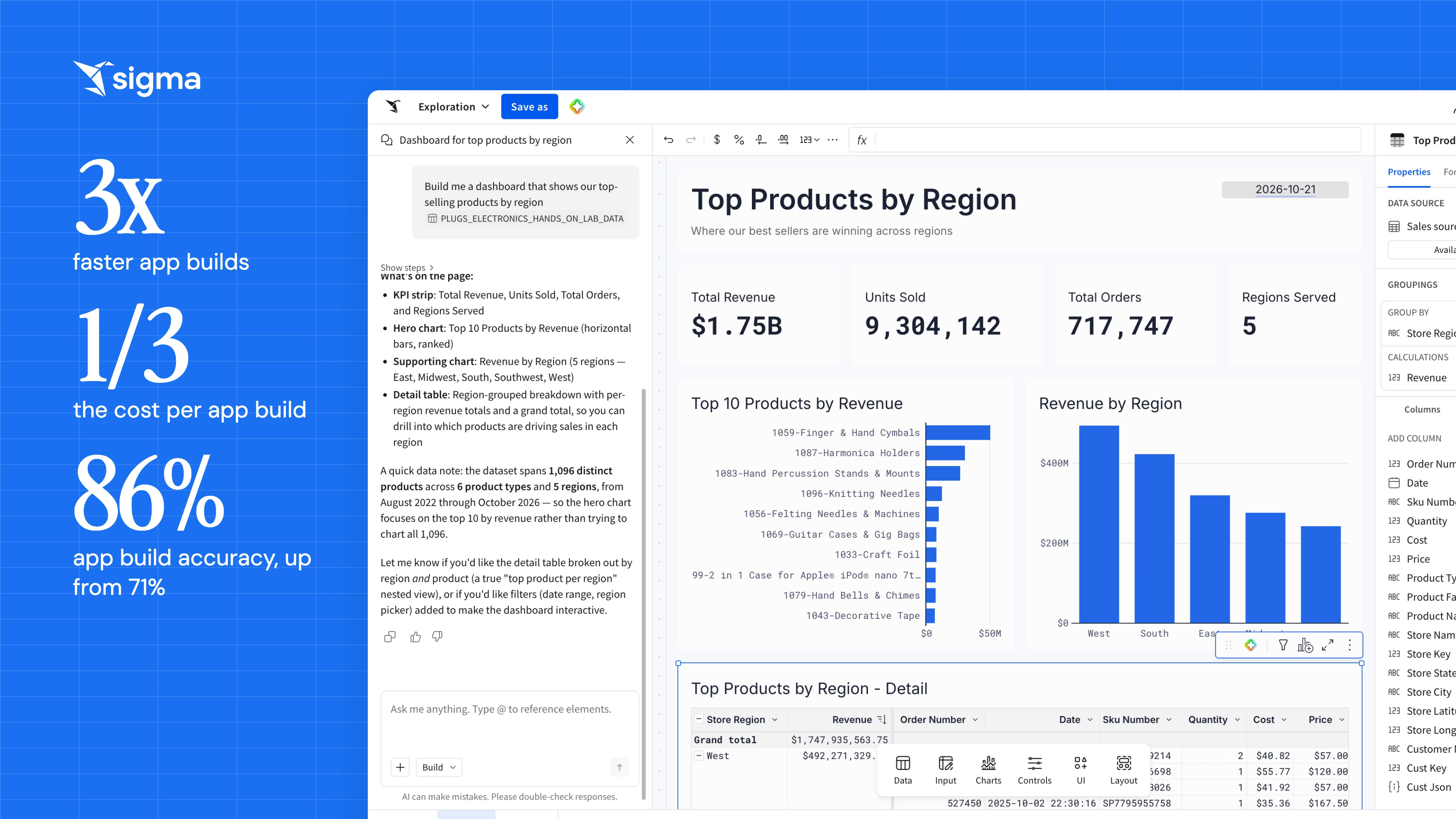
You can use Assistant to build reusable, deployable, interactive applications right on top of the data warehouse—all while using your custom data models, certified metrics, endorsed workbooks, and usage patterns.
What’s new in the upgraded Sigma Assistant?
Over the last few months our engineering team has been hard at work making Sigma Assistant more performant on exploratory, open-ended questions.
Precisely capturing business intent in a single query is challenging. For instance, asking “how did bookings perform last quarter?” can yield three distinct interpretations across different organizations, as analysts know the nuances of all the definitions. Quick assumptions often lead to risky, inaccurate conclusions. We’ve rearchitected the Assistant instead to ask when ambiguity isn’t resolved in your semantics and metadata, be transparent about adjacent assumptions made along the way, and point out any caveats with the data.
Assistant now provides significantly deeper, more insightful answers to open-ended queries with faster response times for follow-up questions within a thread. Today, all these updates have shipped and are live for all Sigma customers.
Here’s everything that’s new in the upgraded Sigma Assistant:
1. Sigma Assistant works with you to clarify your goal
Over the last year, we’ve seen popular AI assistants like Claude, Cursor, and ChatGPT introduce clarifying questions to user prompts. For example, you may ask Claude to “edit this blog post,” and Claude will reply with three options for how it can edit a blog post, and then ask you to choose an option and provide more feedback. This back-and-forth dynamic clarifies the intended outcome, and therefore produces a stronger result.
We’re now bringing that same dynamic to Sigma Assistant.
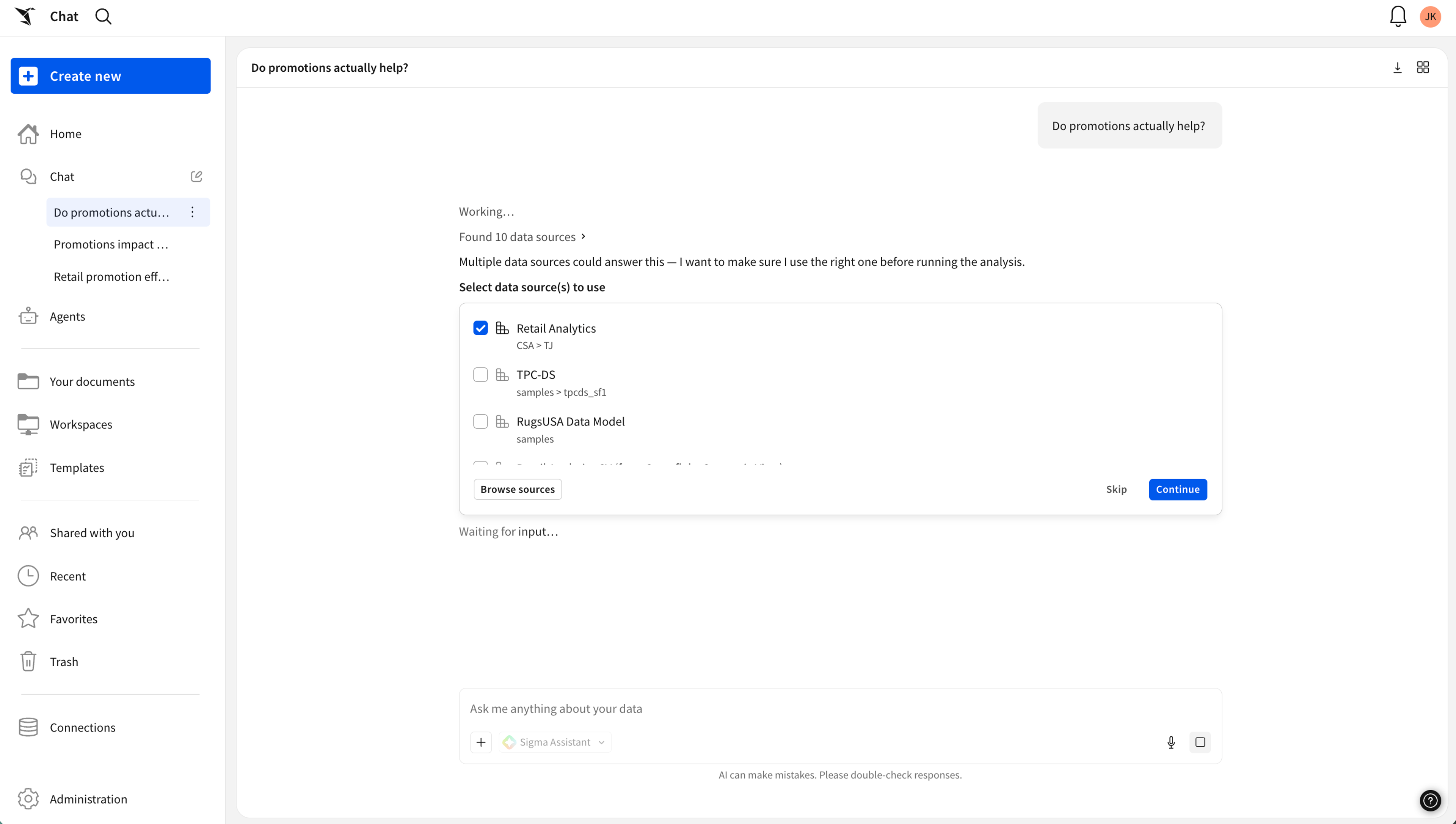
Ask an open-ended question, and Sigma Assistant will respond with clarifying questions. It pro-actively shares assumptions and works with you to narrow down your question.
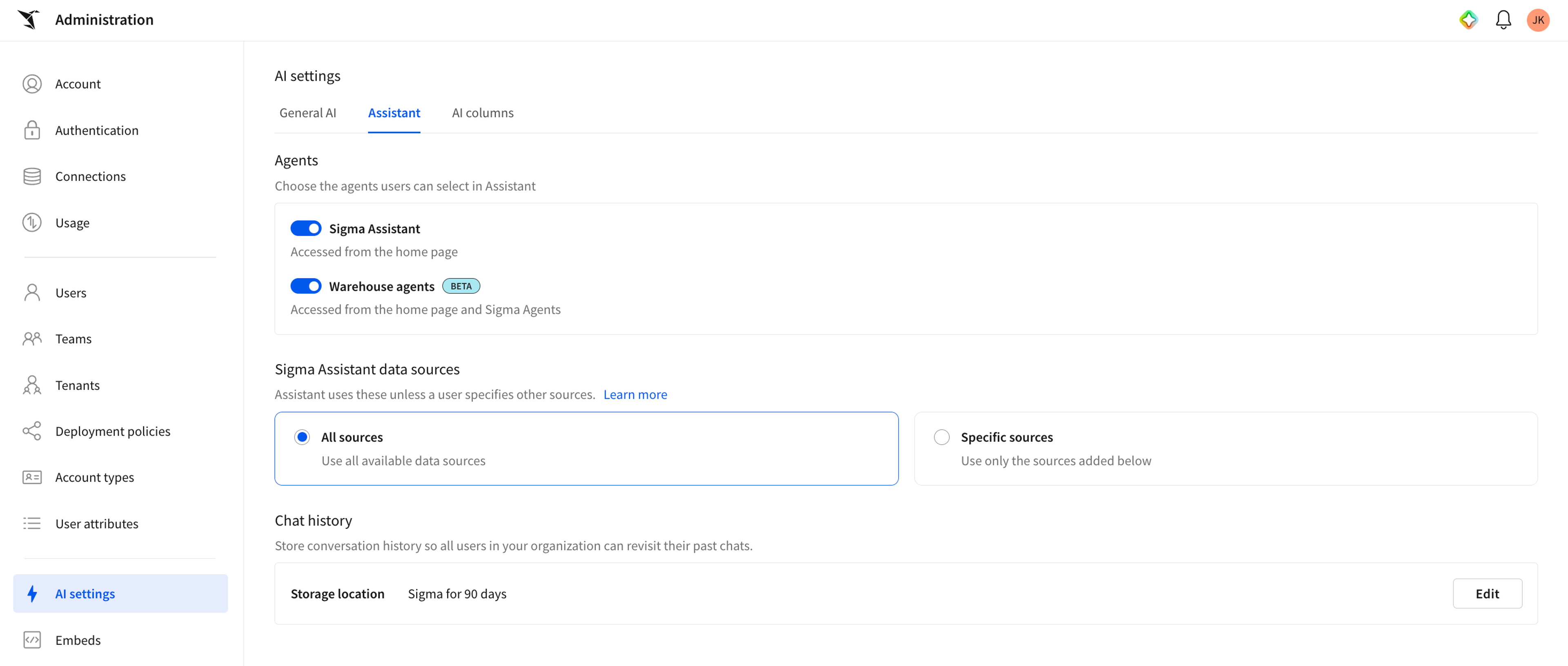
2. Use Sigma Assistant across all sources, or curate a shortlist
Admins can now configure Sigma Assistant to search across all data sources, rather than just a curated shortlist. With this level of data access, Sigma Assistant is more equipped to handle a broad range of questions. At the same time, governance is still strictly enforced: row-level security, column masking, and connection permissions carry over exactly as they do everywhere else in Sigma. The Assistant never returns data you couldn’t query yourself.
3. See and inspect the thinking process in real time
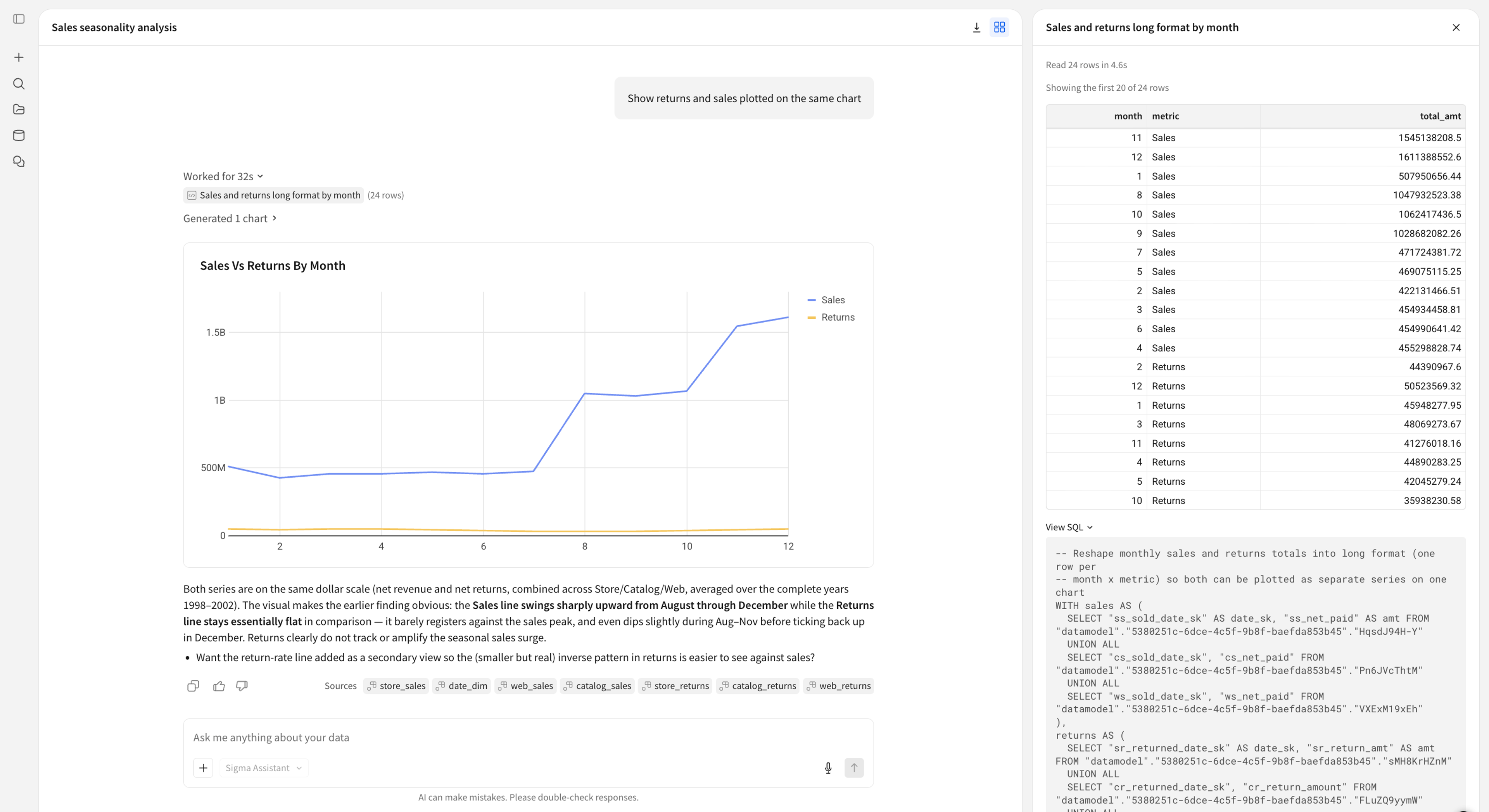
Assistant now shows its work as it goes, so you can inspect the data or course-correct the approach. You watch as it considers sources and builds the analysis.
You can expand the breakdown of the work to read the step-by-step logic, the generated SQL, and the underlying tables. With full transparency, whether in the quick-inspect side pane, or by diving deeper in a workbook, you can be more confident asking complex questions.
4. View insights snapshotted in time with chat history
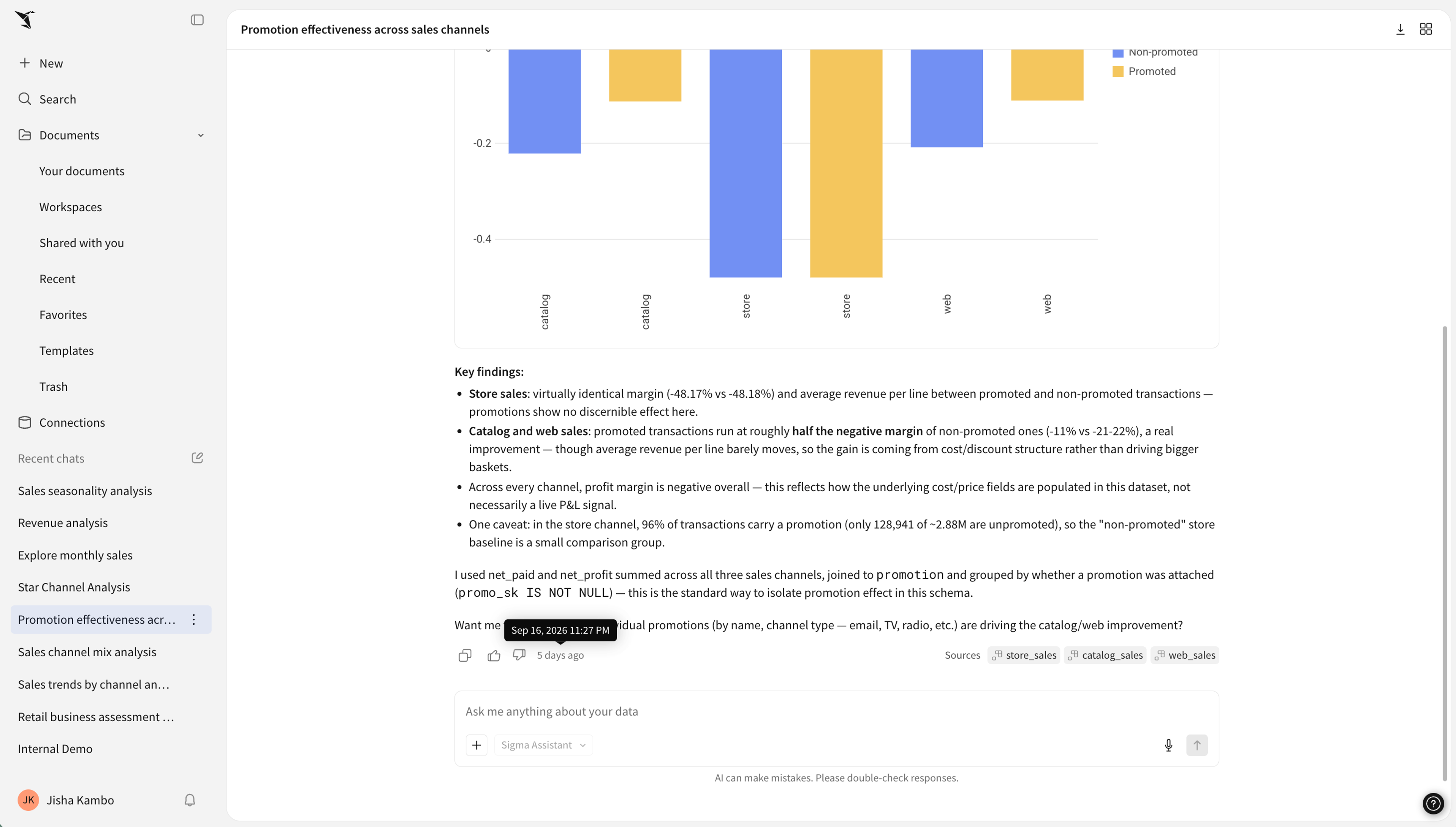
You can now see your past conversations with Sigma Assistant in the sidebar, so a question you asked last Thursday is still there on Monday, with its insights fully intact. You can run more than one line of investigation at a time and come back to either. You can also export full conversations as an image to share with your team. Or you can promote any past conversations into permanent, reusable workbooks that your entire organization can run on.
Chat history is generally available and needs to be configured by an admin. Reach out to your account team if you’re not sure if you have access.
5. Start with an AI-first landing experience [Preview]
We’re also excited to preview a brand new homepage for Sigma, available in beta. This is a complete redesign that makes your experience in Sigma start with AI guiding you, leading you to the right insight, source, or workflow before you even click into a workbook.
Soon, when you land in Sigma, getting insights from your data or getting back to your recent work is faster than ever. The new homepage is designed to reduce cognitive load, highlight the most relevant content for you, and get you to your goal. You can still set up a custom homepage for your org, so you can customize the landing experience your users see.
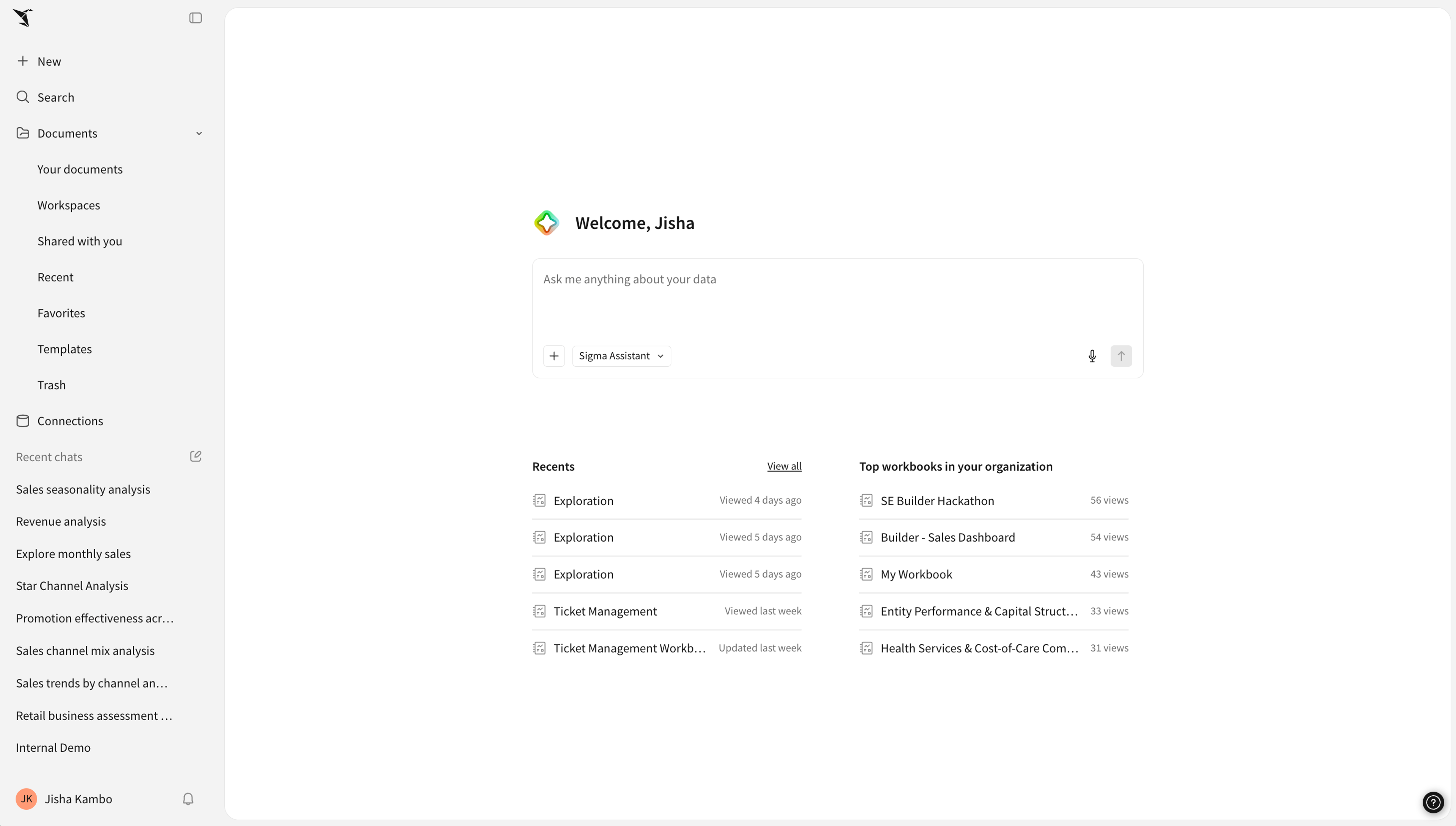
NOTE: This new homepage is currently in private beta. If you’re interested in early access to an AI chat-first Sigma experience, reach out to your Sigma account team today.
Why you should explore open-ended questions in Sigma instead of another AI assistant
Open-ended data questions are exactly the questions that go wrong outside a governed environment, because the person asking usually can’t tell a correct answer from a plausible one. Sigma handles it structurally:
- Governance is inherited. Sigma Assistant queries your warehouse directly under your existing permissions, so row-level security, column masking, and connection access all carry over, with full audit trail.
- The answer is auditable. Sources referenced, steps, and SQL are visible on every response. Inspect in a quick side-by-side view or deep dive in a workbook.
- Exploration continues in a workbook. Take answers to editable and shareable Sigma workbooks so that the analysis you did in a conversation becomes something your team can keep running. Promote crucial insights to dashboards and repeatable workflows in applications.
- Your existing work is the context. Sigma Assistant uses endorsed data models, metrics, and workbooks. Every piece of context or metadata, every definition your data team certifies or every data source used for building, raises the quality of the next answer.
- Start wherever you get work done. With the Sigma MCP, you can start your work in tools like Claude or Codex and bring it to Sigma when you’re ready to go deeper. You can also bring any warehouse analysis agents you’ve already curated—like Snowflake Cortex agents or Databricks Genie agent—to Sigma Assistant to distribute across your organization.
What’s coming next to Sigma Assistant
Helping you explore and build more with data is just the beginning. Soon, Sigma Assistant will step up as your personal guide for automating workflows. You’ll be able to ask Sigma Assistant to find specific workbooks, apps or agents, teach you how to navigate Sigma, and schedule data-based workflows.
Get started today
The upgraded Sigma Assistant is generally available (GA) for all customers. Chat History must be configured by a Sigma admin, so connect with your account team if you’re not sure if you have access.
If you’re interested in trying out the AI-first homepage in Sigma, join the private beta by reaching out to your account team.
New to Sigma? Request a demo or Start a free trial to see how the new Sigma Assistant can transform your business.
Frequently asked questions
Do I need to do anything to enable chat history?
Yes. A Sigma admin enables chat history for your organization. Ask your admin, or reach out to your account team if you’re not sure whether it’s on.
Which data sources can Sigma Assistant search?
Sigma Assistant can search over warehouse tables and data models. Full support for Snowflake Semantic Views and Databricks Unity Catalog Metric Views is coming soon. Admins configure the default set of sources that are searched, and they can set a curated list or open it up to all accessible sources. Data permissions always apply, so Sigma Assistant never returns data you couldn’t query yourself.
Can I verify what Sigma Assistant did?
Yes. Every response includes the sources used, a step-by-step analysis breakdown, and the generated SQL, and you can open the result in a workbook to inspect the underlying data.
How is Sigma Assistant different from Sigma agents?
Sigma Assistant is the out-of-the-box AI experience available by default to anyone in Sigma, with no setup. Sigma Agents are custom workflows a builder configures for a specific workbook, with their own instructions, data sources, and actions. Use Sigma Assistant to ask and explore, use a Sigma Agent when you need a curated workflow that takes action.
Can I use Sigma Assistant from Claude or ChatGPT?
Yes. The Sigma MCP server lets external assistants query your governed Sigma content, and the Sigma plugin is available in ChatGPT, Codex and Claude Code.