Sigma for transportation and logistics teams
See terminals, lanes, and loads on live data, work exceptions before they cost a truck, and give shippers their own portal.
One view of the network
Terminals, trailers, lanes, and margin on live warehouse data, not this morning’s export.
Exceptions that get worked
Review, comment, and snooze in the app, so tomorrow’s list shows only what’s new.
Portals your shippers use
Embed analytics in your product, with each customer’s data isolated by Sigma Tenants.
Trusted by transportation and logistics teams













A network on live data
Your network moves faster than your reports
Dispatch, operations, and finance each pull their own extract, shippers wait on reports built by hand, and the exception list is stale before the morning call.
| Today | With Sigma |
|---|---|
| Terminal reports rebuilt from TMS exports each morning | Terminals, trailers, and lanes on live warehouse data |
| The same exceptions reviewed again daily | Reviewed exceptions snoozed so only new ones surface |
| Audits check a few dozen trucks because the work lives in spreadsheets | Truck checks on live data saved to the warehouse |
| Shippers email for reports your team builds by hand | Each shipper sees its own shipments, spend, and on-time performance in your product |
| Finance reconciles operations data across acquired systems | One governed view across entities once the data lands |
| Field and finance teams wait in the BI queue for each new view | Field and finance teams build their own views on governed metrics |
From the morning call to the next load
Each workflow runs on live data and saves what people decide back to the warehouse.
Analytics revenue
Give shippers a portal inside your product
Embed white-labeled analytics in your TMS or customer app. Sigma Tenants keep each shipper to their own shipments, spend, and on-time performance, and shippers build their own views.
- One tenant per customer, with no per-customer builds
- Shippers explore and ask questions on their own
- Offer analytics as a paid tier of your product
Exceptions worked
Work each exception once
Check freight invoices against contract rates and accruals, and route each exception to its owner. Reviewed items get a comment or snooze, so the next run shows only new outliers.
- Exception rules on live TMS and billing data
- Comments and snoozes saved to the warehouse
- Accessorial and accrual discrepancies caught before close
Whole-fleet coverage
Review drivers against the fleet
Compare each driver’s trips, cancellations, and safety events against the whole fleet. Managers flag who needs coaching, and the flag and note save to the warehouse for the next review.
- Cohorts by tenure, region, and equipment
- Coaching flags and notes saved to the warehouse
- Agents draft the summary from the data
Profitable lanes
See margin by lane and customer
Join linehaul, fuel, and accessorial costs to each load to see which lanes and customers make money. Pricing proposes new rates, and margins recompute before anything is submitted.
- Margin by lane, customer, and office
- Cost drivers like deadhead and detention
- Rate proposals routed for approval
Answers without tickets
Let anyone ask the network a question
Dispatchers, field managers, finance, and executives ask in plain language and get answers from governed definitions, so one analyst isn’t the bottleneck for ad hoc requests.
- Answers from the same governed models as your reports
- The SQL behind each answer, one click away
- Permissions follow each person’s warehouse role
Ask which lanes lost money last week.
Network analyst
Ask about lanes, terminals, or customers. I answer from live data.
Lanes, last week · margin per load
Network Answers
Loads
146
+4.3%vs prior week
Revenue
$500.0K
3 lanes
Margin
5.3%
−1.1 ptsvs prior week
Lanes by margin
| Lane | Loads | Revenue | Margin | Status |
|---|---|---|---|---|
| Laredo → Chicago | 42 | $188,600 | −4.2% | Flag |
| Atlanta → Dallas | 66 | $214,500 | 11.8% | On track |
| Memphis → Columbus | 38 | $96,900 | 9.4% | On track |
Lane reviews
| Lane | Action | Owner | |
|---|---|---|---|
| 1 | Atlanta → Dallas | Fuel surcharge update | Pricing |
| 2 | Memphis → Columbus | Detention fee review | Operations |
| + | |||
Margin by lane
No reconciliation
Bring acquired companies onto one governed view
Map each acquired company’s status codes to the metrics you already govern, so each reports on-time, cost per mile, and margin the same way. Analysts edit mappings, and views update.
- Source codes mapped to governed definitions in an input table
- On-time, cost per mile, and margin on the same terms for each company
- Unmapped codes flagged until someone maps them
Agents on the network
Agents that catch the overnight surprise
Agents check linehauls and terminals on a schedule, with the same governed data and roles as your reports, flag what moved, and draft the fix. Nothing changes until someone approves it.
- 1DetectA scheduled agent compares late orders, dwell, and on-time performance with recent history and flags what changed.
- 2ExplainAsk which lanes, customers, or terminals drove it, and get the answer from live data.
- 3Approve the fixThe agent suggests a reship or a reroute. Operations approves it, and it’s written back with an audit trail.
Logistics teams running on Sigma
 40% growth in carrier utilization over 18 months. $12M+ contract revenue visibility and optimization. $150K / year operational savings through automated commission reporting.How Armstrong Transport Group Transformed Contract Freight Management with Real-Time Analytics
 7x faster report delivery times. 50% bi resource savings. $8,000 cost savings per report.Payload Unlocks a New Revenue Stream in Record Time with Sigma
 1,500 reports consolidated. 33,000 objects simplified.From 1,500 Reports to One Workbook: Inside Saddle Creek’s BI Reset with Sigma
Explore logistics apps built in Sigma
Working examples from the App Library. Open one to see how it works.
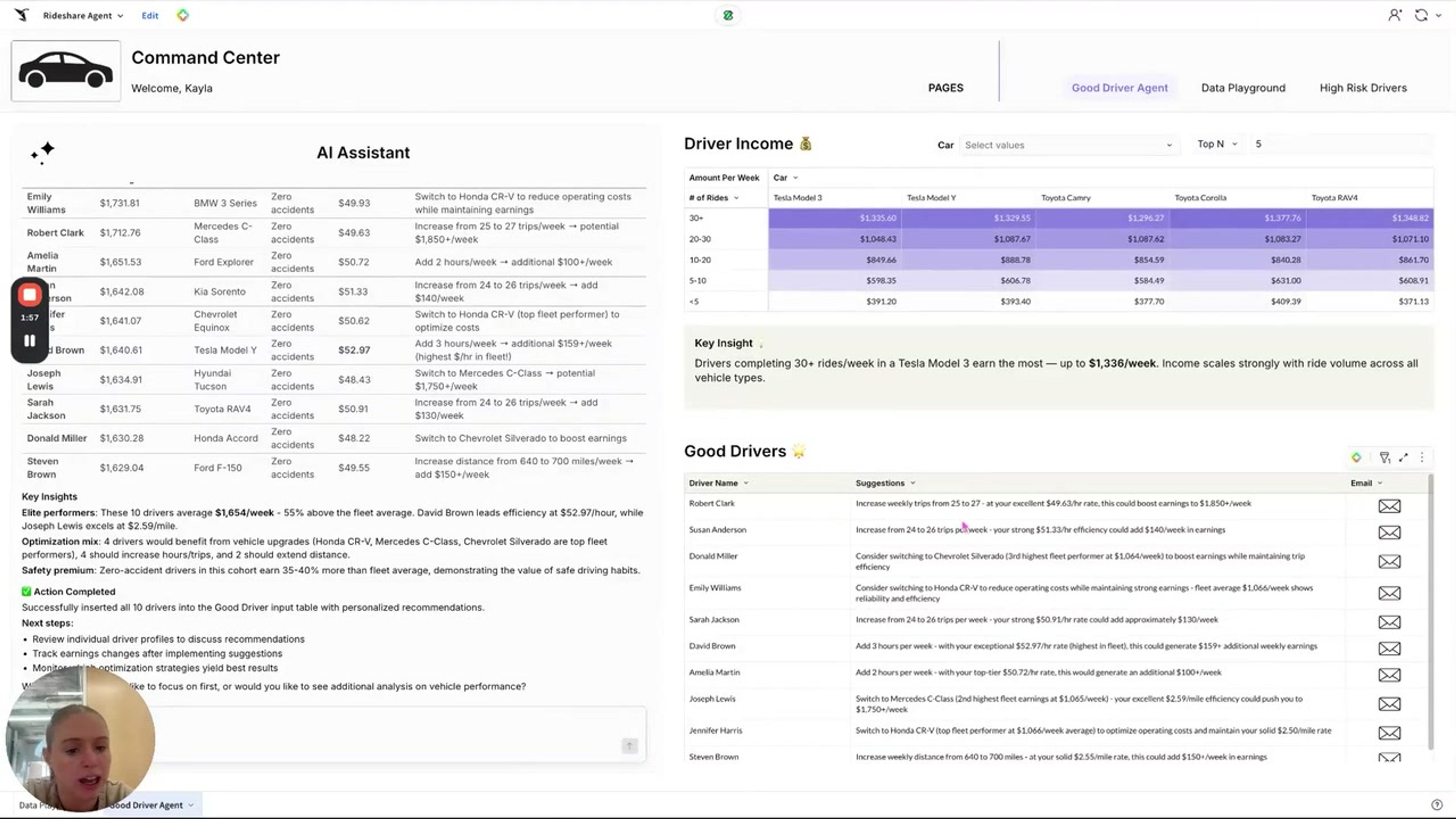
Rideshare Fleet Agent
A rental company supplying cars to rideshare drivers uses Sigma agents to grow per-driver revenue and improve rider experience. Cohort view, vehicle mix, and driver insights.
See the appFleet Management
Track Tasty Bytes' global food-truck fleet. Executive summary plus deep-dive truck analysis with line-item visibility.
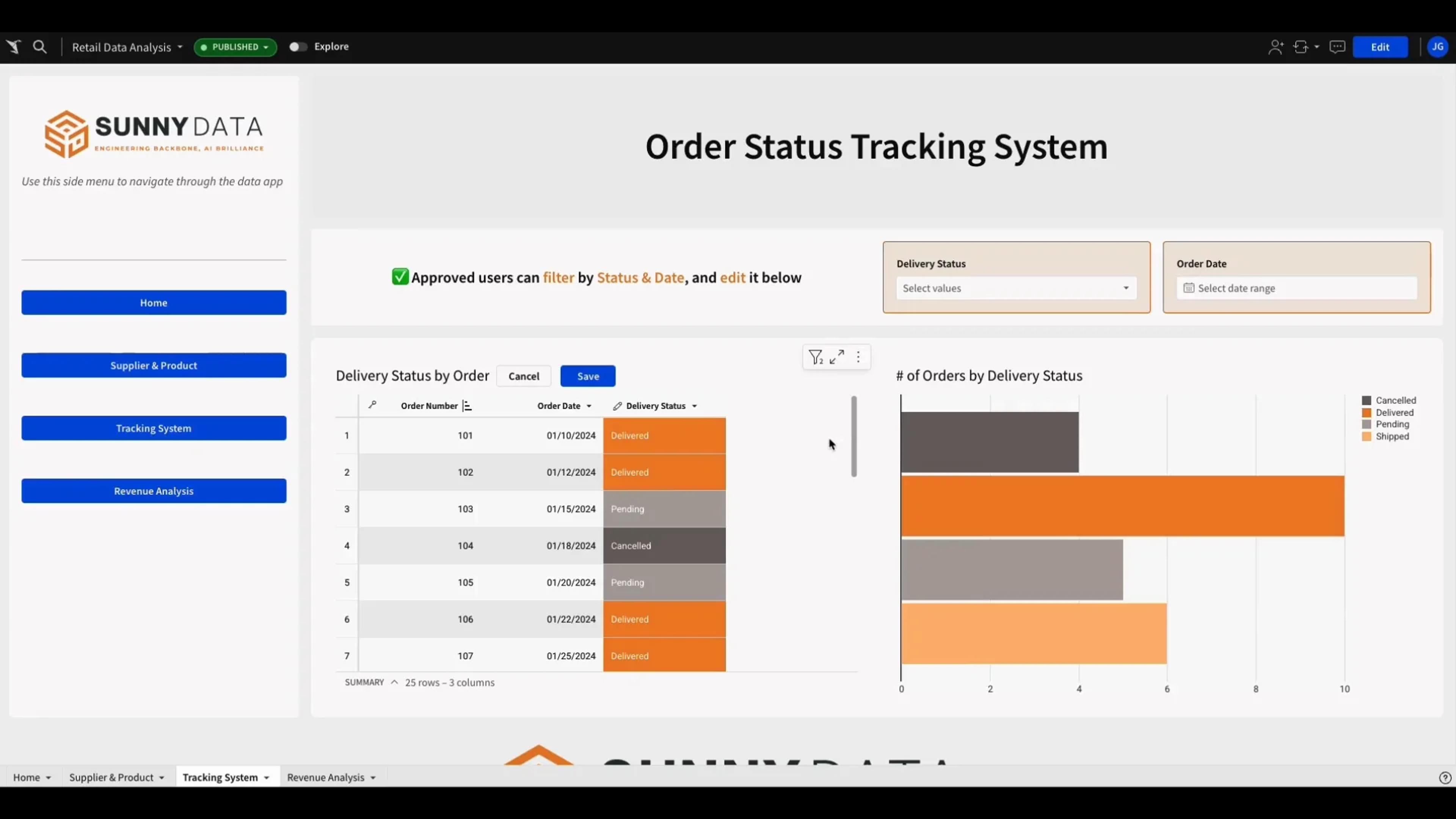
See the appSupply Chain Tracking
Manage supply chain order statuses in a single workbook. Streamline updates and improve operational efficiency.
See the app

Governed from the warehouse to the shipper
Internal teams and external customers each see exactly what their role allows.
Customer data isolated
Sigma Tenants keep each shipper’s data, users, and content separate in your embedded portal.
Per-user OAuth
Connect with OAuth so queries run with each person’s own warehouse role.
Row- and column-level security
Reads and writes both inherit your table policies.
Audit trail
Audit logs record user activity, AI conversations, and input table edits, so you can see who changed what.
Your data stays put
Sigma queries your warehouse in place and never copies the data out.
Certified
SOC 1, SOC 2, SOC 3, HIPAA, GDPR, CCPA, and ISO 27001.
Transportation and logistics FAQs
Can we embed analytics in our TMS or customer platform?
Yes. Embed Sigma workbooks in your product with your own branding, and let customers explore, build views, and ask questions without leaving your app.
Do we have to build a portal for each shipper?
No. Build the portal once. Each shipper signs in to the same workbook, and Sigma Tenants and your warehouse’s row-level security decide which shipments, spend, and users each one sees.
How do we keep each customer’s data separate?
Sigma Tenants isolate each customer’s data, users, and content, and row-level security from your warehouse applies to all queries.
Do we have to move freight data out of the warehouse?
No. Sigma queries TMS, telematics, and billing data where it lands in your cloud data warehouse, with no extracts to schedule.
Can analysts snooze exceptions they’ve already reviewed?
Yes. Comments and review status save to an input table in your warehouse, so the exception list can hide reviewed items and surface only new outliers.
Can we require approval before an agent changes data?
Yes. An agent’s action can require sign-off before it changes any data. For example, an agent can propose a reship for an order that will miss its promised date, and an operator selects Approve or Skip before anything is written back. Agent actions are recorded in the audit log. Sigma agents are in beta.
If we change a metric, do we have to fix each report?
No. Define the metric once in a Sigma data model, and the workbooks and portals built on it pick up the change.
Bring this morning’s exception list
We’ll show it running on your warehouse, with reviewed items snoozed and new ones flagged.