Sigma for sales and operations teams
Build the tools your team needs and turn efficiency into your competitive advantage, with agents that help reps prep and forecast.
Ask in plain language
Ask Sigma Assistant about pipeline, coverage, or win rates and get answers from live data.
Build with AI
Describe the app you need and Sigma Assistant builds it on your governed data.
Write back to the warehouse
Forecast calls, territory changes, and notes save to your warehouse, and actions can sync them to your CRM.
Trusted by revenue teams











Trusted revenue numbers
Shift your analytics from reporting to decision-making
Revenue teams still build the monthly report and the forecast in spreadsheets copied from the CRM, then wait for RevOps to answer the next question.
| Today | With Sigma |
|---|---|
| Monthly CRM exports rebuilt in spreadsheets | Live CRM and warehouse data in one view with nothing to export |
| Forecast calls collected in a spreadsheet each Friday | Rep calls roll up to the manager as they change |
| Territory and quota changes modeled offline and re-keyed | Territory changes saved to the warehouse and synced to the CRM |
| Account notes split between the Sales and CS tools | Sales and CS add notes to the same account row |
| New reports wait in the RevOps queue | Managers ask Sigma Assistant and get the answer in seconds |
| Conversion and win-rate math debated at each QBR | One definition per metric with the calculation visible |
Apps for every part of the revenue process
Each app runs on data from all your operational systems and saves its changes back to the warehouse.
Forecast accuracy
Call the number on live pipeline
Reps update forecast categories and next steps in the app, managers review the roll-up, and the team call is submitted with a record of changes.
- Rep, manager, and weighted forecast side by side
- Forecast category and next step saved to the warehouse
- Agents flag deals that slipped or stalled
One account view
Give Sales and CS one account record
Join CRM, product usage, and billing data in the warehouse. Sales and CS add notes to the same account row in an input table, so both teams see the same history.
- CRM, usage, and billing joined live
- Shared account notes, saved to the warehouse
- Usage-based churn and upsell signals
Ask why Vantry’s usage dropped.
Account Prep
I pull CRM, usage, and billing for an account before a call.
CRM, product usage, and billing, joined live
Customer 360
ARR up for renewal
$516K
3 accounts, next 90 days
ARR at risk
$240K
Vantry Labs
Usage, 30 days
−6.5%
ARR-weighted
Accounts up for renewal
| Account | ARR | Usage, 30d | Health | Status |
|---|---|---|---|---|
| Vantry Labs | $240K | −22% | At risk | Open |
| Kestrel Media | $180K | +9% | Healthy | On track |
| Pinegrove Health | $96K | +3% | Healthy | On track |
Account notes
| Account | Team | Note | |
|---|---|---|---|
| 1 | Kestrel Media | CS | QBR set for Nov 12 |
| 2 | Pinegrove Health | Sales | Renewal quote sent |
| 3 | Kestrel Media | Support | Two P2 tickets closed |
| + | |||
Usage change, 30 days
Balanced territories
Model territories and quotas with confidence
RevOps balances territories and capacity in input tables, then writes the new assignments and quota targets back to the warehouse.
- Territory and account assignment modeling
- Quota targets written back to the warehouse
- High-propensity accounts surfaced for each rep
Hiring plans
Plan capacity and hiring in one place
Model sales capacity, headcount, and productivity targets together, and route hiring requests for approval against the plan.
- Capacity by segment, region, and ramp
- Hiring scenarios against the budget
- Requests submitted and approved in the app
Price approvals
Manage pricing and promotion approvals
Model price and discount scenarios against historical results, route them for approval, and keep a full history of what was approved.
- Price and promotion scenario modeling
- Approval routing with comments
- Approved prices saved to the warehouse
Agents for reps and managers
Agents that help sell, forecast, and prep
Design agents that help reps generate pipeline, help managers forecast more accurately, and cut meeting prep to minutes.
- 1Prep the meetingBefore a 1:1 or a QBR, an agent pulls slipped deals, stale next steps, and commit at risk.
- 2Generate pipelineAn agent ranks accounts on usage and fit and drafts outreach for the rep to review.
- 3Approve the updateThe rep approves the agent’s suggested changes, and they’re saved to the warehouse and synced to the CRM.
Why revenue teams build on Sigma
Spreadsheet inputs written back to your warehouse
Calls, quotas, and notes entered in a grid save straight to your cloud data warehouse, and apps read them back live.
Data from all your operational systems
CRM, product usage, billing, and marketing data, joined live in the warehouse.
Apps and agents built with AI
Describe what you need and Sigma Assistant builds it on governed data.
Prototype to production
Start with a draft, test it with the team, and promote it when it’s ready.
Own the process
Change the app when the process changes, without waiting on a vendor.
Real-time support
Live chat with Sigma’s support team, right inside the product.
Revenue teams running on Sigma
 10+ new capabilities introduced. 50+ data sources flowing into snowflake hourly.Workday’s Marketing Engine, Rebuilt for Speed

 80% decrease in manual reporting. Days to minutes drop in time to insight. 94% of the fortune 500 uses scribe.How Scribe's Finance Team Sparked a Company-Wide Data Revolution

 3 Days to <1 Hour spiff logic changes. 0 Spreadsheet Errors with sigma data apps. Increased Sales Motivation with gamification of spiff and quota tracking.phData Replaces Spreadsheet Sales Commission Workflows with Sigma Data Apps
Explore sales apps built in Sigma
Working examples from the App Library. Open one to see how it works.
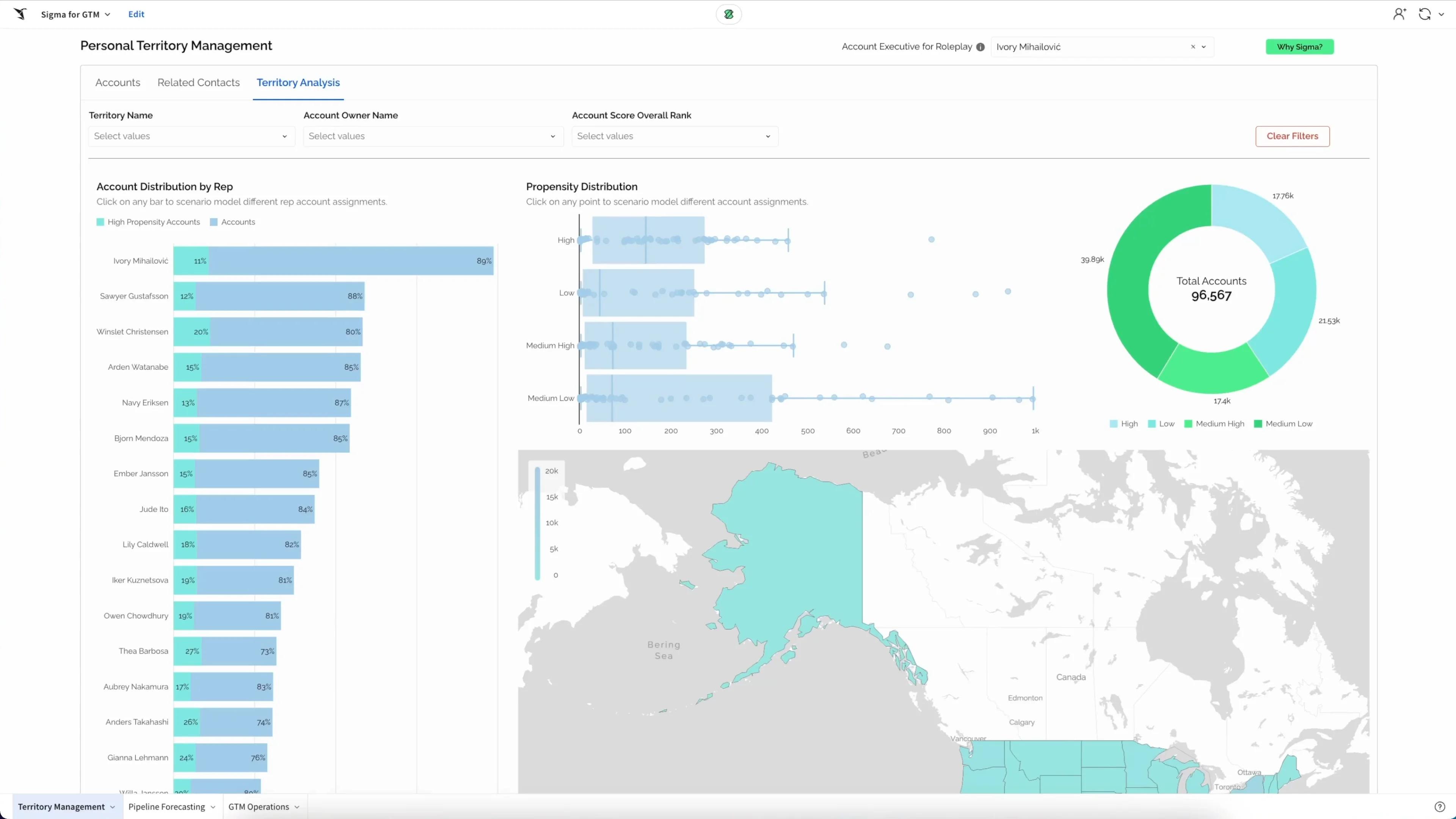
Personal Territory Management
Sales rep territory workbook. Surface high-propensity accounts, log outreach, and use LLMs to draft outbound emails.
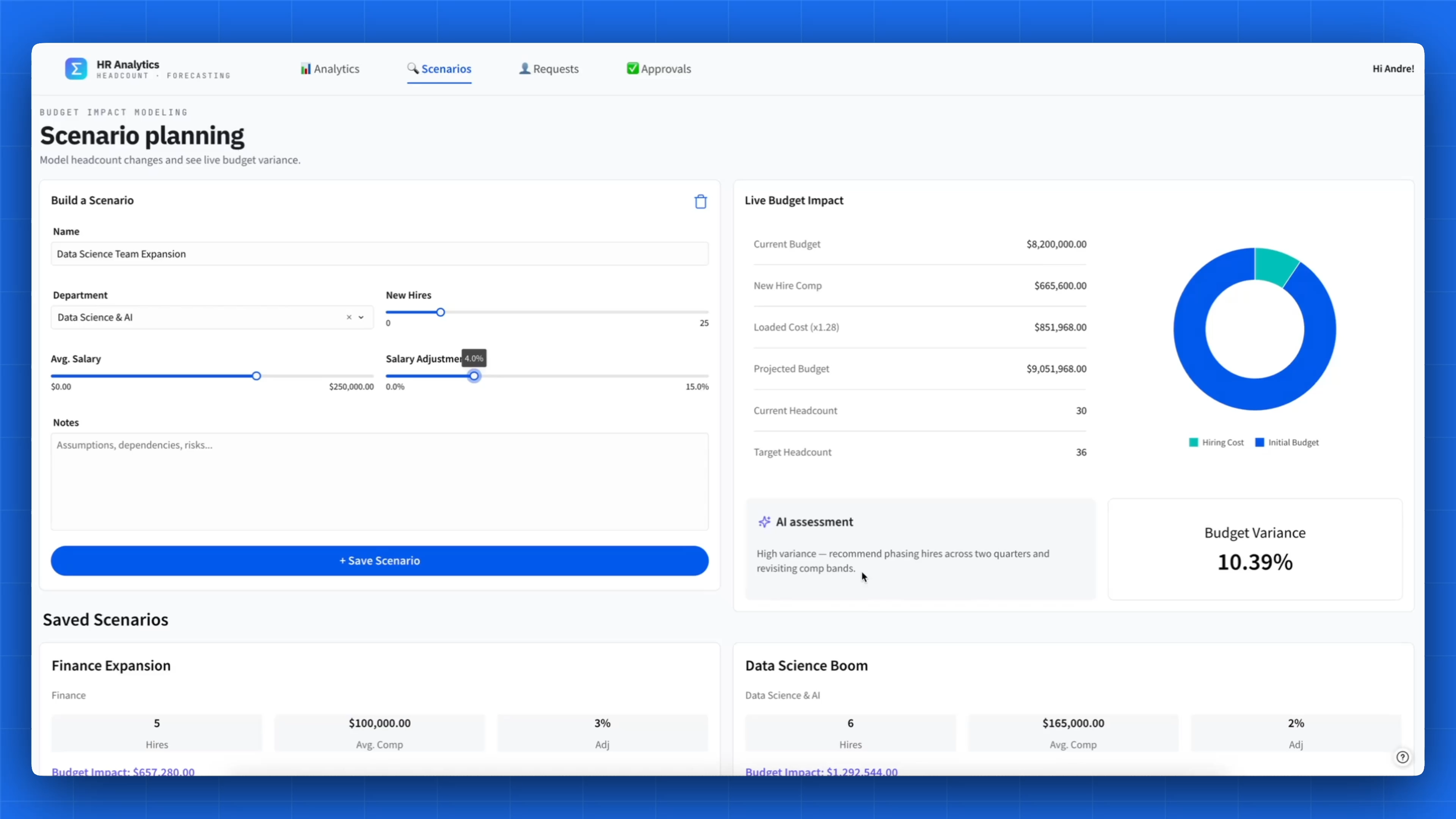
See the appAI-Driven Headcount Planning and Hiring Scenarios
A live view of headcount targets, pipeline risk, and attrition by department. Build hiring scenarios against the budget, then submit and approve requests in Sigma.
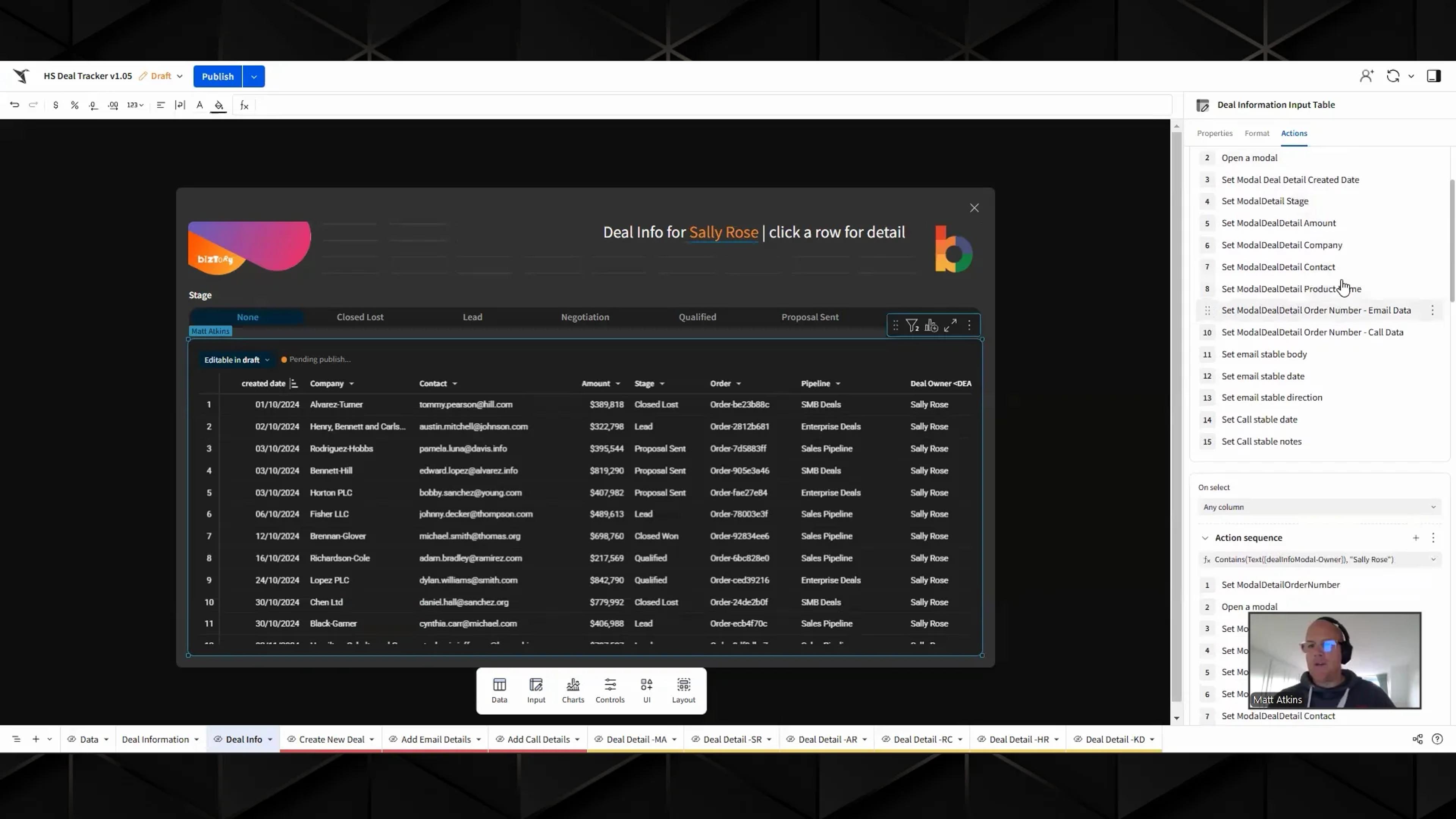
See the appHubspot Replacement
Manage HubSpot leads in Sigma: update statuses, add notes, create opportunities, and visualize lead data.
See the app
Sales and operations FAQs
Can we model territories and quotas directly in the warehouse?
Yes. RevOps models assignments and quotas in input tables and writes them back to your warehouse, so reports and apps use the same targets.
How do we combine CRM data with product usage to spot churn?
Join opportunities, usage logs, and billing data live in the warehouse, and flag accounts where usage drops before renewal.
Can we automate commission logic to reduce rep disputes?
Model commission plans on live data, with attainment, accelerators, and clawbacks visible to finance, RevOps, and reps in the same app.
Can Sigma write updates back to our CRM?
Changes save to your warehouse first. Actions can then call your CRM’s API, so an approved update in Sigma also lands in the CRM.
How do we connect marketing spend to closed revenue?
Analyze multi-touch attribution on full campaign event data in the warehouse, joined to closed opportunities.
Can sales leaders ask pipeline questions in plain language?
Yes. Sigma Assistant answers from your governed data on the warehouse, so a question about win rate uses the same definition as the dashboard. Open the result to see how it was calculated.
Can all teams use the same metric definitions?
Yes. Define win rate, pipeline coverage, and conversion once as metrics in a Sigma data model. Workbooks, apps, and Sigma Assistant answers use that definition, and anyone can open a metric to see how it’s calculated.
Can reps edit only the accounts they own?
Yes. Sigma inherits your warehouse’s row-level security and applies user attributes, so each rep and CSM sees and edits only their own accounts. Approved changes save to the warehouse, and actions can sync them to your CRM.
Bring your Friday forecast call
We’ll build it on your pipeline data: reps update their call, managers see the roll-up, and changes are recorded.