Sigma for energy and utilities teams
Turn billions of rows of telemetry into work orders, emissions reviews, and demand plans, with changes approved and logged.
Find the failing asset
An agent rebuilds the offenders list from billions of rows of telemetry each morning.
Try the remote fix first
Compare set points and recent telemetry to see whether a remote change will do.
Approve and log it
Work orders and rebalancing plans are approved, then written to the warehouse.
Trusted by energy and utilities teams













Alerts, triaged
Alerts arrive faster than people can triage them
Focus on the job, not the dashboard: find the failing asset, decide what to do, and log it. Today, each new cut of the telemetry waits on the data team for SQL and a summary table.
| Today | With Sigma |
|---|---|
| Alerts land in inboxes and dashboards nobody owns | An agent rebuilds the offenders list every morning |
| Telemetry too big to open in a spreadsheet | Billions of rows queried in place with no extracts |
| Lost production tallied by hand for the weekly review | Deferred production by well and cause, updated daily |
| Adjustments and plans fixed in spreadsheets and keyed back by hand | Changes entered once and saved to the warehouse with the editor’s name |
| Work orders and emissions reviews tracked in email | Work orders and plans approved and logged in the warehouse |
From telemetry to an approved decision
Upstream and downstream, each workflow ends with a decision recorded in your warehouse.
Run time
Find the units trending out of spec
Flag units trending out of spec and compare normal and abnormal periods for speed, pressure, temperature, and set points. Flogistix analyzes about 2.5 billion telemetry rows a day.
- Offenders list refreshed by a scheduled agent
- Unit telemetry compared across periods
- Input tables for analysis against live telemetry
Emissions reviewed
Measure and report emissions
Measure CO2e emitted and captured from production and telemetry data for SEC reporting. One Flogistix vapor recovery unit’s capture rose from 210 to 816 metric tons in a month.
- Emitted and captured, measured together
- Emissions data reviewed and approved
- An audit history of changes
Load balanced
Plan demand and load downstream
Combine simulations, demand and supply analysis, and automated forecasting, then write adjusted plans back to the warehouse.
- Demand forecasts by region and period
- Supply and demand scenarios
- Adjusted plans written back
Desk in sync
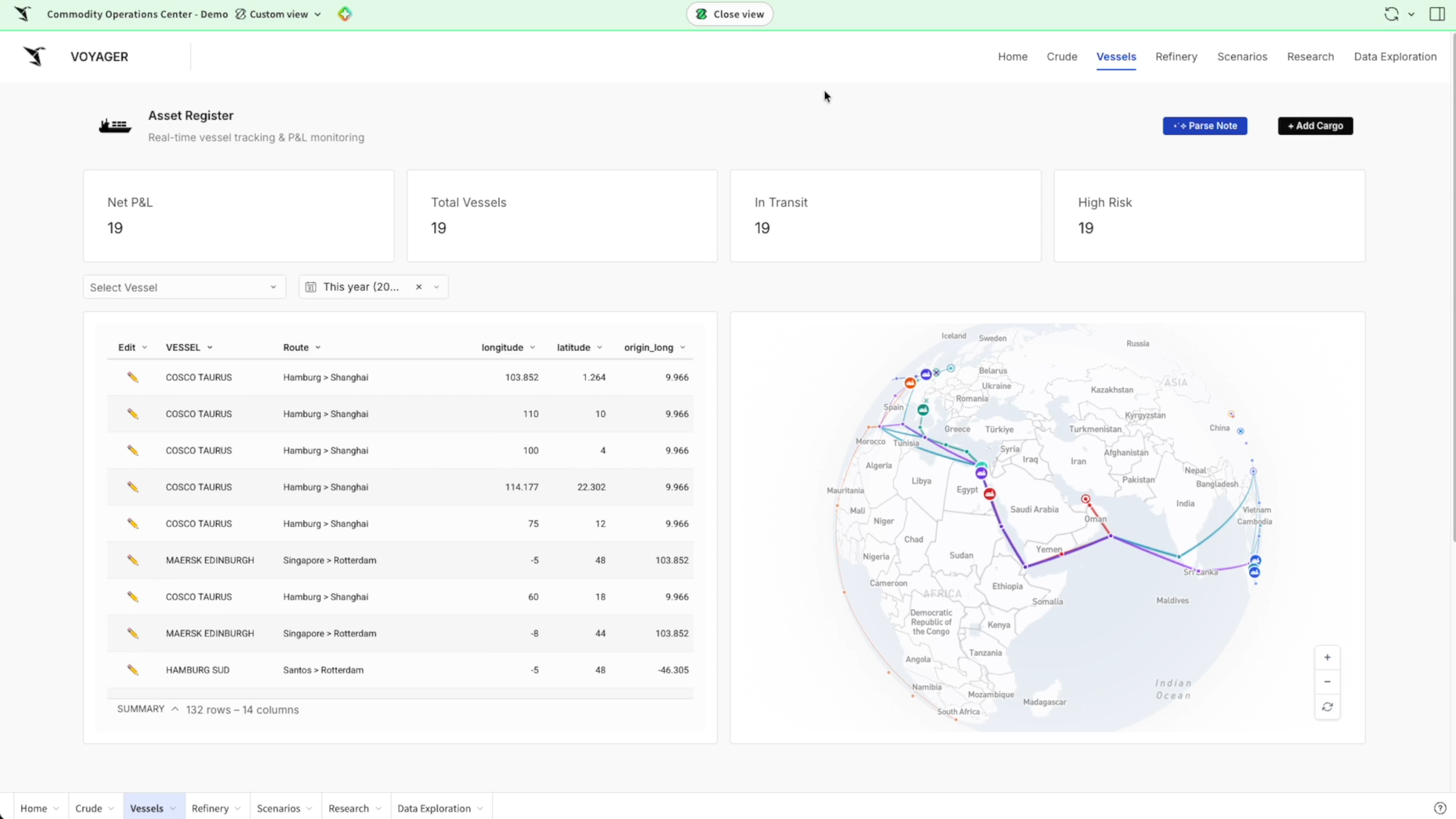
Give the trading desk one live workspace
Track vessels, cargo, and prices in one place, ask an agent questions, and capture broker intel that writes back to the warehouse for the whole desk.
- Vessels, cargo, and prices on live data
- Questions answered by an agent
- Broker intel logged for the whole desk
Production recovered
Find and recover deferred production
See each well’s output against forecast and the deferred volume by cause. Engineers code each shortfall and its next step, saved to the warehouse with their name.
- Actual output against forecast by well
- Deferred volume by cause across the field
- Causes and next steps saved to the warehouse
Safety reviewed
Close each incident with an owner
Track incidents and near misses by site and severity on live data. An agent drafts the follow-up, and the HSE lead approves corrective actions and stop-work reviews in the same app.
- Incidents and near misses by site and severity
- Corrective actions assigned and tracked to close
- Stop-work reviews approved and logged
Ask what happened at Hollis Draw 14.
HSE agent
Each morning I review new incidents and near misses and draft the follow-up for the HSE lead.
Open incidents and near misses · Saltreed region
HSE Incidents
Open incidents
3
Saltreed region
Near misses, 30 days
12
+3vs prior 30 days
Awaiting an action
1
High severity
Stop-work reviews
0
Open
Incidents
| Incident | Site | Type | Severity | Status |
|---|---|---|---|---|
| INC-3318 | Hollis Draw 14 | H2S alarm, near miss | High | Open |
| INC-3307 | Sable Flats 3 | Dropped object | Medium | Action assigned |
| INC-3299 | Juniper Tank 7 | Release, 2 bbl contained | Medium | Action overdue |
Corrective actions
| Incident | Action | Owner | Due | |
|---|---|---|---|---|
| 1 | INC-3307 | Tool lanyard check | K. Moss | Oct 28 |
| 2 | INC-3299 | Berm repair | T. Nguyen | Oct 22 |
| 3 | INC-3284 | Gas detector bump test | K. Moss | Oct 15 |
| + | ||||
Agents in the field workflow
Nothing is written or sent until someone approves
Agents triage the alerts, recommend the fix, and draft the work order. A supervisor approves it before it reaches the warehouse or the work-order system.
- 1AlertAt 5:30 an agent rebuilds the offenders list: of 2,418 units, 37 are out of spec.
- 2AskAsk whether a unit can be fixed remotely. The agent recommends a set-point review first and a site visit only if pressure stays high.
- 3Approve and recordOnce approved, the work order is written to the warehouse and sent to the work-order system, with each step in the audit history.
Ask whether CU-4417 can be fixed remotely.
Compression agent
At 5:30 I rebuilt the offenders list: 37 of 2,418 units are out of spec.
Compression units out of spec · Saltreed region
Overnight Offenders
Units out of spec
37
+5vs yesterday
Out 8 hrs or more
3
2 on yesterday’s list
Work orders today
0
Saltreed region
Offenders
| Unit | Site | Issue | Hrs | Status |
|---|---|---|---|---|
| CU-4417 | Hollis Draw 14 | Pressure high | 14 | Open |
| CU-2290 | Sable Flats 3 | Suction low | 11 | Open |
| CU-3051 | Juniper Tank 7 | Vibration high | 9 | Open |
Work orders
| WO | Unit | Plan | Status | |
|---|---|---|---|---|
| 1 | WO-20926 | CU-1187 | Valve repack | Closed |
| 2 | WO-20918 | CU-0972 | Cooler wash | Closed |
| + | ||||
Hours out of spec
Energy teams running on Sigma

 2.5 billion individual rows of telemetry data generated per day. 2+ terabytes of telemetry captured daily.How Flogistix Turned 2.5 Billion Data Points Into a Fleet That Thinks for Itself
 Data Accessibility volta now has automated reporting with sigma. No Code business users can self-serve and drive-insights. Data-Driven more accurate insights that drive revenue.Volta Charging Harnesses Data to Power Electric Vehicles
 7x faster report delivery times. 50% bi resource savings. $8,000 cost savings per report.Payload Unlocks a New Revenue Stream in Record Time with Sigma
Explore energy apps built in Sigma
Working examples from the App Library. Open one to see how it works.
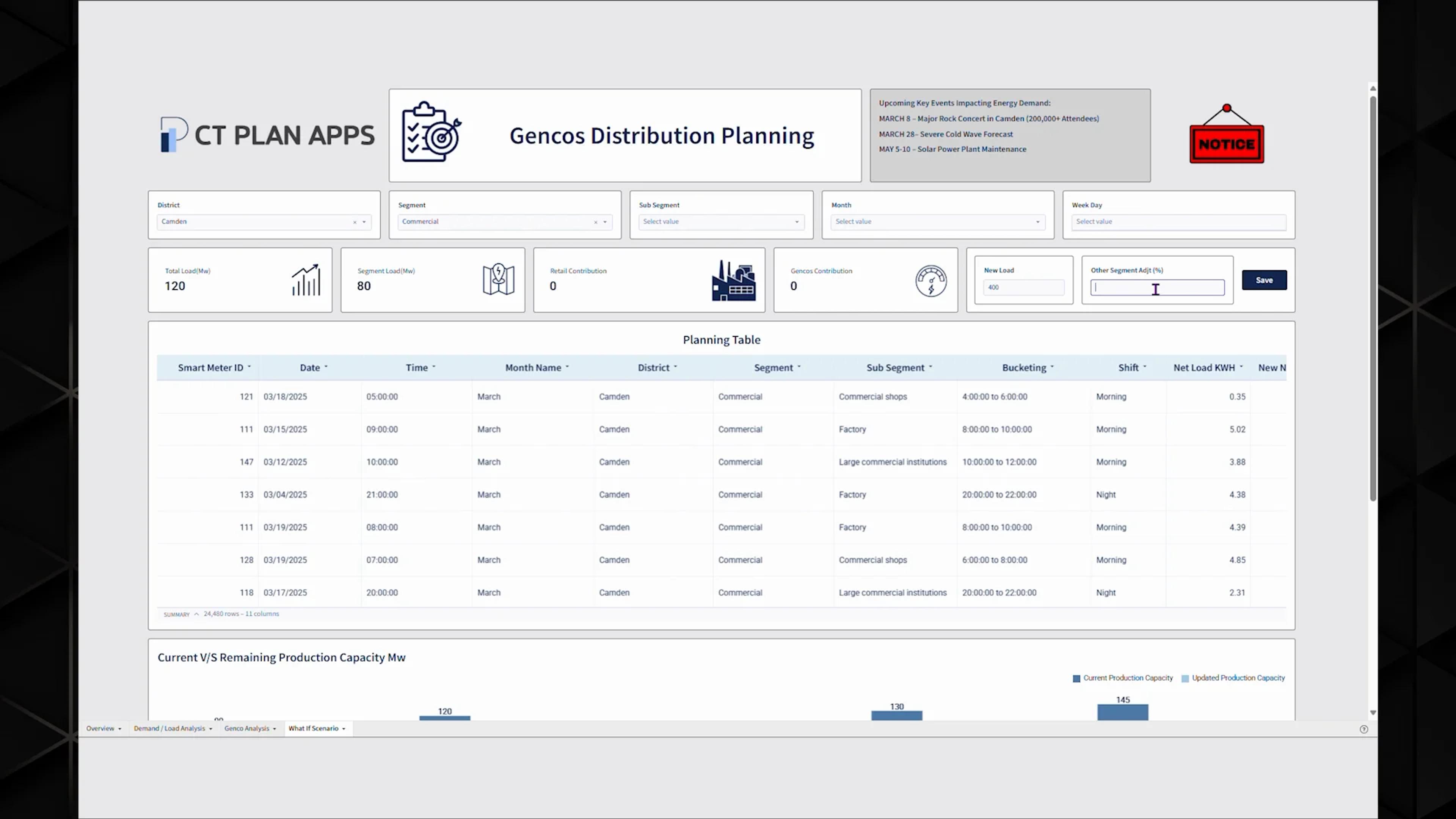
Energy Load Distribution Analysis
Energy demand planning with real-time simulations, demand-supply analysis, and automated forecasting for grid stability.
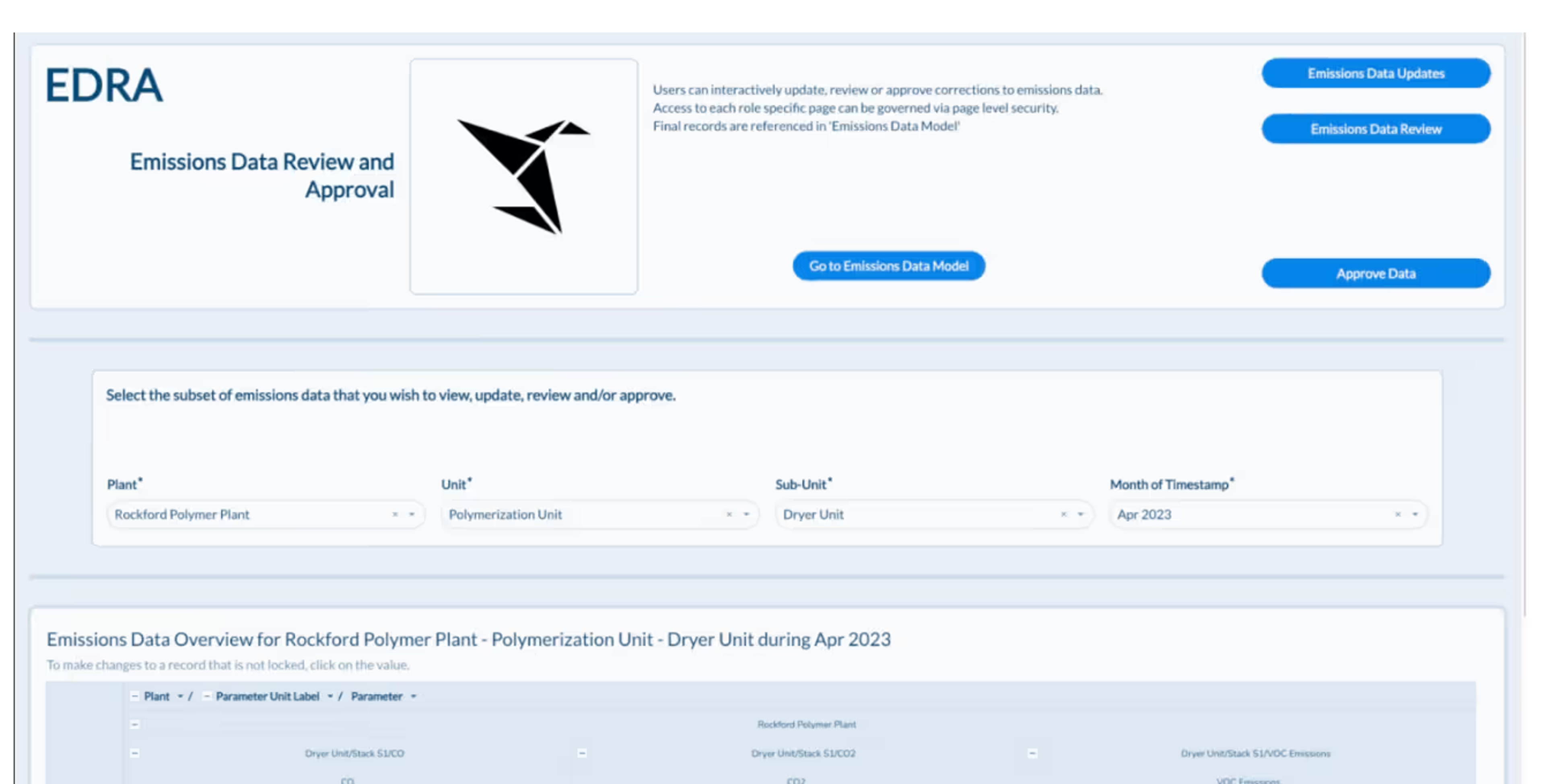
See the appEmissions Data Entry and Review App
Emissions data management for SEC reporting. Update, review, and approve emissions data securely on a single platform.
See the appCommodity trading
One live workspace for vessels, cargo, and prices, with an AI agent and broker intel written back to the warehouse for the whole desk.
See the appAI-Driven Planning
AI forecasting and scenario planning for energy, manufacturing, and retail CPG, with adjusted plans written back to the warehouse.
See the app
Enterprise-grade analytics for energy scale
Live warehouse connectivity, inherited permissions, and secure writeback.
Secure writeback
Plans, comments, and approvals save to tables in your warehouse, with a full edit history.
Per-user OAuth
Connect with OAuth so queries run with each person’s own warehouse role.
Row- and column-level security
Reads and writes both inherit your table policies.
Audit trail
Audit logs record user activity, AI conversations, and input table edits, so you can see who changed what.
Your data stays put
Sigma queries your warehouse in place and never copies the data out.
Certified
SOC 1, SOC 2, SOC 3, HIPAA, GDPR, CCPA, ISO 27001, and ISO/IEC 27701.


Energy and utilities FAQs
How do we monitor billions of rows of telemetry without extracts?
Sigma queries the data in your warehouse directly, so there is no extract to build or refresh. Flogistix analyzes about 2.5 billion rows of telemetry a day in Sigma on Databricks, and its teams drill from an offenders list into each unit’s speed, pressure, and temperature.
How do we measure and report emissions?
Combine production and telemetry data in one workbook to measure what is emitted and what is captured. Flogistix reports that emissions capture at one vapor recovery unit rose from 210 to 816 metric tons CO2e in a month. For SEC reporting, the Emissions Data Entry and Review App lets teams update, review, and approve emissions data in one place.
How do we plan load and demand?
Start with the Energy Load Distribution Analysis app in the Sigma App Library. It combines simulations, demand and supply analysis, and automated forecasting, and you can adapt it to your own data. The AI-Driven Planning app shows how to write adjusted plans back to the warehouse.
Can our teams record decisions and field findings in the warehouse?
Yes. Input tables let people enter data in a Sigma workbook and write it back to your warehouse, with an audit history of the changes. For example, a production engineer can record why a well fell short of forecast and the plan to bring it back, next to the production data.
Does Sigma copy our data out of the warehouse?
No. Sigma queries your warehouse in place and never copies the data out. Writeback goes only to the schemas your admins allow, and reads and writes follow the permissions already set in your warehouse.
Can we require approval before an agent changes data?
Yes. Builders can require sign-off before an agent changes any data. For example, an agent watching fuel inventory at a terminal can flag a projected shortfall and propose a transfer. The planner selects Approve or Skip before the plan is written to the warehouse. Agent actions are recorded in the audit log. Teams with agents already built in Databricks Genie or Snowflake Cortex can have Sigma agents call them. Sigma agents are in beta.
Does Sigma work with Databricks and Snowflake?
Yes. Sigma connects directly to Databricks and Snowflake, among other cloud data platforms. Flogistix runs its telemetry analysis on Databricks. Reports, apps, and agents follow the security policies already set in your warehouse.
Can finance and planning teams make changes in Sigma instead of spreadsheets?
Yes. Input tables let accountants and planners enter adjustments and plan numbers in a Sigma workbook, next to the ERP and warehouse data behind them. Each entry is written back to your warehouse with who made it, totals roll up by business unit as soon as it’s saved, and row-level security keeps each user to their own unit.
Bring last night’s offenders list
We’ll show the path from the list to an approved work order, on your warehouse.