Introducing the Sigma Plugin for Claude Code

TL;DR: The Sigma plugin for Claude Code is now available. Install it in two commands and build complete Sigma data models — columns, metrics, relationships, field-level descriptions — directly from your terminal, without opening the Sigma UI.
Data engineers spend a lot of time context-switching. You're in the terminal, in the warehouse, in the Sigma UI, back in the terminal. Every model you need to build or update means leaving your flow to navigate a browser interface — then picking up where you left off.
The Sigma plugin for Claude Code closes that loop. It teaches Claude Code how to work with Sigma's APIs so you can build and manage Sigma data models (including columns, metrics, relationships, descriptions) without leaving the terminal.
What is the Sigma plugin for Claude Code?
The Sigma plugin ships two skills: sigma-api, which handles authentication with your Sigma organization, and sigma-data-models, which teaches the agent how to create and modify data models via Sigma's API. Once installed, the agent discovers both skills automatically and activates them when your request calls for them.
This is distinct from theSigma MCP Server, which connects AI assistants to Sigma for natural language exploration — querying data, discovering assets, and building workbooks (coming soon). The plugin described here is purpose-built for data and analytics engineers who want to manage Sigma's assets programmatically, whether in Claude Code.
How does it work in practice?
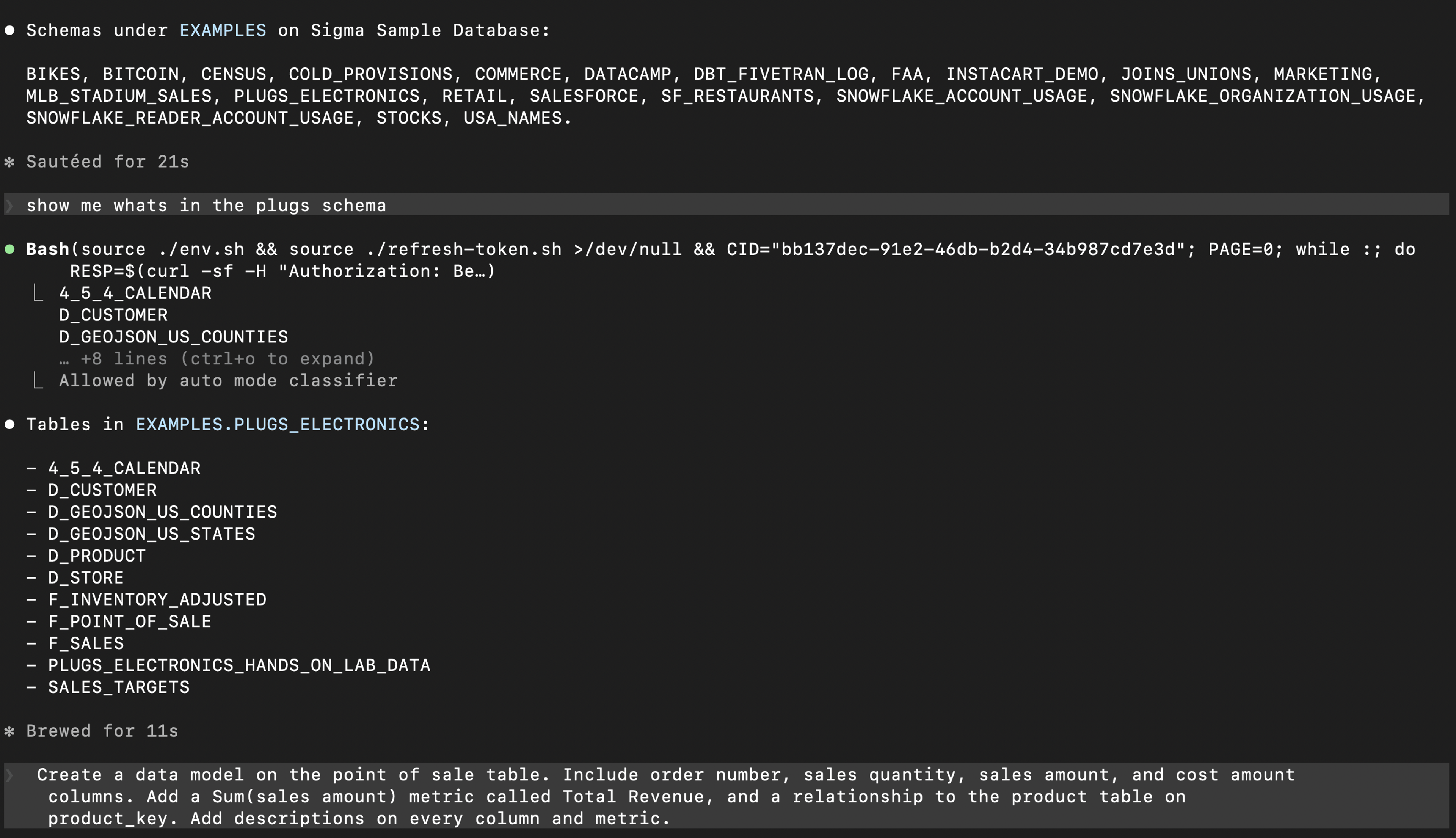
Say you're a data engineer working in Claude Code. You've pointed the agent at the right database. Start by asking it what data is available. It navigates the schema and returns the full table list. You find what you need: a point_of_sale table and a products table.
From there, describe what you want the model to include:
- The columns to pull from
point_of_sale - A
total_revenuemetric - A relationship to the products table
- Descriptions on every column and metric
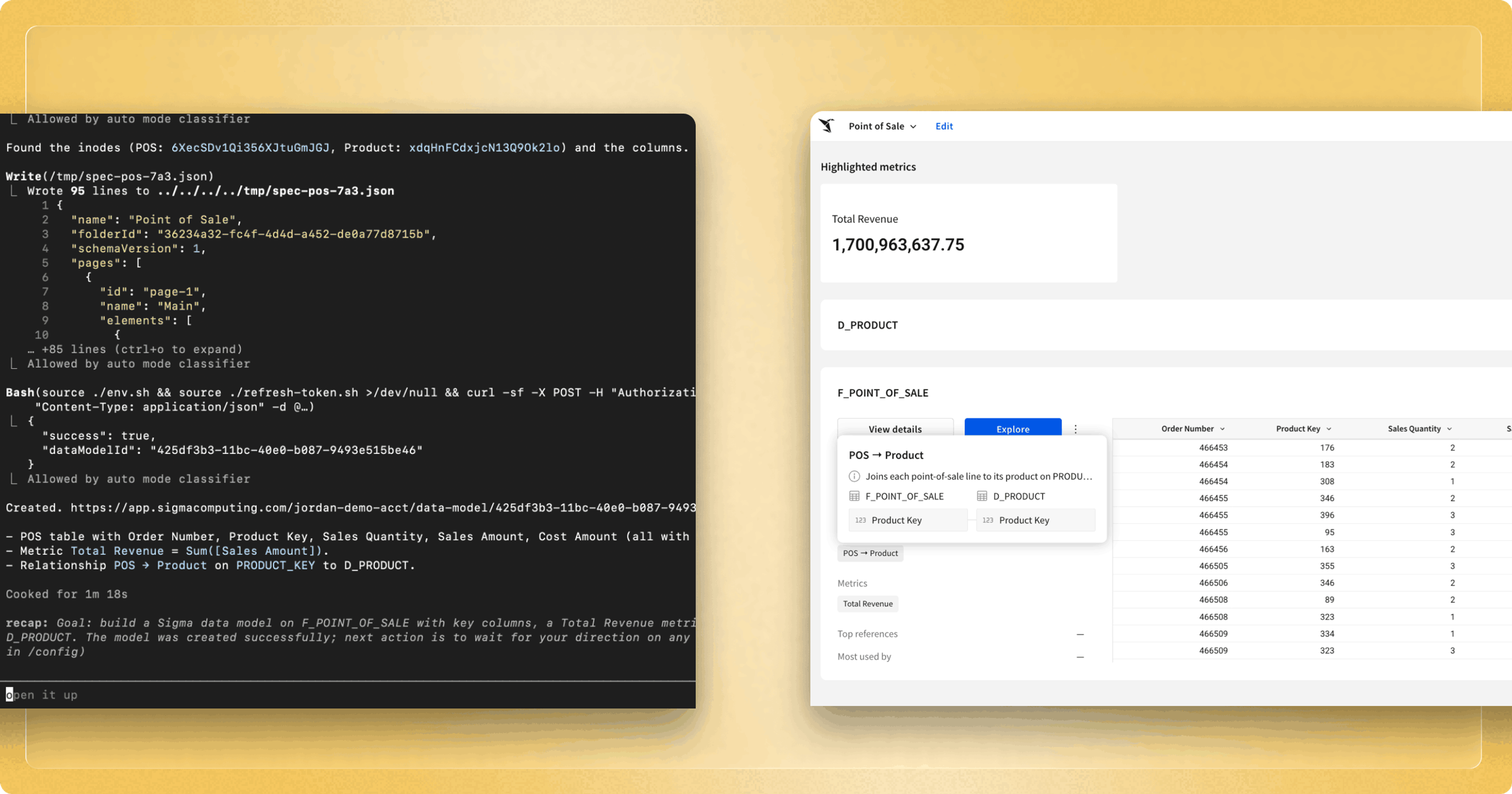
With this prompt, the agent authenticates via sigma-api, resolves the actual column names from your warehouse, composes the full spec — metric, relationship, descriptions and all — and submits it to your Sigma instance via the correct endpoint.
The result is a live, governed data model, built entirely from the terminal.
What does the plugin do under the hood?
The sigma-data-models skill gives Claude Code a precise set of instructions for working with Sigma's API — not just general REST knowledge, but the specific sequence of steps the agent needs to follow: authenticate first via sigma-api, resolve real column names from the warehouse before composing the spec, include metrics and relationships in the correct format, and submit via the right endpoint.
The skill also ships a reference/ directory of feature-specific patterns the agent can draw on for more complex requests. The agent doesn't guess; it follows the logic the skill defines, making the right API calls in the right order without you needing to spell it out.
How are data teams using this?
Standing up models for new tables is faster when you don't have to leave the terminal. When a new table lands in the warehouse, data engineers can define the Sigma model on top of it in the same workflow. Describe the columns, metrics, and relationships in a single message — the model is live before the analyst team asks for it.
Adding context at the source pays downstream dividends. Column descriptions defined in a data model flow into every workbook built on top of it. Generating them as part of model creation — not as a follow-up task — means teams start with self-documenting, governed data from day one.
Keeping pace with schema changes no longer requires a context switch. When the warehouse team adds a column or renames a field, updating the Sigma model is a single description in the terminal. The agent pulls the current spec, applies the change, and resubmits. Every downstream workbook picks it up automatically.
What's next?
We’ve got a lot more coming for agentic BI, including updates to our MCP server, legacy BI migration skills, and workbooks as code. We’re excited to release the features and hear your feedback.
To get started with the plugin, visit our GitHub repo of Sigma Skills for AI agents and review our documentation.
To learn more about building with Sigma's data modeling layer, schedule a Sigma demo. You can also explore the Sigma data models documentation and the Sigma Skills guide to go deeper.
Frequently asked questions
How is this plugin different from the Sigma MCP Server?
The Sigma MCP Server lets AI chat assistants like Claude and ChatGPT interact with Sigma through natural language — searching objects, managing organizations, and working with data models via 50+ exposed tools. The Sigma plugin for Claude Code is specifically for use inside the Claude Code terminal agent. It's built for data engineers and analytics engineers who want to manage Sigma's data modeling layer programmatically, in their existing terminal workflow.
How is this different from Sigma Skills for other AI Agents?
Sigma Skills — accessible at this GitHub repo — currently work with multiple providers, including Claude Code, Cursor, OpenAI Codex, and Snowflake Cortex Code. This means you can leverage Sigma Skills in whichever coding agent you prefer. While the deployment methods are different, the skill capabilities are the same.
Does the Sigma plugin require a specific version of Claude Code?
Yes — version 1.0.33 or later is required for plugin support.
What can the Sigma plugin do today?
The current release covers data model creation and modification: columns, metrics, relationships, and field-level descriptions. Additional skills are in development.
Does the agent need access to my warehouse?
Yes — the agent resolves real column names from your warehouse before composing the data model spec, so it needs to be pointed at the right database connection in Claude Code.
Where does the plugin live?
The plugin is available on GitHub at sigmacomputing/sigma-agent-skills.