Sigma for financial services teams
Run reconciliations, fund operations, and compliance reviews with changes approved, logged, and governed by your warehouse.
Changes approved before they land
Breaks, allocations, and exceptions are approved in the app and logged, so audit sees the whole trail.
Your warehouse’s rules, everywhere
Reports, apps, and agents inherit the row- and column-level policies set in Snowflake, Databricks, BigQuery, or Redshift.
Built by the team that owns the process
Operations and risk teams build their own apps in a spreadsheet interface, or describe them to Sigma Assistant.
Trusted by financial services teams









Out of spreadsheets
Your riskiest numbers still live in spreadsheets
Reconciliations, fund operations, compliance reviews, and client reports run on extracts and email. Each copy outside the warehouse is a control you can’t show an auditor.
| Today | With Sigma |
|---|---|
| Each client request becomes a custom report build | Each client gets an isolated portal with Sigma Tenants |
| Hundreds of legacy reports on an expiring license | Reports rebuilt on the warehouse so the old server can retire |
| Extracts copied into spreadsheets outside warehouse controls | Work on live data under the warehouse’s own permissions |
| Approvals with no record of who signed off or when | Approvals written back with an audit trail |
| Breaks and exceptions tracked in email threads | Breaks assigned, explained, and closed in one app |
From exception to approved change
Each workflow ends with the action someone takes, recorded in your warehouse with who took it.
Client portals
Give each client and portfolio company its own portal
Sell clients interactive visibility into their own transactions and performance. Sigma Tenants keep each client’s data, users, and content isolated, with no custom engineering.
- One tenant per client or portfolio company
- White-labeled reporting inside your product
- Clients explore their own data, governed
Breaks closed
Resolve reconciliation breaks in one place
Match positions, cash, and trades across custodians and internal books on live data. Each break gets an owner and a reason, and resolutions are written back with an audit trail.
- Breaks matched across systems as the data lands
- Owner, reason, and status saved to the warehouse
- Agents flag new breaks and draft the first explanation
Allocations approved
Route allocations for approval
Fund operations teams propose allocations and exceptions, route them to an approver, and lock them once they’re signed off. Nothing moves until the right person approves it.
- Allocation proposals with supporting data attached
- Approve, reject, or send back, with comments
- Approved allocations locked and logged
Ask the agent whether the private credit move fits the fund’s limits.
Allocation Analyst
I check proposed allocations against the fund’s limits before anything moves.
Q4 rebalance · Fund III · $M
Fund Allocations
Fund size
$400.0M
Net change $0.0M
Private credit share
45.5%
−4.5 ptsvs cap
Moves approved
3 of 4
1 pending
Proposed allocations
| Sleeve | Current | Target | Proposed | Status |
|---|---|---|---|---|
| Private credit | 182.0 | 200.0 | +18.0 | Pending |
| Infrastructure | 96.0 | 90.0 | −6.0 | Approved |
| Real estate debt | 74.0 | 70.0 | −4.0 | Approved |
| Cash | 48.0 | 40.0 | −8.0 | Approved |
Allocation approvals
| Sleeve | Amount | Decision | By | |
|---|---|---|---|---|
| 1 | Cash | −$8.0M | Approved | C. Ruiz |
| 2 | Real estate debt | −$4.0M | Approved | C. Ruiz |
| 3 | Infrastructure | −$6.0M | Approved | C. Ruiz |
| + | ||||
Proposed change by sleeve
Packs on live data
Build risk and NAV packs without the exports
Risk and NAV packs refresh from live warehouse data instead of days of pasted SQL exports. Reviewers drill from portfolio exposure to the transaction behind any figure.
- Risk and NAV packs on live data
- Transaction-level drill-down
- Liquidity, exposure, and stress views in the same pack
Legacy retired
Move legacy and regulatory reports onto the warehouse
Rebuild regulatory, control, and client reports on your warehouse, then retire the old report server. Figures trace to source, and audit, risk, and operations review them together.
- Pixel-perfect regulatory and control reports
- Scheduled delivery, so the old server can switch off
- Data lineage and audit trails
Where AI-built work runs
AI works on governed data in place
Answers, apps, and agent actions all run in Sigma on your warehouse, under the same permissions and audit logs as everything else.
- 1AskAn analyst asks an agent why a break appeared. It queries custodian and book data in the warehouse, and you can open the query.
- 2ProposeThe agent finds the cause, such as a fee posted at the custodian but never booked, and drafts the adjusting entry.
- 3Approve and recordNothing posts until the analyst approves. The entry is written back, the break resolves, and the audit log records who approved it.
What your data team gets
One governed model
Define metrics once and reuse them across reports, apps, and agents.
Dev, QA, and production
Version tags promote workbooks through review, and viewers see only the approved version.
Logs for your SIEM
Audit logs record activity, AI conversations, and edits, and export to your SIEM.
Fewer one-off requests
Business teams build their own apps on governed data, so the queue gets shorter.
Workbooks as code
Workbook definitions live in git and get the same review as the rest of your code.
Your choice of model
Admins pick the AI provider: models in your warehouse, or OpenAI, Gemini, Amazon Bedrock, and more.
Financial firms running on Sigma
Blackstone teams add commentary and run what-if analysis with input tables, on the same data their reports use.
 “Input Tables from Sigma gives our employees the ability to enhance their data by adding their commentary, conducting “what-if” analysis, and telling better data stories.”Blackstone Leverages Sigma & Snowflake to Perform Data Analytics at Cloud Scale

 “Sigma and Snowflake Cortex make unstructured legal documents actionable for 500+ business users.”AB CarVal Harnesses AI in Sigma to Unlock Secure, Real-Time Investment Insights
 “Sigma empowers teams across Cowen to easily analyze historical data and take a holistic approach to their analytics.”Cowen Creates a Communal Environment for Self-service Analytics and Eliminates Ad-hoc Requests with Sigma
Explore financial services apps built in Sigma
Working examples from the App Library. Open one to see how it works.
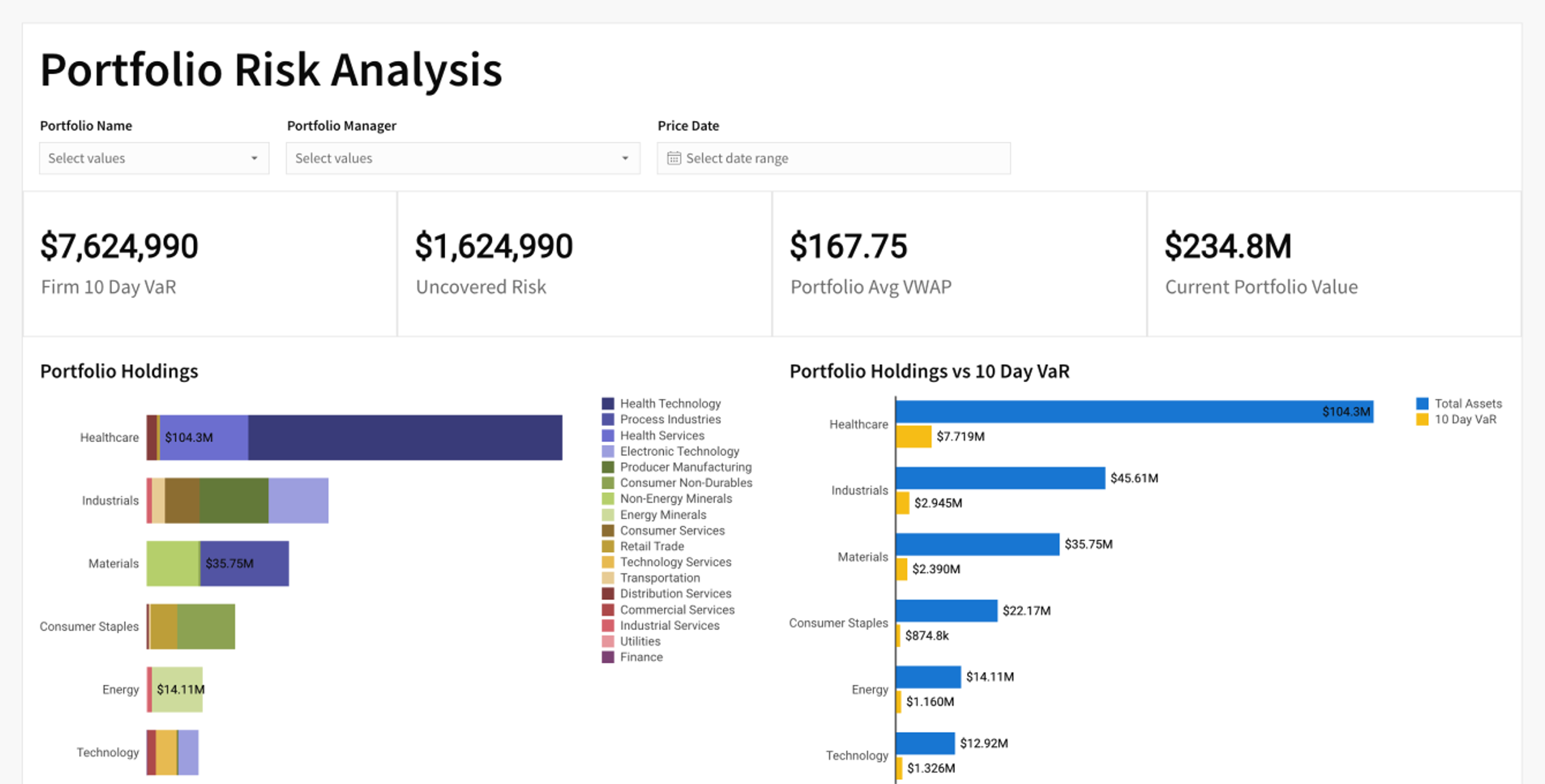
Portfolio Risk Modeling and Analysis
Apply VaR and CVaR analytics to manage portfolio risk on Snowflake-integrated data. Real-time analysis and rebalancing.
See the appLoan Analysis
Loan portfolio performance with loan-level detail. See acceptance/rejection stats and identify outliers.
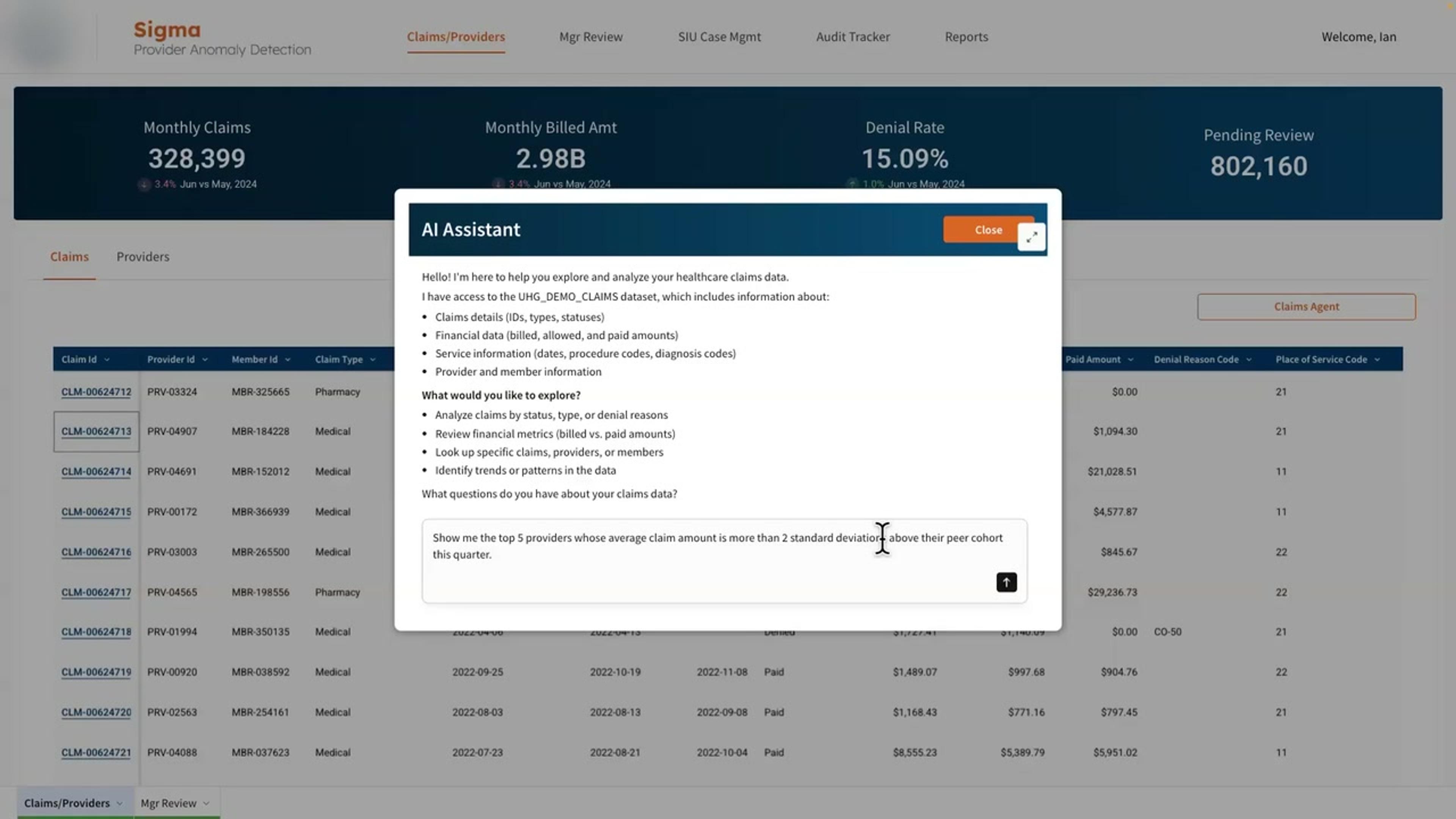
See the appClaims Anomaly Detection Agent
A claims analyst pulls live data, drills in a spreadsheet interface, writes back changes, and asks an agent to summarize the case.
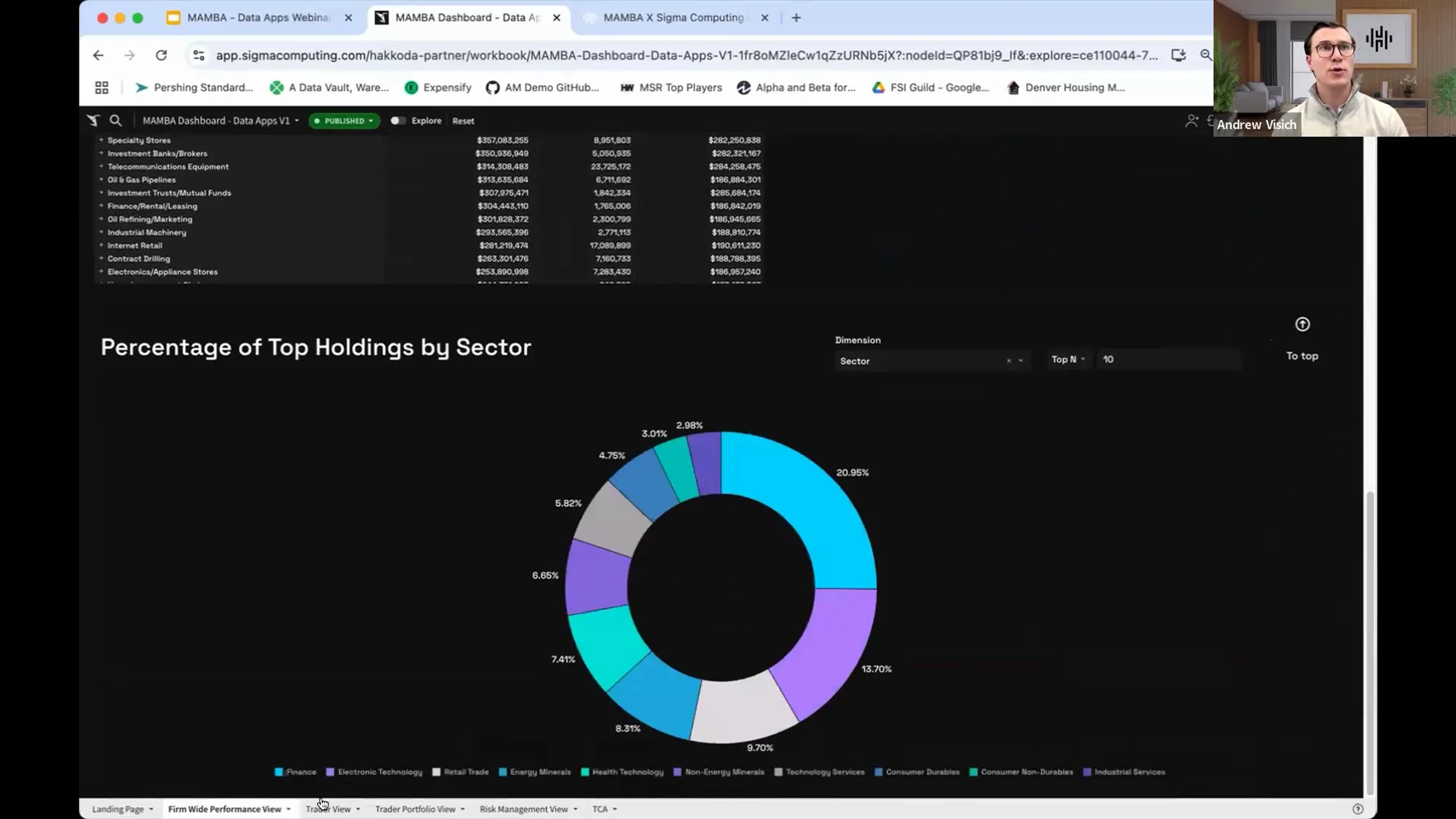
See the appModern Asset Management
End-to-end asset management. Consolidate portfolio and market data, including Bloomberg, for real-time risk, performance, and compliance reporting.
See the app

Security your auditors will recognize
Built for institutions that have to explain each access, edit, and approval.
Version-tagged promotion
Tag workbook versions for development, QA, and production, and restrict viewers to the approved one.
Third-party assessed
SOC 2 Type II, ISO 27001, 27017, and 27018, and TruSight assessed.
Per-user OAuth
Connect with OAuth so queries run with each person’s own warehouse role.
Row- and column-level security
Reads and writes both inherit your table policies.
Audit trail
Audit logs record user activity, AI conversations, and input table edits, so you can see who changed what.
Your data stays put
Sigma queries your warehouse in place and never copies the data out.
Financial services FAQs
How do we trace a figure in a regulatory report?
Formulas are visible at the cell, and Sigma shows the exact SQL it sent to the warehouse. With your warehouse’s query log, model risk teams and regulators can trace each figure to its source.
Does Sigma copy or extract our financial data?
No. Actions in Sigma run as SQL in your cloud data warehouse, such as Snowflake, Databricks, BigQuery, or Redshift, and only the results return to the browser. There are no extracts to secure.
Does Sigma bypass our row-level and column-level security?
No. Connected with OAuth, Sigma inherits your warehouse’s row-level security, masking, and role-based access, so no one sees a row or column in Sigma they can’t see in the warehouse.
Can each client see only its own data?
Yes. With Sigma Tenants, each client or portfolio company gets its own organization, users, and content, built from one template. A change to the template reaches all clients, and no client can see another’s data.
Can we move our legacy reports to Sigma before our license runs out?
Yes. Teams rebuild their reports on the data already in the warehouse, including pixel-perfect reports for regulatory and client delivery. Scheduled delivery means the old report server can be switched off.
Can we require approval before an agent changes data?
Yes. An agent’s action can require sign-off before it changes any data. For example, an agent watching reconciliation breaks can propose an adjustment, and an analyst selects Approve or Skip before it’s written back to the warehouse. Agent actions are recorded in the audit log. Sigma agents are in beta.
What audit logging does Sigma provide, and can we export it to a SIEM?
Audit logs capture user activity, content access, AI conversations, input table edits, and admin actions, and you can export them to your SIEM. Your warehouse’s query history also records the SQL Sigma ran on your behalf.
How does Sigma support dev, QA, and production promotion?
Tag workbook versions for each environment, restrict viewers to tagged versions, and require a review before a version is promoted.
Bring the reconciliation your team dreads every month
We’ll show it running on your warehouse, with approvals and an audit trail on each change.