Sigma Tables are now in public beta

Sigma Tables are now in public beta and available to most Sigma customers. A Sigma Table is an editable table you create from Sigma that lives in your data warehouse, so any Sigma workbook, app, or outside system with the right permissions can read from it and write to it. When someone updates a value in one app, every other app built on that table reflects the change.
Input Tables already let teams write data back to the warehouse from a single workbook. Sigma Tables take that further: one table now persists across many workbooks and apps, so finance, operations, and sales can each work in an app built for their job while sharing the same live, governed data.
We first announced Sigma Tables in private beta in May. Read on for what’s new in the public beta, how teams use Sigma Tables across apps, and how private beta customers put them to work.
What is a Sigma Table?
A Sigma Table is a flat, editable table that you create in Sigma and that Sigma stores as a standard table in your data warehouse. You can create one from scratch, from an existing Input Table, or, on Snowflake, an admin can turn an existing warehouse table into a Sigma Table. Because a Sigma Table is a regular warehouse table, you can:
- Query it like any other table in your warehouse, from Sigma or from any tool connected to your warehouse.
- Build multiple Sigma workbooks and apps on it, each reading from and writing to the same table.
- Let outside systems, such as a Python script, or an upstream service, insert, update, and delete rows with standard database operations.
Your warehouse stays the system of record. Table owners grant teammates permission to use, write to, or own each Sigma Table, and Sigma Tables are supported on Snowflake now, with support for Databricks and PostgreSQL connections coming soon after. For setup details, see the Sigma Tables overview.
What’s new in Sigma Tables: 4 updates for the public beta
Since the private beta, we’ve focused on what teams need to run Sigma Tables in production: a way to add input to any table, a safe way to change tables that other content depends on, a record of every edit, and a way for any app to write to a shared table.
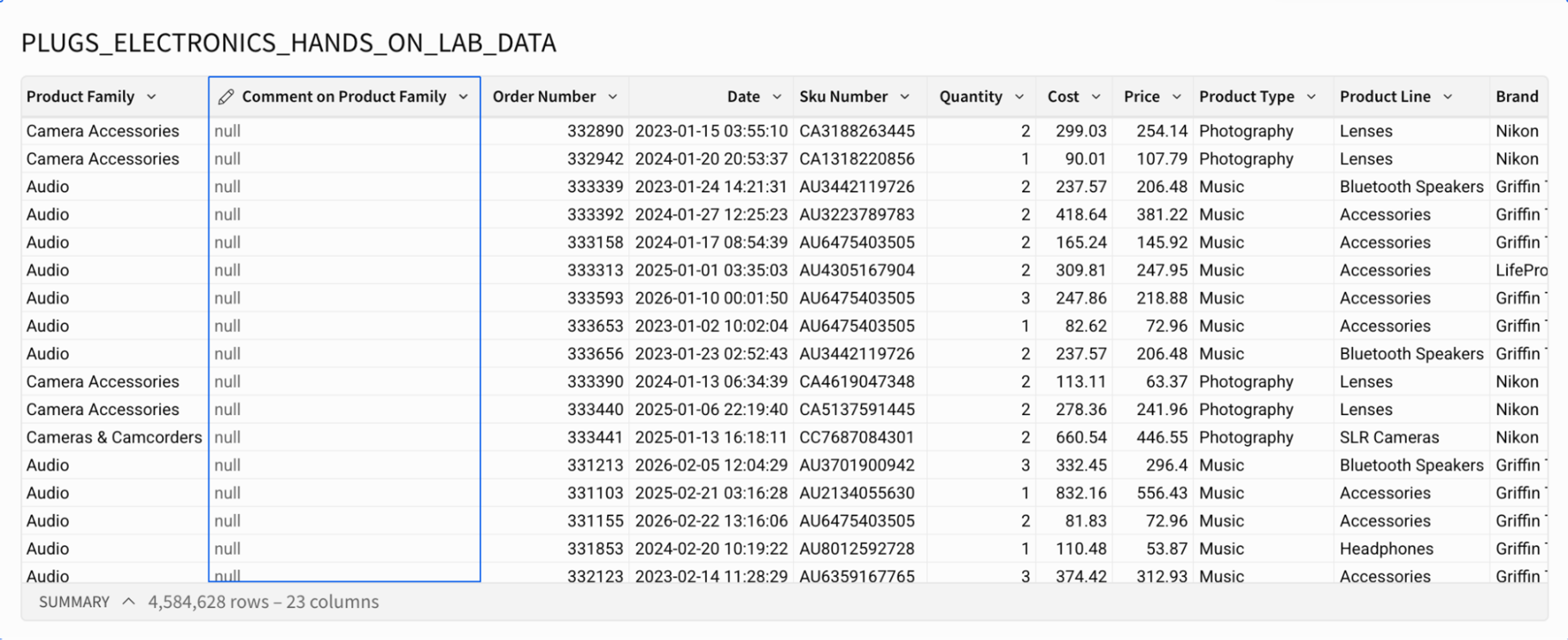
Add comments and inputs to any table with input columns
Input columns let you add an editable column to a table that is otherwise read-only, such as one built on a production source. Sigma stores the entries in a Sigma Table and joins them back to your data by primary key, so reviewers can add comments, flags, or numbers beside the data without changing the source table.
Change a Sigma Table without breaking downstream content
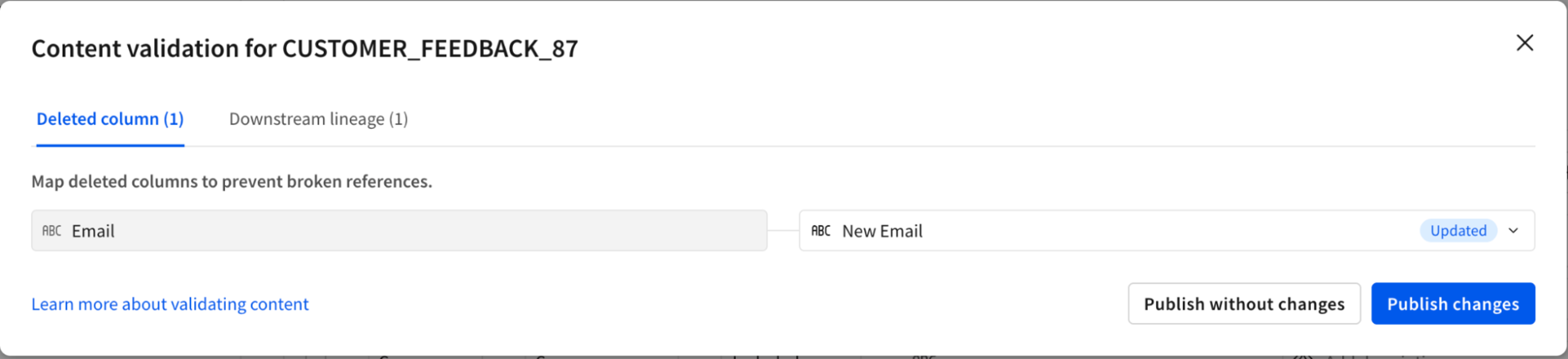
When you rename or delete a column in a Sigma Table, content validation keeps the workbooks built on it from breaking. Sigma shows which workbooks reference the table, lets you pick a replacement for any deleted column, and updates the published version of every downstream document when you publish the change.
See who changed what, and when, with audit logging
Audit logging keeps a record of every edit made to a Sigma Table through Sigma. Each log is an append-only table in your data platform that records who made a data or schema change, when it happened, and what changed, so you can review the history in a workbook like any other table.
Write to a Sigma Table from any app with actions
Actions let builders add buttons and automated triggers that insert, update, or delete rows in a Sigma Table. A request form in one app can add a row, an approval button in another can update its status, and every app that reads the table reflects the change right away.
3 Sigma Tables use cases for finance, retail, and marketing
Sigma Tables fit any workflow where one team’s update needs to reach another team’s app the moment it’s saved. In each use case below, two apps built for different teams share one Sigma Table.
Finance: roll up department budgets without chasing spreadsheets
Finance teams typically build the company plan from numbers that each department owns, such as budgets, revenue forecasts, and depreciation schedules. Collecting those numbers usually means emails, file versions, and another round of reconciliation every time a department revises its plan.
With a Sigma Table, each department updates its numbers in its own budget app, and the finance rollup app reads the same table. When a department changes a figure, the rollup reflects it right away, and the financial analyst never has to merge versions.
Finance spends its time analyzing the plan instead of assembling it.
Retail operations: adjust purchase orders as returns come in
Store operations and inventory planning usually work in separate systems. When a store logs a spike in returns, such as 100 of the same jacket in a single day, planners often don’t see it until a nightly sync or a weekly report, so the next purchase order goes out as planned.
With a Sigma Table, store operations logs returns in a store-level app, and the purchase order planning app reads the same table. The reorder calculation accounts for the returned units as soon as the store saves the update, so the planner can delay the next purchase order.
The retailer avoids reordering stock that’s already coming back through the door.
Marketing: rebalance the budget when a campaign overspends
Campaigns overspend for ordinary reasons, such as rising channel costs or a strong campaign the team decides to scale. Because spend and the overall budget live in separate places, the overage usually surfaces at a weekly or monthly review, after the rest of the budget is committed.
With a Sigma Table, the campaign team records actual spend in its campaign app, and the budget allocation app reads the same table. The budget app recalculates what’s left for every other campaign as soon as spend changes, so the budget owner can shift funds the same day.
Nobody has to catch the problem in a review meeting and rebuild the plan by hand.
How customers in the private beta program use Sigma Tables
Since May, private beta customers have created more than 500 Sigma Tables. Here are a few examples of how they’re using Sigma Tables to power new workflows.
Large retailers run recursive inventory on Sigma Tables
Retailers in the private beta use Sigma Tables for the hardest part of inventory planning: recursive calculations, where each period’s ending inventory becomes the next period’s beginning inventory. A planner groups the plan by product family and product, changes one period’s adjustment, and every future period for that product updates instantly. Sigma recalculates in the browser without running a new query and commits the edit to the warehouse in the background, so this work no longer needs spreadsheets or costly, purpose-built planning software.
An analytics team puts a shared Sigma Table behind its data model
An analytics team wanted one editable table that every workbook built on its data model could use. The team created a Sigma Table and added it to the data model as a source. Analysts and other teammates enter data into the table, and every downstream workbook reads the same current values.
A planning team collects feedback beside the data at every level
A planning team needed reviewers to add comments and numbers at several levels of its hierarchy, such as region, product, and store, all in the same table view. With input columns, reviewers enter their notes alongside the data, and the source table stays untouched.
What’s next for Sigma Tables
Sigma Tables are in public beta, and we’re still building. We’re working on three areas next:
- Row-level and column-level security. Table owners will be able to control which rows and columns each person can see and edit.
- Full parity with Input Tables. Sigma Tables will support the Input Table capabilities they don’t have yet, such as multi-select columns and data validation, along with a way to upgrade existing Input Tables to Sigma Tables.
- More warehouses. We plan to bring Sigma Tables to more warehouses beyond Snowflake, Databricks, and PostgreSQL, such as BigQuery, Redshift, and ClickHouse.
Sigma Tables give the data your business creates one shared, governed home in your warehouse. Teams write back and collaborate in real time, and every app and system built on that data stays in sync.
Start building apps on Sigma Tables
Sigma Tables are available in public beta today to most Sigma customers on Snowflake, Databricks, and PostgreSQL connections. Ask your Sigma admin to configure access for Sigma Tables on your connection, then create your first Sigma Table and build two apps that share it.
New to Sigma? Request a demo to see how one shared table keeps your finance, operations, and sales apps working from the same live numbers.