How I Turned Partner Data Into a Rep Coach With Sigma

Most sales teams know that co-selling with partners works. The data supports it, the leadership believes it, and the reps know it too. The harder problem is actually doing it consistently. Who's the right partner rep to call? Which accounts do you lead with? What do you say that's going to land with them specifically? These aren't hard questions in theory. But in practice, the answers are buried in spreadsheets, overlap reports, and tribal knowledge that's impossible to act on quickly.
That's the problem we've been trying to solve since I joined Sigma five years ago, and where I lead ISV Partner Engineering. Our team sits at the intersection of Sigma's technical folks and our partners' technical folks, which means that we align product teams, enable sales, and build the assets that make two products better together. We've been building internal tools in Sigma to tackle this for a long time. The early versions were essentially reference books — a rep could look something up, but the tool wasn't going to tell them what to do next.
So when Sigma released Sigma Agents, I started asking a different question: what if we flipped that upside down entirely? Instead of a reference point to go look at, what if it was a tool that told you what to do?
That question became the Partner Ground Game (PGG) workbook. Building it turned out to be an eye opener, both for what it does for our reps and for what it showed me about how far Sigma has come as an application platform. This is how I turned this idea into a reality.
The workbook that lives where reps already work
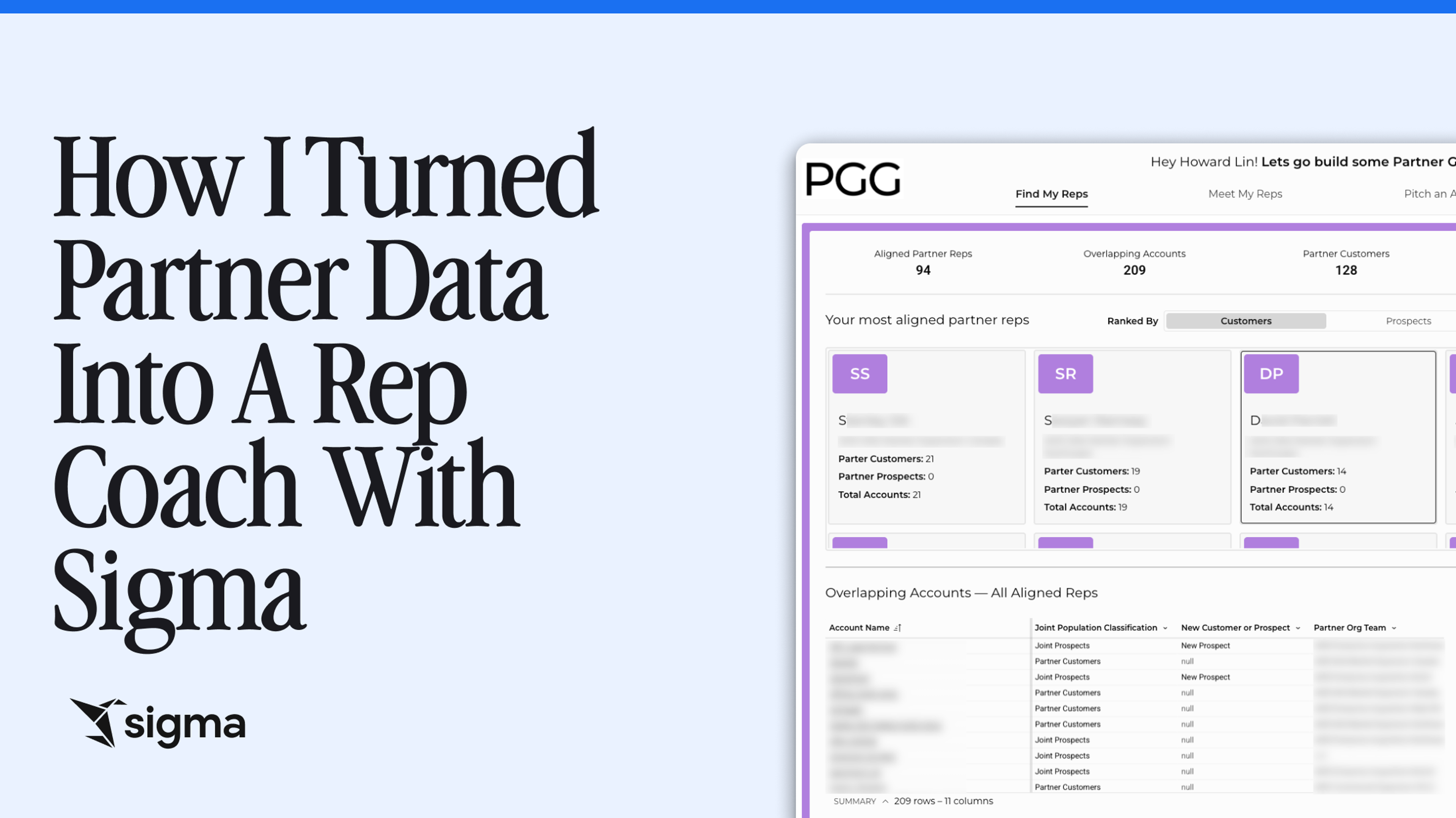
At its core, the PGG workbook is a Sigma application embedded directly inside each rep's existing Personal Territory Management workbook, as a dedicated PGG tab.
The foundational data underneath everything is partner overlap, the idea of understanding which of our customers and prospects also overlap with our partners' customers and prospects. We pull that data into our cloud data warehouse (CDW) environment using a third-party overlap matching tool, which gives us a rich dataset to work from. But as with any large-scale data problem, good data alone isn't enough. You need an interface that lets people actually act on it.
The mental model I kept coming back to was a sales funnel. In sales, you start broad — a lot of cold calls, a lot of leads — and you work your way down to a specific action, like a deal or a close. I wanted the workbook to work exactly the same way, and start with the broadest picture of your partner territory, guiding the rep all the way down to a specific next step they can take today.
To do that, I structured the workbook around four pages, each one representing a distinct stage of the partner co-sell motion:
- Find the right partner reps to work with
- Build the relationship with the right accounts
- Pitch a specific account
- Stay attached through an active deal
Each page has its own purpose-built AI agent, trained specifically for that stage. The whole thing is designed to move a rep forward, not just inform them.
4 agents, 1 workflow
Each Sigma agent in the workbook has a different job, different data it can access, and different actions it's trained to take. Here's how each one works:
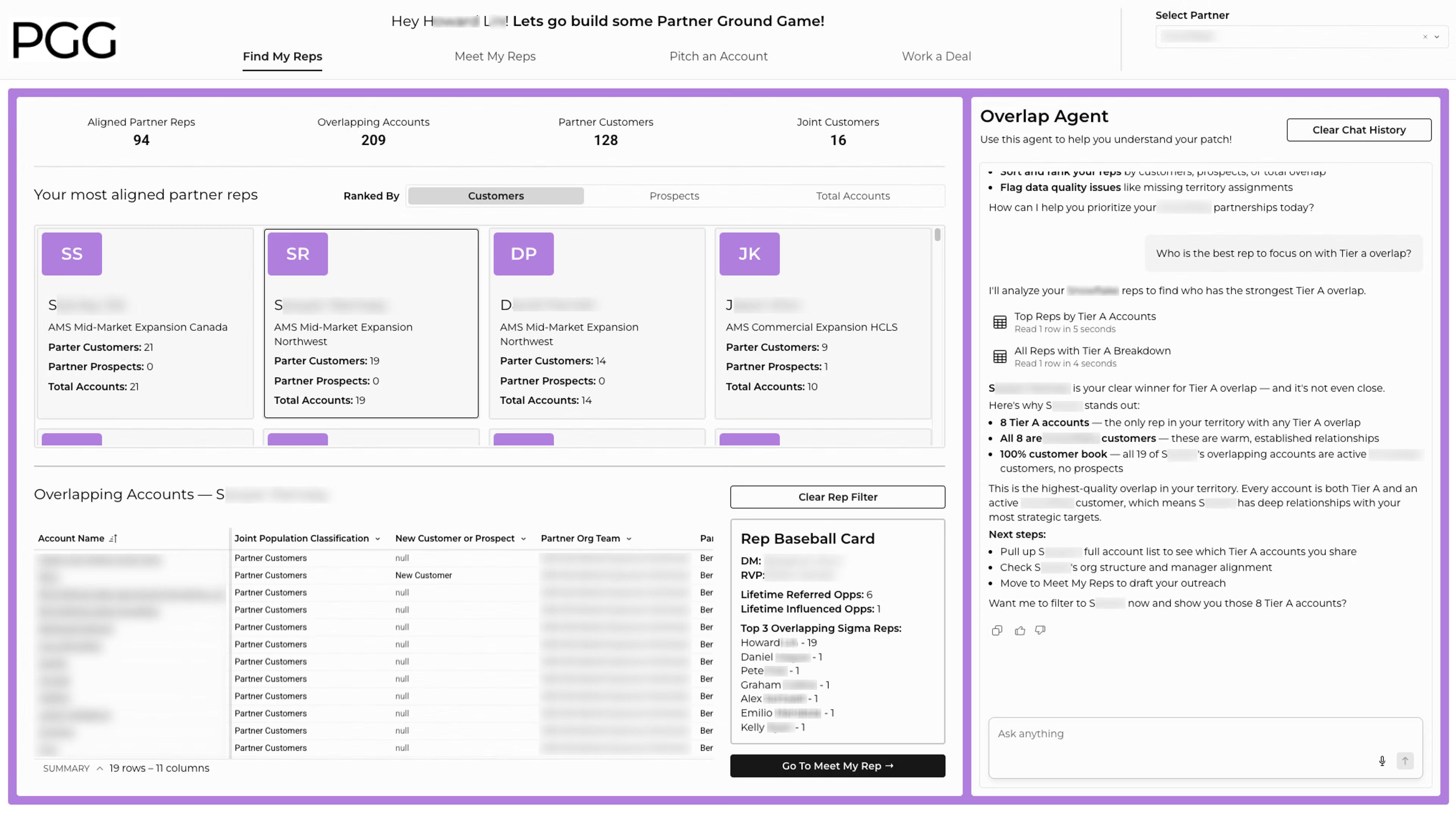
Sigma agent 1: Find my reps
This is where a rep starts, by getting a clear picture of which partner reps they actually overlap with, and who to prioritize. The agent on this page is built to answer data questions: which reps have the most tier-A account overlap, which accounts are shared customers versus shared prospects, and so on. But its real job is to get the rep to a decision point.
Once they've identified someone worth pursuing, the agent moves them to the next page — passing the filters along so nothing gets lost in the handoff.
Sigma agent 2: Meet my reps
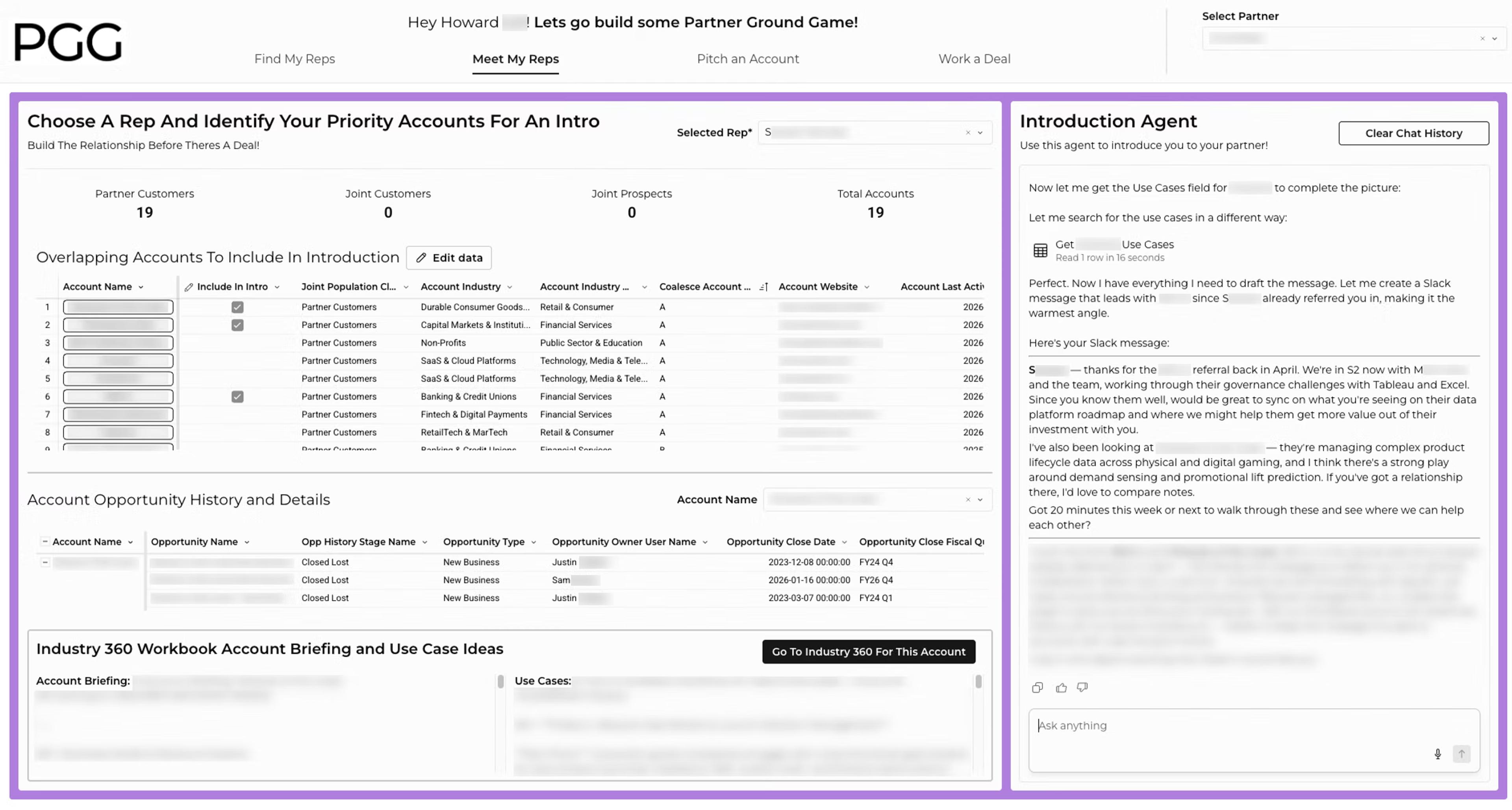
The second page is “Meet my reps.” This is where the relationship actually starts. The rep selects a few accounts they want to lead with for a given partner rep, and the agent gets to work. It pulls in account briefing information and use case ideas from our CDW environment, then helps craft outreach — Slack messages, emails — using the right partner-specific language, programs, and terminology.
Sigma agent 3: Pitch an account
By this point, the rep has a relationship. Now they need to bring something worth talking about.
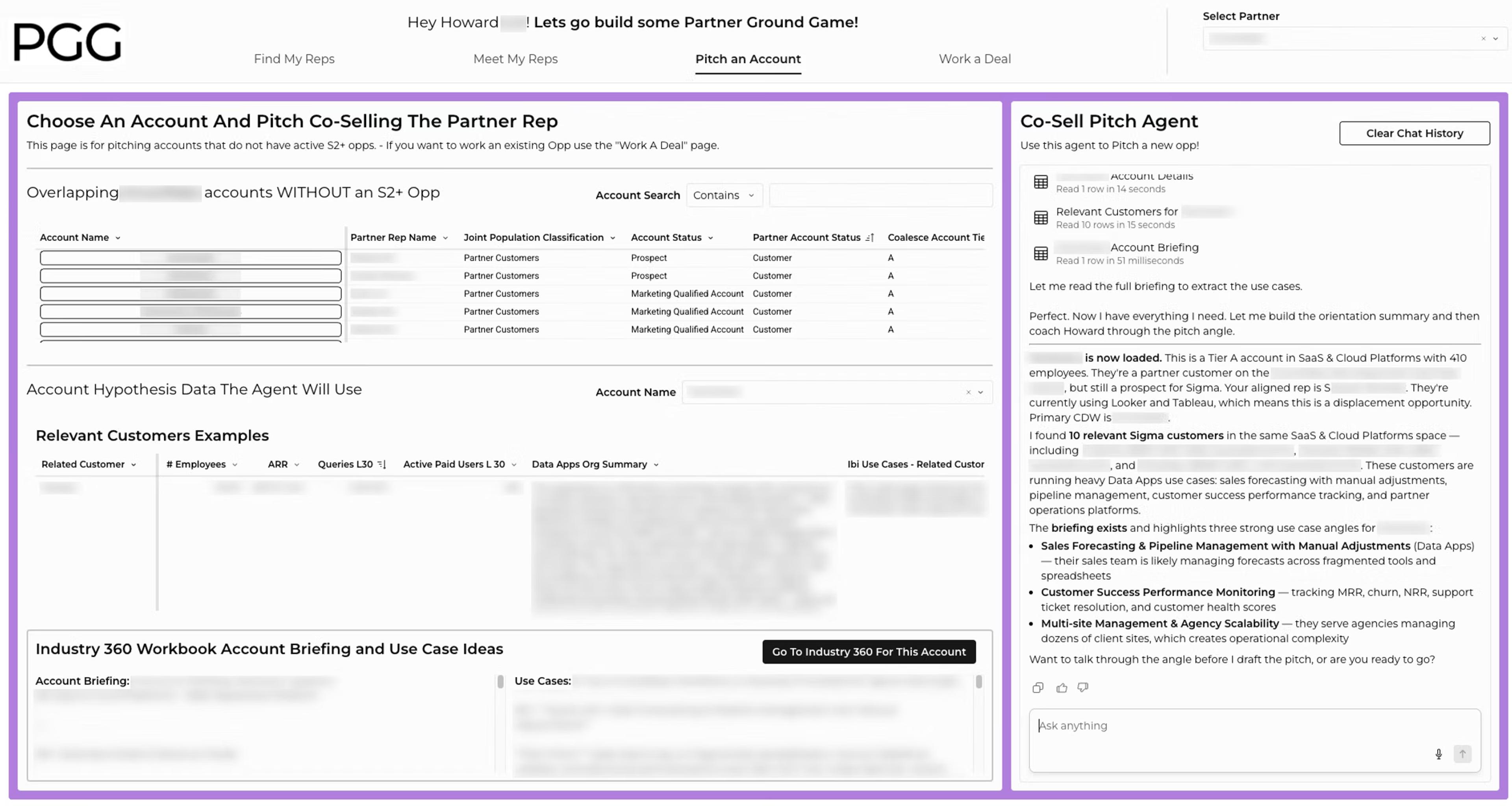
This agent builds a data-driven co-sell pitch for a specific account, drawing on relevant customer proof points from the same sub-industry, an AI-generated account briefing, and any opportunity history we have. It also accounts for context that matters in a real sales conversation — whether the partner rep is focused on growing an existing customer footprint or landing a new one. The messaging for those two situations is very different, and the agent adjusts accordingly.
Sigma agent 4: Work a deal
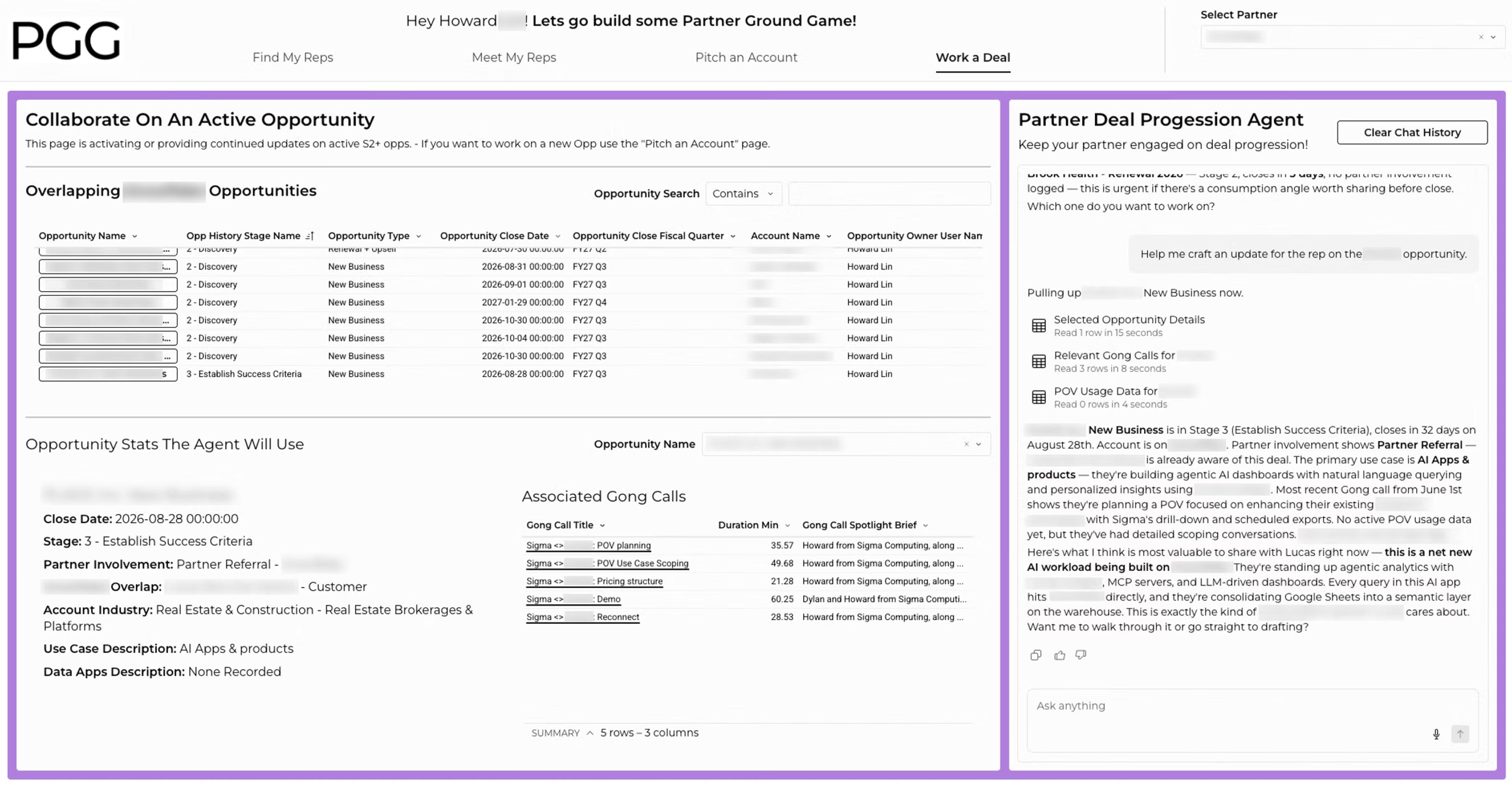
This is for active opportunities past stage two. The agent reads Gong call summaries, opportunity details, and live proof-of-value usage data to surface what's most relevant, then helps draft a partner update that keeps the partner rep in the loop and invested in the deal. The principle throughout is what we call “Give to Get” — every message leads with value for the partner before making any ask. The agents are built to reflect that from the first word.
What it actually took to build the PGG Workbook
Going into this build, I was staring down what felt like a tsunami — 7 data sources, each matching up in different ways to create different views, all of which needed to work together inside a single application. The thing that saved me was Sigma's internal data team, who had already done the hard modeling work. It's what enabled me to focus on figuring out which view belonged on which page and how to connect everything into a coherent user workflow.
On the UI side, I used some of my favorite Sigma app-building features:
- Repeater elements give the workbook its application feel. Think of them as cards in an Instagram scroll or a Pinterest board, rather than a traditional data table.
- Tabbed containers let me show different contexts on the same screen at the click of a button, without forcing the rep to jump between pages or scroll through content that isn't relevant to them right now.
- And Input Tables — Sigma's ability to write data back into the CDW — meant the workbook could actually remember things, like who a rep has been working with, which accounts they've pitched, and where things stand.
Part of what helped me build something so complex was starting in Figma. I used it to wireframe the full architecture before building a single thing in Sigma. I mapped out what lived on each page, how the pages connected, what the agents needed to know at each stage. That upfront investment paid off significantly once I was actually building.
But looking back, the biggest reason the whole thing came together so smoothly was because of Sigma agents, and how straightforward it turned out to be to build something real with it.
Why Sigma agents changed the equation
I had played around with Sigma agents before this, but the PGG workbook was the first time I built a real use case with it. And what surprised me was how approachable it was. A Sigma agent is easy. What it really is, at its core, is a set of instructions pointed at the right data. When you set up an agent, you add the table elements or charts inside your workbook, give the agent explicit permission to read from them, and write a prompt that trains it on what to do. Point it at clean data, give it clear instructions, and you're off to the races.
The reason each agent in the PGG workbook behaves differently comes down to three factors:
- Every page in the workbook has different views available, so each agent works from a different slice of the picture.
- Each agent is trained to take a different action. The "Find my reps" agent, for example, is focused on driving the rep toward a decision and moving them to the next page. The "Meet my reps" and "Pitch an account" agents are focused on drafting correspondence.
- Each agent has a different prompt, with specific tie-ins to which partner is in context, which account, which rep. The agents are custom-coded to exactly what's happening on that page at that moment.
The one thing I'd call out for anyone building with Sigma agents: the quality of your agents is directly tied to the quality of your data. Once you have clean, well-modeled data in place, you can cut out a lot of the noise and your agents become significantly more effective. The data work is the foundation. Everything else builds from there.
Built in Sigma, used by Sigma
If I had to distill what I learned from this build into a single piece of advice, it would be this: start with your data architecture, not your UI. Understand what data you have, get it modeled cleanly, and then figure out which view belongs where. Once that foundation is solid, everything else follows much more naturally than you'd expect.
The other thing this build reinforced for me is how much Sigma has grown as a platform. I've been here long enough to remember when building something like this would have required stitching together a lot of different tools. Repeater elements, tabbed containers, Input Tables, Sigma agents — all of it inside a single workbook, talking to each other, driving a real workflow. That's a different product than the one I used five years ago. And honestly, seeing what Sigma can do when you push it was one of the more exciting parts of this whole project.
The PGG workbook is now live in every rep's territory management workbook. The reference book is gone. In its place is something that tells you who to talk to, what to say, and how to stay in the deal — all the way through. That's what we set out to build. I think we got there.
Request a Sigma demo to see what an agent-powered application looks like inside your own data.