Claude Dashboards: Prototype in Claude and send to Sigma


We're excited to share that Sigma is a launch partner for Claude Dashboards, which Anthropic released in beta today on paid Claude plans. You can now ask Claude to prototype a live dashboard using an MCP connection with natural language, and send the draft to Sigma, where it becomes a governed, shareable workbook or app.
“Send to Sigma” from Claude is available today for all Sigma customers with a Build license and a Claude paid subscription.
Why finish a Claude dashboard in Sigma?
Claude Dashboards work well for quick, exploratory questions, such as how this week's sign-ups compare with last month's. It's a great way to get quick answers from well-modeled data. But when a question needs deeper analysis, or a dashboard prototype is ready for broader use at your company, it's time to send the dashboard to Sigma, where the prototype is rebuilt into a governed, shareable workbook or app that stands the test of time.
In Sigma:
- Governance and credentials are enforced at every layer. Row-level security, column-level security, and workspace permissions apply to every viewer, so you can rest assured that no one sees data they shouldn't have access to.
- Go deeper in your analysis. Pick up where Claude left off: drill into data, run Excel-style analysis, or use SQL or Python for more advanced analysis.
- Build on the metrics your team already trusts. Point any chart at a Sigma data model and reuse the metrics, relationships, and column descriptions your data team has already defined.
- The dashboard can become an app. App elements like forms, controls, and Input Tables let your team add forecasts, approvals, and commentary next to the numbers and write them back to your warehouse. You can run your critical business workflows out of the Sigma app.
- Agents extend the dashboard. Add a Sigma Agent to the workbook to answer follow-up questions, flag anomalies, or take action on the data. Build your own agent, or bring in the warehouse agents your team already runs, such as Snowflake Cortex agents or Databricks agents, as tools a Sigma Agent can call. Your team can even chat with Sigma Agents from Claude through the Sigma MCP server.
- Every action is auditable, and every data point is verifiable. Every element traces back to the warehouse tables and data models underneath it, so you can check the lineage before you share. In addition, Sigma audit logs record who accessed and changed each workbook, and Input Table audit history shows who edited a value and when. Admins can also track each agent's usage, access, and token spend.
Sigma is the governed system where your team works with data, and Claude is one more way into it. Whether someone builds in a workbook, asks Claude a question through the Sigma MCP server, or sends over a Claude dashboard, the same permissions, data models, and audit trail apply in Sigma.
All of it runs live on cloud data warehouses such as Databricks, Snowflake, ClickHouse, and BigQuery, so nothing is extracted or copied along the way.
Turn a Claude prototype into a governed Sigma app in 3 steps
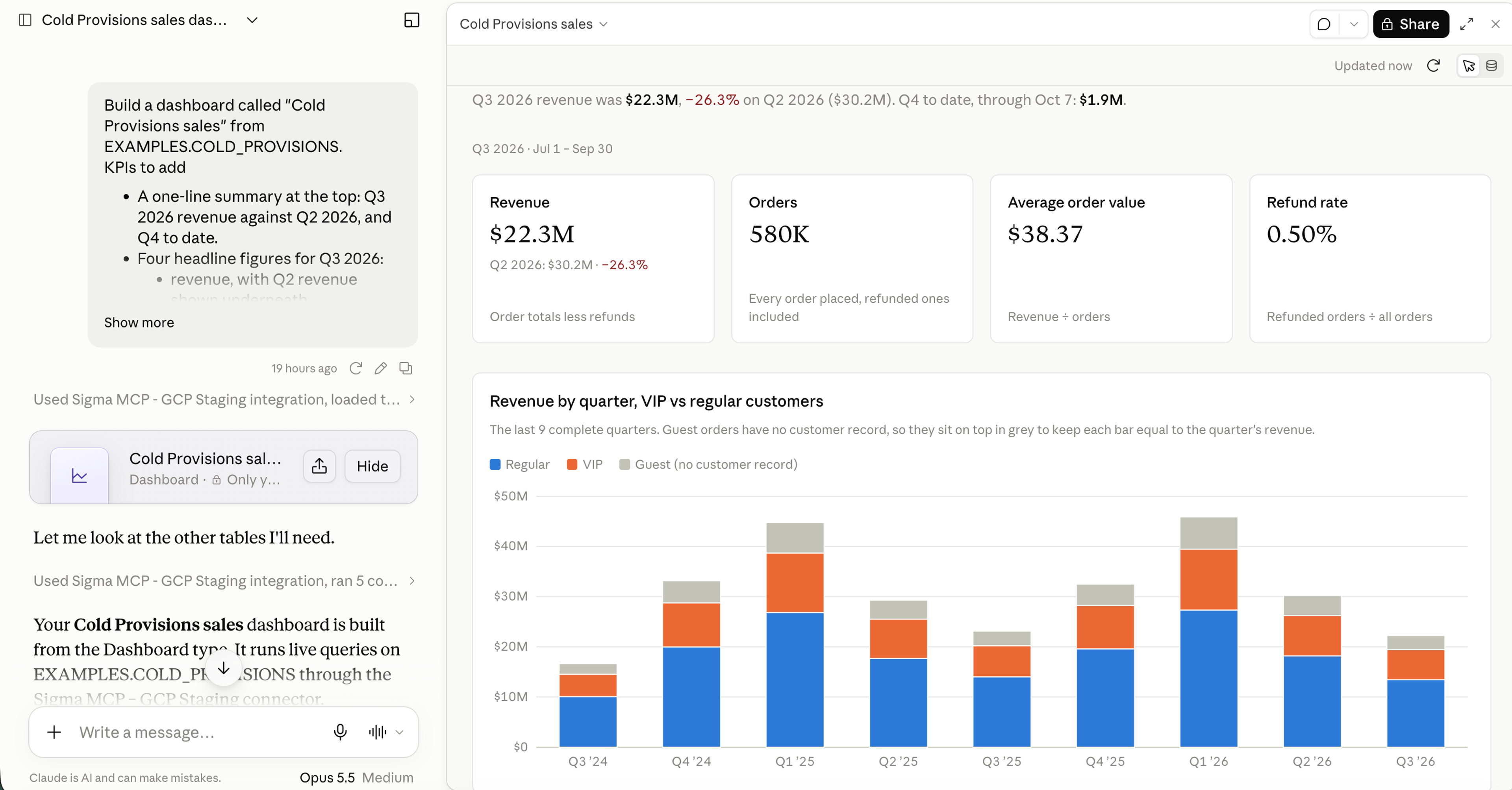
1. Prototype in Claude
Connect Sigma or another data connector to Claude and ask a business question in plain language. Claude writes the SQL and builds a dashboard prototype to answer the question. You can keep iterating with Claude in natural language.
2. Send it to Sigma
When a question needs more than a quick look, choose "Send to Sigma" from the Share menu of any Claude dashboard. The dashboard opens in your Sigma account as a workbook, and the SQL behind each chart comes across with its tables, columns, and filter defaults intact.
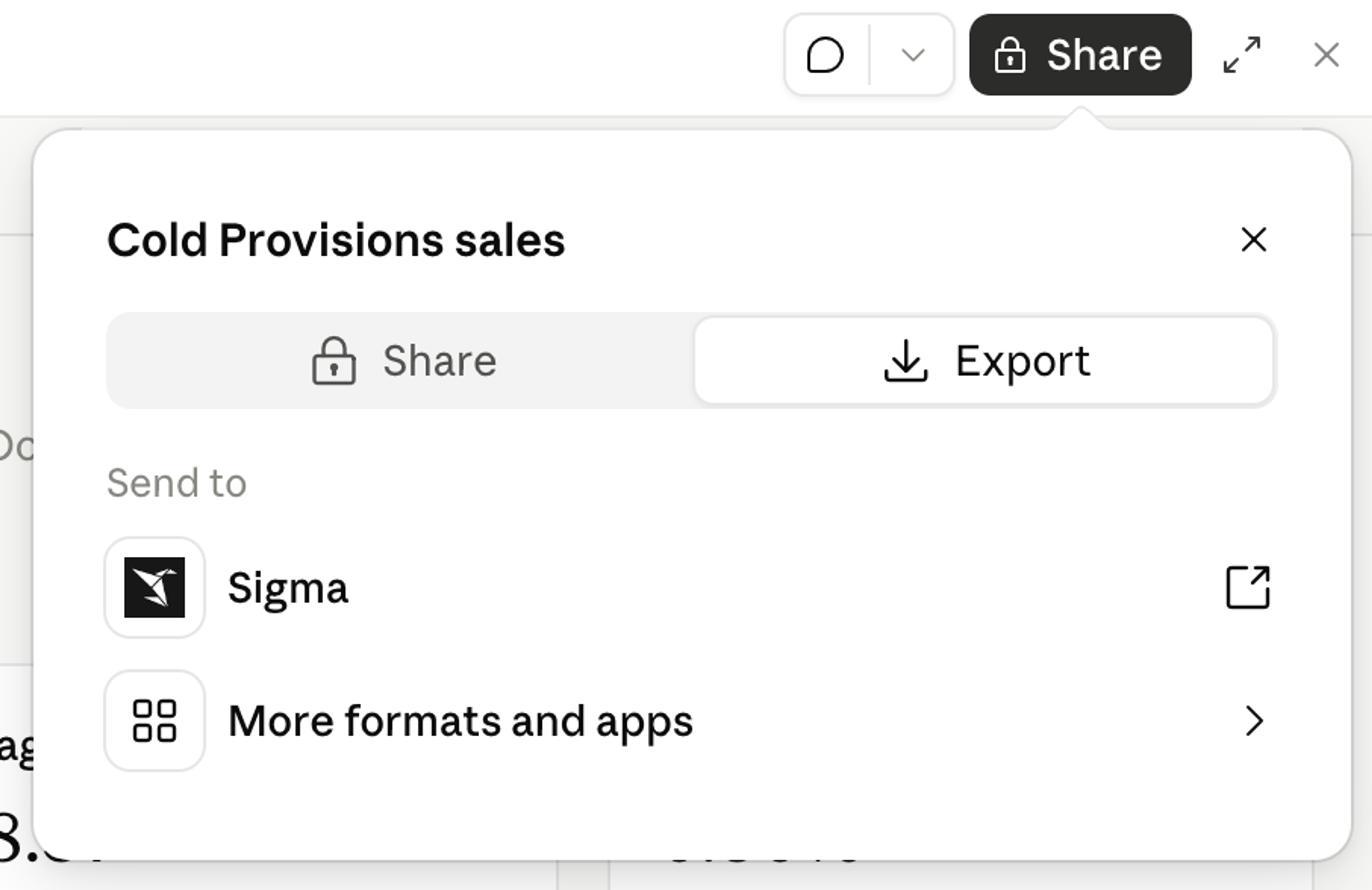
“Send to Sigma” runs through the Sigma MCP server, so the workbook arrives with your existing credentials and permissions; there's nothing to reconnect.
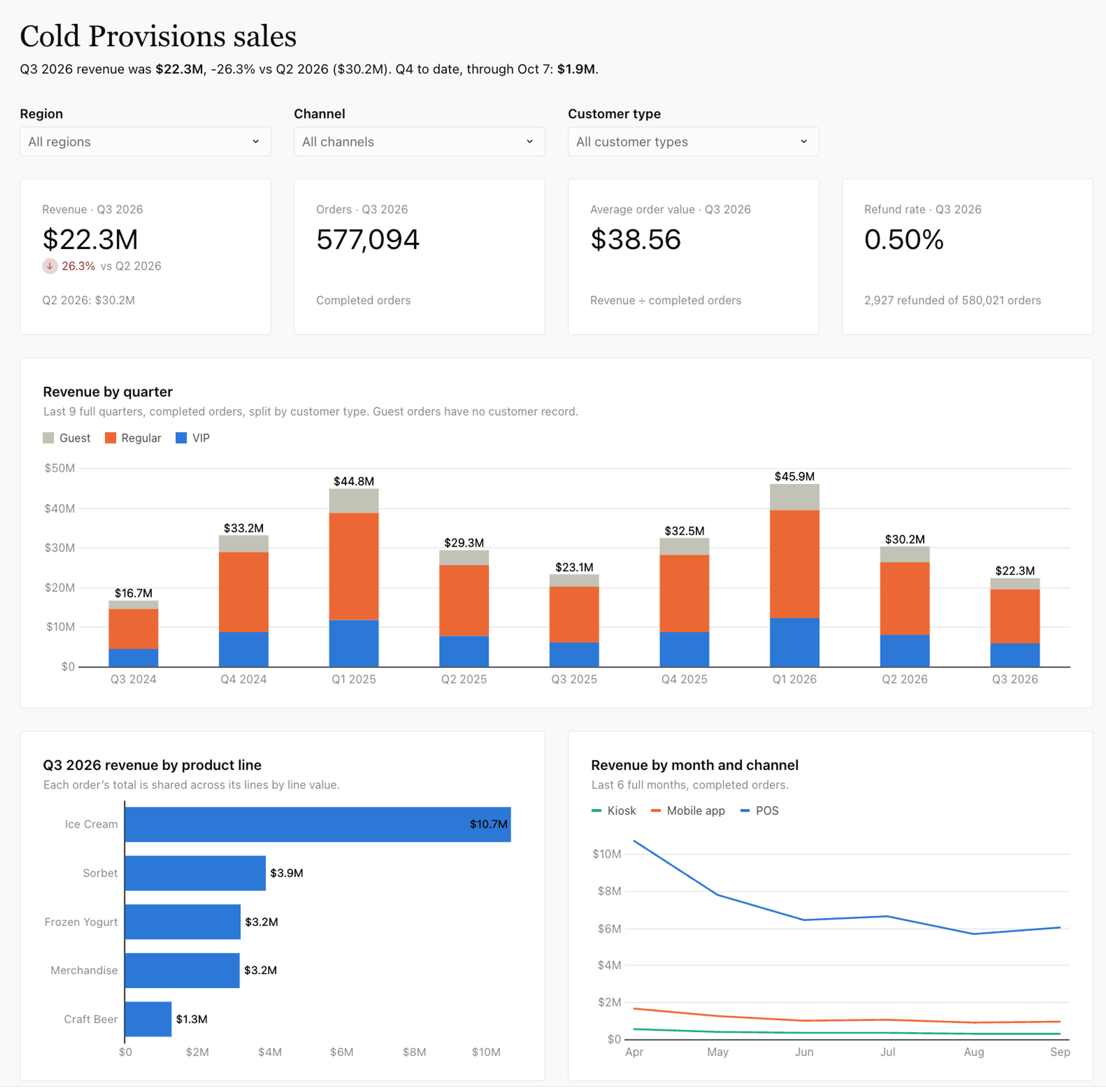
3. Extend in Sigma: Build it into an app your team relies on
In Sigma, the prototype becomes a starting point. Go deeper with drill-downs, SQL, or Python, add an Input Table so regional leads can enter their forecasts, and add an Action that routes changes for approval or invokes an API call. A Sigma Agent can then monitor the forecast on a schedule and notify regional leads when their numbers slip. Then share it with your team, permissions already in place.
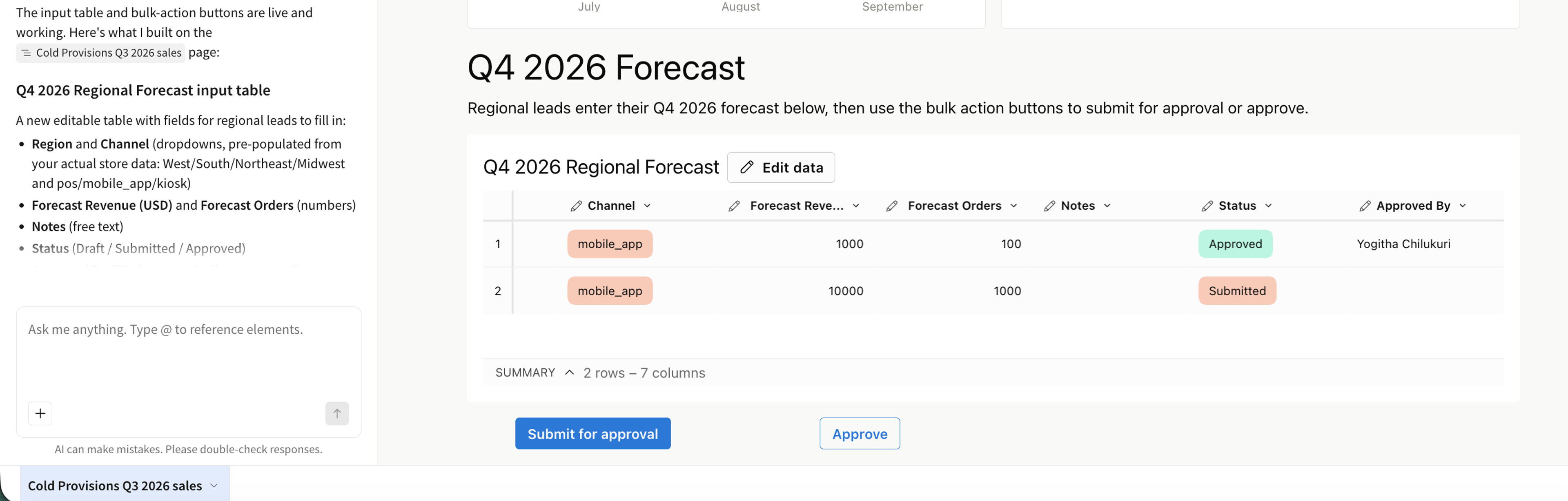
Claude Dashboards makes the first draft easy. With “Send to Sigma,” that draft becomes a governed, collaborative workbook or app that your team can build on.
Send your first Claude dashboard to Sigma
Existing Sigma customers can search for the Sigma MCP connector in Claude's Connectors Directory, connect it, and sign in to Sigma when prompted. Then choose "Send to Sigma" from the Share menu of any Claude dashboard.
On Claude Team and Enterprise plans, an owner can add the Sigma connector for the whole organization, and each person connects with their own Sigma account.
Claude Dashboards is in beta on paid Claude plans. To see what else Claude and Sigma can do together, check out the following content:
- Building with Claude Code in Sigma
- Build a Sigma app with the Sigma MCP and CLI
- Connect the Sigma MCP Server to AI Chat Assistants
- Build governed apps in minutes with code-backed Sigma and a coding agent
- Move Off Legacy BI to Sigma With 1 Prompt to a Coding Agent
New to Sigma? Request a demo to see “Send to Sigma” turn a Claude dashboard into a governed workbook on your own data.
Frequently asked questions
Do I need a specific Claude plan? Yes. Claude Dashboards is in beta on paid Claude plans. On Enterprise plans, an admin needs to turn it on first.
Which permissions apply once the dashboard is in Sigma? Your team's existing permissions apply. Send to Sigma acts as you, and every viewer of the workbook sees only what their Sigma permissions allow, including row-level and column-level security.
What do I need in Sigma to use Send to Sigma? You will need a Sigma Build license with the Use Sigma MCP with OAuth permission enabled. If your organization uses an IP allowlist, an admin also needs to add Claude's IP addresses to it.
How is Send to Sigma different from using the Sigma MCP server in Claude? They are very similar. The Sigma MCP server lets Claude search, analyze, and build in Sigma from a conversation. Send to Sigma moves a dashboard you prototyped in Claude Dashboards into a Sigma workbook in a few clicks, and it runs through the same Sigma MCP server as well.
Is Send to Sigma available now? Yes. Send to Sigma is available today for all Sigma customers with a Build license, and Claude Dashboards is in beta on paid Claude plans.