Move Off Legacy BI to Sigma With 1 Prompt to a Coding Agent

The single biggest reason teams stay on a BI tool they've outgrown isn't loyalty. It's dread.
Migrating dashboards has always been a manual slog: a person opening the old tool and the new one side by side, rebuilding every chart by hand, re-deriving every calculation, eyeballing whether the numbers still match, and praying nobody notices the one KPI that quietly drifted. A mid-size deployment is hundreds of dashboards. That's months of someone's time, and a fresh chance to introduce an error on every single chart.
So most teams don't migrate off the outdated tool. They stay put.
Today we're changing the math on that decision. We’ve open-sourced our migration skills: a set of agentic tools that take a Tableau, Power BI, Qlik, or ThoughtSpot workbook and rebuild it in Sigma.
What are the Sigma Migration Skills?
The Sigma Migration Skills are open source SKILL.md files that direct AI agents on how to migrate assets from other BI tools into Sigma.
These Sigma Migration Skills can rebuild all the major components of existing dashboards and reports into new Sigma workbooks, including:
- Data models
- Charts
- Dashboard layouts
- Formatting
- Reference lines, colors, etc.
Once the assets are migrated to Sigma, the agent skills can then prove that the result matches the source, value by value.
Which agents can use the Sigma Migration Skills?
The Sigma Migration Skills are agent-neutral. Install them as a Claude Code plugin, or run them from Cursor, Cortex Code, and other agents. Each one is just a SKILL.md plus scripts, built on Sigma's Workbooks as Code API.
In Claude Code, add the marketplace and install the converters you need:
/plugin marketplace add twells89/sigma-migration-skills
/plugin install tableau-to-sigma@sigma-migration-skills
/plugin install thoughtspot-to-sigma@sigma-migration-skills
On other agents, clone the repo and point them at the skill folders. AGENTS.md maps each task to its skill.
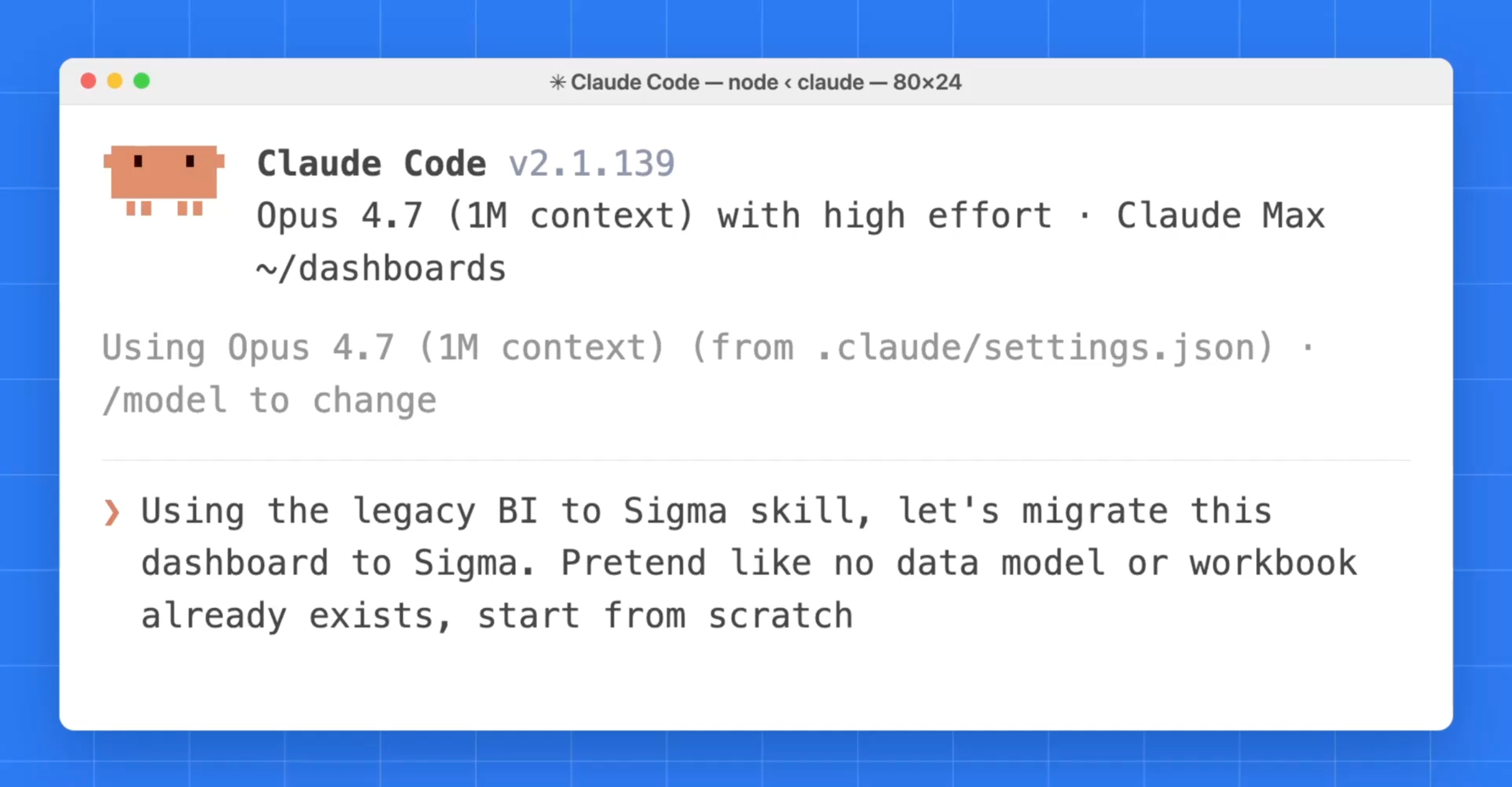
Then, simply point the agent to a dashboard and prompt it to “migrate this.” What used to take a quarter of work now takes an afternoon.
Why open source the migration skills?
Two reasons.
First, migrations are too varied to hide behind a black box. Every Tableau site has its own calc-field quirks. Every Power BI model has its own DAX habits. When the converter meets something it can't translate perfectly, you deserve to see that: read the code, read the warning, and decide. A migration you can't inspect is a migration you can't trust.
Second, the long tail is a community problem. There's a huge variety of source-tool idioms, and the fastest way to cover them is in the open, where anyone can add a translation rule, a fixture, or a whole new source connector and have it benefit everyone. The skills ship with their test fixtures and a contribution path for exactly this.
How the Migration Skills Work
Each skill follows the same shape. You can run it end to end with one instruction, or step through phase by phase. Every stage is a readable script, idempotent and re-runnable.
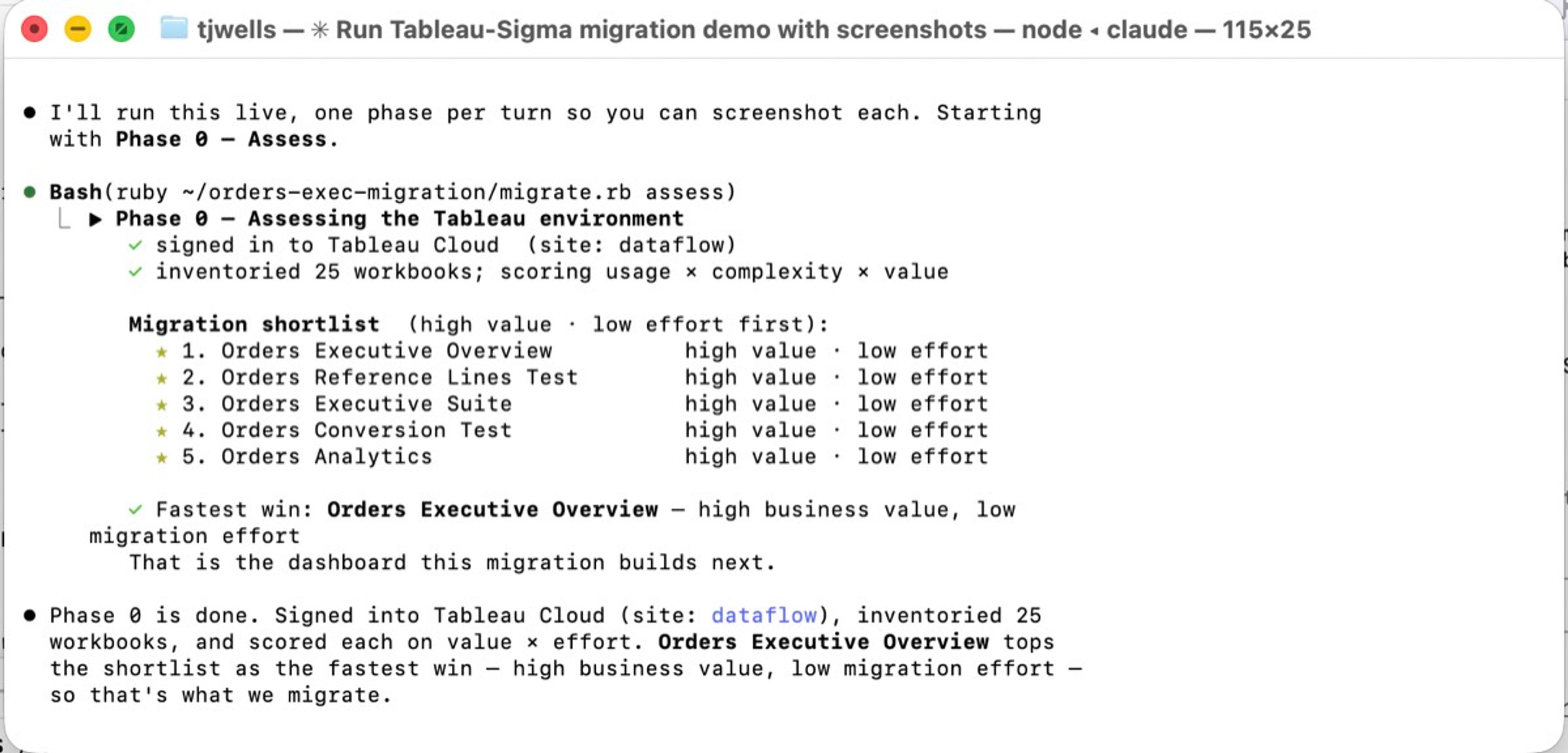
Phase 0: Assess (decide what's worth moving)
Before you migrate anything, the companion assessment skill takes inventory of your whole environment: how many workbooks and datasources, which are actually used, how complex each one is, and a value-vs-cost ranked shortlist of what to migrate first. Most BI sprawl is dead weight: dashboards nobody has opened in 90 days. The fastest migration is the one you don't do, and this is how you find it.
Phase 1: Connect and extract
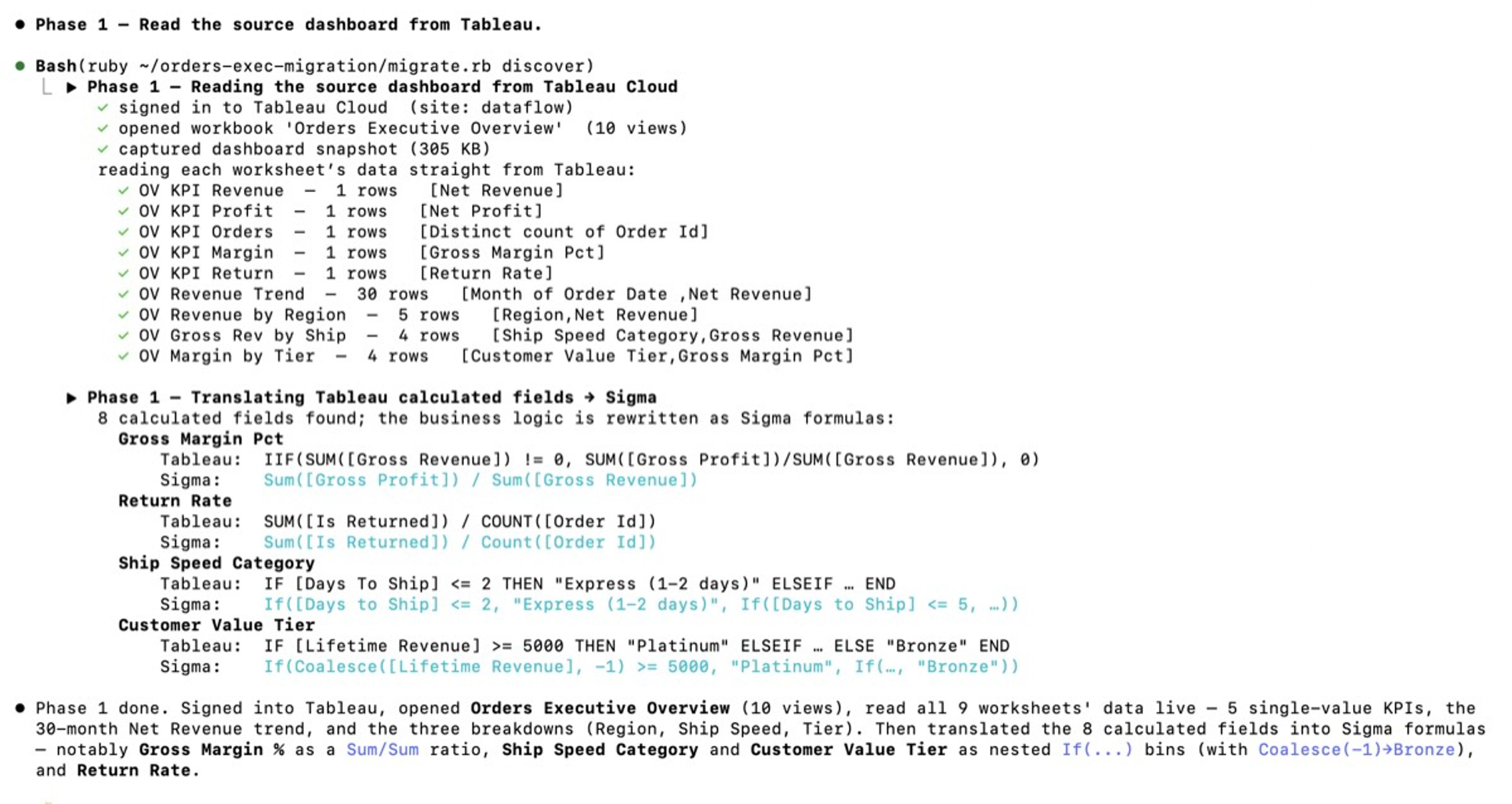
The skill connects to your source through that tool's standard access path (device-code auth, a CLI, or an export API, depending on the source) with no special admin app to stand up, and pulls the real definitions: the data model or datasource, and the report layout, with every chart, its position, its bindings, and its number formats. This is the raw material, captured as structured data, not screenshots.
Phase 2: Convert the semantic layer
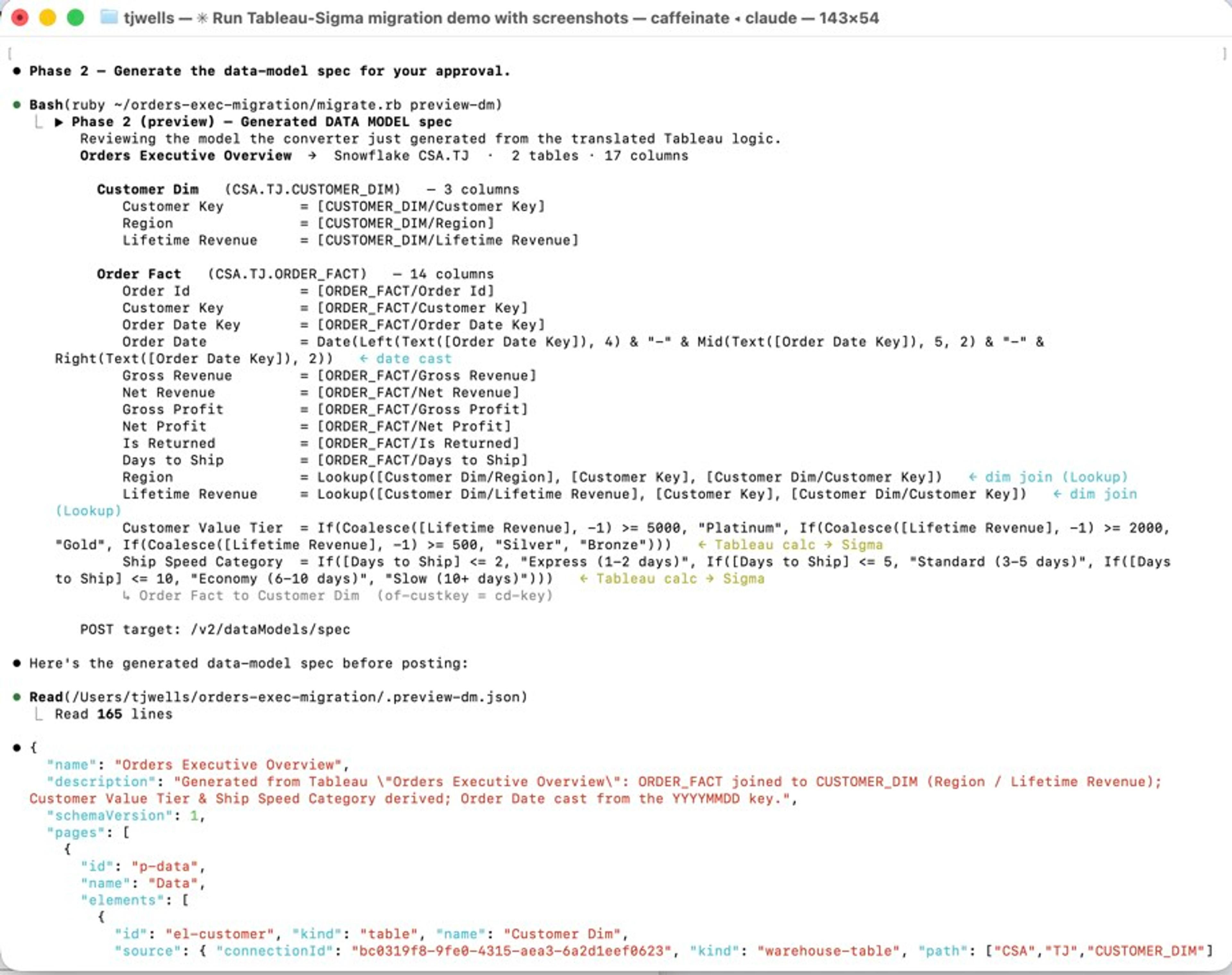
This is the hard part, and the part that earns trust. The skill translates the source's logic into a Sigma data model: tables, relationships, and the gnarly bit, calculated fields and measures. Tableau LOD expressions, Power BI DAX, Qlik set analysis, ThoughtSpot formulas: most of it maps mechanically to Sigma formulas.
Two principles make this safe:
- Flagged, never faked. When a measure has a clean Sigma equivalent, the skill translates it. When it genuinely doesn't (a dynamic filter-context trick, a relationship-swapping calculation), the skill drops it with a loud warning and a pointer to the Sigma pattern to use instead. It never silently ships a formula that returns the wrong number. A wrong dashboard is far more expensive than a flagged one.
- It keeps getting smarter. A “gap scout” sub-agent takes the patterns that don't translate cleanly, proposes a Sigma equivalent, validates it against the live API, and saves the rule so the next migration applies it automatically. The covered surface grows every time someone runs it.
Phase 3: Build the workbook
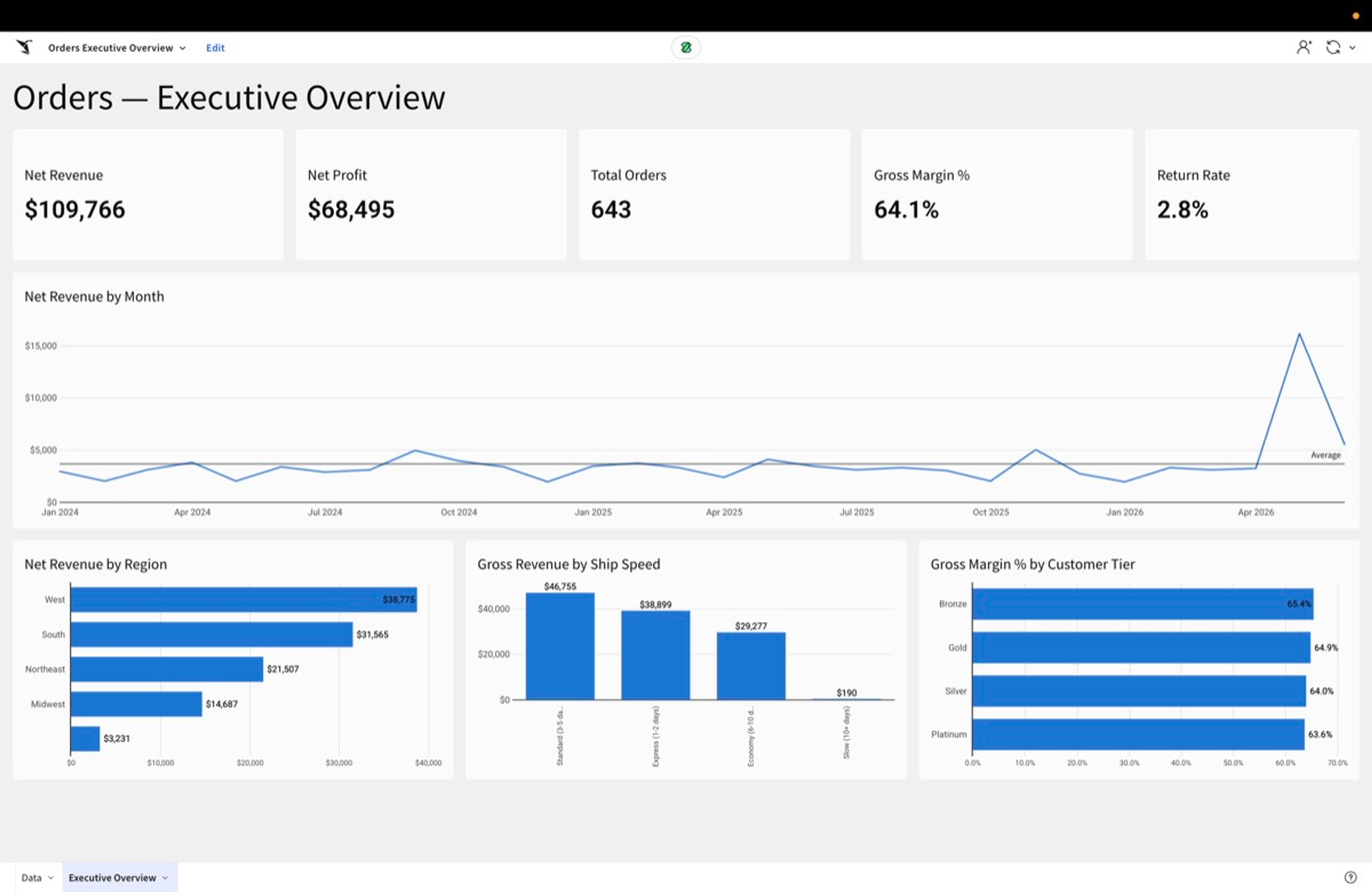
With the data model posted, the skill generates the Sigma workbook itself, as code. Every chart from the source becomes a Sigma element with the right binding and aggregation. Controls become controls. The source's pixel layout becomes a clean responsive grid. Number formats carry over, so a dollar reads as a dollar.
Crucially, the output isn't a pile of floating charts. It's built: KPIs grouped in proper containers, sized so their labels show, sections laid out the way a person would. A faithful migration should still look like a real dashboard.
Phase 4: Verify (the phase that matters most)
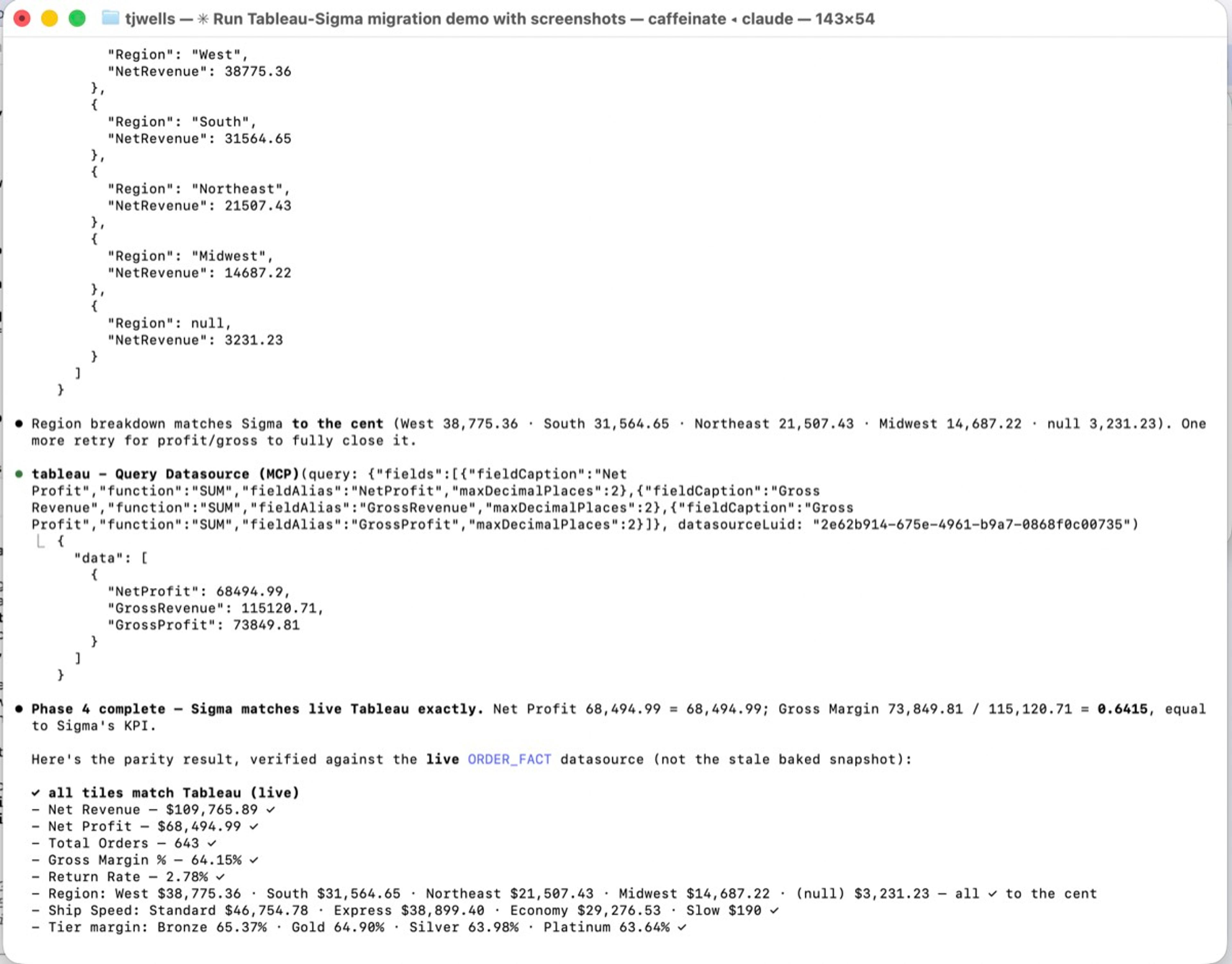
Here's the difference between “I think it matches” and “I checked.” Because the workbook is code and Sigma queries live against your warehouse, the skill queries the migrated dashboard and compares it to the source, element by element. Region totals, profit margins, distinct counts and more are all checked against the original tool's own query engine.
This has held up where it counts. Across our own test corpus and on real customer migrations, the translated elements match the source to the digit. And when something can't match, you already know (it was flagged in Phase 2). There are no surprises in front of an executive.
Phase 5: Enhance (optional: make it better than it was)
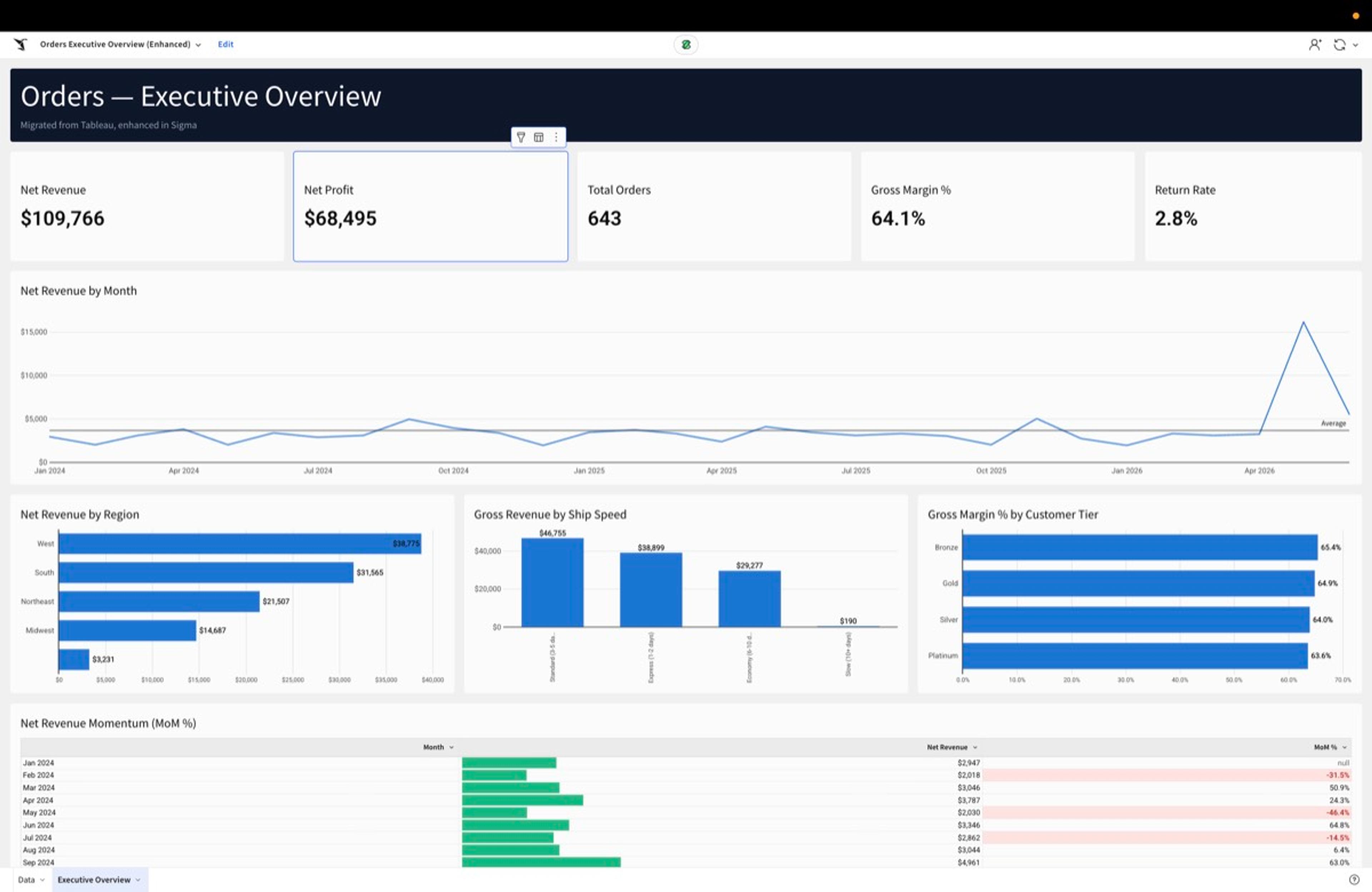
A lift-and-shift just gets you parity with a tool you already decided to leave. So the skills add one more, opt-in phase: once the faithful version is verified, you can apply a Sigma-native enhancement pass that makes it better. A branded header, a cleaner modern palette, conditional formatting that flags negative margins in red, and measures the old tool couldn't express but Sigma can. The skill always keeps the faithful version intact and builds the enhanced one as a copy.
This is the part that turns “we survived the migration” into “the dashboard is actually better in Sigma.”
What do BI migrations look like in Sigma?
Here are two short walkthroughs of the migration skills running end to end against live warehouse data. Each one starts from an existing dashboard, rebuilds the data model and workbook in Sigma, and finishes with the parity check.
How do you migrate a Power BI dashboard to Sigma?
In this walkthrough, I point the skill at a Power BI dashboard built on live Snowflake data and prompt it to migrate. The skill downloads the PBIX file, reads the DAX measures, translates them into Sigma formulas, builds the data model, and assembles the workbook as code. The full employee dashboard, with its bar chart, line chart, and pie chart, comes back rebuilt in Sigma in about five minutes, and the numbers are validated against the source before I touch anything.
How do you migrate a Tableau dashboard to Sigma?
This walkthrough starts from a Tableau orders dashboard and runs the same phased process from scratch. The skill captures each Tableau view, reads the underlying data, matches it to the warehouse tables and columns through the Sigma API, and builds a governed data model with relationships across the order, customer, and product tables. It then lays out the workbook and verifies chart data against the original Tableau extracts, value by value. In the side-by-side at the end, the figures match to the digit, down to a 3.85% rate and a 7,370 total that are identical across both, and Sigma even formats numbers that Tableau left raw.
What it feels like to migrate a BI dashboard with agent skills
The honest pitch is that it's anticlimactic—in the best way. You install the plugin, point it at a report, and watch it work: it inventories, connects, converts, posts a data model, builds a workbook, lays it out, and prints a parity table comparing the new dashboard to the old one. If a few exotic measures didn't translate, it tells you which and why. You review, you accept, you move on to the next one.
The drama of BI migration (the war rooms, the slipped quarters, the “did revenue change?” Slack threads) happen when migrations are manual, opaque, and unverifiable. Take those three elements away and what's left is a script you run and a diff you read.
Try it (and contribute)
The skills are open source and live now:
- Get the skills: in Claude Code,
/plugin marketplace add twells89/sigma-migration-skills, theninstall tableau-to-sigma,powerbi-to-sigma,qlik-to-sigma, orthoughtspot-to-sigma. On other agents, clone the repo and follow AGENTS.md. - Read the docs: phase-by-phase, with the assessment and verification flows.
- Contribute: add a translation rule for a DAX/LOD idiom we don't cover yet, drop in a fixture, or open a connector for a new source tool. The test corpus and contribution guide are in the repo.
We spent years telling people Sigma was worth switching to. The honest blocker was never whether it was worth it. It was the dread of getting there. That part is open source now.
Want to see it in action? Watch our on-demand session Migrate off Tableau, Agent First to see how AI-powered workflows can accelerate your Tableau-to-Sigma migration while preserving the logic and trusted numbers your business relies on.
Frequently Asked Questions
Which source tools are supported?
Migrations from Tableau, Power BI, Qlik, ThoughtSpot, Cognos, Quicksight, and Looker to Sigma are supported today, each with a paired assessment skill. A Domo converter is in development and joins the marketplace once it clears the same parity bar. Because it's open source, new sources are a contribution away.
Do I need to be technical to use them?
You need a coding agent that runs skills (Claude Code, Cursor, Cortex Code, and others), access to your source tool, and a Sigma connection. From there it's conversational: “assess my Tableau site,” “migrate this workbook.” Stepping through the individual phase scripts is available if you want the control, but it isn't required.
How do I know the migrated dashboard is correct?
Every migration ends with a parity check: the skill queries the new Sigma workbook and compares it to the source tool's own results, element by element. We reached exact parity both in our own test corpus and on real customer migrations. The skill flags anything it can't translate faithfully during conversion. It never silently drops or fakes a value.
What happens to calculations that don't translate?
The skill flags them with the specific Sigma pattern to use instead (a grouping, a window function, a period-over-period setup), and the “gap scout” can propose and validate a translation that's then reused on future runs. The covered set grows over time.
Is this a lift-and-shift, or can it improve the dashboard?
Both, in two tiers. The initial output is faithful to the source and cleanly built. Then an optional enhancement pass applies Sigma-native design and recovers logic the old tool couldn't express, on a copy, so the faithful version stays intact.
What's it built on?
Sigma's Workbooks as Code API, the same spec interface that lets you read, generate, and version any Sigma workbook programmatically, plus a companion data-model converter that maps each source's measures and calcs into Sigma formulas. The migration skills tie the two together.