How to build full stack apps in Sigma with AI

In Sigma, business teams can now describe an app in plain language, and get a working, full-stack build, complete with a custom interface, business logic, and data tables running on data their IT team already governs. In the recent livestream, Build anything in Sigma with AI, our product experts demonstrated how they create, iterate, publish full stack apps in Sigma.
Sigma is an analytics, apps, and agent platform built on cloud data. In this recorded session, available on demand, the team showed how business users can describe the application they need, refine it through conversation, and share it out so anyone at their company can use the finished apps. The new app-building experience in Sigma is available through a private beta.
Key takeaways
- Describe a business workflow in natural language, and Sigma’s full stack app-building experience can generate an application with a custom interface and business logic.
- Application updates can be written to Sigma tables, editable tables backed by the data warehouse. With the right access, teams can reuse that data in other Sigma documents and applications, with no ETL and no extra copy.
- Choose a workbook when exploration and analysis are the primary goals. Consider a full stack app when the team needs a custom interface for a specific process.
- Admins set the boundary before anyone builds: approved data sources, a write-back schema, and approval of third-party libraries. Builders keep their freedom to build inside it.
- The livestream showcased applications for project management, inventory decisions, product planning, and data storytelling. Each brought a different workflow together with warehouse data.
- Sigma hosts and publishes the applications in the same platform teams use for analytics. IT can manage access and infrastructure while builders focus on the workflow.
Why AI-built apps are easy to start and hard to run
Business teams already build apps with AI tools that sit outside the systems IT manages. That creates app sprawl: copies of company data in places IT can’t see, more vendors to host and secure, and prototypes nobody knows how to take further. In a poll during the livestream, attendees named “don’t know what to do beyond a prototype” and “not sure if IT approves” as their top two challenges.
AI can help teams move from an idea to an application quickly. For an application to be useful beyond a prototype, it also needs access to business data, a place to run, and a way to be shared and managed.
Sigma’s app-building experience brings those pieces together. A builder describes the application, reviews the proposed plan, and iterates on the result. Sigma generates the application interface and the logic that powers its workflow. The builder can then publish the application and share it with the people who need it.
A project manager may need a dashboard and calendar for tracking work, while an inventory manager needs to review stock levels and record decisions. Both can build around their own processes while keeping the data those workflows generate in the warehouse.
Choose between a workbook and a full stack app
Start with the job the end user needs to do. A workbook is a strong choice when the primary goal is to analyze data: explore a dashboard, filter results, or drill into a metric. Sigma’s spreadsheet-like interface gives people room to investigate questions as they arise.
A full stack app is a strong choice when the primary goal is to carry out a process through a tailored interface. That might mean assigning project tasks, reviewing inventory recommendations, managing expenses, or tracking requests. The app can bring the relevant data and business logic into the same experience.
Some workflows need both. A team might use an application to record decisions and a workbook to analyze the results. Because the underlying data is in the warehouse, teams can put it to work across those experiences.
See 4 applications built in Sigma
The livestream covered four examples, from managing projects to turning sales data into a story. Together, they show how a builder can tailor an interface to a workflow and keep the resulting data available for analysis.
Track projects across board, calendar, and timeline views
The project management application brought projects and their tasks into one place. Users could create tasks, change their status, add comments, and view work on a board, calendar, or timeline.
In the timeline view, a user could extend a task’s due date by dragging it. The change was written to a table in the warehouse, making the updated date available to the rest of the team. The demo also showed notifications for users when they were added to the application or assigned a ticket, by email and Slack.
Make inventory decisions with warehouse data
The inventory management application brought sales actuals and inventory workflows together. In the example, an inventory manager could review a recommendation, decide whether to lower a value or dismiss the suggestion, and record that decision in the application.
The decision and the underlying sales data stayed together in the warehouse. Other users could see the change, and the team could use the resulting data to understand decisions alongside actual performance.
Run a product team’s work in one application
The product planning application was designed around a product team’s work: logging features, research, launch activities, and operational tasks.
The team showed how the builder translated those requirements into an interface and configured the data sources. In the example, the builder selected Snowflake as the destination for application data. Sigma created the tables needed for the workflow, along with the application’s supporting logic.
Turn sales analysis into an interactive story
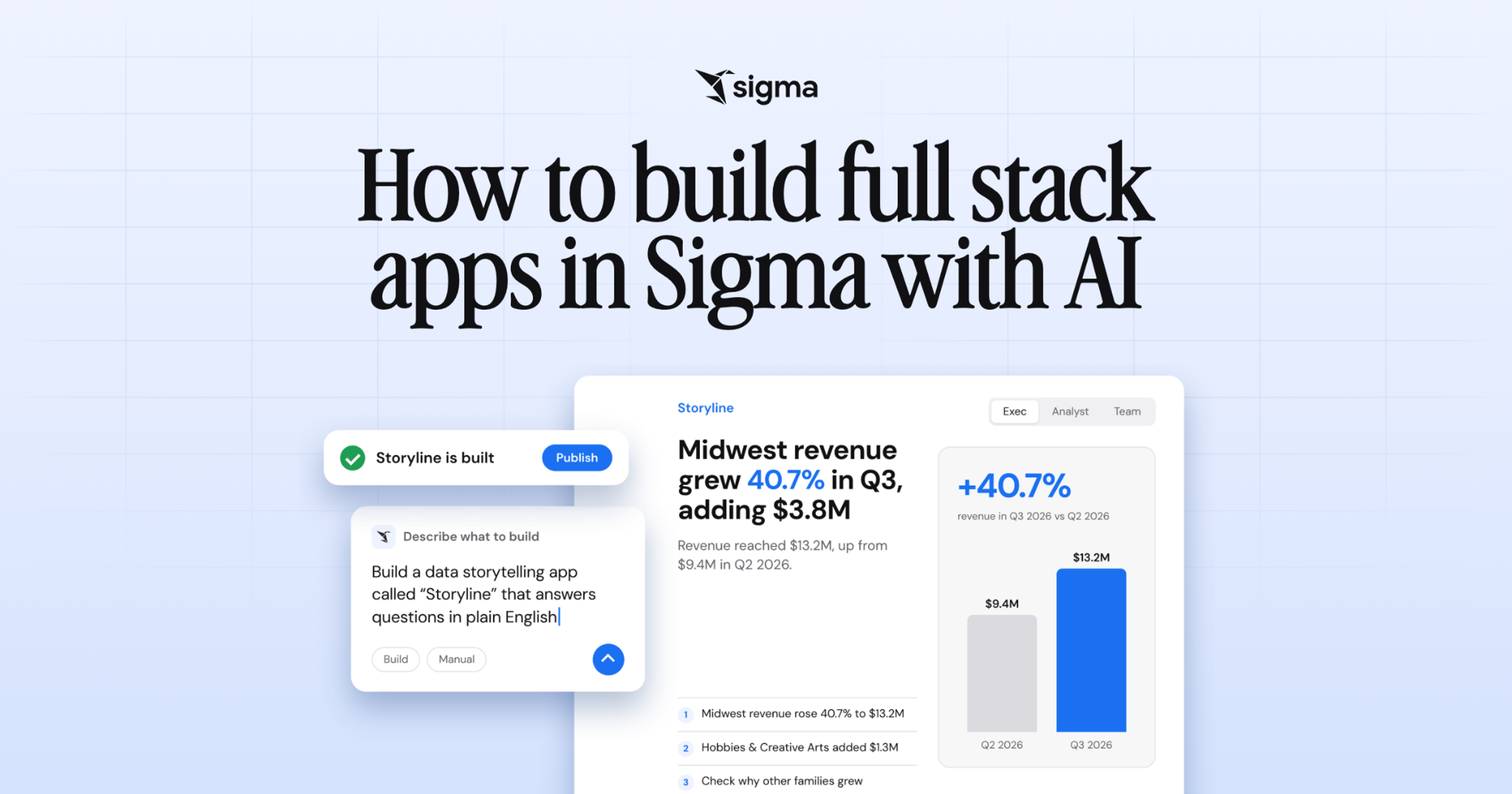
The team also demonstrated Storyline, a data storytelling application built on a retail electronics dataset. A user could ask a question about sales in plain language and receive a narrative supported by a chart.
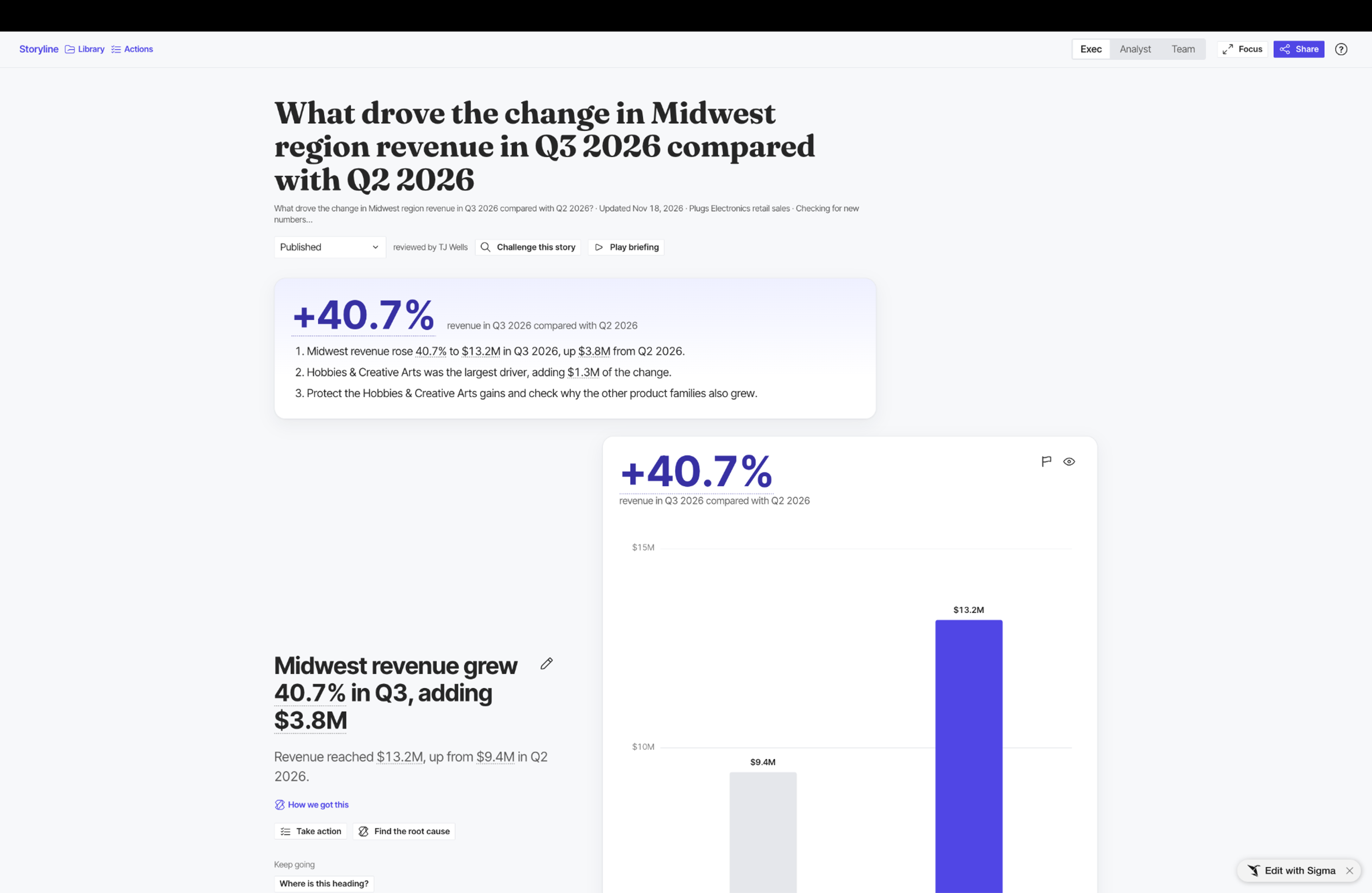
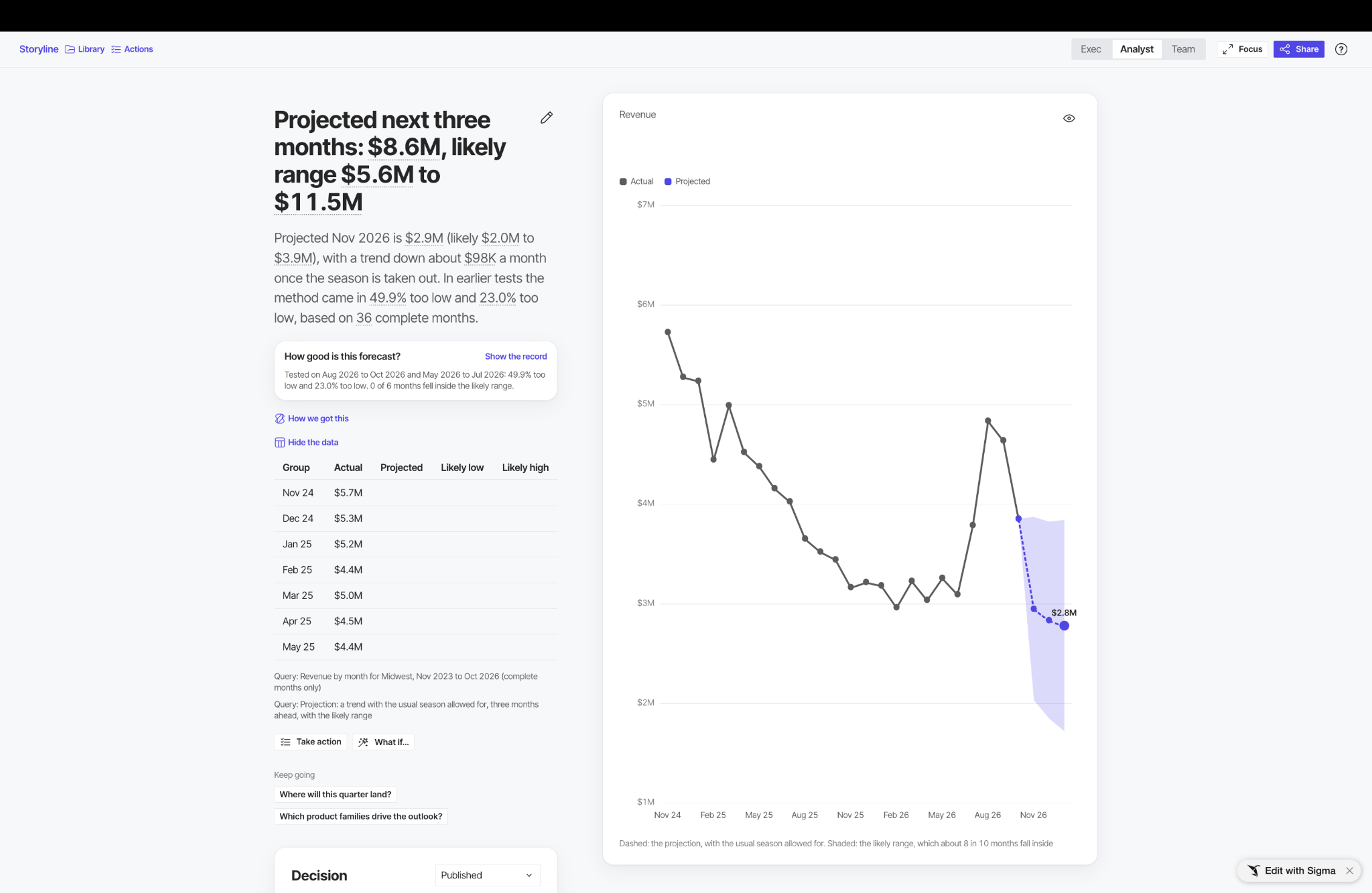
From there, the user could select a portion of the chart to ask a follow-up question, explore a what-if scenario, and inspect a number’s underlying query. The application also included ways to assign follow-up work, add notes, and set alerts.
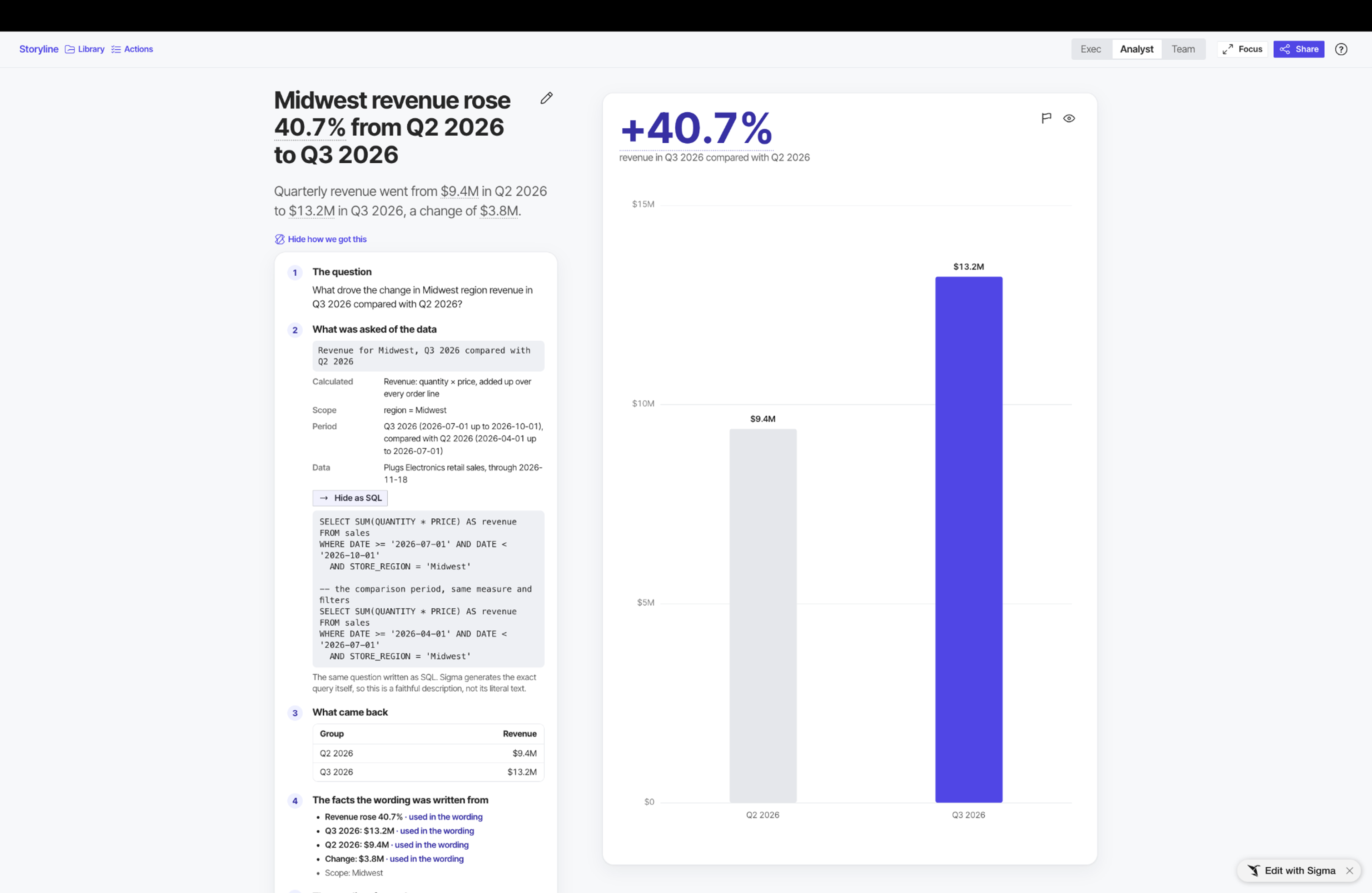
Storyline illustrates how a custom application can connect analysis to the next decision. A team can investigate a change in sales and record what it plans to do about it in the same workflow.
How to build and publish a full stack app
- Describe the process. Explain the types of work the team tracks, the information each item needs, and how people will use the application. In our example, a single description covered the item types and the views.
- Review the proposed plan and data destination. In our example, the builder selected Snowflake so the application’s data would be stored in the data warehouse.
- Refine the application. Iterate with follow-up requests, or attach a screenshot of what you want changed, until the interface and workflow fit the team’s needs.
- Add users and set what each can do. Grant access before you share the application.
- Publish and share it. Once the application is ready, publish it and give the link to the people who need access.
The team’s updates become warehouse data that can be reused for further analysis or another application, subject to access permissions.
Why Sigma
The applications shown in the livestream serve different purposes, but they share one foundation: they run in Sigma and use data connected to the warehouse. Builders can create interfaces around the needs of their teams, while IT has a central platform for managing access and infrastructure.
The data generated by a workflow can also serve a broader purpose. A task update, inventory decision, or planning input can remain available in the warehouse for a workbook or another application, subject to permissions. Teams can build on the data and governance they already have as their needs evolve.
Watch the full session and start building
Watch the full livestream session on-demand to see the application demos and hear the discussion about building, publishing, and managing apps in Sigma. To learn more and request access to the private beta, read Introducing full stack apps in Sigma.
For inspiration on what to build, visit our library of full-stack apps created in Sigma.
New to Sigma? Request a demo to see how your team can build applications on governed warehouse data.