How Sigma's Data Platform Team Manages the Semantic Layer with dbt and Dagster

Snowflake has Semantic Views. dbt has a metric layer. Sigma has data models. Define ARR in all three by hand and you will eventually get three answers, usually in the same meeting.
That problem got worse when AI showed up. A person squints at two dashboards and knows something is off. An agent picks one and answers with confidence. At dbt Summit this year, I gave a breakout session with Dagster on how the internal data team at Sigma handles it: we treat the semantic layer as code, build it in dbt, and deploy it with Dagster in the same job that builds our tables. This post walks through that setup and what it powers in Sigma.
Why the semantic layer matters more with AI
The semantic layer has been around since the days of OLAP cubes. It keeps coming back under new names because the underlying problem never goes away. Every surface in the company needs to agree on what a customer is, how revenue is counted, and which join is the right one.
Large language models raised the stakes. Our semantic layer now does three jobs at once: it carries governance rules like PII restrictions and SQL formatting instructions, it holds the one definition of every metric and relationship, and it gives agents the synonyms, verified queries, and model context that generic text-to-SQL is missing.
The goal is to hand an LLM everything it needs in the most condensed form possible. A well-built semantic model does that better than any prompt. It is also auditable, which matters the first time someone asks where an agent's number came from.
What goes into a semantic model
Every vendor's semantic model shares the same core: tables, relationships, facts, dimensions, and metrics. The newer additions are what make it useful to AI. Comments describe intent, SQL generation instructions constrain how queries get written, and categorization gives agents synonyms and business context. Snowflake, dbt, and Sigma each have their own version of this structure.
We split our semantic models by business function: Sales, Marketing, Customer Success, Renewals, Product, Engineering, Technical Support, Finance, and Partnerships. A CS analyst prepping a QBR works against the Customer Success model, not a 400-column monolith with three fields named arr. We wrote about this domain split in more detail: How Sigma's data platform team manages Snowflake Semantic Views.
Managing the semantic layer as code in dbt
Some BI tools only let you build a semantic model by clicking through a UI. That works until you need to roll back a change, review a diff, or let two people work in parallel. Modern semantic layers are moving to code.
Code gives you version control, pull requests, and rollbacks. It also turns out coding agents are far better at reasoning over a YAML file and a SQL model than over a sequence of screenshots. When we ask a coding agent to add a dimension to the Renewals model, it reads the definition, makes the change, and opens a pull request. Nobody has to describe where the button is.
Sigma supports this directly through data models as code. We define Sigma data models inside the dbt project with SQL and Jinja, map each one to specific warehouse databases, schemas, and tables, and explicitly declare which columns business users can see.
3 dbt packages we use
Three open-source dbt packages turn each semantic object into a dbt node: dbt-sigma-data-models for Sigma data models synced through the Sigma REST API, dbt_semantic_view for Snowflake Semantic Views, and dbt-cortex-agent for Cortex Agents like J.A.K.E., our internal Cortex Agent. Because every object is a node, it sits in the dbt DAG with full lineage back to the tables it depends on.
Our project follows a standard medallion architecture. Bronze holds raw ingested source tables, silver holds cleaned and conformed assets, and gold holds business-level marts. On top of that we added a fourth layer, semantic/, that holds every semantic object:
semantic/
├── AGENTS.md
├── cortex_agent/
│   ├── cortex_agent_<agent>.sql
│   ├── _cortex_agent_<agent>.yml
│   └── skills/
├── cortex_search/
│   ├── semantic_search_<topic>.sql
│   └── _semantic_search_<topic>.yml
├── semantic_views/
│   ├── semantic_view_<domain>.sql
│   └── _semantic_view_<domain>.yml
└── sigma_data_models/
    ├── sigma_data_model_<domain>.sql
    └── _sigma_data_model_<domain>.yml
Continuously deploying the semantic layer with Dagster
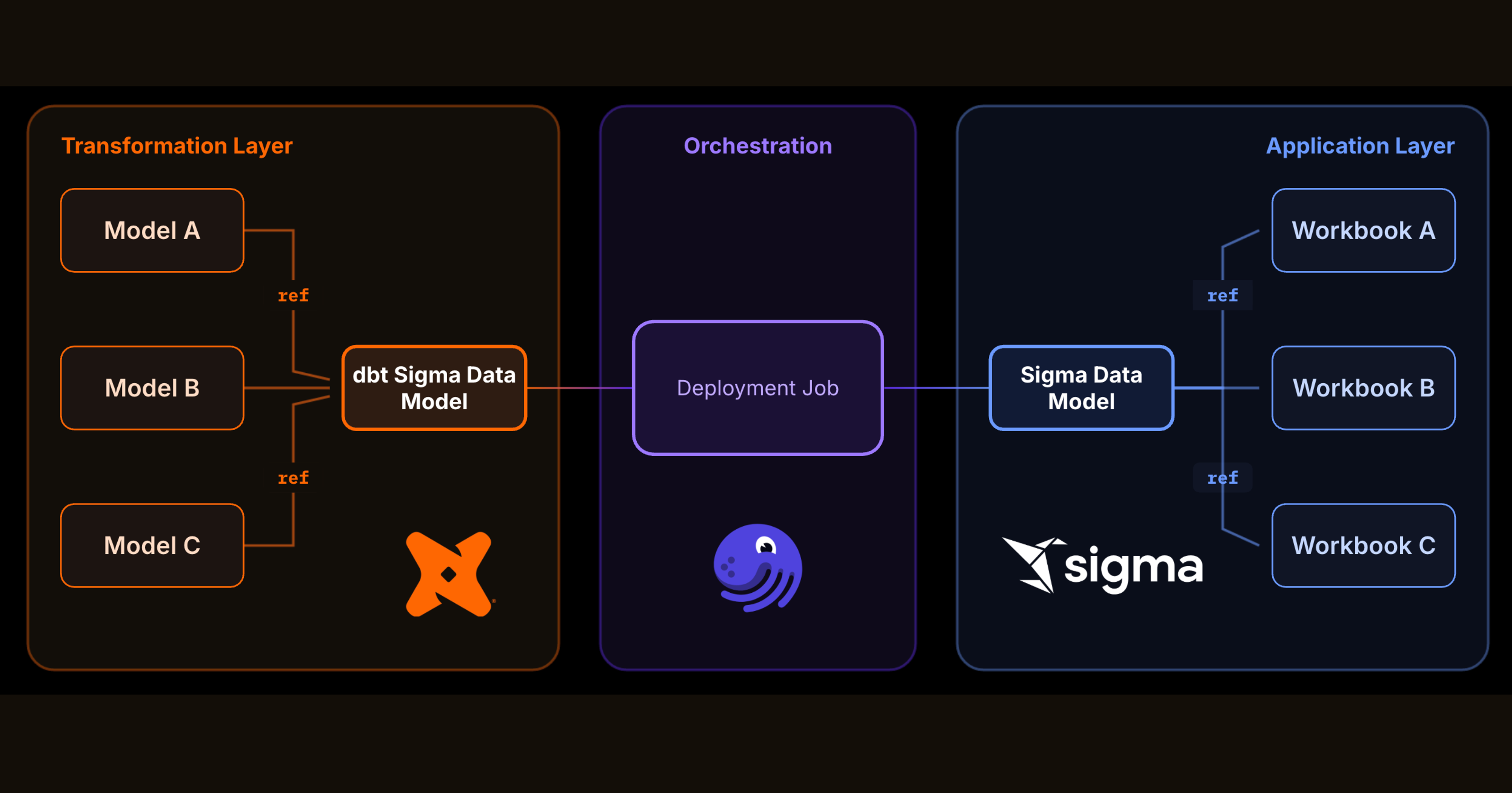
A semantic layer defined in code still has to reach Sigma. If that step is manual, the code and the tool drift apart the first week someone is on vacation. We deploy every semantic object in the same Dagster job that builds our dbt tables, so a merge to main updates the tables and the data models together.
Dagster orchestrates everything our team builds: 63 jobs and 2,883 dbt models across six data regions. The semantic layer is one more asset in that graph. It gets no special deployment process and no separate schedule.
The orchestration pattern
The dbt half of the job is familiar. Dagster downloads the last production manifest from S3 and runs dbt build -s state:modified, so only changed models and their dependents rebuild. After the build, two steps run in parallel: the updated manifest goes back to S3 for the next run, and a Sigma sync step pushes every changed data model definition to Sigma through the Sigma API.
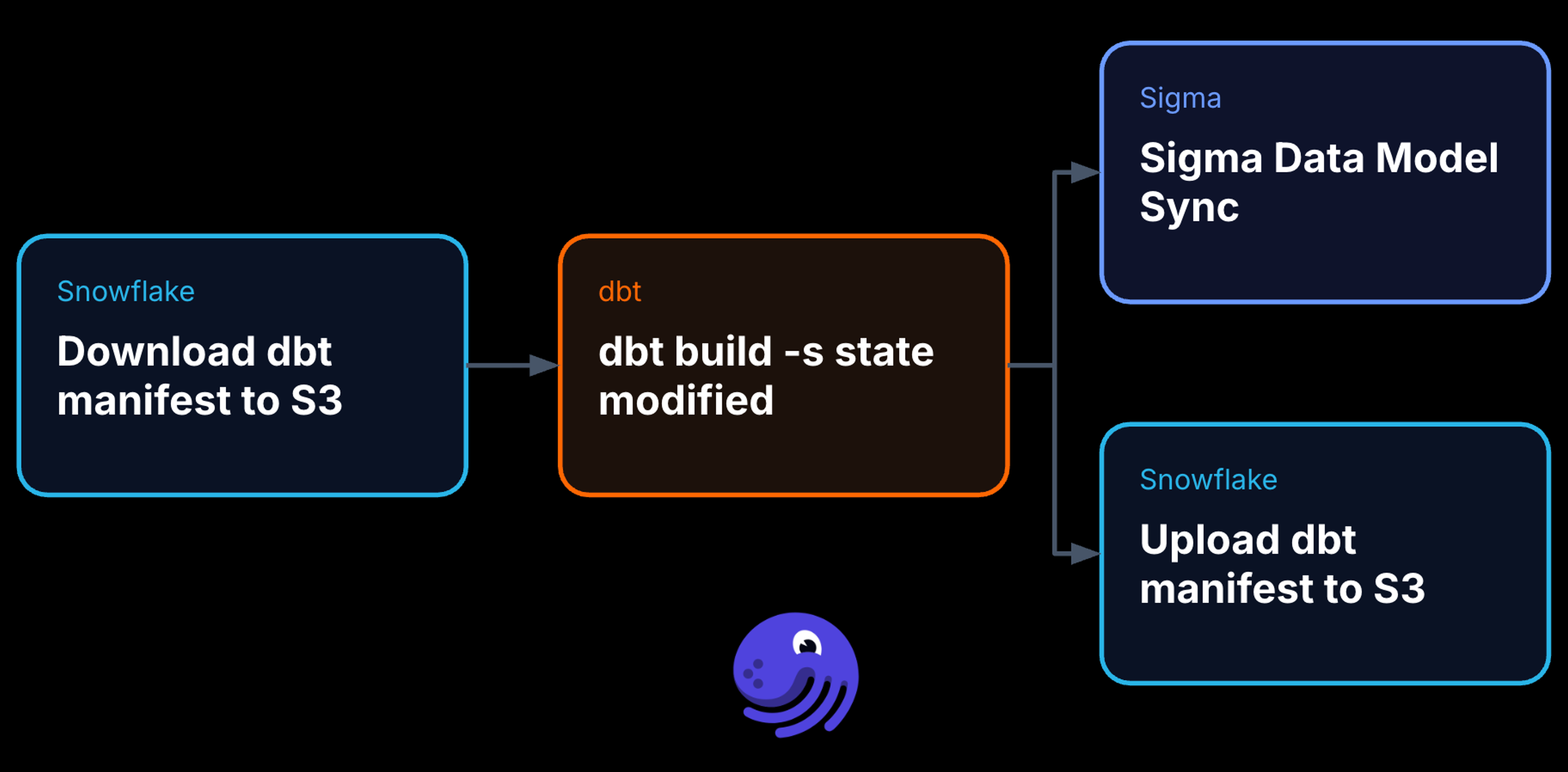
The Sigma step is the new part. It syncs the warehouse connection so new tables are visible, then syncs the data model objects themselves. A new metric merged at 10 a.m. is in the Customer Success data model before the CSM's afternoon renewal call. Nobody opens Sigma to click anything.
What the semantic layer powers in Sigma
Nobody maintains a semantic layer for its own sake. For us, the payoff increasingly comes from agents.
Sigma Agents
Sigma Agents are where the semantic layer does operational work. An agent can be triggered by hand, embedded in a chat interface, or left running as an autonomous background workflow, and in every case it queries the semantic layer directly and writes results back to the warehouse under the same governance as everything else. Model Context Protocol (MCP) extends its reach to external tools and custom REST APIs. A renewals manager can hand an agent a list of at-risk accounts and get back a summary per account, built on the same ARR numbers finance reports to the board.
Sigma Assistant
Sigma Assistant is the open-ended side. Anyone can ask a question in natural language and get live tabular results with source attribution back to the data model that answered it. When a question turns into real analysis, the assistant can spin up a workbook and keep going.
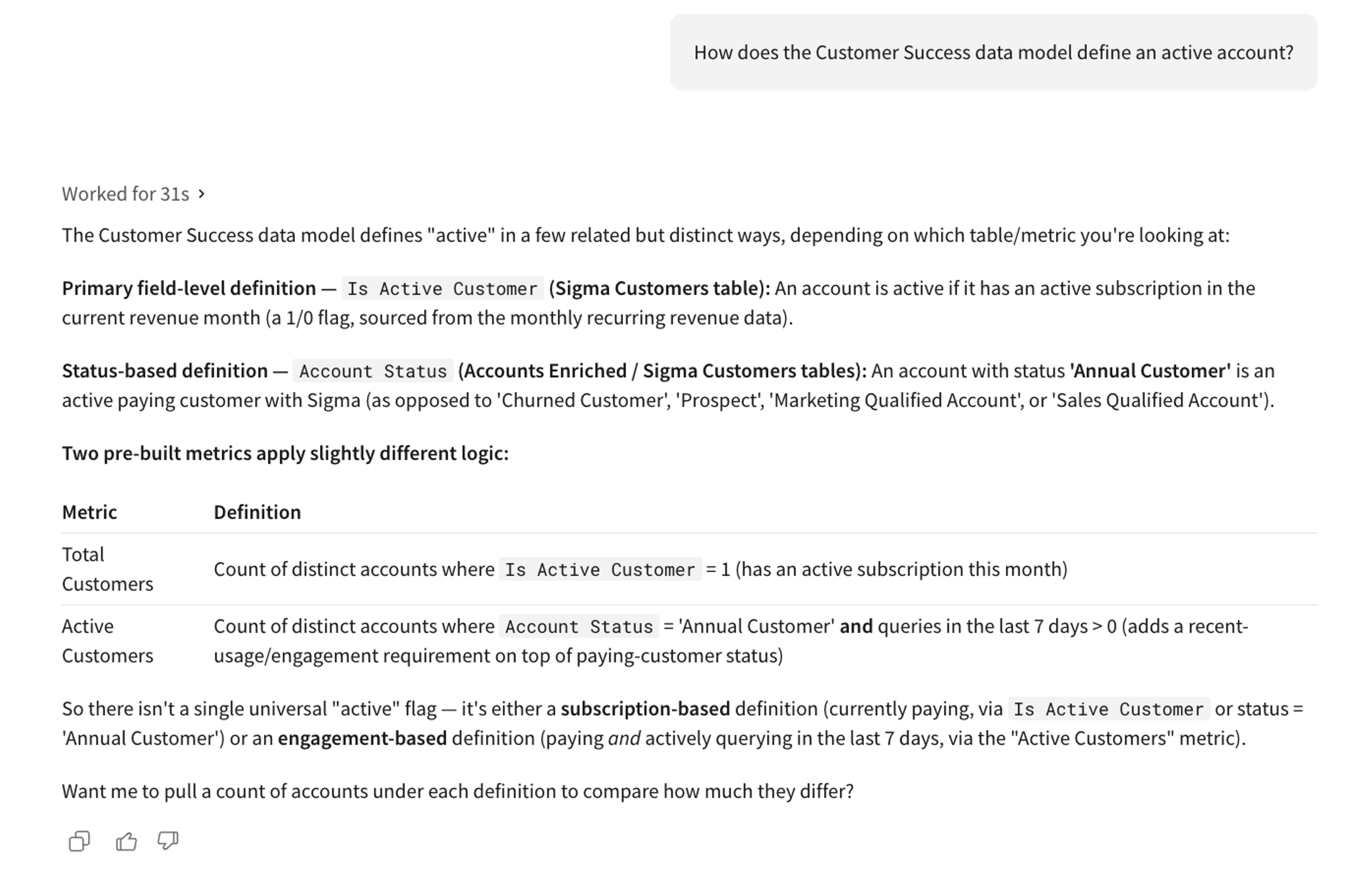
Outside Sigma, the same semantic layer backs our Snowflake Cortex Agents and Cortex Search Services. Our coding agents read it too. A semantic model is the most condensed description of the business we have, which makes it the first file an agent should open before touching a pipeline.
Where this leaves us
Today, we manage our core Sigma Data Models within this process and integrate it within our teams development lifecycle. A metric changes in a pull request, a reviewer approves it, and every workbook, agent, and assistant answer in Sigma picks it up on the next deployment. Nobody on the data team is in the deployment step anymore. The merge is the deployment.
See it in your own warehouse
If you want to run your semantic layer as code and deploy it straight into Sigma, request a demo or start a free trial.
FAQ
What is a semantic layer?
A semantic layer is a shared set of definitions for metrics, dimensions, and relationships that sits between the warehouse and the tools that query it. It makes every dashboard, agent, and query use the same business logic.
Why manage the semantic layer in dbt?
dbt gives semantic definitions the same version control, code review, CI, and lineage as the models they depend on. A change to a metric becomes a reviewable diff instead of an untracked edit in a UI.
How does Dagster deploy Sigma data models?
Our Dagster job runs dbt build against modified models, then runs a Sigma sync step that pushes changed data model definitions through the Sigma API. Tables and data models update in the same run after every merge.
Do I need Dagster to manage Sigma data models as code?
No. Sigma data models as code works with any orchestrator that can run dbt and call the Sigma API. We use Dagster because it already orchestrates the rest of our pipelines.
How does the semantic layer improve AI answers in Sigma?
Sigma Agents and Sigma Assistant query governed data models instead of guessing at raw tables. Metric definitions, synonyms, and instructions in the semantic layer keep answers consistent with every other report in the company.