How to Build a Sigma Agent for Data Modeling in Your Warehouse

There's a lot of talk right now about AI agents. What they can do, where they fit, whether they're actually useful or just a more elaborate way to run a script. I've been thinking about this a lot, and my take is that the best way to answer that question isn't to debate it in the abstract. It's to build something and see what happens.
So I did. I built a Sigma Agent to create and manage Sigma data models, and it taught me more about what agents are actually good at than anything I've read about them. Not because it's magic, but because it forced me to think carefully about where human judgment belongs in a workflow and where it doesn't.
In this post I'll walk you through what the agent does, how it works, and what it actually looks like in practice. If you've been curious about what Sigma Agents are capable of, this is a great example of what's possible today.
The Problem with Manual Data Modeling
If you're a data engineer, you already know this pain. A stakeholder needs a new metric. A table gets added to the warehouse. Someone wants a semantic view spun up for a new Cortex Analyst project or a Unity Catalog Metric View for Databricks Genie. Each of these is a small task on its own, but they all require you to context switch, pull up the right model, remember the spec structure, make the change carefully, and hope you didn't break anything in the process.
The tooling has gotten better over the years but the workflow is still mostly manual. You're still the one tracking down column names, wiring relationships, and making sure your metric formulas reference the right physical columns. For a single model that's manageable. For five models across two schemas it starts to feel like maintenance work that never ends.
What I kept coming back to was this: the logic of data modeling isn't the hard part. Knowing that ORDER_FACT connects to CUSTOMER_DIM on CUSTOMER_KEY, or that your revenue metric should be a sum of NET_REVENUE, that's the easy stuff. The hard part is all the surrounding work to actually express that logic in a way the system understands. That's exactly the kind of thing an agent should be handling.
Meet the Sigma Data Model Agent
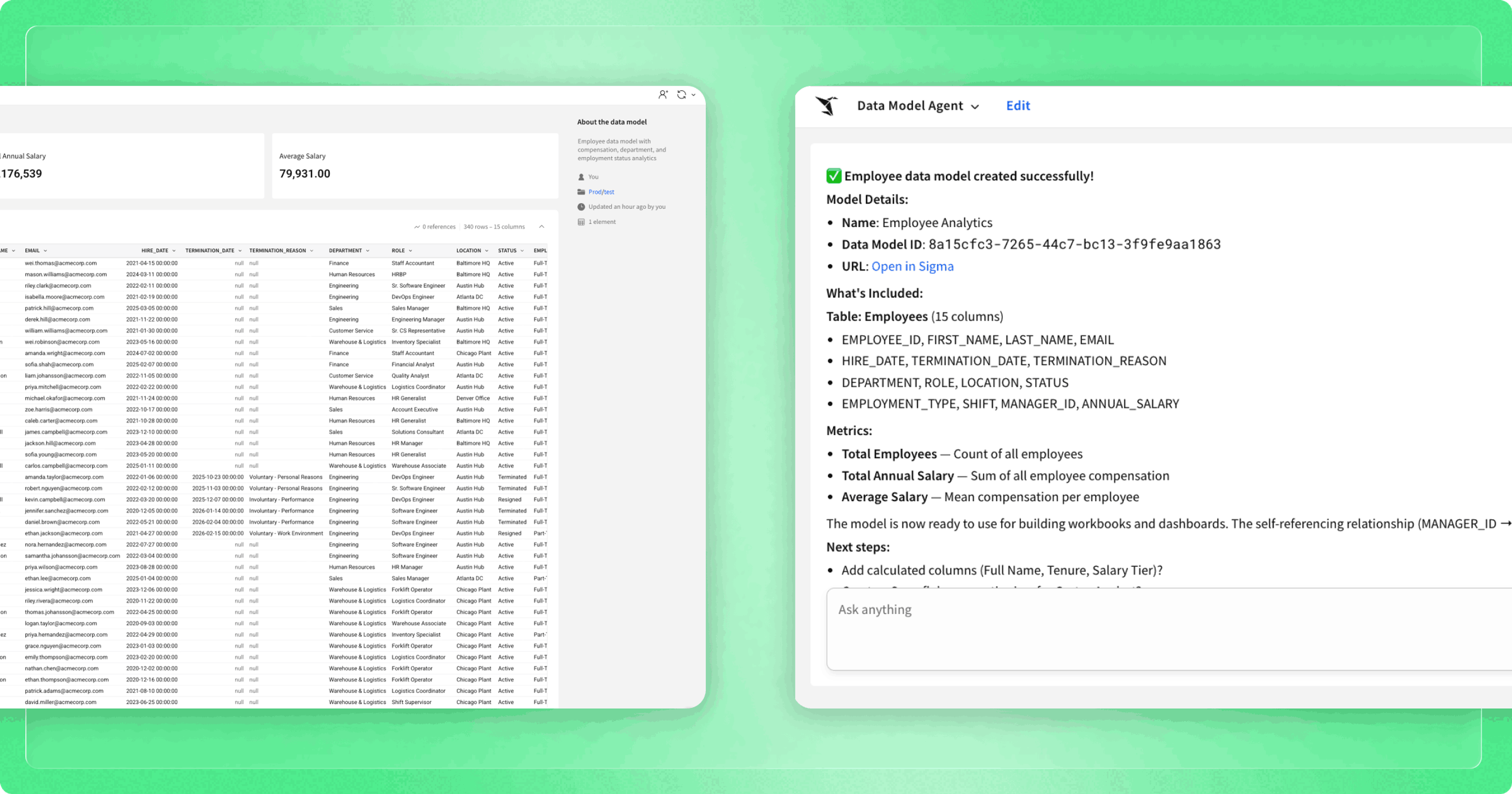
The Sigma Data Model Agent is a Sigma Agent I built specifically to handle the create, edit, and manage lifecycle of Sigma data models. You talk to it in plain English and it handles the mechanical work, from figuring out what's in your warehouse to wiring up relationships to publishing a semantic view when you're done.
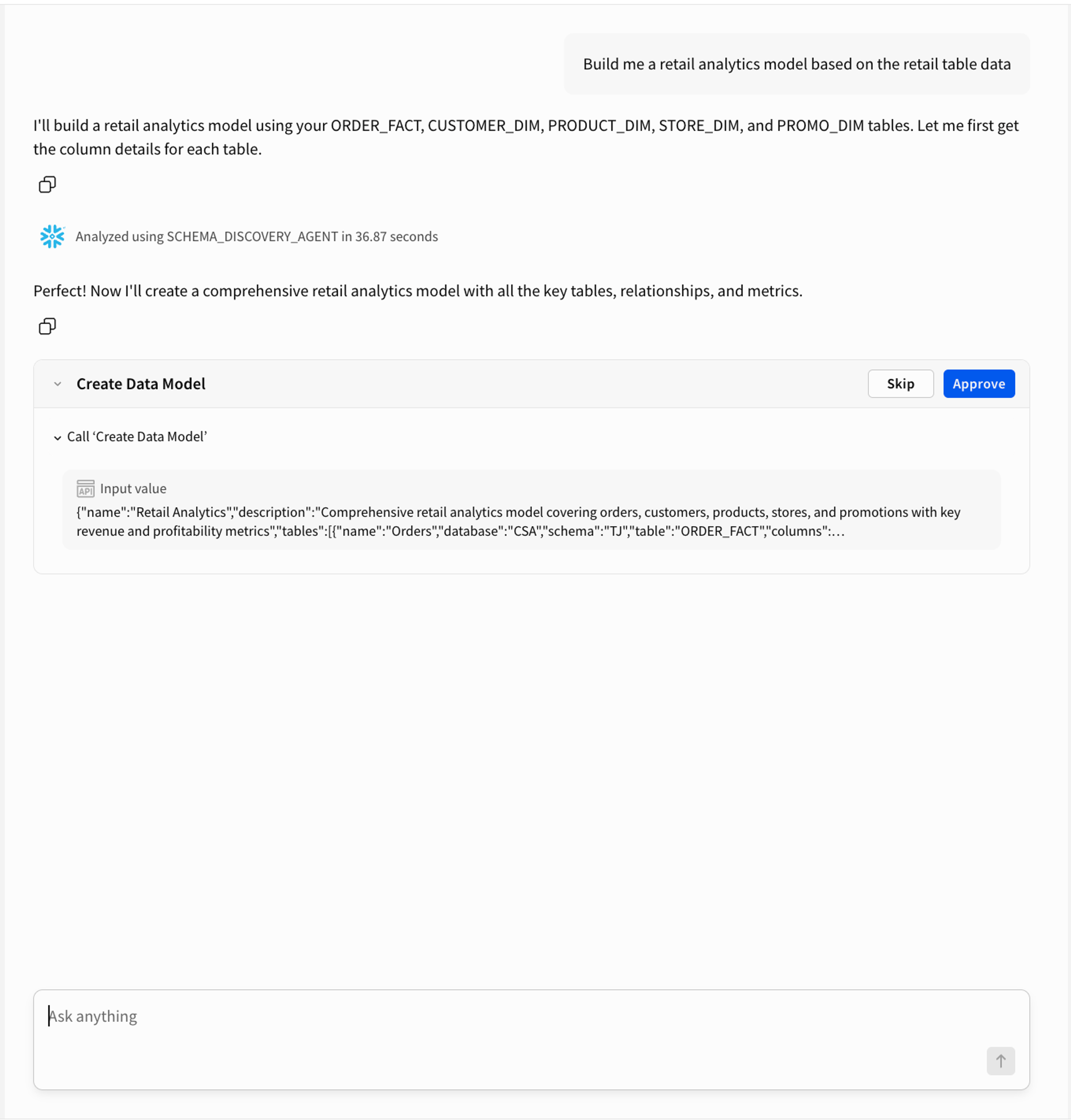
One thing I want to be clear about upfront: this agent is not fully autonomous. It's designed to work with you, not around you. Every meaningful action, creating a model, making a structural change, generating a semantic view, requires you to confirm before anything happens. This is by design. Agents are most useful when they handle the parts of a workflow that don't require your judgment, and check in when the parts that do come up.
With that framing in mind, here's what it can do:
Schema discovery
Before the agent does anything, it asks your cloud data warehouse what's actually there. It queries the warehouse directly to find tables, columns, data types, and relationships. The agent never guesses or assumes column names. If it doesn't know, it asks the warehouse first. That one rule alone prevents a whole category of silent failures that are painful to debug later.
Model creation
Once it knows your schema, the agent can recommend a model structure, propose which tables should be facts vs. dimensions, suggest join keys, and create the whole data model in a single step. You confirm, it builds.
Surgical editing
Instead of pulling the full model spec, making a change, and pushing the whole thing back, the agent knows when to make targeted edits. Adding a metric? It adds just the metric. Adding a table? Just the table. Nothing else gets touched.
Semantic view generation
When your model is ready, the agent can spin up a Snowflake semantic view directly from it. That means a CREATE OR REPLACE SEMANTIC VIEW statement gets executed in your warehouse, and the result is a fully governed, queryable semantic object stored in Snowflake, ready to connect to Cortex Analyst or any other tool that consumes semantic views.
The whole thing runs as a Sigma Agent, which means it lives right alongside your other Sigma workflows. No separate tooling, no context switching, no extra infrastructure to manage.
Step-by-step example: Creating a Snowflake semantic view with a Sigma Agent
The best way to understand what a Sigma Agent can do is to just watch it work. Here's a real end-to-end run using my own warehouse schema, from a blank prompt to a live Snowflake semantic view in three steps.
Step 1: Discovering the Schema
The first thing I do is ask the agent what's available in my schema.
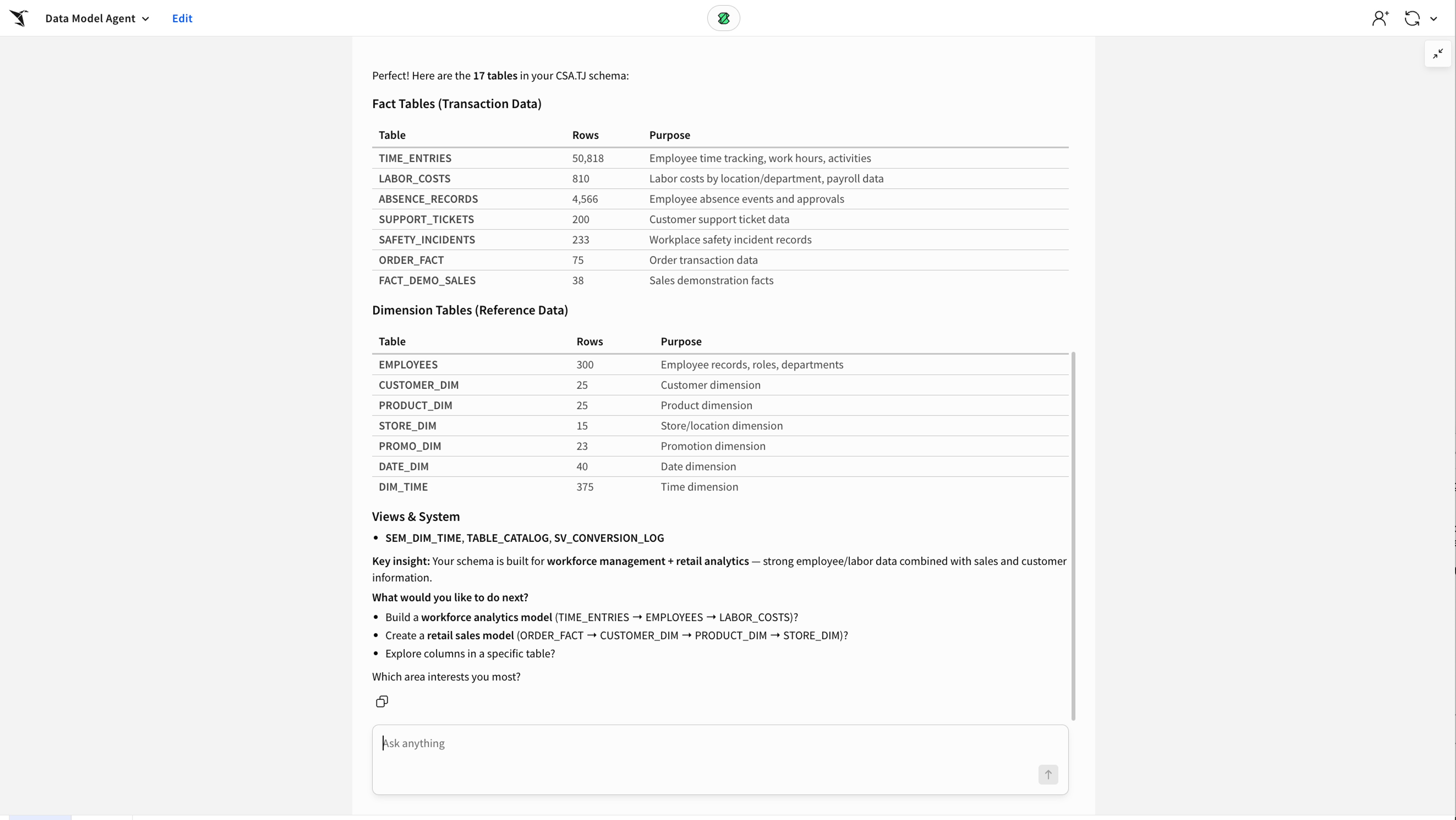
The agent queries Snowflake directly and comes back with a structured list of tables and columns. From here it already has enough context to start making recommendations.
Step 2: Building the Model
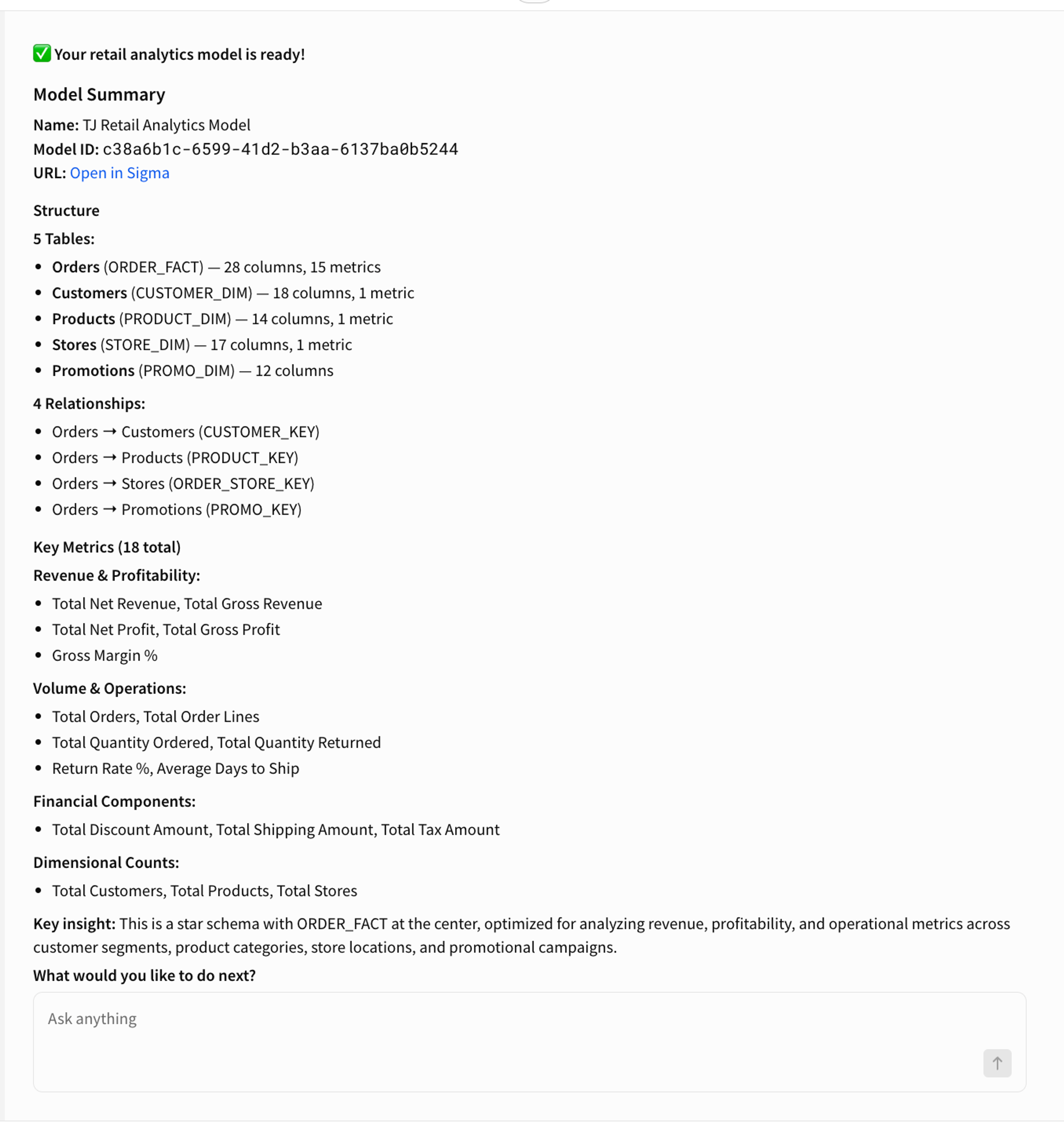
Next I ask it to build me a retail analytics model. The agent looks at what's in the schema, identifies the fact and dimension tables, proposes the relationships between them, and suggests a starting set of metrics.
This is where the human input matters. The agent is making recommendations based on the schema, but I'm the one who decides if they're right. I review the proposed structure, make any adjustments, and confirm. Then it builds.
Step 3: Creating the Semantic View
The model is ready so I ask the agent to create a Snowflake semantic view from it.
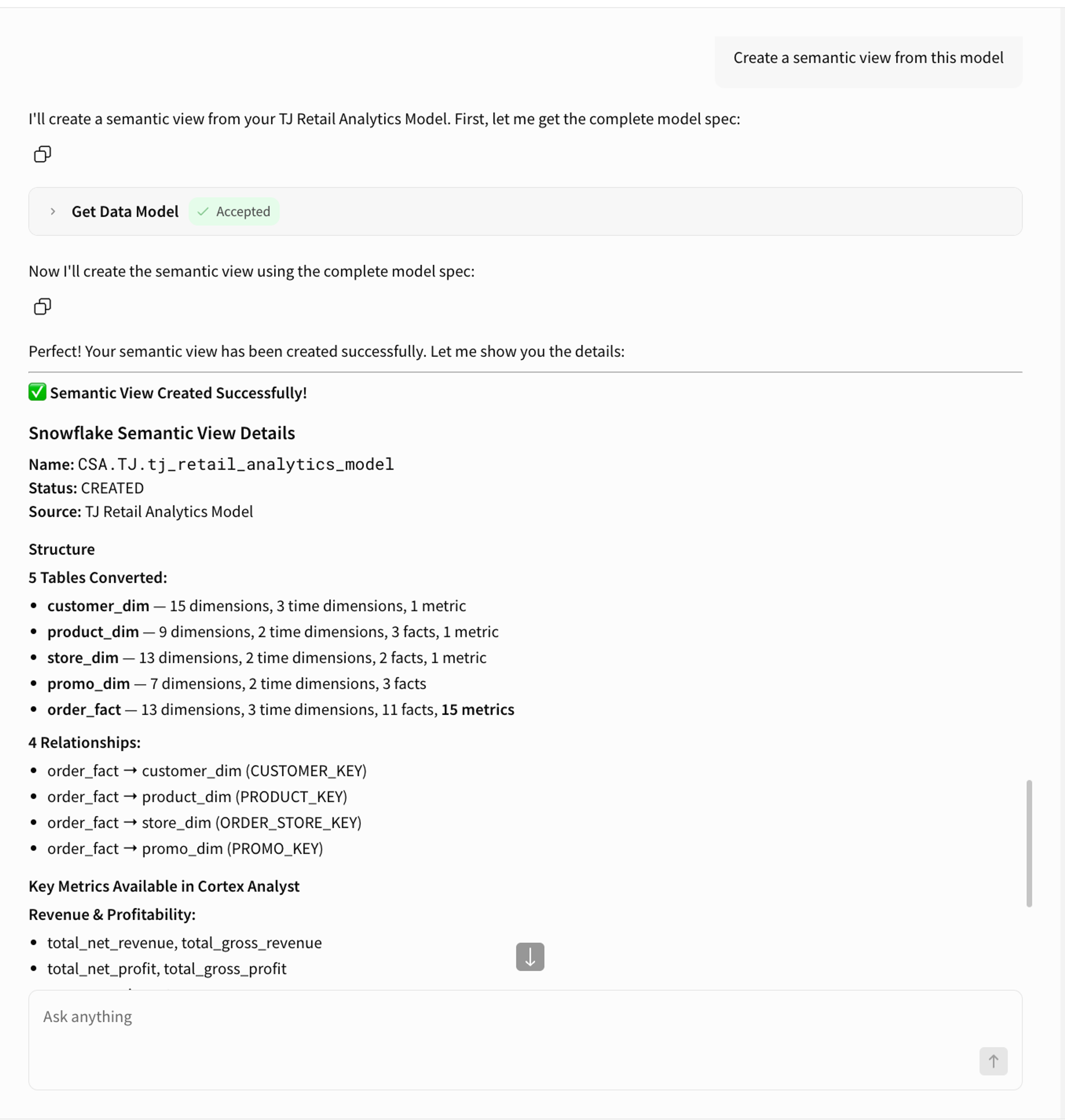
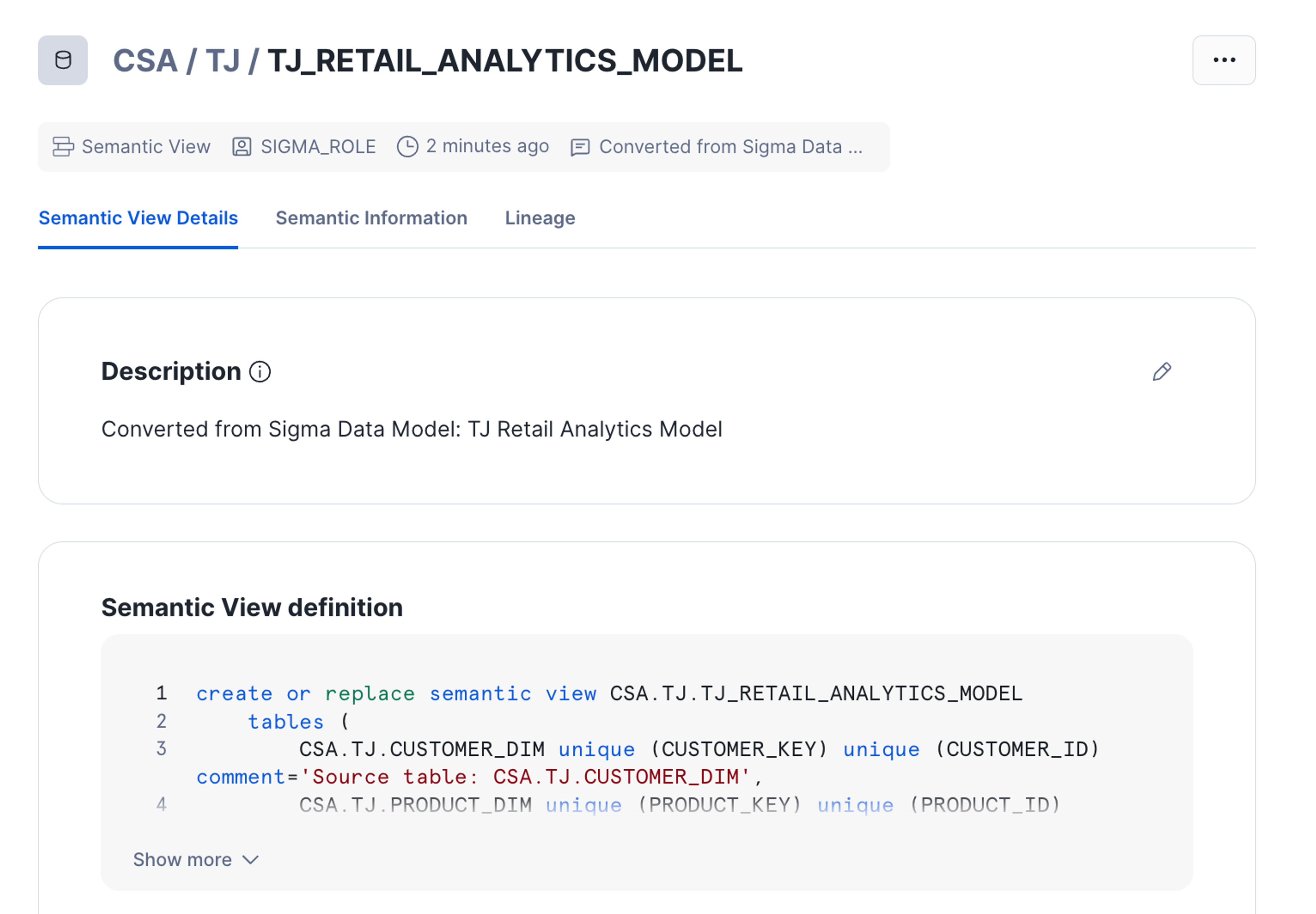
That's it. From schema discovery to a published semantic view in three prompts.
What makes a great Sigma Agent?
At this point you might be thinking this sounds like automation, and in some ways it is. But there's an important distinction between an agent and a script, and building this one made it really clear to me what that distinction actually is.
A script does exactly what you tell it. An agent figures out what you mean, decides how to do it safely, and knows when to stop and ask. Here's what that looks like in practice:
It reasons before it acts
When I ask the agent to build a model it doesn't just fire off an API call. It queries the warehouse first, looks at what's actually there, and makes recommendations based on real data. It's working with context, not just instructions.
It's designed around human confirmation
The agent handles the mechanical work but it doesn't make judgment calls on your behalf. Proposing a model structure, deciding which relationships matter and choosing which metrics belong—those decisions stay with you. The agent just makes it a lot faster to act on them.
It makes safe edits by default
One of the trickier parts of managing data models programmatically is that a bad update can wipe out content you didn't mean to change. The agent handles this by always fetching the current state of a model before modifying it. It never reconstructs a spec from memory or assumes what's there.
It picks the right tool for the job
Adding a single metric doesn't require replacing the whole model spec. The agent knows this and uses the most targeted approach available. That's the difference between a tool you can trust and one that makes you nervous every time you use it.
These aren't just nice to haves. They're what make an agent actually usable in a real workflow rather than just an impressive demo.
Agents handle the mechanics. You handle the decisions.
The data model agent is useful on its own, but I think the more interesting takeaway is what it points to more broadly.
Agents are good at the parts of your workflow that are well defined, repetitive, and low on ambiguity. Schema discovery, API calls and spec management are perfect agent tasks. The parts that require real judgment—like what your model should represent and what metrics actually matter to your business—still belong to you. A good agent makes that division of labor really clear.
For data teams specifically, this means you can start to think about your workflow differently. Instead of spending time on the mechanics of model management you can spend it on the modeling logic itself. Instead of being the person who knows how to wrangle the JSON spec you can be the person who decides what the model should actually do.
And this is just one example. The same pattern applies across a lot of data engineering workflows: give an agent the right tools, the right guardrails, and a clear scope, and it can take a meaningful chunk of the repetitive work off your plate while keeping you in the loop on the decisions that matter.
Start using Sigma Agents in your data workflows
Building this agent changed how I think about what agents are actually for. They're not here to replace the thinking that goes into good data work. They're here to handle everything around it so you can focus on the parts that actually require your expertise.
If you're a data engineer who's been curious about Sigma Agents, I'd encourage you to start with a workflow you find repetitive and well defined. Build something small, see where the human input naturally belongs, and go from there. The ceiling is higher than you might expect.
To learn more about Sigma Agents, watch our product launch, review the documentation or request a custom demo.
Frequently Asked Questions
What is a Sigma agent?
A Sigma Agent is a customizable AI assistant built inside Sigma that can take actions on your behalf, including querying your warehouse.
How do I build a data model in Sigma?
From your Home page, click Create New and select Data Model. Add table or input table elements sourced from your warehouse, a CSV, custom SQL, or an existing data model. From there, transform the data the same way you would in a workbook: add calculated columns, define relationships between tables, create metrics, and configure column-level security. Publish when you're ready, and the model is available as a reusable source across workbooks and other data models in your organization.
Can I manage Sigma data models programmatically?
Yes. Sigma's REST API lets you list, retrieve, and update data models. Fetch a model's full spec with GET /v2/dataModels/{dataModelId}/spec, make your changes in JSON or YAML, and write it back with PUT /v2/dataModels/{dataModelId}/spec. The PUT endpoint replaces the full spec, so the recommended pattern is to retrieve the current representation first, apply changes, then push it back. This works well for version control and CI/CD workflows.
What are best practices for designing data models for use with Sigma agents?
3 things make the biggest difference:
Structure your schema clearly. The agent discovers tables and columns directly from your warehouse before building anything. Clean, descriptive physical column names reduce ambiguity during discovery and make generated formulas easier to verify. The agent references column names in UPPER_CASE in all metric and calculated column formulas, so names like NET_REVENUE and CUSTOMER_KEY are easier to work with than abbreviated or inconsistent naming.
Define relationships with the right orientation. Relationships must be set with the fact or many-side table as the source and the dimension or one-side table as the target. The agent enforces this, and it's what allows queries to join across tables correctly. Get this right in the model and downstream analysis just works.
Write meaningful descriptions on metrics and columns. The agent can populate description fields during model creation. Use them. Describe what each metric calculates, the grain of each table, and any assumptions like currency or fiscal calendar. This context improves accuracy when the model is later queried by Sigma Assistant, an MCP tool, or a Cortex Analyst semantic view generated from the model.
Can business logic be defined once and reused across multiple models?
Yes. That's the core purpose of Sigma data models. Define your tables, relationships, metrics, and calculated columns once, and any workbook or downstream data model in your organization can use them as a source.
How do I create a data model from code in Sigma?
The most reliable pattern is to create the data model in the UI first, then manage it entirely through code from that point. Once created, retrieve the full spec with GET /v2/dataModels/{dataModelId}/spec and use PUT /v2/dataModels/{dataModelId}/spec to push updates in JSON or YAML. The spec covers tables, columns, sources, relationships, and metadata.