Headless Sigma agents: bring governed answers into Claude and your own apps

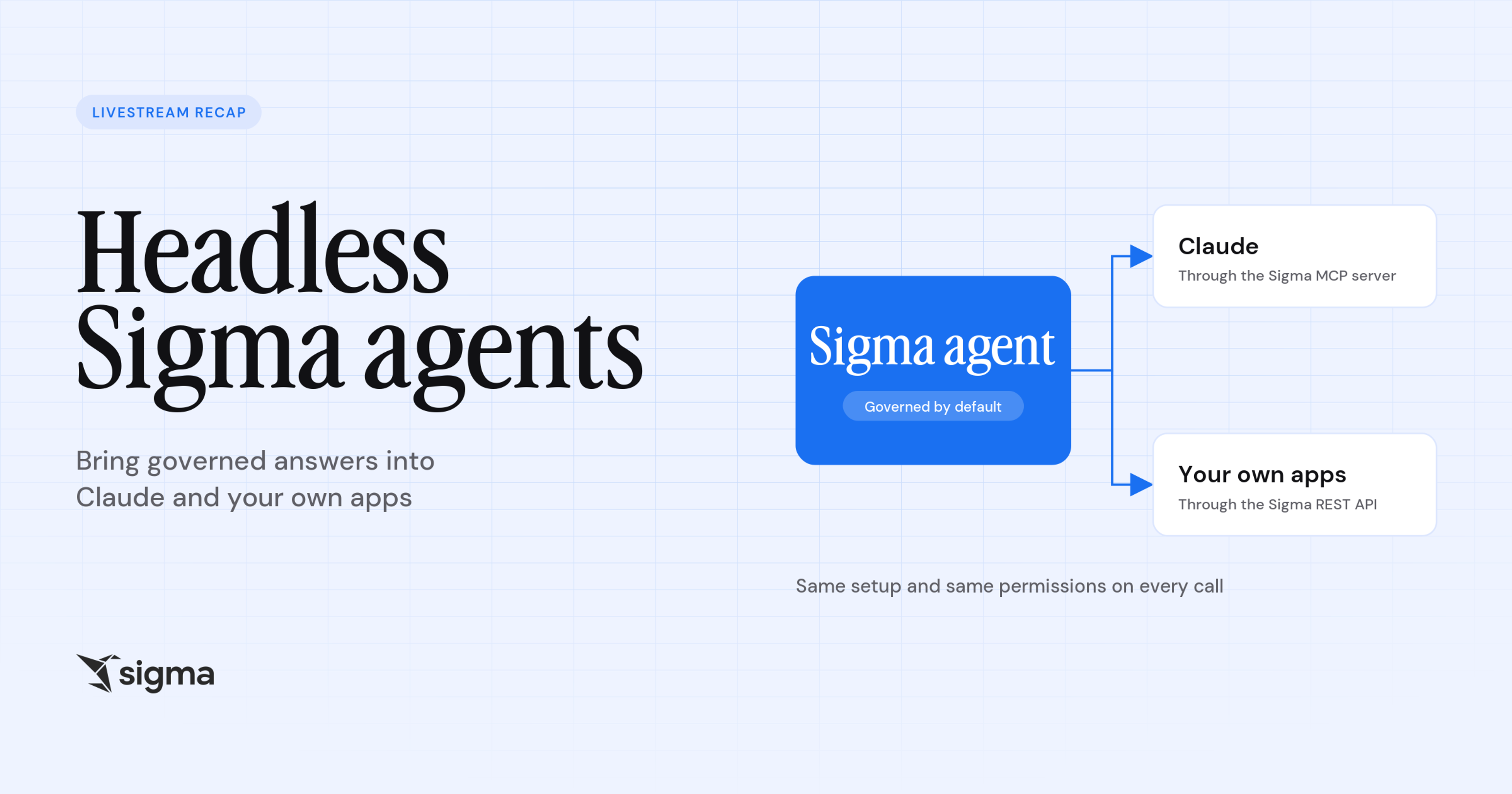
Sigma agents can now answer questions wherever your team works, not just inside a Sigma workbook. In our livestream, Building Headless Sigma Agent Experiences with Claude, we showed how a Sigma agent can run “headless,” separate from the Sigma interface, adopting the same permissions and governance already established.
Key takeaways:
- Any AI assistant that supports MCP can reach your Sigma agents through the Sigma MCP server with no custom integration work.
- The same agent can power your own apps, embeds, and automations through the Sigma REST API, using the instructions and data sources you already configured in the workbook.
- Permissions carry over automatically. Every call runs as the calling user, so existing Sigma access rules apply, and no separate security model is needed.
- Your existing Sigma agents work as they are. Connect one your team already uses to Claude, with no rebuilding or new setup.
While the livestream focused on using Claude for the build, you can connect any AI assistant—like ChatGPT, Codex, CoCo, or Cursor—to headless Sigma Agents using the Sigma MCP.
2 ways to put Sigma agents to work outside Sigma
Until now, a Sigma agent was reachable only through a chat element or an action sequence inside a workbook. On the livestream, our team showed two new pathways to the same agent. Whichever you choose, you set up the agent once in its workbook, and every request, whether it comes from Claude or your own app, uses that same setup.
1. Connect Claude with the Sigma MCP server
The Sigma MCP server lets an AI assistant like Claude find and call the Sigma agents you can access. Setup takes three steps:
- Add a custom connector in Claude using the server URL from the Sigma documentation.
- Sign in with OAuth.
- Ask for an agent. Claude lists your workbook agents, then sends your request to the one you choose.
The same server also lets Claude search your organization and query data models under your permissions. It works with other AI assistants that support MCP, such as Cursor, CoCo, ChatGPT, and Codex.
2. Build custom experiences with the agents API
For embeds, custom chat interfaces, and automations, you can call Sigma agents with the Sigma REST API. Your server exchanges API client credentials for a bearer token, lists the agents in a workbook, and sends your question to the agent you choose. Three request options shape what comes back:
- Full trace: the agent’s reasoning, tool calls, query results, and final answer, which you can log, debug, or display.
- Streaming: server-sent events, so users watch the answer arrive.
- Response format: a JSON schema, so every answer has the same shape and can feed a chart or another workflow.
Ways to see headless Sigma agents in action
Our team ran two demos. The first uses Claude as the front end, and the second uses a custom app. In both, the Sigma agent executes the end user’s requests while maintaining that user’s permissions, regardless of the interface.
Ask a Sigma agent a question from Claude
1. Start with a plain request
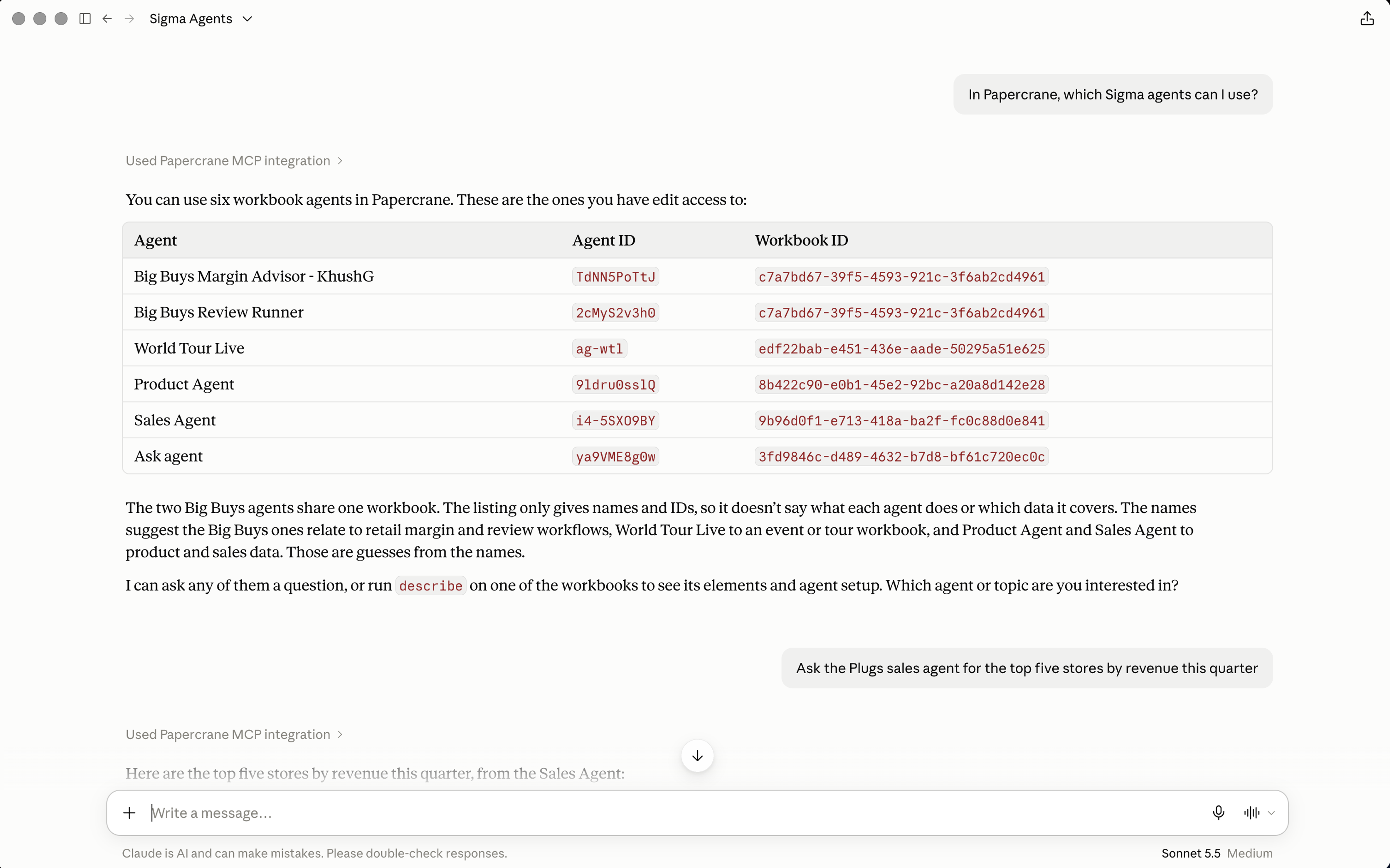
Ask Claude which Sigma agents you can use. Claude calls the Sigma MCP server and lists the workbook agents you have access to, along with their agent and workbook IDs. In our example, Claude returned six agents. A teammate in the same organization could see a different list, because results follow each user’s access.
2. Ask the agent a real question
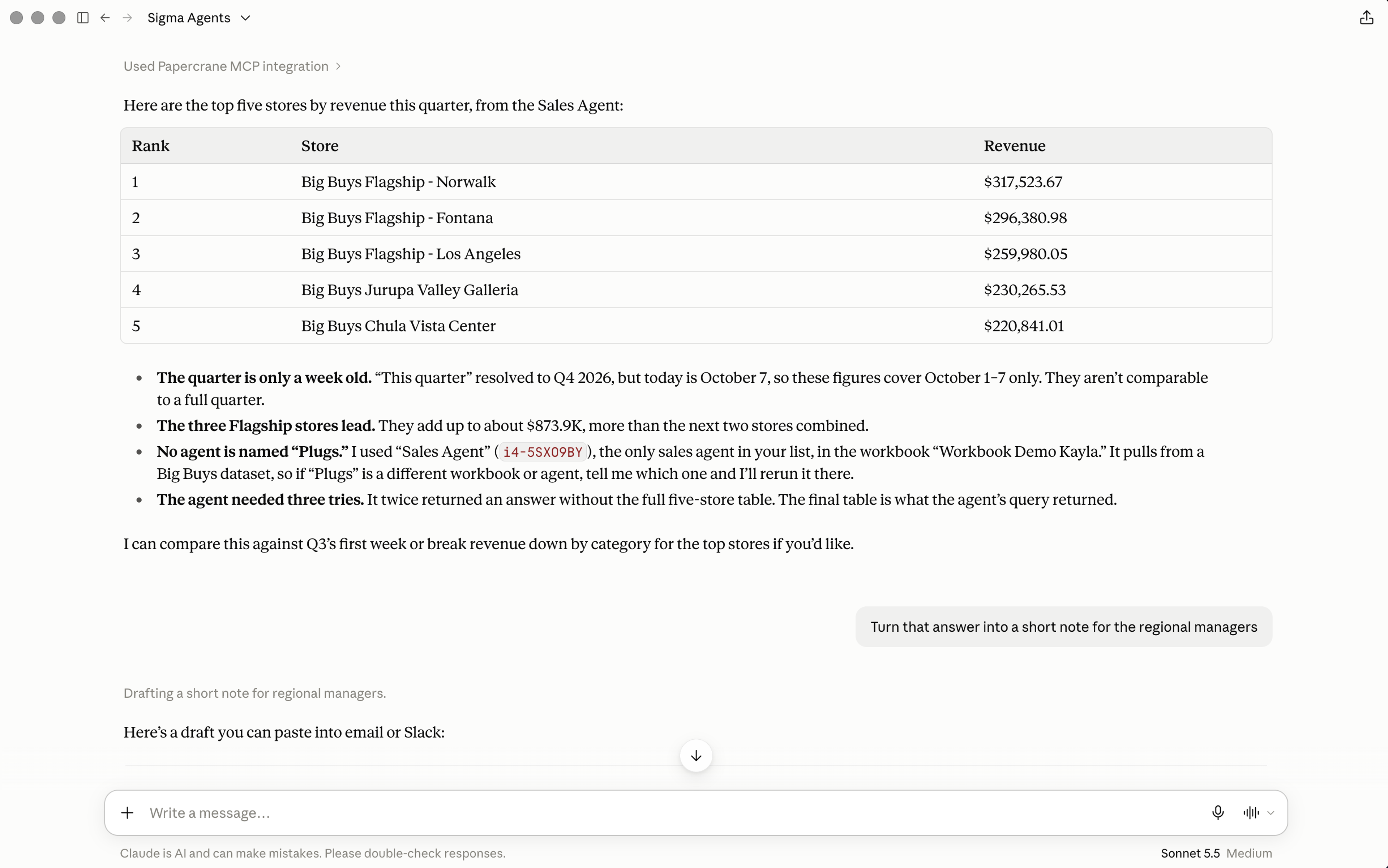
Pick an agent and ask something it can answer from your data. In our example, we asked a sales agent for the top and bottom five stores by revenue for the quarter, using sample data from a fictional electronics store. The answer came back inside Claude.
3. Ask for a follow-up that builds on the result
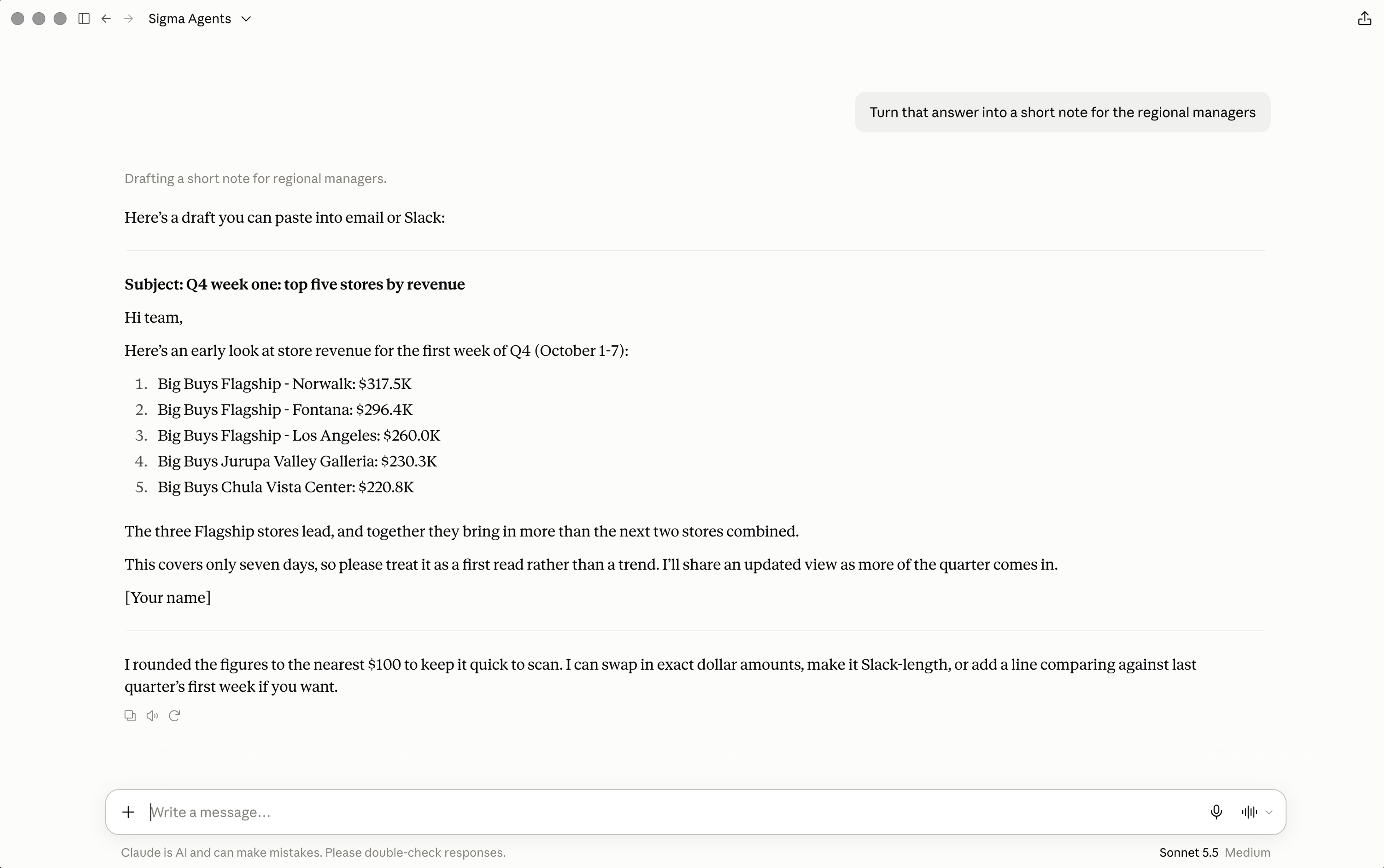
In our example, we asked Claude to turn the store rankings into a short write-up for an area sales manager, using Claude’s own skills alongside the governed data. The numbers came from the Sigma agent, so they respect the same permissions as in Sigma, and the next step happened right in Claude, where the team already works, with no exporting or copying and pasting between tools.
Build an agent hub inside your own app
Instead of using Claude, you can build your own experience on the agents API. Our example is an agent hub inside an embedded app:
1. Let people pick an agent
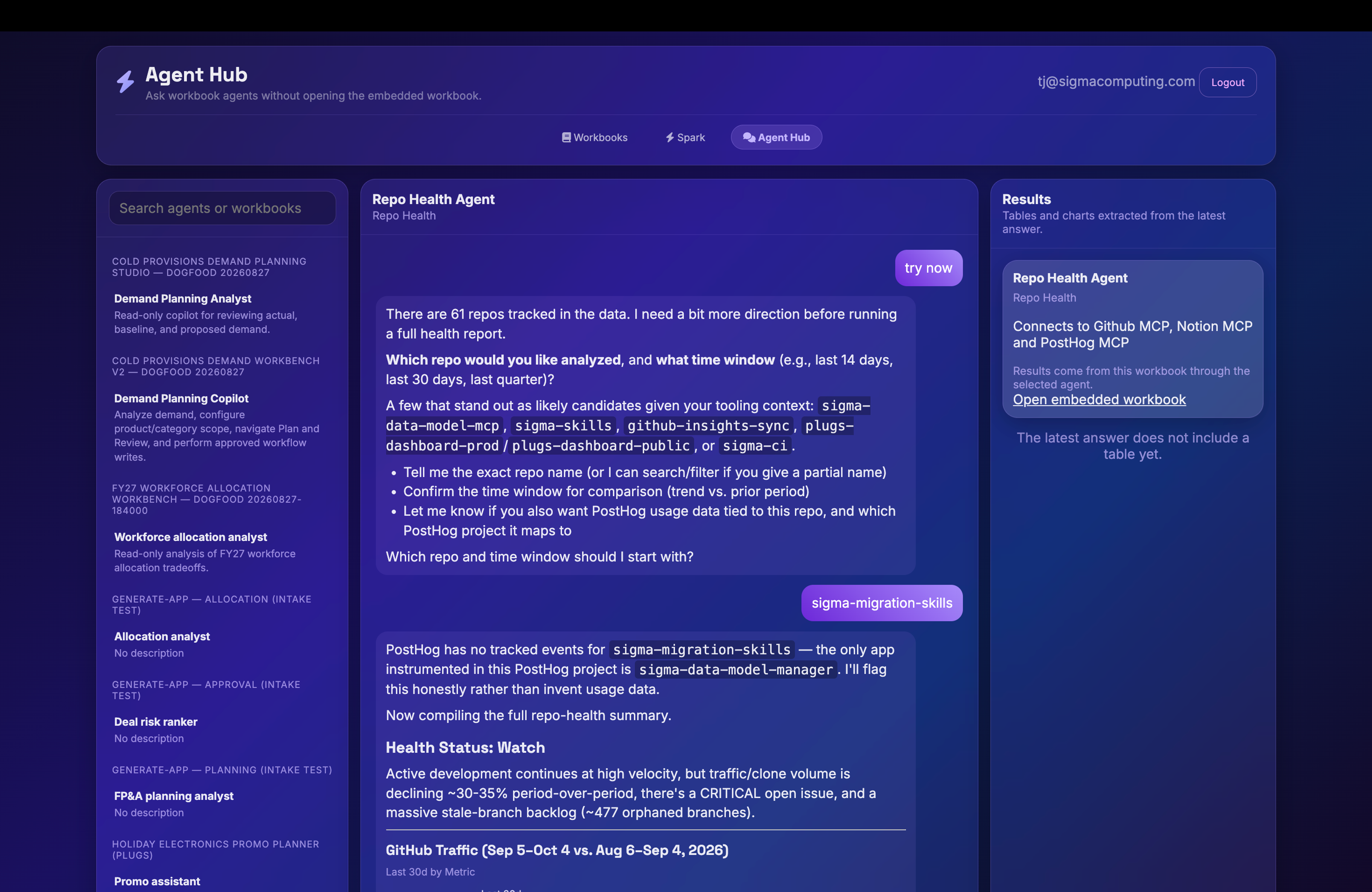
The hub asks Sigma for every agent the signed-in user can access, grouped by workbook. New agents show up without a code change, and past conversations stay available.
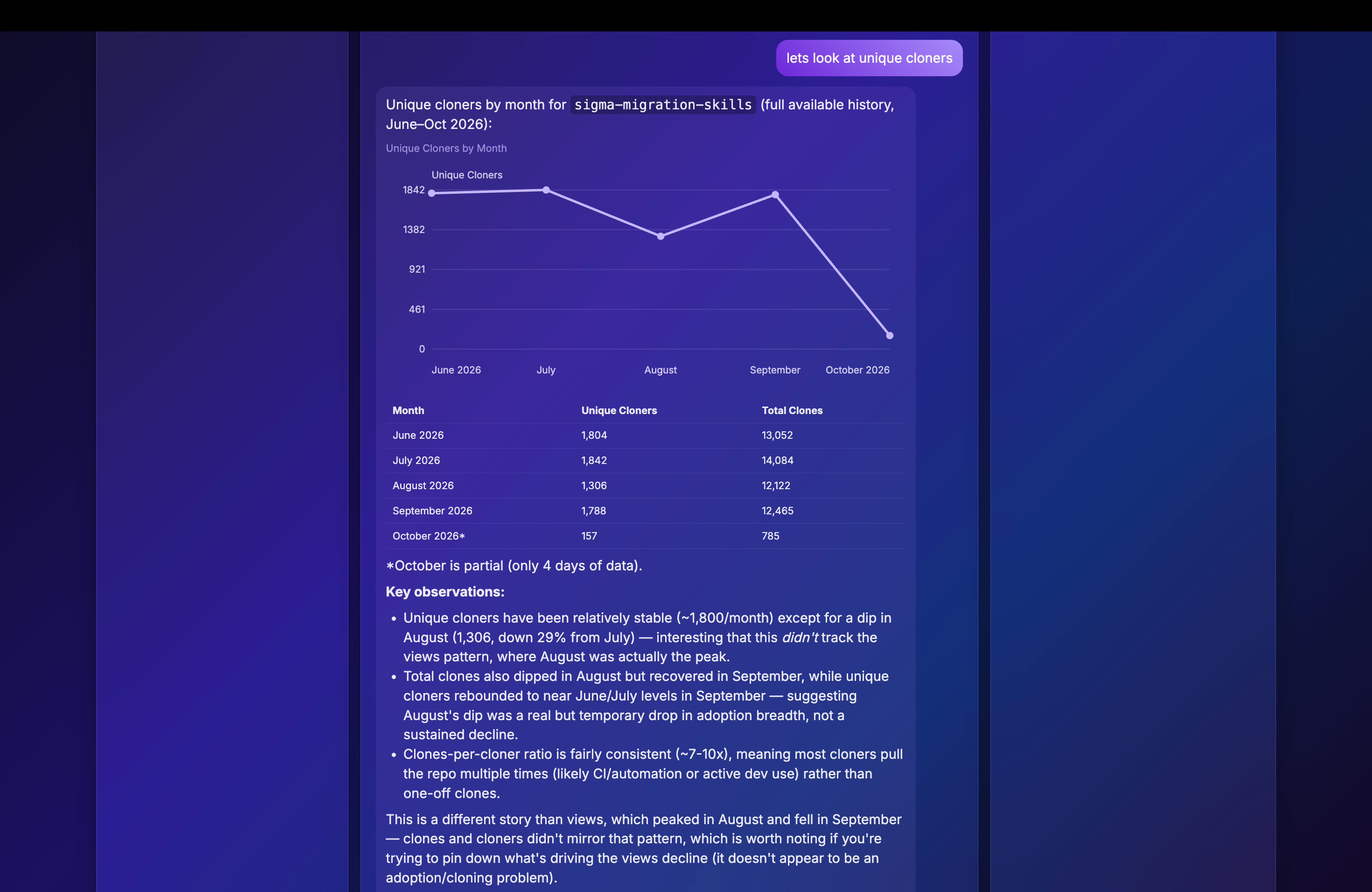
2. Show answers the way people want to read them
Because each response comes back as structured data, the app turns tables into charts, such as views by month for a repository.
3. Keep secrets on the server
A small server holds the client credentials, creates the bearer token, passes requests to Sigma, streams the answer back, and signs the embed URL. None of it reaches the browser.
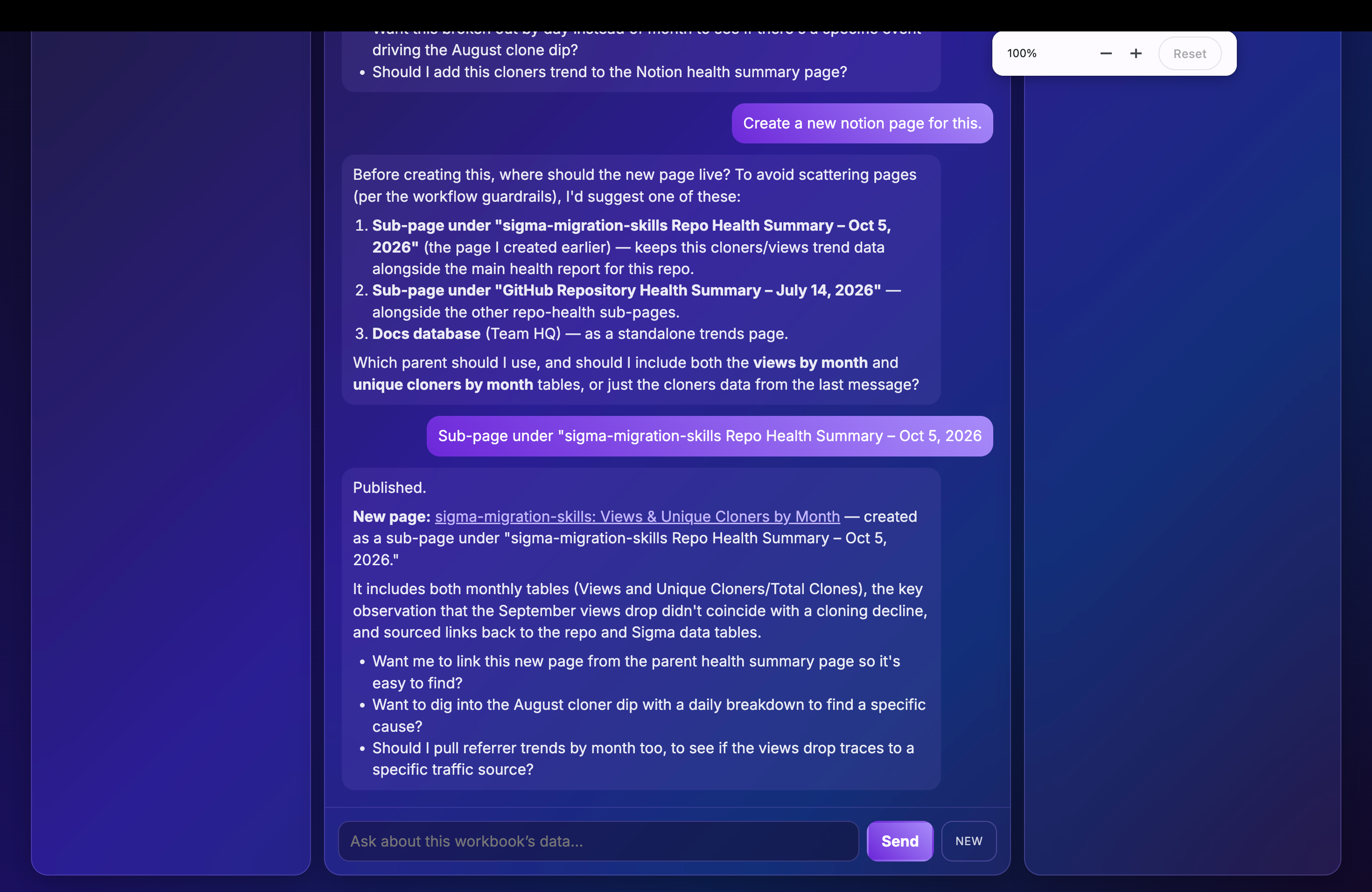
4. Let the agent take action
Connect the agent to a third-party MCP server so it can take action in other systems. For example, with a Notion MCP connector attached, we asked the agent to write up its findings, and it published a new Notion page from inside the embedded app.
The agent in Sigma can do more than answer questions. Working from the same governed setup, it can also take the next step.
Why Sigma: governed by default, built once, used everywhere
Governance is why headless agents are safe to roll out. Each call runs as the calling user, so row-level security and permissions apply exactly as they do in Sigma. There is no separate API-only setup. Agents run from the published version of the workbook, so republish after you change an agent.
That same setup also makes agents easy to maintain, because you build once and use them everywhere. You manage an agent’s instructions, data sources, and permissions in one place, then release it into other apps without rebuilding it. Pick an agent your team already relies on, connect it to Claude, and see what people ask next.
Watch the full session and start building
Watch the full livestream session on-demand to see both walkthroughs and learn more about permissions and governance with headless Sigma agents. Start building today with Sigma’s agent skills repo and the docs for calling Sigma agents with the API.
New to Sigma? Request a demo to see how Sigma agents and the Sigma MCP server can work on your live warehouse data.
Frequently asked questions
Can I use other AI assistants?
The Sigma MCP server should work with most MCP-compatible assistants, including Claude, OpenAI, and Cursor.
Can I create and manage agents with the REST API?
Yes, through workbooks as code, which means creating agents as part of building a workbook.
Do I need OAuth and API keys?
Calling the agents API from your app uses API client credentials. The Sigma MCP server uses OAuth.
Where is it hosted?
Everything built in Sigma is hosted in Sigma.
Will agents see my data model’s metrics and relationships?
Give the agent access to the data model. Our team will follow up on the specifics.