Embedded BI: What It Is, Benefits and How to Implement It

Product teams at B2B SaaS companies face the same decision: whether to build business intelligence (BI) directly into their product so customers can explore data without leaving the app, or send them out to a separate BI tool. That call touches your data pipeline, your multitenant security model, and your engineering roadmap for the next year.
This article defines embedded BI, walks through how it actually works, lays out the benefits, and covers what it takes to implement and maintain it well.
Key takeaways
- The reliability of embedded BI depends on infrastructure. Live warehouse queries, secure user tokens, and tenant isolation keep an embedded BI experience fast, accurate, and safe across customers.
- Building embedded BI in-house is a long-term engineering commitment. Query execution, permissions, multitenant isolation, and connector maintenance are all ongoing work.
- Warehouse-native embedded BI is the durable pattern. When queries run live on the cloud data warehouse and inherit its governance, data stays fresh, tenants stay isolated, and you avoid maintaining a second permissions system that can drift from the first.
What is embedded BI?
Embedded BI is analytics functionality, such as charts, dashboards, reports, and increasingly AI-powered querying, delivered inside another software product so users can explore and act on data without leaving the application they're already using.
The category is also called embedded analytics, and the two terms are used interchangeably. “Embedded analytics” often signals interactive self-service rather than static reporting, but the underlying idea is the same: put data analysis where the work happens.
Embedded BI differs from standalone BI in one structural way. Standalone BI is a destination that users have to travel to: open a dedicated tool, log in, and hunt for the report they need. Embedded BI removes that trip. For a SaaS product team, it also means accounting for per-customer data isolation, since the embedded surface serves many tenants through a single product.
The benefits of embedded BI
Embedding BI into your product shortens the path from data to decision and turns analytics into a feature that increases product stickiness.
- Embedded BI keeps decisions in context. Users get the answer inside the workflow they're already in, without filing a ticket, waiting on a data team, or switching to another tool.
- Tiered analytics creates a revenue lever. Tiered analytics packaging (basic dashboards on lower tiers, interactive self-service, and full authoring as paid add-ons) creates expansion revenue opportunities within the accounts you already have.
- Analytics quality differentiates the product. Analytics quality becomes a clear reason to choose your product over a competitor whose data experience ends with a CSV export.
- Self-service analytics reduces the load on your internal analyst team. When customers can filter, drill, and query their own data inside the product, the ad hoc requests that would otherwise queue with your analysts drop off.
These benefits reframe embedded BI from a feature request into a product strategy decision.
How embedded BI works
When a user loads an embedded BI view inside your product, a coordinated exchange runs behind the scenes across your application, the BI platform, and the data warehouse.
Here is what happens end to end when a user opens an embedded dashboard:
- The host app issues a signed embed token. Your application generates a short-lived, signed token (commonly JWT-style) that encodes the user's security context: tenant ID, role, and any per-user attributes the BI platform needs to scope data.
- The BI platform validates the token and resolves scope. The platform verifies the signature, reads the security context, and translates it into the filters, row-level rules, and permissions that must apply to every query this user runs.
- The dashboard renders inside the host app. The analytics surface loads through whichever delivery mechanism you've chosen, styled to match your product.
- The platform issues live queries to the warehouse. When the user filters, pivots, drills, or asks a question, the platform compiles that interaction into SQL and executes it against the connected cloud data warehouse. In a warehouse-native implementation, no data is extracted or copied to the platform.
- The warehouse applies row-level and column-level security. Access policies defined in the warehouse run at query time. If a user isn't entitled to a row, the row never leaves the warehouse.
- Results stream back and render. The scoped results return to the embedded surface and update the UI. Every follow-up interaction repeats the loop with live, governed queries.
Delivery mechanisms for embedded BI
Product teams face a real trade-off between setup speed and customization depth when rendering the dashboard. There are three common patterns for embedding BI in a SaaS product:
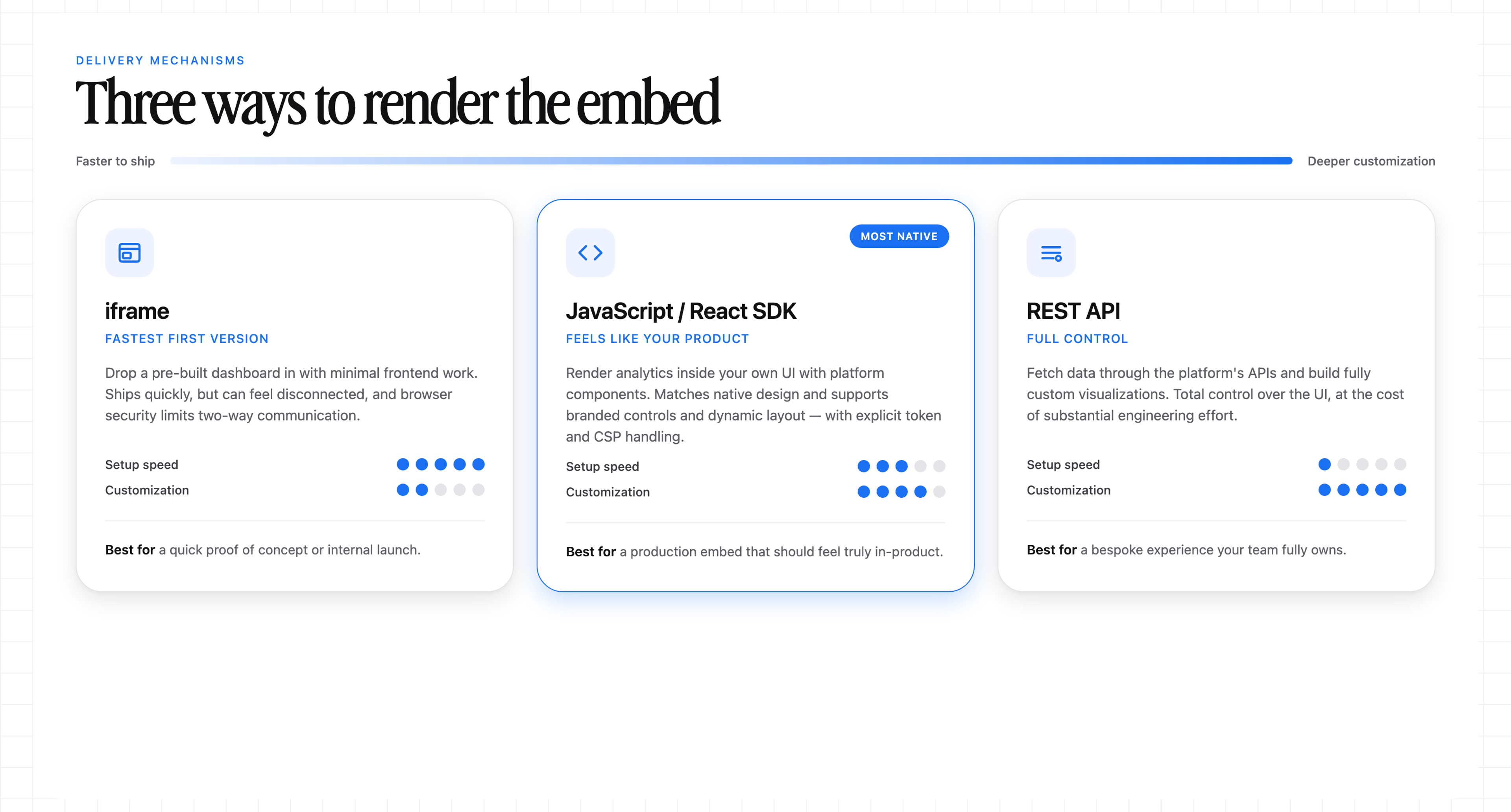
- iframe: An HTML <iframe> loads a pre-built dashboard with minimal frontend integration. It ships quickly, but dashboards can feel disconnected from the product, and browser security controls can limit two-way communication with the host app.
- JavaScript or React SDK: The analytics renders within the host app's UI via components supplied by the analytics platform. This can match native product design and support interactive filters, branded controls, and dynamic layout behavior, at the cost of more frontend work and explicit token and CSP handling.
- REST API: Your application fetches data through the platform's APIs and builds fully custom visualizations. This gives full control over the UI, but it requires substantial engineering effort.
Teams often start with an iframe when they need a fast first version, then move to an SDK as product requirements mature and the embedded surface needs to feel native.
Building embedded BI in-house or using a white-label platform
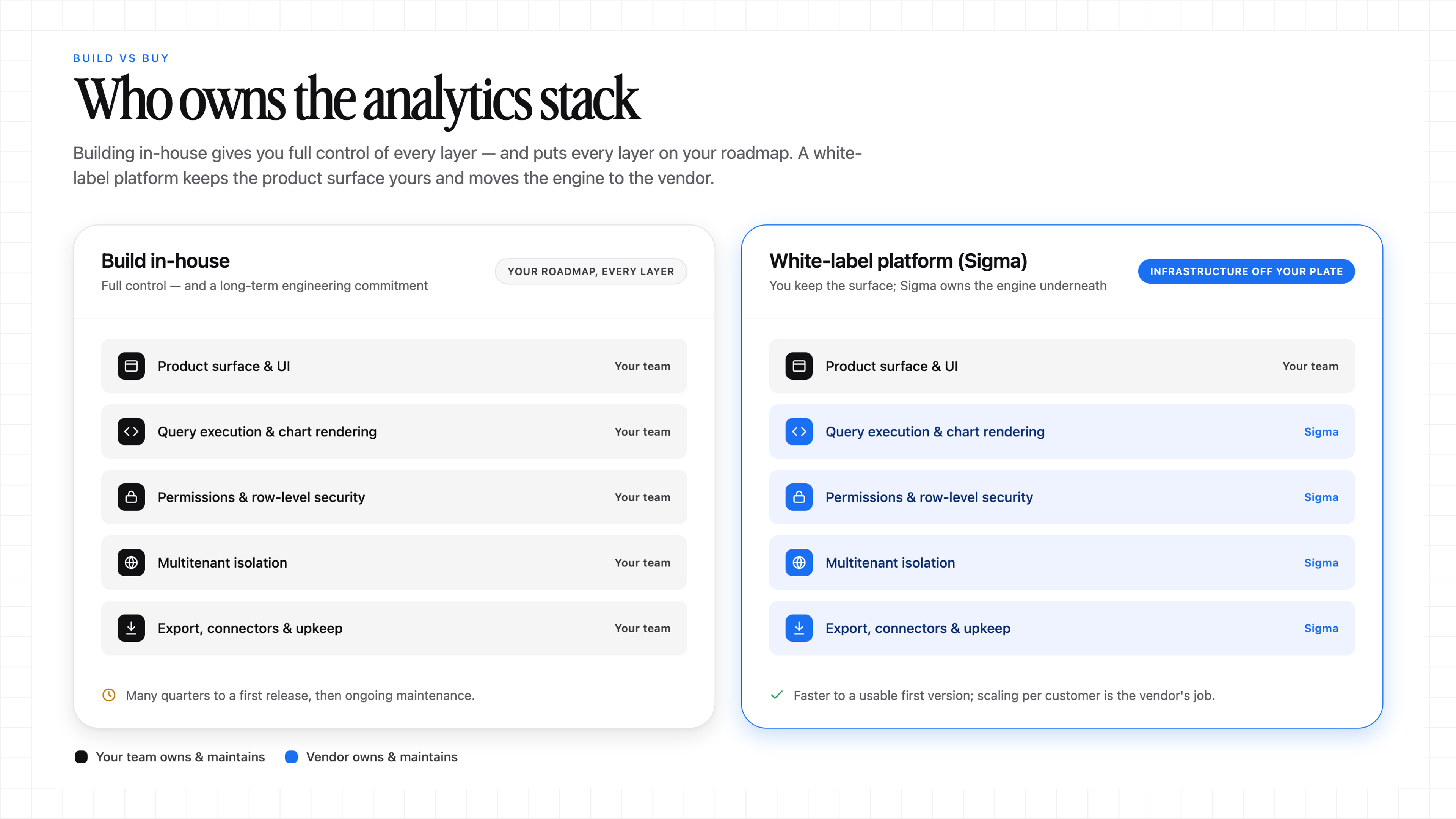
For a SaaS company whose core product isn't BI, this decision shapes the roadmap. Building embedded BI in-house gives you full control over the experience, but it is also a long-term engineering commitment to infrastructure, security, and maintenance alongside your core product. Using a white-label platform means integrating a third-party engine and presenting it as your own, so much of that infrastructure lives with the vendor.
An in-house embedded BI module is rarely a one-time feature
Building the first version is only the start. Query execution, chart rendering, dashboard authoring, permissions, row-level security, multitenant isolation, and export delivery all need to be built.
Adding self-service, filters, drilldowns, and AI-powered querying further expands the scope. Maintenance continues after launch: warehouse connectors break when upstream APIs shift, schemas keep changing, and every new customer surfaces new performance and isolation edge cases.
The build tends to fit teams with substantial engineering capacity, dedicated analytics expertise, a unique data model that no platform can serve, and time to invest. For teams outside that profile, the trade-off usually comes down to how much engineering time you want to spend on the analytics layer versus your core product.
A white-label platform takes analytics infrastructure off your team's plate
White-label embedded BI means integrating a vendor's engine, restyling it to look and feel like your product, and letting the vendor own the layers that would otherwise sit on your team's roadmap.
The platform takes over query execution, chart rendering, permissions and row-level security, multitenant isolation, and export delivery. Your team keeps ownership of the surfaces that touch your product experience and offloads the analytics engine underneath.
The scalability math also shifts. Adding another customer uses the platform's tenant provisioning, permissions, and scaling patterns instead of a custom rebuild of the analytics layer, so multitenant scaling no longer adds operational complexity per customer.
Time to market and total cost are the deciding factors
Building embedded BI in-house can take many quarters to reach a first release. Buying a platform that fits your requirements typically shortens time to a usable first version and shifts the infrastructure, maintenance, and scaling work to the vendor rather than your team.
Teams that start building embedded BI capabilities sometimes switch platforms after underestimating the ongoing investment required. Buying tends to stay the more practical path until embedded analytics becomes a major standalone revenue line for the company.
What it takes to implement embedded BI well
A durable implementation rests on four requirements. Getting any one wrong tends to show up later as a governance incident, a performance complaint, or an engineering rebuild.
A live connection instead of a data copy
Extract-based legacy BI stacks carry hidden costs: you maintain sync pipelines that break during schema changes, pay two storage bills for the same bytes, and query data that lags until the next sync. A live connection to the warehouse eliminates the extract-load-refresh cycle so decisions run on current numbers, which is what your customers expect from an in-product analytics experience.
Access control inherited from the warehouse
Governance stays centralized when access control stays close to the warehouse. When row-level security is in place, embedded queries can inherit those policies without replication. Extract-based tools may require duplicating that security logic in a second system, which expands the audit surface and can allow access controls to drift over time. Treat governance as part of the first workload.
Multitenant isolation enforced at runtime
For a SaaS product, the highest-consequence failure is one customer seeing another customer's data. Application-layer filtering alone creates cross-tenant exposure risk because a single missed path can expose data across tenant boundaries.
Tenant isolation has to be enforced reliably at runtime and as close to the data as possible, ideally by the warehouse itself. That way, every embedded query is scoped to the right tenant no matter which surface issued it.
Interactivity and self-service built into the embed
Interactivity is the difference between a place that displays data and one where users work with data. Embedded BI runs on a capability spectrum, from static dashboards to guided self-service with filters, drilldowns, and natural-language querying. Self-service within the embed keeps follow-up analysis in the product, rather than pushing users back to a spreadsheet or another tool, which strengthens adoption and retention.
Implementation checklist
Before you scope the first embedded workload, confirm the following are defined and tested end to end:
- Embed token and identity model. Signed, short-lived tokens with a documented claims schema (tenant ID, user ID, role, custom attributes) and a rotation policy.
- SSO integration. SAML or OIDC connection between your application's identity provider and the BI platform so users never re-authenticate against a second system.
- Tenant ID mapping. Deterministic mapping from your application's tenant identifier to the BI platform's tenant or workspace construct, with a plan for adding, renaming, and offboarding tenants.
- Warehouse RLS and CLS. Row-level and column-level policies defined at the warehouse and verified per tenant and per role before the embed goes live.
- Role mapping. Each application role is mapped to a corresponding set of BI permissions and data policies, so changes in the app propagate predictably.
- Delivery choice: iframe, SDK, or REST API. Selected against the customization depth you need and the frontend engineering capacity you have.
- Performance testing. Load tests for concurrent embedded sessions, cold and warm query paths, worst-case tenants, and worst-case dashboards.
- Logging and audit. Query logs, embed session logs, and permission changes captured centrally so security reviews and incident response have something to work with.
- Support ownership. A clear runbook for who owns tenant, warehouse, and platform issues when a customer reports a problem, including escalation paths to the vendor.
How Sigma delivers embedded BI
The durable work in embedded BI comes down to keeping data fresh, enforcing tenant isolation for every query, and letting your customers work with governed data.
Sigma is the runtime layer to build and scale analytics, AI Apps, and agents on live cloud data warehouse data. It sits between your warehouse and the AI tools that generate queries against that data. Workbooks, dashboards, AI Apps, and agents become production-ready software that inherits your existing governance.
Live warehouse queries instead of a data copy
Sigma runs live queries against your cloud data warehouse, whether that's Databricks environments, Snowflake, BigQuery, or Amazon Redshift. Formulas, filters, and pivot tables compile to SQL and execute inside the warehouse. Sigma does not extract or copy data from the warehouse, so your storage costs remain consolidated on your warehouse bill. Your embedded users always see current numbers through Sigma's warehouse-native architecture.
Row-level security and multitenant isolation inherited from the warehouse
Sigma enforces row-level and column-level security at query time by inheriting warehouse policies rather than maintaining a parallel permissions model. Sigma applies each end user's scope at query time, and warehouse policies apply before results display, so per-customer data isolation is enforced at the layer closest to the data.
Sigma Tenants adds a multitenant environment with data isolation, cross-region provisioning, and source swap policies for teams that need to run separate embedded surfaces across regions or brands.
Multiple functionality tiers you can package as revenue
Sigma's embedded BI offers three levels of functionality:
- View-only (charts and KPIs filtered to the end user's data).
- Drill down (filter, sort, and inspect the underlying data).
- Full edit mode (end users create their own workbooks, run ad hoc analyses, and optionally write back).
You're not limited to these three defaults. Sigma also supports custom account types, so you can create your own scoped roles and turn individual pieces of functionality on or off at a fine-grained level. That means you can design tiers that match your own packaging and pricing model instead of building around Sigma's out-of-the-box options. Each level is a revenue lever you can package as a paid add-on, and full edit mode offloads the ad hoc requests that would otherwise queue with your internal analyst team.
Bi-directional integration with your platform
Sigma connects to your platform through event listeners, so the embed doesn't just sit inside your product, it talks to it. When a user interacts with your platform, for example applying a filter, that action can drive what Sigma shows. When a user interacts with Sigma, that action can trigger a change in your platform. This two-way communication is what makes highly customized, in-context experiences possible, well beyond what a static embed can do.
Usage telemetry that shows you how customers use the embed
Sigma captures usage telemetry across the embedded surface and surfaces it back to you as the platform owner. You can see which dashboards, filters, and workbooks your customers actually use, then use that data to improve the end-user experience instead of guessing what to build next.
Native AI inside the embedded surface
Analyze with Sigma Assistant runs inside the embedded surface, so your customers can ask questions of their data in plain language and get governed answers grounded in their own scoped data. Queries are validated before they execute, and every answer inherits the same row-level security and lineage as the rest of the embed. Your customers get an AI experience without you having to build the embedded AI interface from scratch, while answers inherit Sigma and warehouse governance.
Start implementing embedded BI with Sigma
Embedded BI succeeds when analytics stay live, governed, interactive, and isolated per customer. Your data never leaves the warehouse, and every embedded query inherits the governance you already trust.
Sigma's embedded BI capabilities ship with a React SDK, SSO, and per-customer theming, so the embedded surface can look and feel like your product from day one, without the frontend team having to rebuild the analytics layer to match. See it firsthand in a hands-on lab.
Get a demo or try Sigma free to build your first governed embedded experience.