AI agents for people analytics software: From reports to action

Many people analytics software surface workforce risks like attrition, disengagement, and pay inequity, then leave the resolution to someone else. Flight-risk scores, engagement dips, and comp outliers land in a dashboard, while the follow-up work (the stay interview, the counteroffer math, the succession update) happens somewhere else, in emails and Slack threads, if it happens at all.
The consequences of that broken handoff become visible only after an employee has already decided to leave. Among voluntary leavers, 45% report no proactive conversation with a manager about job satisfaction in the three months before they left. The warning signs often sat in a dashboard the whole time. What was missing was a system that could turn the signal into a conversation, a retention plan, or an approval before the exit interview.
Agents for people analytics are built to close that loop. They connect governed workforce signals to bounded, human-approved action, and log what happened for later review.
Key takeaways
- AI agents for people analytics pick up where the static HR dashboard stops. They read a flight-risk score or engagement drop, pull the surrounding context, draft the stay interview or retention plan, and route the decision to the right approver, inside the same system that produced the score.
- Trustworthy HR agents need three things: governed data access, a tiered action set, and auditable writeback. The agent should inherit row- and column-level security from the source at query time, auto-execute only low-risk steps, and route hiring, promotion, termination, and comp decisions to a human.
- Configuring an agent on the same governed HR tables that already power dashboards can shorten what might otherwise be a multi-month engineering effort into a scoped prototype a people analytics team can build in days.
What are AI agents for people analytics software?
An AI agent for people analytics is an AI system that combines HR analysis with bounded action on live workforce data. A person defines the goal and data scope, specifies which actions the agent may take, and the agent carries that goal forward under those rules.
The agent reads signals like tenure, performance ratings, engagement scores, and compensation history. It reasons across the related context, then executes permissioned steps such as flagging a retention risk, drafting a headcount request, or writing a retention plan back to the warehouse.
AI agents for people analytics differ from two adjacent tools. An assistant answers a question and waits for the next prompt. A dashboard renders a number and stops. An agent continues to the next step, whether that means sending an approval email, updating a record, or routing a decision to the right person.
Why enterprises need AI agents for people analytics software
Most enterprises already run a people analytics stack: a human resources information system (HRIS), a survey platform, a flight-risk model, a headcount planning tool, and dashboards on top. That stack still stops short of the action in three recurring ways:
- Attrition signals don't connect to follow-up. A flight-risk score predicts who is likely to leave, but it doesn't book the stay interview, check whether comp has room for a retention raise, or track whether the manager did anything with the alert.
- Engagement sentiment doesn't translate into tracked action plans. Survey platforms measure sentiment and produce heatmaps. Managers are then expected to build action plans, execute them, and follow up outside the survey tool, usually in a document nobody revisits.
- Headcount plans go stale between refreshes. Finance counts full-time equivalents (FTEs), HR counts individuals, and recruiting counts requisitions. Each count is right on its own terms, but the definitions don't align, and organizations may review talent plans quarterly or less. Between reviews, a regretted exit, backfill approval, or comp adjustment can sit in an inbox until the next cycle.
These are workflow problems; the dashboard did its job: it produces the score, but the work between that score and the outcome is what's missing.
How AI agents for people analytics software work
An agent for workforce data runs a four-step loop: read a live signal, reason across the related context, propose or take a scoped action, and log the decision for review. The same loop handles a flight-risk score, a comp outlier, or a survey result that dropped 15 points in one team.
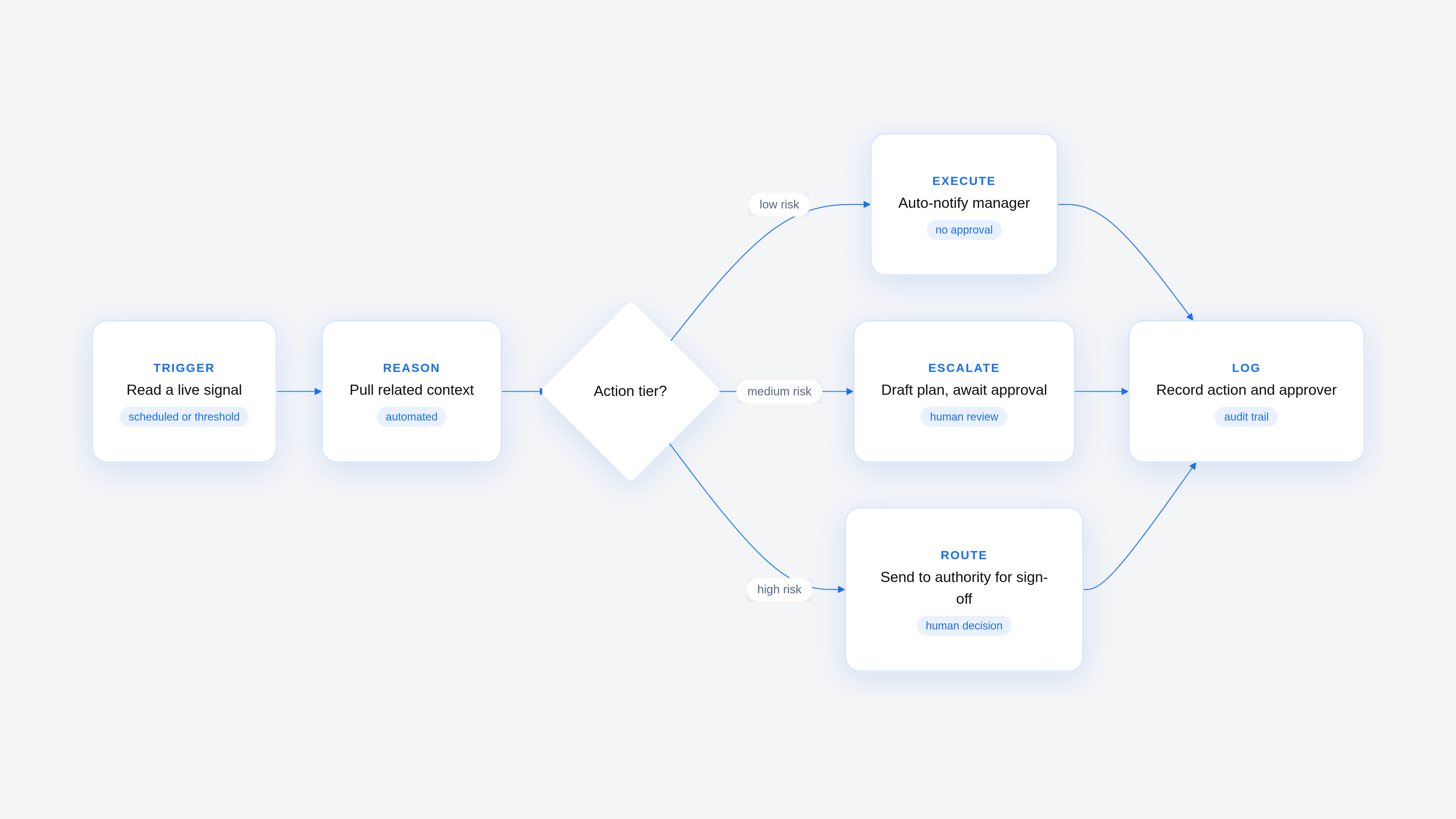
Reads a live signal
The agent runs on a schedule set by the builder (Monday mornings before staff meetings, the first of each month for headcount reviews). Related workbook actions can fire separately when a defined threshold is crossed (a flight-risk score above 0.75, an engagement score dropping more than 10 points in one team, an open requisition aging past 60 days).
Builders can combine those triggers, such as magnitude plus confidence plus tenure, so managers hear about the cases that warrant a conversation rather than each score change. The query runs against live warehouse tables rather than a weekly extract, so the signal reflects the current state of the workforce and not last Friday's snapshot.
Reasons across the context
A flight-risk score alone doesn't explain why an employee might want to leave. The agent can pull time since the last role change, engagement against team average, comp ratio against band, tenure, recent role scope changes, and the manager's team attrition rate to build a picture of what may be driving the score.
Employees with no role change in two years, below-average engagement, and a manager with high team attrition often sit at elevated risk for reasons a manager can act on. Turning a score into a narrative also improves transparency for predictive models that don't always disclose what drives a rating.
Proposes or takes a scoped action
The action depends on the tier the builder assigned it. For a low-risk step, the agent can notify the manager or queue a check-in prompt on its own. For a medium-risk step, it drafts a retention plan with a stay-interview date, a comp review request, and a stretch-assignment suggestion, then waits for approval before writing anything back.
High-risk steps, such as hiring, promotion, termination, and compensation changes, proceed only when an authorized person acts. Because the agent applies the policy a builder set up front, the same signal tends to produce the same class of response.
Logs the decision for review
Each proposal, approval, and writeback lands in an audit record with the retrieved context, the committed action, the approver, and the time.
That record is what an HR business partner can produce when an employee asks why a comp adjustment was recommended for a peer, what compliance can produce when a regulator asks how an automated system contributed to a decision, and what the people analytics team uses to measure whether the agent's recommendations are improving retention.
What an AI agent for people analytics software needs to act
The read-reason-act-log loop only works if the agent can be trusted with sensitive workforce data. Three requirements keep the agent inside its lane and give HR a defensible record of what it did: governed access, a scoped action set, and a durable audit trail.
1. Governed access to live workforce data
HR data is some of the most sensitive data an enterprise holds: compensation, leave, performance reviews, medical accommodations. A retention agent that reads all of it without inheriting the same access rules the rest of the HR stack uses is a data-exposure incident waiting to happen.
The agent should run with the permissions of the person invoking it. Row-level and column-level security should filter what it can see before the model receives any rows. Access rules, masking, and audit logs should live outside the model, where the agent can't bypass them.
These records may also fall under the data minimization principle in the EU General Data Protection Regulation (GDPR), which sets fines for breaches of core processing principles, data subject rights, international transfer rules, or supervisory authority orders.
2. A scoped set of permitted actions
Least privilege applies to actions as much as data. An agent that drafts retention plans shouldn't hold write access to termination records. Three action tiers work well for HR:
- The agent auto-executes low-risk, reversible steps such as sending a reminder.
- The agent escalates medium-risk steps such as flagging flight risk for human review.
- The agent routes high-risk steps, such as hiring, promotion, and termination, to an authorized person for sign-off.
These tiers keep the agent inside a defined scope and route higher-risk decisions to a human before anything is written.
3. An audit trail for people decisions
People decisions have to be explainable, both to the employee they affect and to anyone reviewing them later. A durable audit trail (retrieved context, proposed action, approver, timestamp) lets an HR business partner defend a recommendation, a manager review the reasoning behind a plan, and a compliance team answer questions about how the agent contributed to an outcome.
It may also be a legal requirement in some jurisdictions. Under the EU AI Act, employment AI affecting promotion, termination, or performance monitoring is generally treated as high-risk. Enterprises should have Legal confirm the applicable effective dates, the log-retention requirement (one analysis cites at least six months of automatically generated logs), the scope of applicability, and the obligation to explain the system's role to workers subject to adverse decisions.
Agentic people analytics in practice
A people analytics team can put the full read-reason-act-log loop into practice by building an agent to handle regretted-attrition risk for a product organization. The example below shows how the pieces fit together for a scoped prototype rather than a guaranteed outcome.
Surfacing a retention risk before an exit interview
The agent reads the weekly flight-risk scores and stops on a staff engineer: 28 months since promotion, engagement 1.4 points below team average, a manager whose team attrition runs at twice the company rate, and a comp ratio at 0.88 of band midpoint. It messages the manager with those facts and recommends a stay interview within two weeks. It then writes the case to a retention tracking table with the status set to open.
Modeling a counteroffer or backfill cost
The manager asks what a counteroffer costs against a backfill. The agent runs both. A retention raise to band midpoint is a one-time adjustment against the existing salary increase budget. The backfill scenario adds recruiting cost, time-to-fill, and ramp time. The agent also surfaces counteroffer retention risk as a factor to weigh, then writes both scenarios and their assumptions to the tracking table.
Routing the decision to the right approver
The manager selects the retention raise and a stretch assignment. The agent routes the comp adjustment to the compensation lead, notifies the HR business partner, and updates the case status. The comp lead approves in the same interface. The record shows the signal, both scenarios, who chose, who approved, and when.
How Sigma supports AI agents for people analytics
Sigma is the AI Apps and analytics platform for building and scaling analytics and agents on live cloud data warehouse tables. For people analytics, that means an agent operates directly on the governed HRIS, comp, and engagement tables that already support HR's existing reports. Security is inherited from the warehouse at query time, and audit and lineage span Sigma and the warehouse rather than being reconstructed in a separate tool.
Sigma Agents scoped to workforce data and HR actions
A builder configures a Sigma Agent inside a workbook with plain-English instructions, access to specific tables and columns, and a defined set of Sigma Actions: notifications, Input Table writeback, REST API calls, webhook triggers, and stored procedure execution. The human-in-the-loop workflow, where the agent proposes and a person approves before it writes or sends anything, maps directly to the retention agent's escalate tier.
Input Tables for headcount, comp, and retention writeback
When the agent writes a retention case, counteroffer scenario, or headcount request, it uses an Input Table in the warehouse. New data writes to a separate schema rather than overwriting the original warehouse data, and the audit history preserves prior record values, including who changed them and when. That gives people decisions a record produced by the workflow rather than reconstructed afterward. The headcount plan becomes a live table that the agent and the financial planning and analysis (FP&A) team both update.
Row-level security inherited from the warehouse for sensitive HR data
Row-level and column-level security are inherited from the warehouse at query time, and the agent runs with the calling user's permissions. A manager asking about their team sees their team's compensation and nobody else's, because the same policy filters the dashboard and the agent's query. For example, Duolingo democratized data access on Sigma while protecting sensitive information. The same approach lets an HR agent operate on comp data without standing up a parallel permissions system.
Build AI agents for people analytics with Sigma
Building AI agents for people analytics on Sigma skips much of the setup that assembling them from parts requires. Sigma provides the agent framework, applies existing warehouse permissions, and operates on warehouse data in place. That reduces separate infrastructure and custom development.
That can shorten the path from "we should build a retention agent" to a working prototype. What might otherwise be a multi-month engineering effort can, for a scoped use case, be prototyped by a people analytics team in days and put in front of a small group of managers soon after.
Get a demo or try Sigma free and model your own attrition scenario live.