Embedded Analytics vs Business Intelligence: How They Differ and When to Use Each

Business intelligence (BI) and embedded analytics are often compared as either an upgrade path or two separate purchases. Both interpretations miss the point. The difference comes down to audience and delivery surface. BI and embedded analytics can run on the same warehouse, the same models, and often the same dashboards.
What separates them is who the analytics reaches and where the experience lives. That distinction shapes your architecture, your buying committee, and whether you maintain one governed platform or two.
Key takeaways
- Embedded analytics and business intelligence serve the same data to different audiences: internal employees versus customers.
- Embedded analytics requires multitenant isolation for external delivery: authenticated tenant context and tenant-aware access controls — row-level security, schemas, or databases — enforced at the data-access layer.
- Running two different stacks for embedded analytics and BI creates metric drift because you'll have two semantic layers, two governance models, and reconciliation every time the numbers diverge.
The key differences between embedded analytics and business intelligence
Business intelligence serves people within your company through a tool they log in to. Embedded analytics delivers analysis inside a product your customers use, under your branding.
What is business intelligence?
Business intelligence is the practice of preparing, modeling, analyzing, and visualizing data so people inside an organization can make decisions. Analysts build dashboards and reports. Employees log in to a standalone platform to view them. The data team governs who sees what.
BI is optimized for known reporting needs: recurring dashboards, scheduled reports, and ad-hoc analysis for analysts and business users who already have a corporate login. It assumes a bounded, internal audience and a governance model that flows from your identity provider down to whoever is allowed to see which rows.
What is embedded analytics?
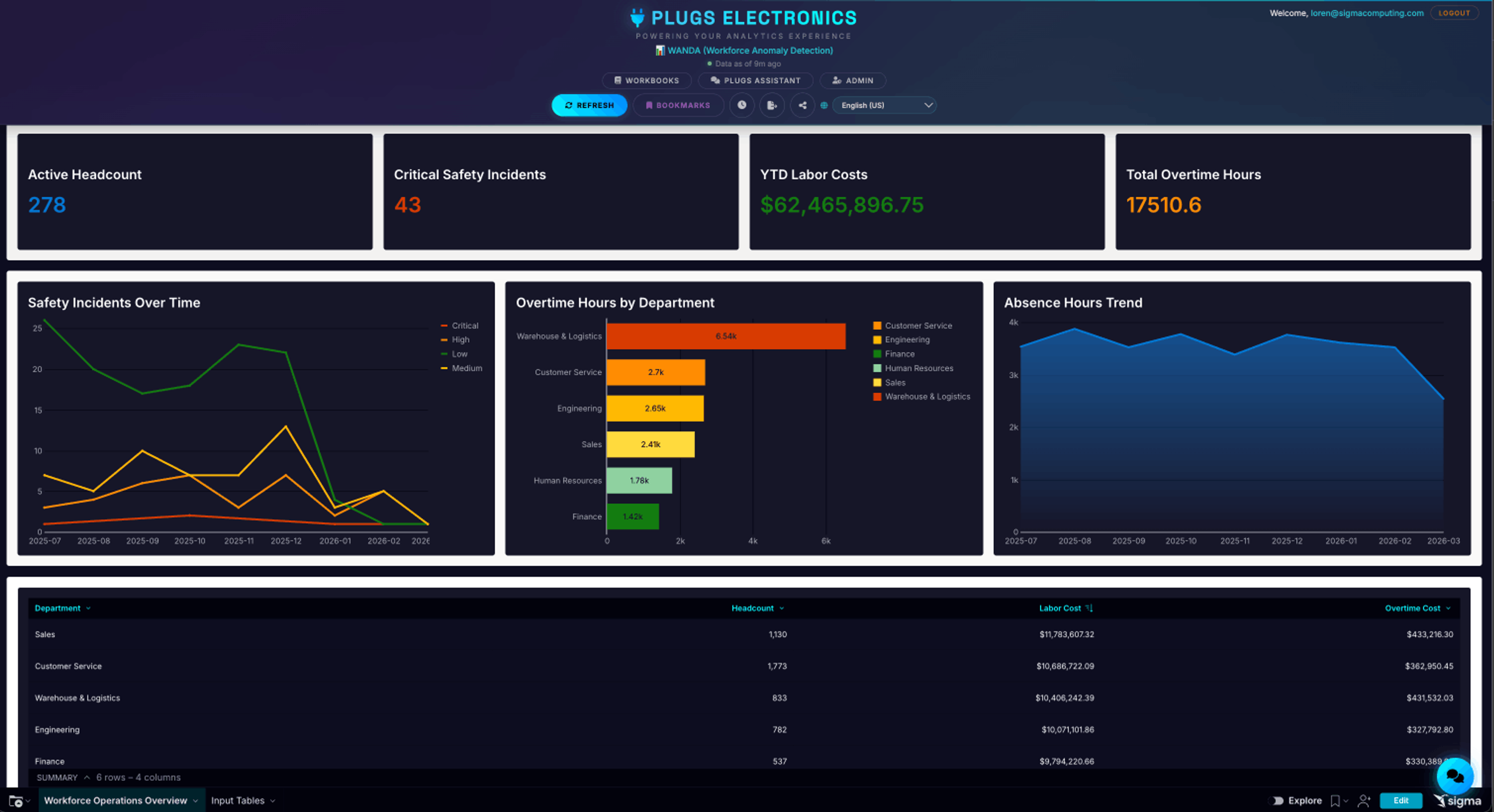
Embedded analytics places those same analytical capabilities inside another application: a SaaS product, a customer portal, a partner dashboard. A merchant checking revenue trends inside their commerce platform, or a vendor tracking sales performance inside a marketplace dashboard, is consuming embedded analytics. In a white-labeled deployment, they don't see a BI vendor's logo, and they don't leave your product.
Where traditional BI stops and embedded analytics starts
Legacy BI is licensed by named internal seat and secured by whatever identity your IT team already controls. That model works until the audience changes. Embedded analytics begins the moment analytics has to reach people outside that perimeter, and that boundary reshapes the four decisions that matter most when you choose a platform.
Embedded analytics vs business intelligence: 4 differences that matter
When comparing embedded analytics and business intelligence, four factors decide which one fits a given use case. The table below gives a quick side-by-side view, and the sections that follow unpack each factor in turn.
| Difference | Business intelligence | Embedded analytics |
|---|---|---|
| Audience | BI serves trusted internal users on a shared identity plane. | Embedded analytics serves external users who are isolated by tenant. |
| Delivery surface | Users log into a standalone tool to view reports. | Analytics appear in an in-product surface at the point of action. |
| Ownership | Data, analytics, and IT teams own the platform. | Product and engineering own it alongside the data team. |
| Technical requirements | Corporate SSO and role-based row-level security are sufficient. | Deployments require authenticated, tenant-aware context — including row-level security, per-tenant schemas and databases, white-labeling, and programmatic provisioning. |
Each row is a different lens on the same underlying shift from internal to external delivery. Start with the one that changes everything else: the audience.
Audience
Internal BI assumes trusted users on a shared identity plane. Everyone signs in through the corporate identity provider, holds a role already defined by IT, and inherits permissions from a directory the company controls. A permissions mistake can usually be contained.
Embedded analytics has no shared directory to lean on. Each tenant's data must be logically separated, and a tenant isolation failure becomes a security incident and a crisis of customer trust rather than an internal bug. That trust-model difference sets up the technical differences that follow.
Delivery surface
BI users switch context, leaving their workflow to open the BI platform and hunt for answers. Embedded analytics puts the answer at the point of action, inside the screen where the decision happens. Expectations shift too. A slow dashboard may pass inside the company. Paying customers expect a responsive experience that matches your product's design system, instead of a vendor-styled one bolted into a corner of your UI.
Ownership
Data, analytics, and IT leaders typically evaluate internal BI for modeling depth, governance, and reporting coverage. Embedded analytics brings product and engineering stakeholders into the evaluation to weigh tenant isolation, white-labeling depth, SDK quality, and time-to-market.
The budget lives in different places too: BI in the analytics or IT line, embedded in the product roadmap, where every quarter spent building analytics infrastructure is a quarter not spent on the core product. In-house embedded builds can absorb serious engineering effort before the first production dashboard ships, with ongoing maintenance afterward. The build-versus-buy question dominates most embedded evaluations for that reason.
Technical requirements
Internal BI deployments can support multiple tenants, such as different business units or regions within a company, with row-level security scoped by role or department and identity coming from corporate SSO.
Embedded deployments add a different operating bar:
- They must enforce isolation across hundreds or thousands of tenants.
- They typically require authenticated tenant context and should avoid relying on client-supplied tenant identifiers.
- Row-level security should be part of the data-access layer in pooled multitenant models, because tenant isolation can't depend on dashboard filters alone.
- They often need per-customer theming, programmatic provisioning for new tenants, and headroom for customer traffic patterns that are less predictable than internal usage.
Those requirements put embedded analytics on a different architecture from most internal BI deployments.
Choosing between business intelligence, embedded analytics, or both
Start with one question: does your analytics platform reach everyone who needs it? Use the criteria below to place yourself.
Choose business intelligence if:
- Your audience is entirely internal (employees, contractors, board members with corporate logins).
- Reporting lives in a dedicated tool people are willing to log into.
- You have no near-term product roadmap item that requires analytics inside a customer-facing surface.
Choose embedded analytics if:
- Your customers are asking for reporting inside your product, portal, or partner dashboard.
- The experience needs to be white-labeled and match your product's design system.
- You need multitenant isolation, per-customer theming, and programmatic provisioning for new tenants.
- Product and engineering own the roadmap for the surface where analytics will live.
Consider a platform that does both if:
- You already run internal BI on a cloud data warehouse and now need to serve customers from the same governed data.
- You want a single semantic layer and a single set of metric definitions for both internal and external audiences.
- You want to avoid the reconciliation project that happens when the number your account team quotes internally differs from the number your customer sees in-product.
Most companies end up in the third bucket whether they planned to or not. The internal-only assumption holds until a single enterprise customer requests in-product reporting, or a product manager decides that analytics is the next feature to close deals. From that point forward, the platform that was chosen for the org chart has to serve people who never appear on it. A platform that already treats internal and external delivery as the same problem, running on a single warehouse with a single semantic layer and a single governance model, outlasts the next roadmap cycle. The alternative triggers a migration the first time the audience widens.
How Sigma delivers both embedded analytics and business intelligence
Sigma is the runtime layer to build and scale analytics, apps, and agents on live cloud data warehouse data. It sits between your warehouse and the AI tools generating against it, so workbooks, AI Apps, and embedded surfaces inherit existing governance as they're built. That runtime model is what enables Sigma to serve both internal BI and customer-facing embedded analytics from a single governed connection, rather than two disconnected stacks.
One governed connection to the warehouse
Sigma is warehouse-native. Queries execute in the connected cloud data warehouse, whether that is Databricks, Snowflake, BigQuery, or Amazon Redshift, instead of extracting source data into a separate engine. Many legacy BI tools copy source data out or require a parallel governance layer around extracts. Sigma leaves source data where governance already lives, so the same connection can serve internal analysts and external customers without duplicating pipelines.
Internal reporting and customer-facing views from the same data
Teams build in workbooks with a spreadsheet interface that compiles to warehouse SQL, so an Excel user can analyze billions of rows without writing code. Those same workbooks become white-labeled product surfaces: embed an entire workbook, a single page, one chart, or pixel-perfect reporting. The embedded developer experience includes the JavaScript Embed API, React SDK, inbound and outbound events, SSO, and JWT claims that carry tenant context. Sigma Tenants provides multitenant isolation for enterprise embedded deployments, and hosts can tune the experience from view-only through full self-service. Higher tiers can be packaged as paid add-ons.
Governance that follows the data, not the audience
Row-level and column-level security are inherited from the warehouse at query time. The same policy governs an internal analyst and an embedded end user, scoped to their respective data, because the policy lives at the source rather than in a separate layer that must be reconciled. IT keeps the guardrails while business teams and customers get the speed.
Experience embedded analytics and business intelligence together with Sigma
Saddle Creek Logistics shows what this looks like in practice. After 17 years on a legacy BI tool that couldn't keep pace with their Databricks-backed data architecture, the team embedded Sigma directly into their ServiceNow platform in under an hour to deliver an in-product analytics experience for clients. Internally, they used the same Sigma connection to consolidate financial reporting. Row-level security flows from Sigma to Databricks so that internal analysts and external users share a single governed source of truth.
The results scale in both directions. The finance team is moving from more than 1,500 static reports to a single interactive workbook, and the broader enterprise rebuild is collapsing 33,000 legacy objects and more than 600 reports into fewer than 30 governed Sigma workbooks, all served from the same warehouse that powers their customer-facing embeds.
That's the payoff of running embedded analytics and business intelligence on a single platform: a governed connection that keeps answers consistent across internal teams and external customers, without a reconciliation project every time two disconnected tools disagree. Sigma's warehouse-native architecture makes that a solved problem: one connection, one set of metrics, and one governance model serving your team and your customers.
See both sides running on your own warehouse data. Get a demo or try Sigma free.