We Replaced a $15k Revenue Execution Platform with a Simple Sigma Workflow

At Sigma, we’ve always loved celebrating a deal closing. When the company was smaller, we actually had a huge gong in the office, and whenever a deal went through, someone would walk over and bang it. You could hear it across the floor, and without anyone saying a word, you knew a win had just happened.
As we grew, that moment moved into Slack, and the gong became a channel called #boom. When a deal hit “Closed Won” in our CRM, everyone in the channel would receive a message featuring a GIF and the names of everyone involved in the deal. People would jump into the thread to celebrate, and over time it became a company-wide ritual.
This #boom channel automated “Closed Won” notifications with a third-party SaaS tool that billed itself as a “revenue execution platform”—it sits on top of CRMs like Salesforce and triggers notifications based on updates in the CRM. It was a fine solution in Sigma’s early days, before our product expanded into AI Apps territory. But as we released new funtionality—like the ability to call external APIs and leverage them in scheduled actions—it became clear to me that we didn’t need to pay for a third-party SaaS tool. We could automate this process ourselves with Sigma.
#Boom notifications: an origin story
The project really started when one of our product managers suggested rebuilding the #boom workflow within Sigma during our annual summer hackathon in 2025.
Sigma had just shipped two capabilities that made this feel possible: an API connector for building workflows around external APIs, and a Slack notification action to export information in a more structured format.
The hackathon gave us the space to work on that idea in a collaborative way, pulling in engineers to talk through product improvements and challenges in real time. One of the main problems we hit was data freshness. Salesforce updates happen fast, but our core models, built through dbt, were running every 30 minutes. This wasn’t going to work for our RevOps team, because they needed to see a deal as soon as it closed. So, we created a smaller, targeted dbt job that ran more frequently and only focused on the opportunity fields we cared about for approvals.
By the end of the hackathon, the project placed second in the AI Apps category. With the prototype built out, we looked into how we could deploy it to production and officially retire the third-party SaaS tool.
How we turned a hackathon project into Sigma’s first full SaaS replacement
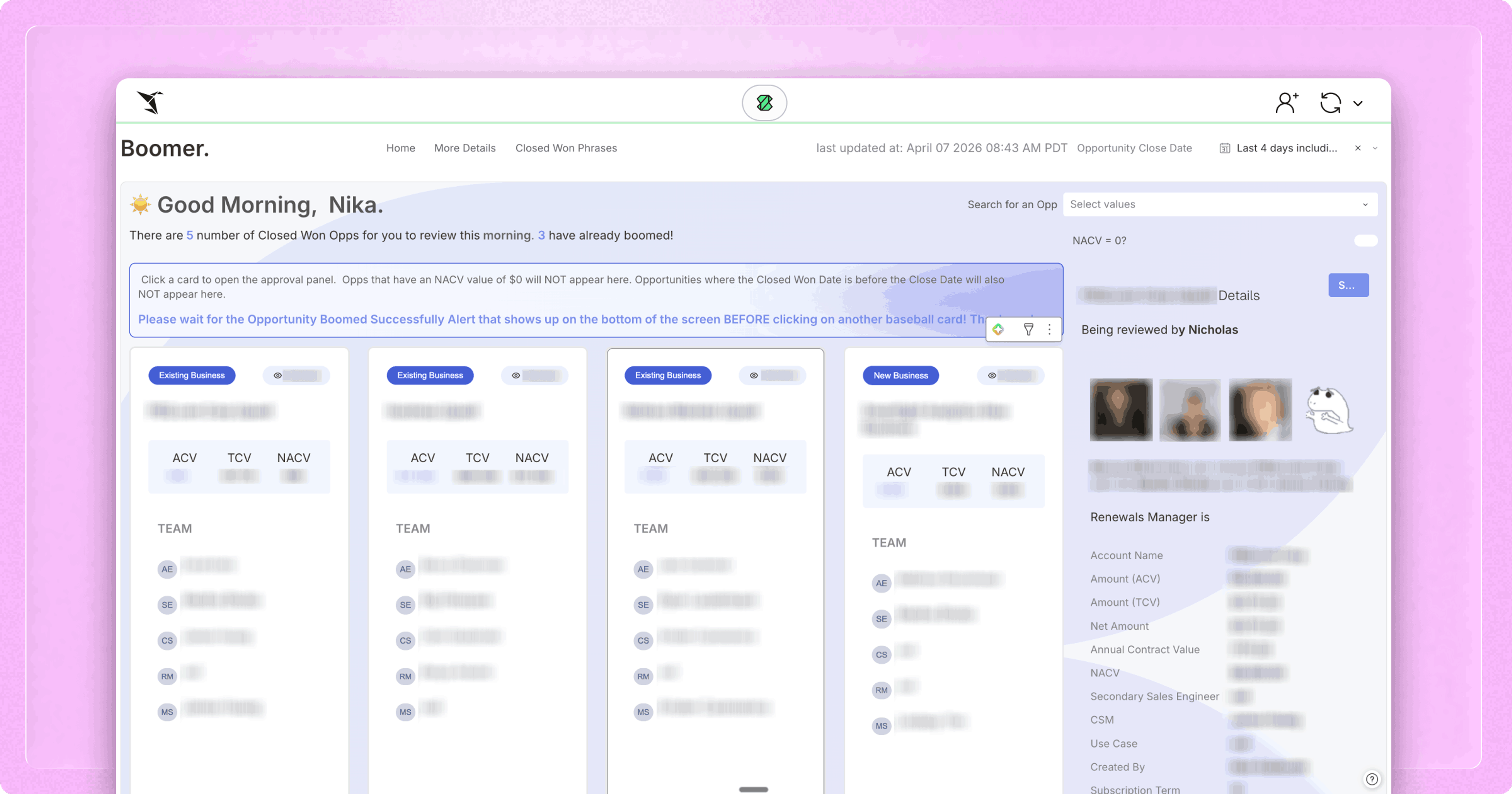
Our goal was simple. RevOps needed one place to review a Closed-Won deal, verify the details, and then send the #boom message to Slack. We built that entire flow inside a Sigma workbook we called “The Boomer.”
Here’s how it works:
1. Sigma surfaces the right deals, with the right context
Salesforce data gets pulled into our cloud warehouse through Fivetran, while dbt models add clarity and business logic. The Sigma workbook is built on a data marts table called “Opportunities Enriched.” In Sigma, the RevOps team filters this live table to deals at the “Closed Won” stage and sorts by dates, so they can see the deals that just closed.
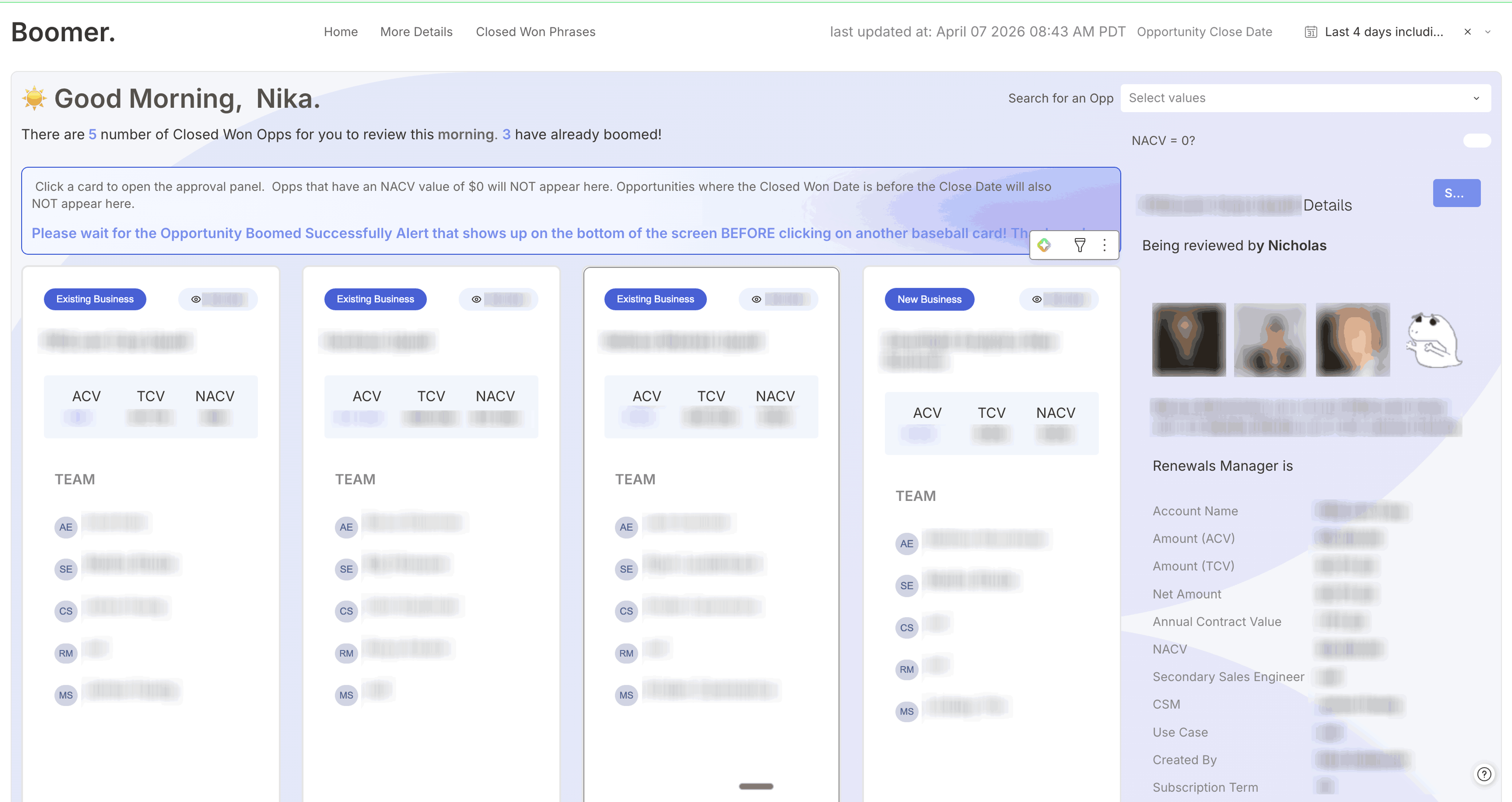
2. Deals show up as “baseball cards” using repeated containers
Sigma’s repeated container element presents each deal as a card, which includes the key fields a RevOps manager needs to approve the deal, like:
- Annual contract value
- Total contract value
- Account executive on the deal
- Supporting roles on the deal (solutions engineer, business development representative, customer success manager, etc.)
It’s fast to scan the information in the card view, and the workflow feels less like reporting and more like review.
3. The RevOps team adds more detail as needed
By clicking one of the “baseball cards,” a modal is opened that allows RevOps managers to update information. They can verify quote items, order forms, and add notes directly on the opportunity—all through Sigma. If a deal shouldn’t be sent to Slack yet, or if something needs to be corrected and resent, they can make a note of that in the detail view.
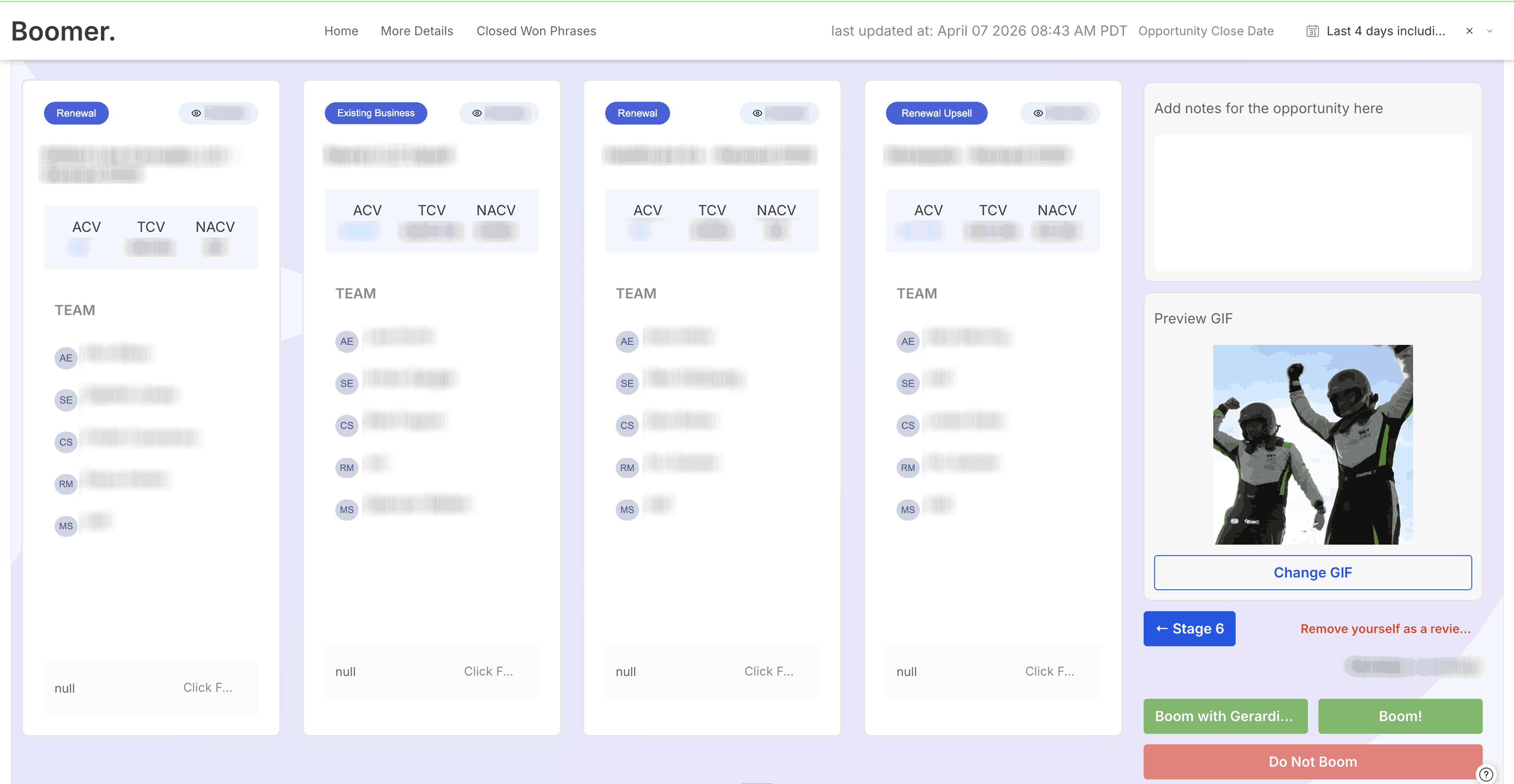
4. The workbook generates GIF options using an API connector to Giphy.
Every time someone clicks into a deal, we run an API connector action that calls the Giphy API and writes a new GIF into an Input Table. That means RevOps can preview GIFs, cycle through options, and pick one that fits the moment before they send the #boom message.
5. A single “Boom” button triggers the Slack message.
Once RevOps is satisfied with the details, they click the “Boom” button in Sigma. That click triggers an API workflow that sends a JSON payload to Slack. We used dynamic variables so the JSON pulls in the specific opportunity details for that deal, plus additional information like the selected GIF.
6. Slack formats the message using Block Kit, then posts it into #boom.
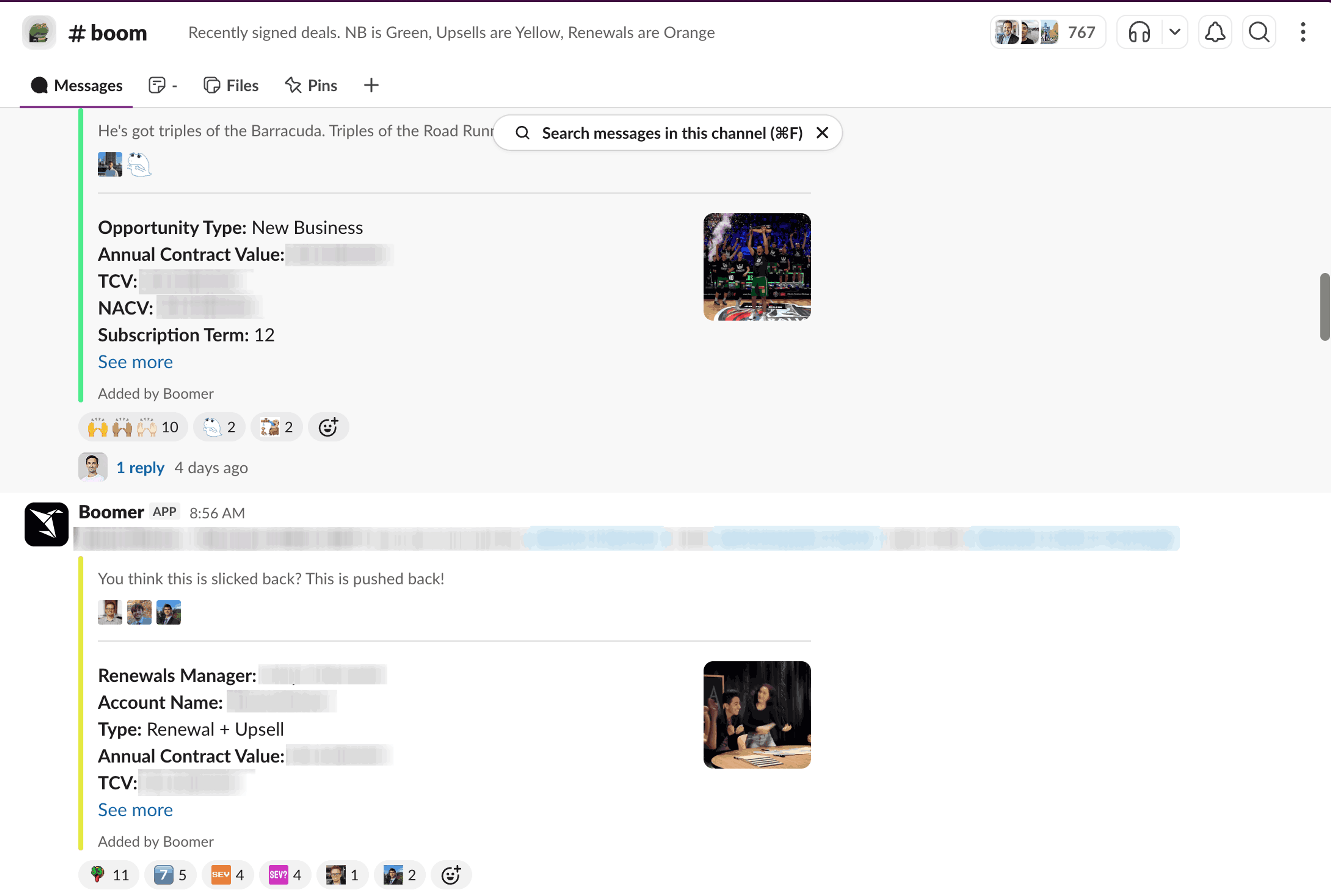
We also created a Slack app and webhook. Sigma pushes the JSON to Slack’s Block Kit Builder API which formats it and delivers it to the #boom channel as a polished, customizable message, complete with avatars and emojis.
Bonus: The larger Sigma team added personality to the messages
Because we owned the workflow end-to-end, we could customize it any way we wanted. For the Sigma team, of course, that meant adding in some goofiness.
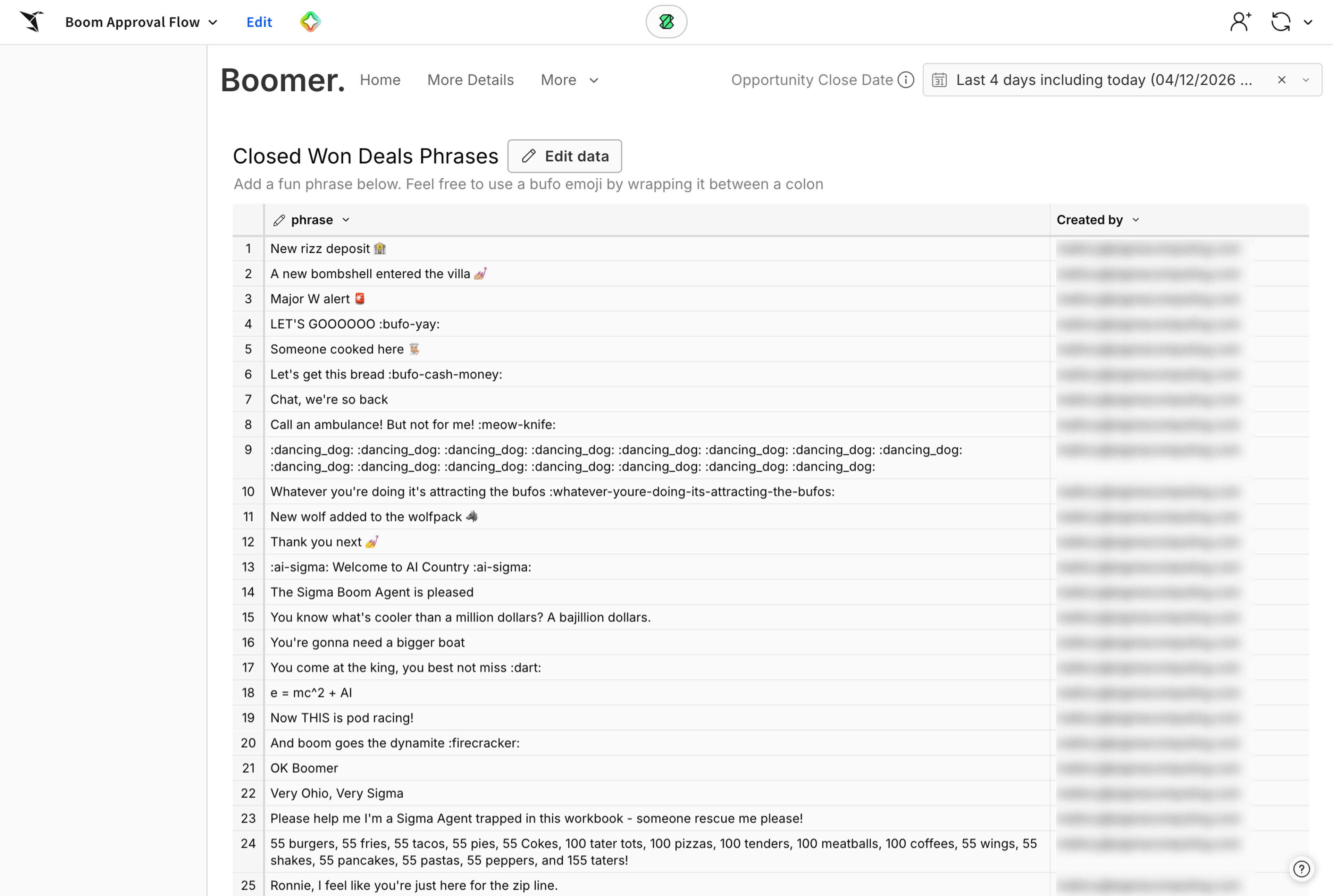
We added an Input Table in Sigma that allows anyone in the company to write a random Closed-Won phrase, and that phrase shows up in the Slack message. People started contributing lines like “someone cooked here,” “new bag acquired,” and my personal favorite, “a new bombshell walked into the villa.” It gave the channel personality, and it created one more way for people to celebrate wins.
Enter Sigma’s first AI App Developer
One of the most impactful outcomes this project had was that Sigma started talking more about a role that hasn’t existed before—the AI App Developer. This is someone who looks at the systems a company runs on every day, understands where the bottlenecks are, and then builds more efficient workflows to fix them.
I’m proud to say that I’m Sigma’s first AI App Developer, and one of my goals is to see this role take hold. That focus feels very aligned with where the industry is going, because we’re not just looking at traditional BI tools anymore, and we’re not just creating dashboards. We’re creating action by building and replacing workflows, as well as by creating apps that actually help the business move faster. A lot of that is now possible because we’re starting to build AI systems that make this kind of work accessible.
That’s where the AI App Developer role really comes from. It’s about using these systems to replace other SaaS tools or make existing processes significantly more efficient, and doing that work in close partnership with operations teams.
Own the workflow and make it fun
For me, this project was never really about Slack notifications, but about showing what happens when analytics moves closer to action. By rebuilding this workflow inside Sigma, we were able to simplify our stack, give RevOps more control, and iterate faster, without adding more tools or complexity.
Plus—we were able to end one more SaaS contract. Dollars and time saved are always a win for our business.
The experience of building #boom notifications changed how I think about what’s possible with data today. If Sigma can fully replace a production RevOps tool internally, there’s a good chance you can simplify parts of your own workflows too. The starting point is asking where your most important processes live, and whether they really need to live outside your data platform.
If you’re someone who sits between data and operations and feels like half your job is gluing tools together, this kind of workflow is exactly where Sigma shines. Request a demo to see what it could look like for your team.