What Are Agentic Workflows? How They Work on Governed Warehouse Data

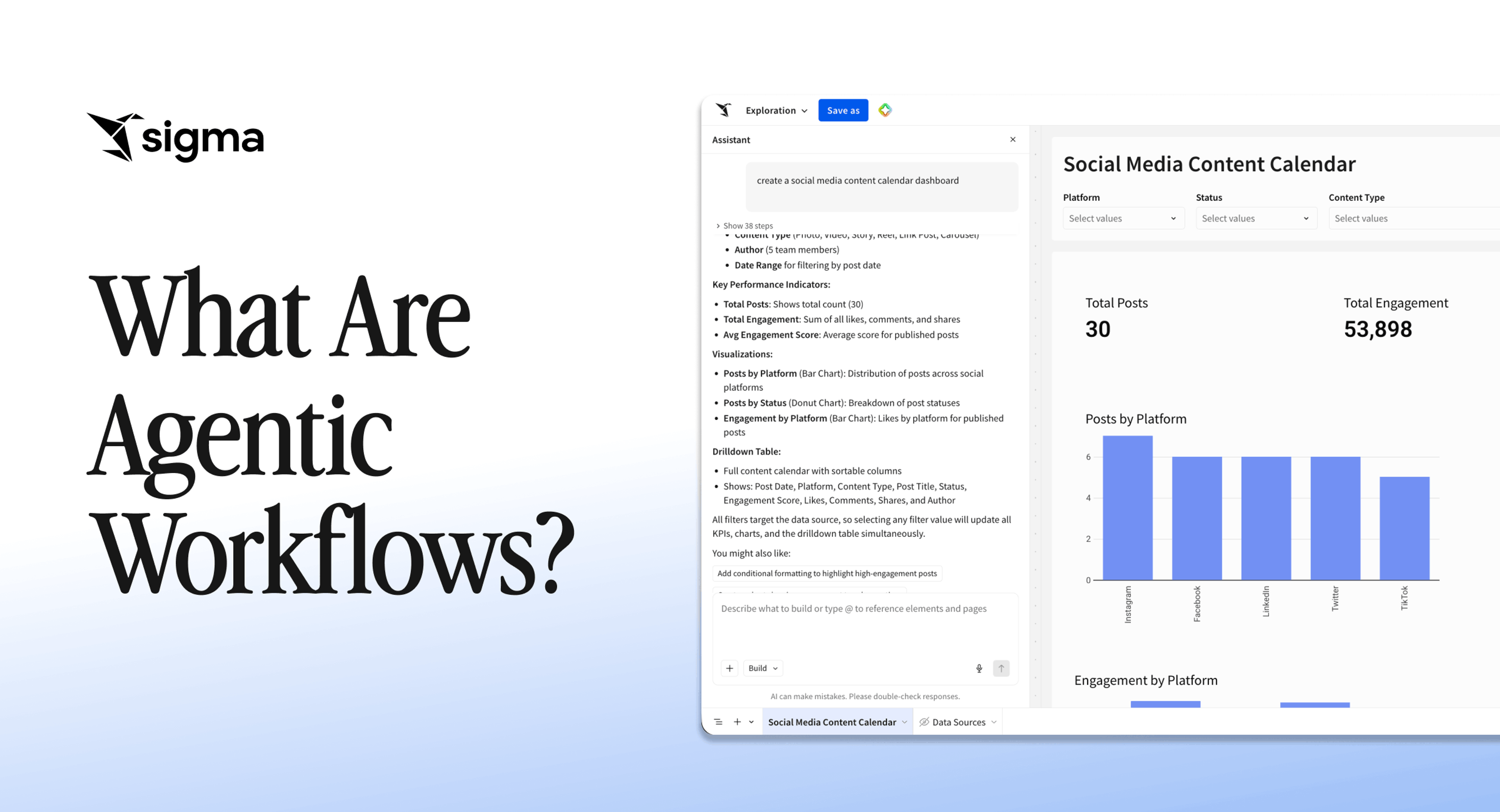
Your data analyst gets pulled into another investigation. The analyst writes SQL, pulls the relevant tables, cross-references upstream changes, traces the anomaly to its source, and writes up the root cause. That investigation took hours of skilled analyst time, and it's the kind of work business intelligence teams field every day. An agentic workflow does the same thing in minutes, on governed data, without a human driving every step.
Analysis that ends at a dashboard is giving way to analysis that completes the task, which is why agentic workflows have moved to the top of the BI roadmap. In 2025, 62% of respondents in a McKinsey survey reported experimenting with AI agents.
Key takeaways
- An agentic workflow decides its next step, executes actions across multiple tools, and writes results back to a system of record without human intervention at each turn.
- Enforce the agent's data access and write permissions at the warehouse layer, not the application layer, so the guardrail holds even if the agent is compromised or misused.
- Scope the agent's decision authority in three sentences before writing any code: what it decides, when it escalates, and what humans retain authority over.
- Build agents on a platform that already inherits warehouse permissions, writes back through governed tables, and logs every change, so scaling from one workflow to many doesn't mean rebuilding the controls each time.
What are agentic workflows?
An agentic workflow is a goal-directed process in which one or more AI agents perceive a condition, reason about what to do, and take action across multiple steps until the agent meets the goal or hits a human checkpoint. The agents carry forward a human-defined objective with autonomy, deciding which tools to call and in what order, rather than executing a fixed script.
Within business intelligence, an agentic workflow is the layer that turns analytical questions into completed work on governed warehouse data. Instead of producing a chart for a human to interpret and act on, the agent queries live data, concludes, writes the results back to a system of record, and notifies the right people, all within the same governed environment.
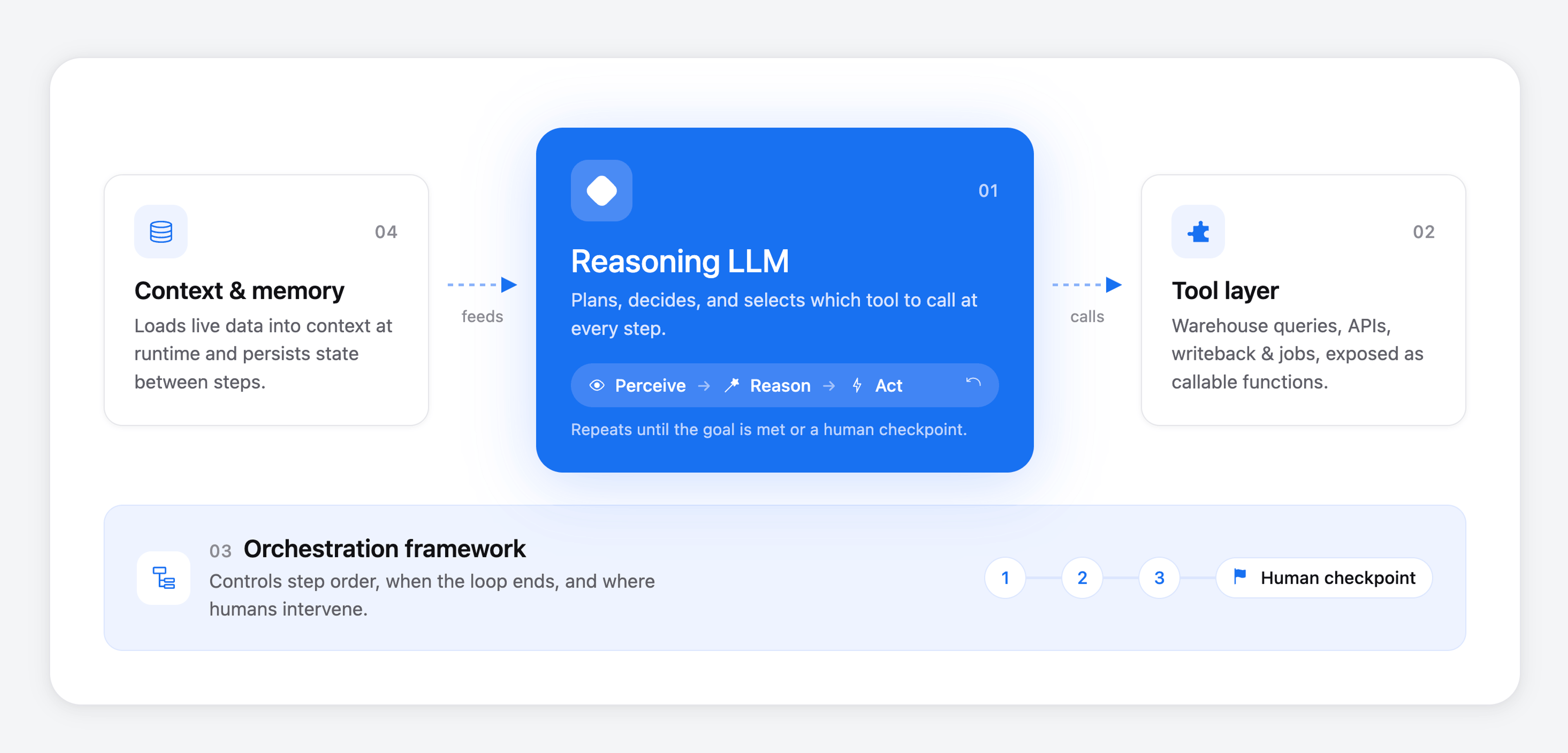
Agentic workflows depend on a small stack of technologies working together.
- A large language model (LLM) that handles reasoning, planning, and tool selection at each step.
- A tool layer that exposes warehouse queries, APIs, writeback operations, notifications, and existing scripted jobs or pipelines as callable functions that the agent can invoke.
- An orchestration framework (often a predefined code path or graph) that controls how steps connect, when the loop terminates, and where humans intervene.
- A context and memory layer that loads relevant data into the LLM's working context at runtime and persists state between steps.
- A governance layer that enforces permissions, logs every action, and bounds what the agent can read or write.
How these five pieces fit together is often the key factor that differentiates an agentic workflow from other AI implementations.
How agentic workflows differ from chatbots, copilots, and scripted automation
Three factors separate agentic workflows from other AI implementations: who controls the execution, how the system handles failures, and how long it can run before a human has to step back in.
| System | Control flow | Error handling | Autonomy horizon |
|---|---|---|---|
| Scripted automation (cron jobs, pipelines) | Hardcoded paths defined in advance | Stops and requires intervention when inputs or schemas change | Runs to completion on a fixed schedule, but cannot adapt |
| Chatbots | User drives every turn with a prompt | Hallucinates plausible answers when it lacks data | Single response, no follow-through |
| Copilots | User drives, AI suggests the next action | User catches and corrects errors in line | One suggestion at a time, inside the user's session |
| Agentic workflows | The agent decides the next step based on observed results | Detects failed steps, retries, escalates, or rolls back | Multi-step execution across minutes or hours, with human checkpoints |
For BI teams, the practical takeaway is that legacy dashboards, chatbots, and copilots all stop somewhere short of action. Agentic workflows carry the work through to action on governed data. The two approaches aren't mutually exclusive, either: an agent can reason about a situation and then kick off a scripted automation to execute the deterministic part, layering adaptive judgment on top of reliable, repeatable execution.
The main types of agentic workflows
Agentic workflows are classified along two axes:
- Architecture: describing how steps are routed and how reasoning is distributed across LLM calls.
- Operation: describing how the agent triggers and how much autonomy it has at runtime.
Most real deployments combine choices from both axes.
Architectural workflows: routing, hierarchy, and computational design
The choice of architecture design for an agentic workflow depends on whether the tasks the agent(s) will handle are predictable, parallelizable, or open-ended.
- Sequential chaining: Each LLM call processes the output of the previous one in a fixed order. It suits predictable, high-stakes tasks like multi-stage report pipelines (extract, verify, format) where each stage must gate the next and traceability matters more than flexibility.
- Parallelization: Multiple LLM instances run at the same time, either splitting independent subtasks (sectioning) or running the same task repeatedly to aggregate confidence (voting). This is the workhorse for latency-sensitive work and for any task where a second opinion improves accuracy.
- Orchestrator-workers: A central LLM decomposes a task on the fly and delegates subtasks to worker LLMs at runtime, with the input determining the subtask list rather than predefined code. It's the right architecture when the team doesn't know the workflow until the agent sees the data.
- Evaluator-optimizer: One LLM generates a response, a second evaluates it against explicit criteria, and the loop continues until the response meets quality thresholds. It earns its keep on tasks where iterative refinement improves output, such as code generation or analytical summaries.
- ReAct (reasoning + acting): The LLM interleaves reasoning traces and action steps in a single loop, directing its own process without a predefined execution path. ReAct offers the most flexibility and is the hardest to govern, which is why teams usually pair it with strict tool scoping and iteration limits.
Most agentic workflows in production tend to blend multiple architectures. An orchestrator-worker setup might use evaluator-optimizer loops inside each worker, or wrap a ReAct agent inside a sequential chain that handles intake and writeback.
Operational workflows: how the agent runs and reacts
The same architecture can operate in very different modes depending on the task's risk profile and the level of human oversight the workflow demands.
- Autonomous: The agent operates independently at each step, without human intervention, escalating only when explicit guardrails are triggered. This mode suits high-volume, low-blast-radius tasks where review at every step would defeat the purpose.
- Collaborative: Multiple agents pursue a shared goal, either hierarchically (one leads, others execute) or horizontally (peers coordinate). This mode helps when the work spans domains that no single agent or context window can cover.
- Reactive: The agent waits for an explicit trigger, a user request, a webhook, a scheduled event, and follows defined paths from that starting point. Reactive agents are the easiest to govern because their surface area for unexpected behavior stays bounded.
- Proactive: The agent monitors goals, schedules, or environmental signals and initiates action without a user trigger. This mode is common in fraud detection and data quality surveillance, where waiting for a human to notice the problem defeats the purpose.
In practice, deployments shift between modes as confidence grows. A workflow often starts as reactive and human-gated, then becomes proactive and autonomous once the audit trail shows the team can trust it.
How an agentic workflow runs on your data
An agentic workflow runs as a loop on live warehouse data, with every pass touching governed data and every action tracing back to a human-approved scope. For BI teams, that loop determines whether the team can safely point the workflow at the warehouse in the first place. A single iteration moves through five stages:
- Sense: The agent pulls structured signals from the systems it can see (warehouse query results, API responses, prior tool outputs), keeping lightweight references and loading context dynamically at runtime rather than pre-loading every table it might need.
- Reason: The LLM decides what to do next, often through a ReAct loop where it produces a reasoning trace, picks a tool call, observes the result, and reasons again.
- Act: The harness executes the chosen step against real systems (a SQL query, a database write, a REST API call, a sub-agent invocation) and passes the result back to the next iteration. The agent can also kick off an existing scripted automation, like a scheduled pipeline or a validated script, when the task needs a guaranteed, repeatable outcome. It decides when to run the script; the script guarantees how it runs.
- Persist: Writeback commits outputs to durable storage (databases, Input Tables, audit logs) so downstream systems and humans can act on them. For BI workflows, this is what turns an analytical insight into an operational change.
- Check and repeat: The agent evaluates whether the step succeeded and whether it has completed the larger goal. The loop terminates on one of three conditions: the agent meets the goal, hits a maximum iteration or cost ceiling, or a human-in-the-loop checkpoint approves or rejects the result.
Termination conditions are one of the most important guardrails against runaway behavior, and every write needs to capture what the agent wrote, who authorized it, and which step in the reasoning chain produced it.
The core components required to build an agentic workflow
Four components have to be in place before an agentic workflow can run safely on business-critical data, and each maps to a control that your data and security teams already care about:
- Governed data access. The agent's service account should have read-only access to tables by default, and you should grant write access only when the workflow requires it. Warehouse-level permissions must enforce this, not application-layer logic alone, so the guardrail holds even if an attacker compromises the agent.
- A scoped set of actions. Excessive agency is a serious risk for LLM systems. Fine-grained access control that blocks any tool call outside the agent's permissions can stop a successful prompt injection from reaching sensitive operations.
- Validated step chaining. Every intermediate result needs validation and traceability before it moves downstream, or one bad step will corrupt every step that follows it. It is important to sanitize inter-agent communications and enforce limits on retries, costs, and tool chains.
- An end-to-end audit trail. A complete record must capture who authorized the agent, which tools and credentials it used, and how each action mapped to its approved scope, so the team can re-trace any decision in an audit or incident review.
Governance must cover the whole system from the start. Retrofitting controls after agents go live creates equal amounts of rework and exposure.
How Sigma enables agentic workflows on governed data
Sigma is the runtime layer to build and scale analytics, apps, and agents on live cloud data warehouse data. It sits between your warehouse and the AI tools generating against that data, turning the artifacts they produce (workbooks, AI Apps, agents) into production-ready software that inherits your existing governance.
For agentic workflows specifically, Sigma puts governed data access, scoped Sigma Actions, writeback paths, and audit trails in the platform BI teams use every day.
Infrastructure is where most implementations stall, and only 21% of organizations report having a mature governance model for agentic AI. Sigma resolves that maturity shortfall by running natively on Databricks, Snowflake, BigQuery, and Amazon Redshift, with Input Tables, layout elements, and actions available out of the box. With Sigma, every agent inherits warehouse permissions and row-level security, and routes activity through the customer's stack for control and lineage.
Sigma Assistant builds and analyzes in natural language
Sigma Assistant lets business users ask questions of their data and build applications in plain language, with every output landing as a real workbook element on a spreadsheet-like canvas they can inspect and edit without writing code.
Analyze with Sigma Assistant returns answers drawn from the warehouse, using endorsed workbooks and workbook content available to Sigma Assistant as context. Build with Sigma Assistant lets you build applications by describing what you want.
Sigma Agents combine analysis and action in a single workflow
A Sigma Agent is a custom workflow a builder configures inside a workbook and surfaces to end users via a chat element. The builder configures three things:
- Plain-English instructions defining the agent's role.
- The workbook data elements that the agent can read (tables, columns, dashboards).
- The Sigma Actions it can run (writeback, notifications, calculations, API calls).
Agents support interactive conversational use, human-in-the-loop workflows where the user approves each step before anything is written or sent, and autonomous scheduled runs in the background.
Agents run on live warehouse queries and write back to Input Tables
Sigma Agents are warehouse-native: they run on the customer's cloud data warehouse, write results back to Input Tables, and never require exporting data or switching tools to close the loop. Agents run on the customer's choice of models through their own stack, so Sigma provides no model of its own. Every change to an Input Table is captured in an audit trail covering the original record, the new record, who changed it, and when.
Agents inherit governance from the warehouse
Sigma Agents inherit five layers of control out of the box:
- Warehouse governance
- Sigma data model governance
- Roles and permissions (the agent inherits the running user's permissions)
- Workbook-level grants
- In-agent scoping
Sigma generates and runs SQL queries against the connected warehouse. IT retains full visibility and control, while business teams gain speed and flexibility.
Get started with agentic workflows on Sigma
The fastest way to learn what an agentic workflow can do for your team is to ship a narrow one on live warehouse data, with governance, writeback, and audit logging intact from the first run. Pick a single recurring question your analysts answer manually, write down the data the agent needs to read and the actions it needs to take, then build it in Sigma.
From there, the same approach extends to higher-stakes work: anomaly investigation, exception routing, account-level outreach, anything where today's analysis ends in a handoff that an agent could complete on governed data.
Get a demo or try Sigma free to build your first agentic workflow on governed data.