Governed down to the credential: introducing Sigma's secret manager integration

Sigma's secret manager integration is in public beta today, with support for HashiCorp Vault and AWS Secrets Manager. Instead of storing the passwords, private keys, and OAuth secrets Sigma uses to authenticate, Sigma can now retrieve them from a secret manager your security team already runs.
How the secret manager integration works
The flow is short: link your preferred secret manager to your Sigma organization, add your secrets, and use them wherever Sigma needs to authenticate. Secrets are configured per connection, so you can start with one and expand from there.
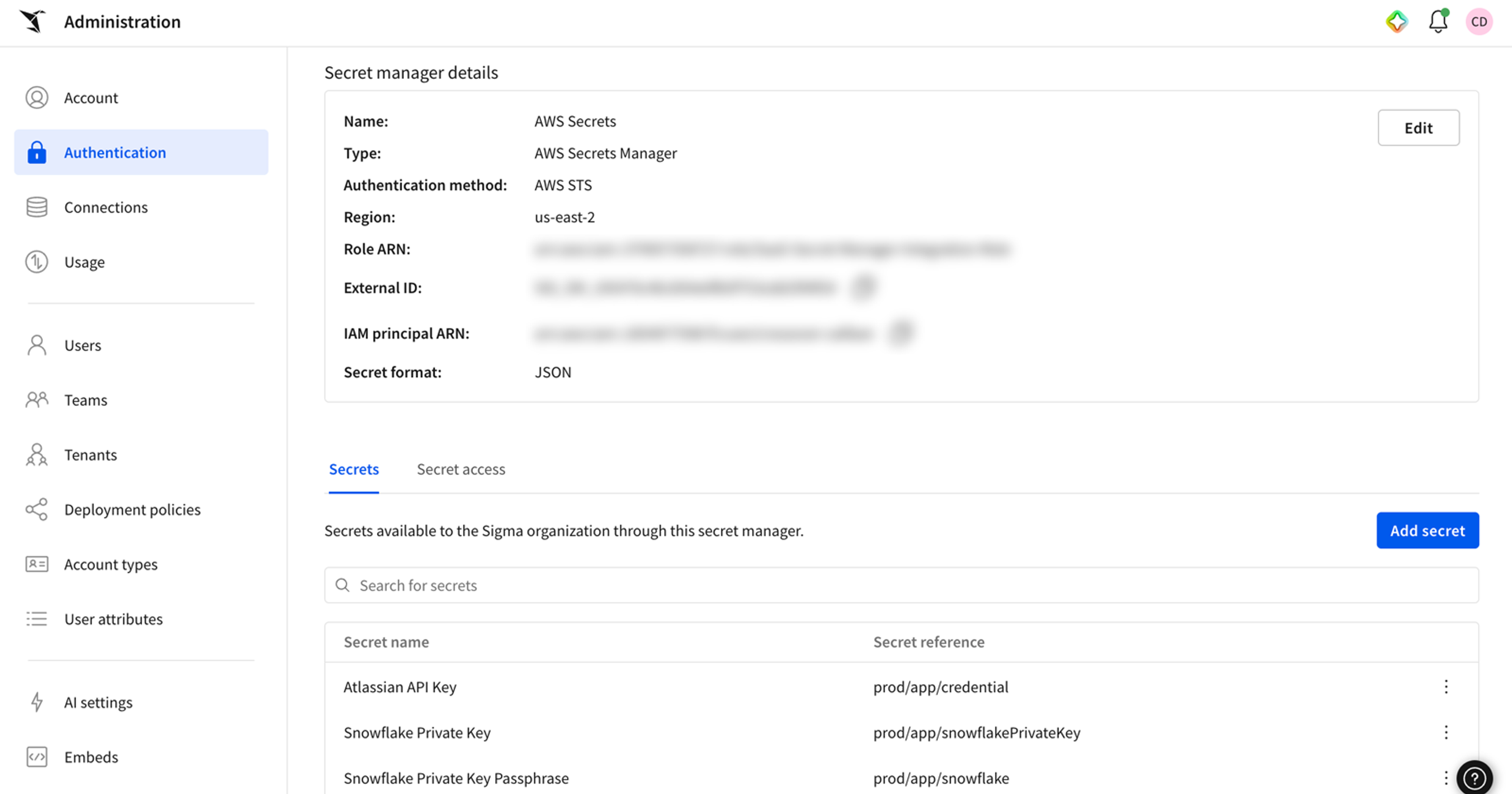
The public beta supports HashiCorp Vault and AWS Secrets Manager, across three kinds of credentials:
- Warehouse connector credentials, including passwords, private keys, and OAuth secrets
- API connector credentials, used when apps call an external API
- MCP tool credentials, used by Sigma agents to reach external systems
From then on, the credential behind your Sigma connection behaves like every other credential you manage. Rotate it on your own schedule and Sigma picks up the change. Revoke it and Sigma can no longer retrieve it.
Why we built the secret manager integration
Retrieving credentials is more secure and scalable
Every SaaS platform that touches your data needs a credential to get in: a password, a key pair, an OAuth client secret. In many cases, each vendor opts to store its own copy. But that means a security engineer at a large enterprise ends up maintaining a credential inventory across dozens or hundreds of vendors, each on its own rotation schedule and its own access model. A platform team that already rotates a warehouse key pair on a fixed schedule has to remember to also update it inside platforms like Sigma by hand, which adds one more manual step in an otherwise automated process.
The scalable solution to this headache is adding a secret manager integration to the product. Most SaaS platforms don't do this though, because building a first-class secret manager integration is a major investment, and the demand is concentrated in large, security-conscious enterprises. But at Sigma, this integration aligns directly to our philosophy around security and governance.
Sigma inherits the controls you already run
From day one, Sigma was built to run on your cloud data warehouse (CDW) directly rather than on a copy of your data. Most analytics vendors take a reverse approach: they extract data from the CDW into their system for users to run analysis on. But that means the data in those systems is now a copy, and every copy comes with a second set of permissions, a second refresh schedule, and a second thing to explain to an auditor.
That's a governance decision as much as an architectural one. At Sigma, our approach that started with analytics has broadened to include applications and agents, all running on the same connection. Access is enforced at query time, so row-level and column-level policies carry into every workbook, app, agent, and AI query built on it, including the ones nobody has built yet.
Everything we've built since day one has extended the same principle: where sensitive material should stay in your systems, it does.
- Writeback goes through Input Tables, which create real tables in your warehouse instead of a store inside Sigma.
- AI and agents run on your warehouse compute and inherit the permissions already in place.
- Metric definitions can come from where your team already maintains them, including the dbt Semantic Layer, rather than being rebuilt in a modeling layer only Sigma can see.
- Customer-managed keys keep the encryption keys in your hands.
- More recently, Tenants extended the same thinking to Sigma's own internal connections, making isolation and inheritance between connected Sigma environments something the architecture guarantees.
Secret manager integration follows the same pattern as the rest of Sigma's architecture: you keep control of what a vendor would normally ask to hold. It is:
- Governed by default: Access policies apply at the connection, so linking a secret manager doesn't change how row-level security, column masking, or audit logging work.
- Built on what you already run: Sigma connects to the secret managers, warehouses, and identity providers you've already deployed, rather than asking you to adopt a Sigma-specific store.
- Revocable on your terms: Rotate or revoke a secret in your own vault and Sigma's access changes immediately. No separate request to Sigma required.
Get started
The integration is currently in public beta. If you're already a Sigma customer, an admin can link a secret manager today. Learn more in these guides:
- Set up secret manager integration (documentation)
- QuickStart: managing secrets with HashiCorp Vault
- QuickStart: managing secrets with AWS Secrets Manager
New to Sigma? Start a free trial to try it in your own org, or request a demo to see how it fits into your security review.
Frequently asked questions
Which secret manager platforms are supported?
HashiCorp Vault and AWS Secrets Manager are supported today.
What secret types in Sigma can be used with a secret manager?
Warehouse connector credentials (passwords, private keys, and OAuth secrets), API connector credentials, and MCP tool credentials can be used with a secret manager.
Does Sigma store a copy of the credential?
No. Sigma retrieves the credential from your secret manager at the moment it needs to authenticate.
What can I manage directly from my secret manager?
You can manage rotation, revocation, and usage monitoring, all without a separate request to Sigma.
How is this different from storing a credential in Sigma directly?
A credential stored in Sigma is always encrypted and access-controlled. The difference is location: with the integration, every credential lives in one store, on one rotation schedule, under one set of access policies, with one audit trail your team already owns. That's what makes a credential policy enforceable across hundreds of vendors.
What happens when I rotate or revoke a secret?
The credential behaves like every other credential you manage. Rotate it on your own schedule and Sigma picks up the change. Revoke it and Sigma can no longer retrieve it.
What do I need to set it up?
Adding a secret manager on the Sigma side is easy: link the store to your organization, add your secrets, and reference them per connection. Configuration on the AWS or HashiCorp side is covered in the QuickStarts linked below.