Sigma Tenants is Generally Available


Today we're announcing the general availability of Sigma Tenants. Sigma Tenants lets you split a single Sigma organization into fully isolated environments. These isolated environments can operate with their own users, data, and content while remaining connected to a parent organization that maintains governance and visibility in a single place.
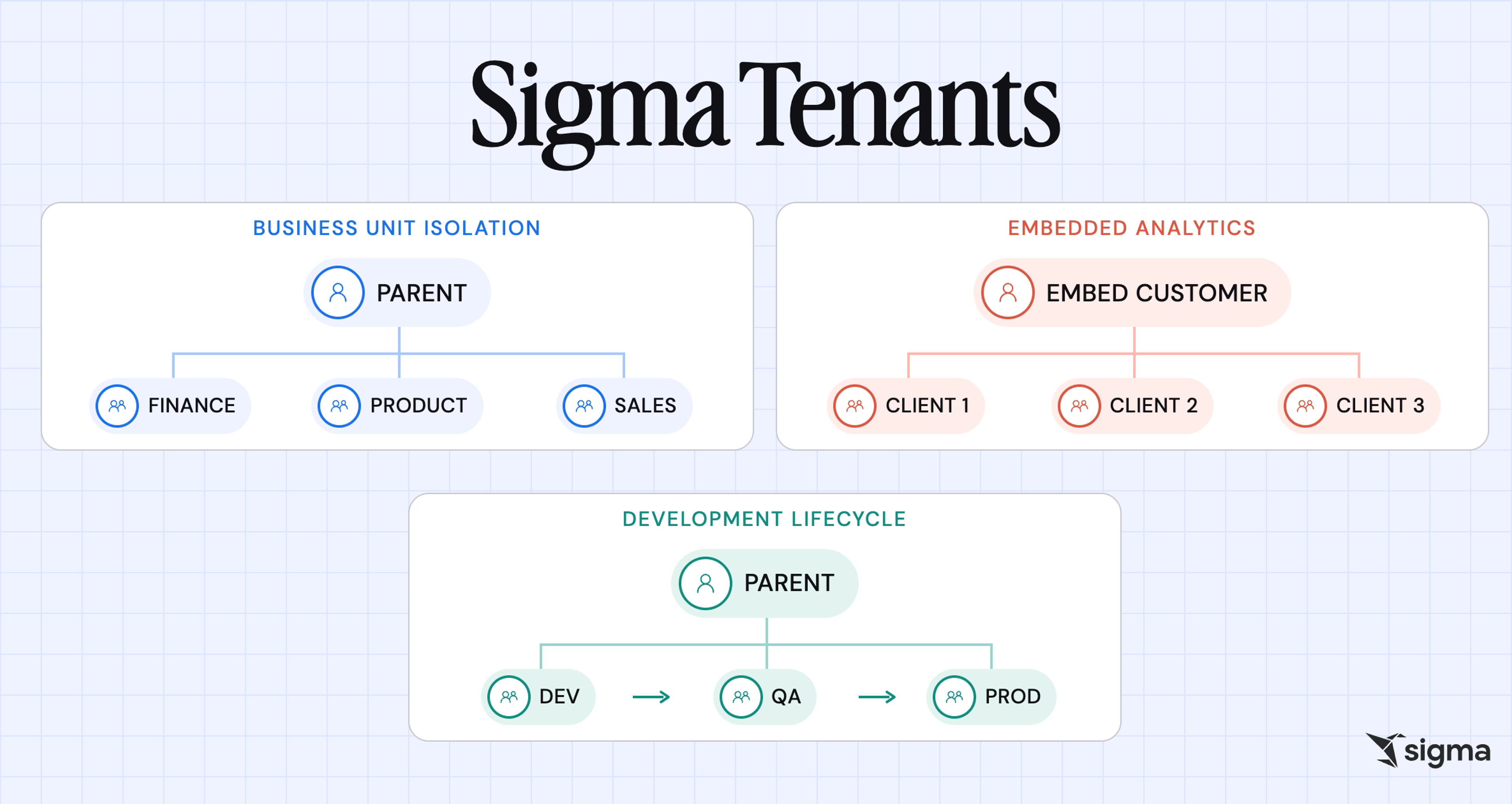
There are many applications for Sigma Tenants. Common use cases include:
- Dedicated Sigma accounts for every business unit and region
- Running dev/staging/prod environments
- Offering an embedded platform with fully isolated instances for each of your customers
This release adds 4 capabilities for running tenants at scale. Read on for what's new and how to turn it on.
Why aren't permissions enough for data isolation?
Typically, permissions decide who can see what inside a single organization. Permissions get inherited, copied, and reconfigured by anyone holding the rights to change them, so they can't guarantee that two business units will never see each other's data. By adding architectural isolation, each group is placed in a separate organization, ensuring that misconfigurations in one group can't affect another.
Enterprise IT usually starts with configuring teams and permissions. For a Financial Services organization, this might mean one group for wealth management, another for investment banking, and so on. Keeping those groups apart is a different problem from guaranteeing they can never see each other's data, no matter what permission changes happen later. This is where Tenants matter.
This problem extends beyond the Financial Services example shared above. It also applies to Product and Engineering teams building embedded analytics and applications. An embedded product often needs to guarantee isolation for every customer, and configuring it by hand across hundreds of customers means hundreds of chances to get it wrong.
Sigma Tenants makes each environment a complete Sigma organization with its own users, data, and content, governed from a single parent organization. Isolation holds regardless of what anyone does to permissions inside it, and standing up the 100th tenant takes the same API call as the first.
4 new Sigma Tenants capabilities in this release
1. Organize and troubleshoot deployments at scale
As the number of tenants under a parent organization grows, so does the number of documents being deployed to them. You can now organize deployed content into folders, view a dependency list showing how documents relate to each other before you deploy, and control everything through a dedicated deployment interface to manage those dependencies in one place.
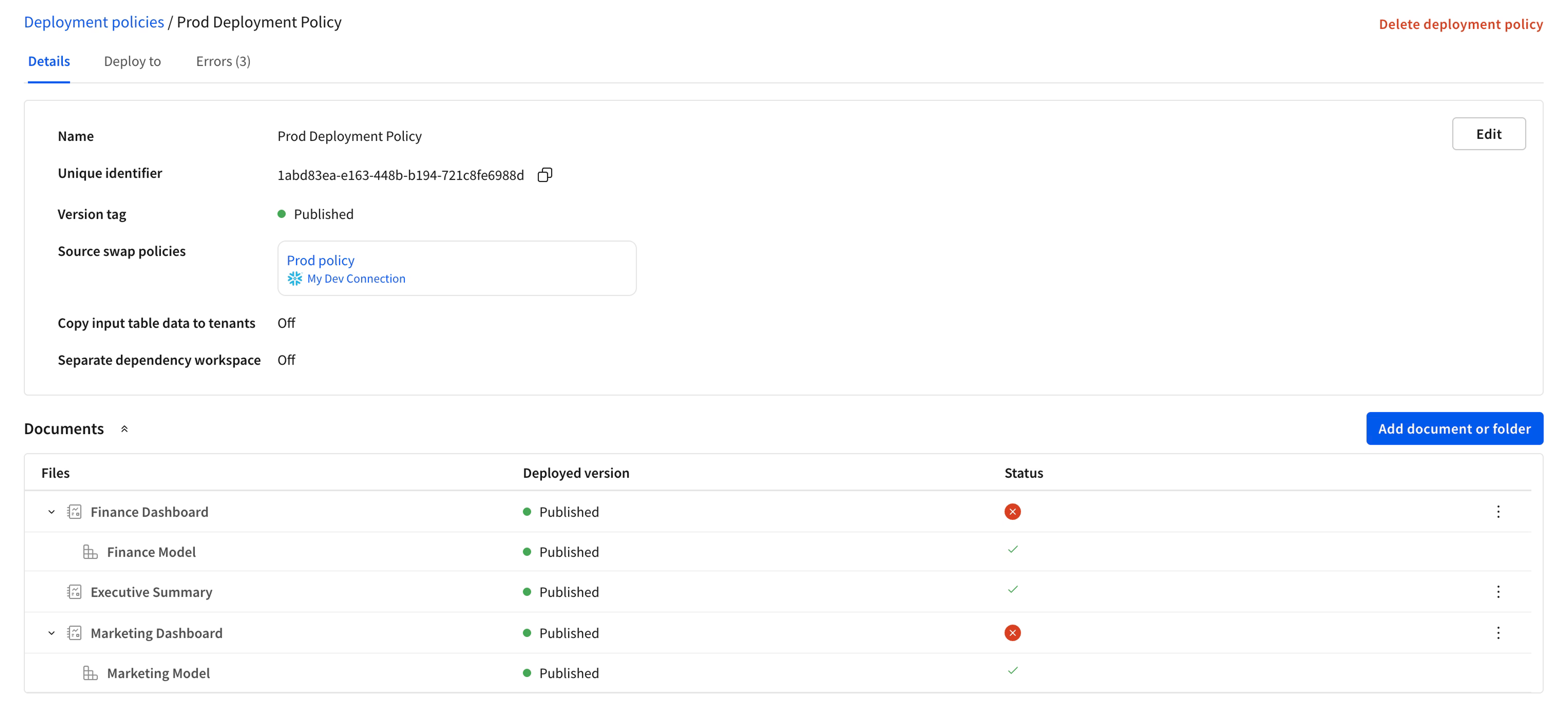
This way, admins managing dozens or hundreds of tenants get a clearer picture of what's moving where, and spend less time chasing down why a deployment failed.
2. Deploy documents with Input Table data and other dependencies
Deployments now support deploying documents across tenants with Input Table data and other dependencies, such as user attributes, applied for row and column-level security.
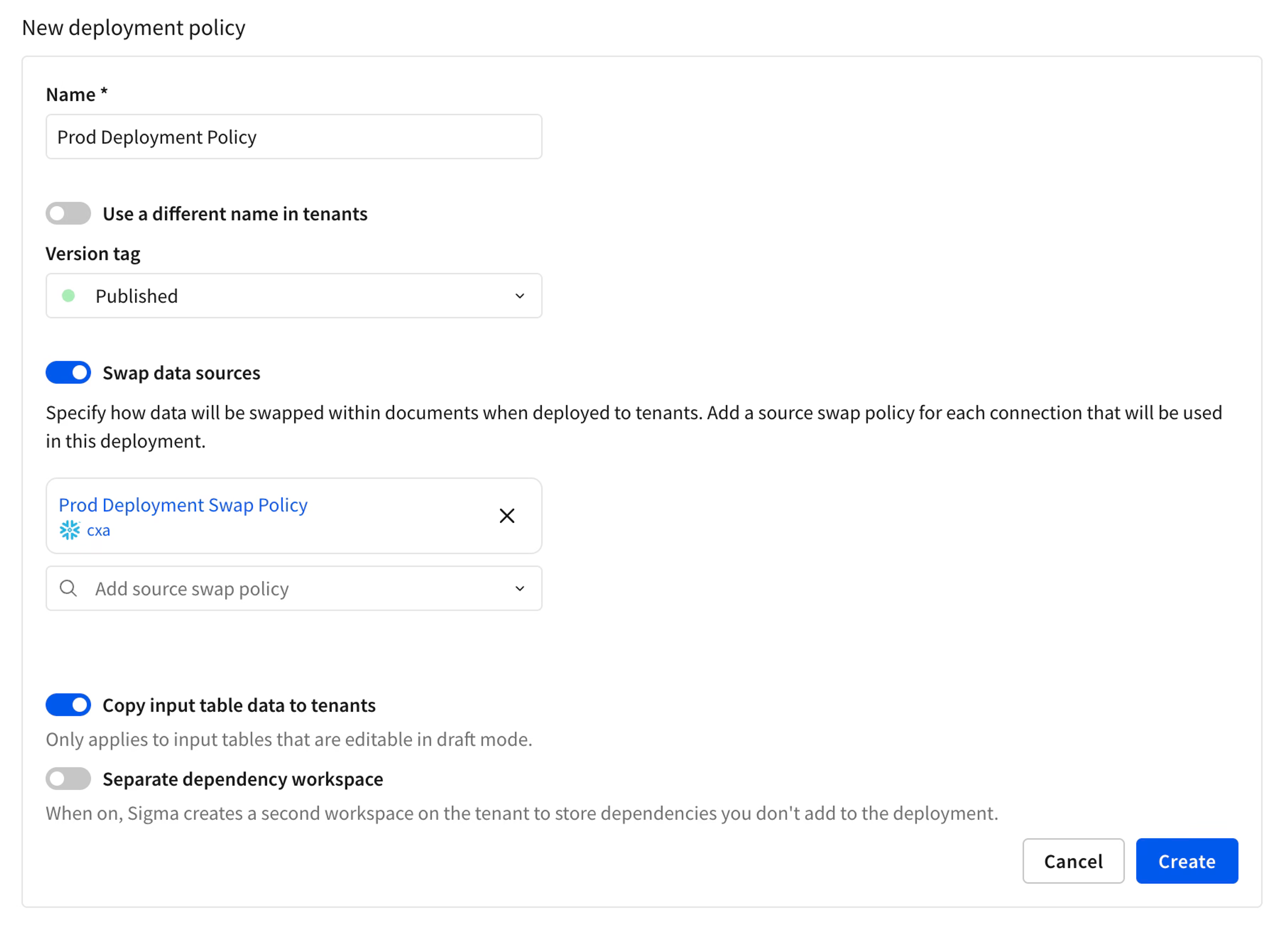
This allows sending tenants complete and secure content in a single deployment, instead of rebuilding parts of it manually in each tenant after the fact.
3. Monitor every tenant's status and activity
The Administration portal already shows the status of every tenant and its deployments. Tenant organizations now also support usage analytics and audit logging, extending that visibility to activity inside each tenant. Audit logging is enabled per tenant rather than inherited from the parent organization.
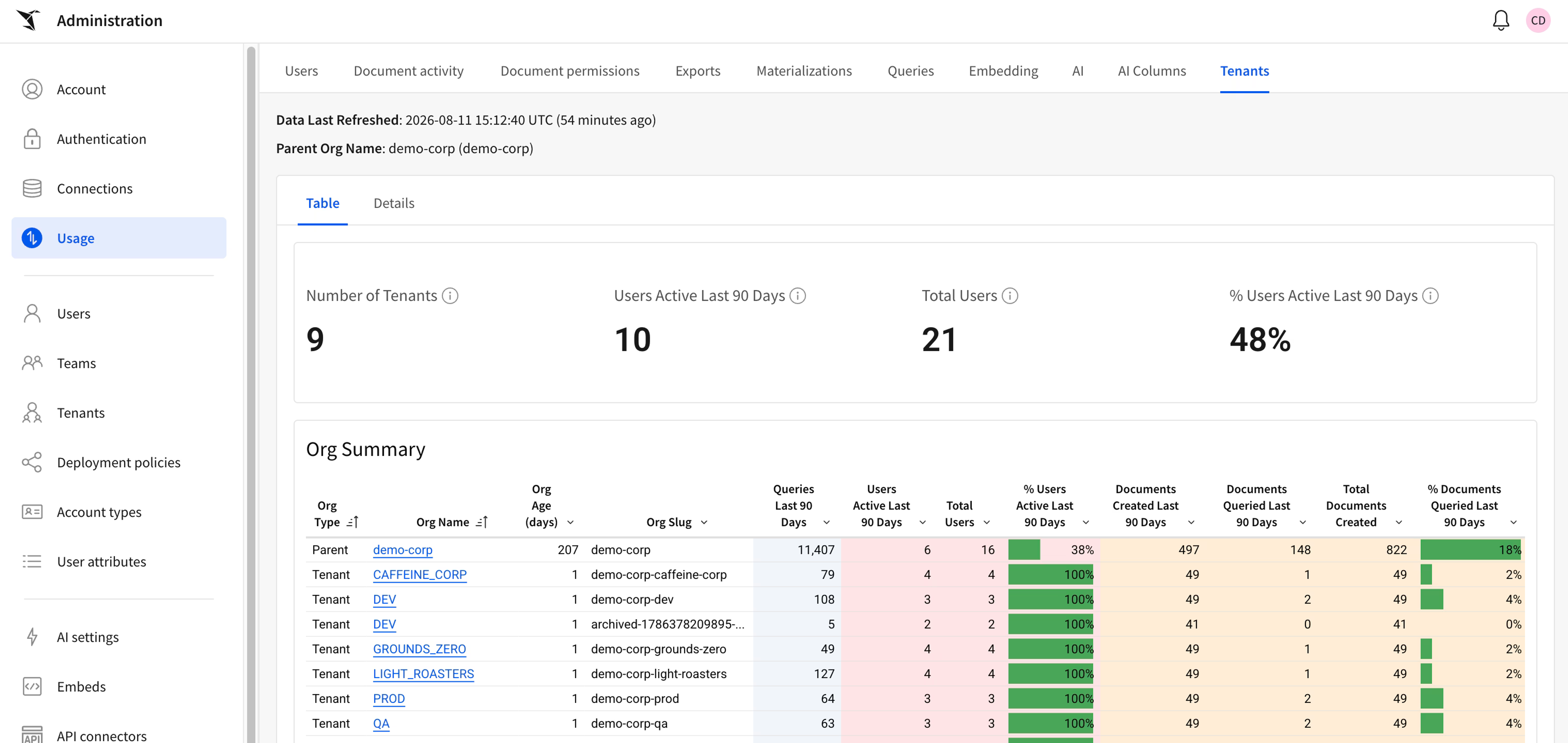
Parent organizations can check a tenant's health and activity in one place, without asking each business unit or customer to report back separately.
4. Give embedded tenants full workbook interactivity
Embedded tenants now support the same interactivity as any other Sigma workbook, so customers using Sigma inside another product get an experience that behaves like the rest of Sigma.
How do deployments work in Sigma Tenants?
- Define a deployment policy. A deployment policy specifies who, what, and how documents get sent to a tenant organization. Any tenant can deploy directly to another tenant, which is what makes a real development, staging, and production pipeline possible without routing every promotion back through a central team.
- Publish. Publishing a workbook or data model deploys the changes to tenants according to that policy.
- Manage and monitor from the parent organization. Folders, the dependency list, tenant status, and audit logs keep deployments organized and visible as the number of tenants grows.
Why Sigma Tenants are the best option for isolating data and centralizing governance
Sigma Tenants isn't a permissions layer on top of a shared organization. Each tenant is its own Sigma organization, with its own users, data, and content, connected to a parent organization that centralizes governance while allowing each tenant to operate independently. Three properties follow:
- Governed by default: Deployment policies control exactly what moves to which tenant, and the parent organization can see every tenant's status and, now, its activity, without extra setup.
- Isolated by architecture: Tenants aren't a filtered view of shared data. They're separate organizations, so isolation holds regardless of how permissions are configured elsewhere.
- Built for embedding at scale: Interactive, isolated tenants and programmatic APIs mean a multitenant product can grow to hundreds of customers without hundreds of one-off configurations.
That combination already shows up across a wide range of industries: Hundreds of Sigma customers are running thousands of tenants across financial services, healthcare, insurance, technology, and many more industries.
Get started with Sigma Tenants
Sigma Tenants is generally available now. If you're already a Sigma customer, talk to your representative about setting up Sigma Tenants for your organization. New to Sigma? Request a demo to see Tenants alongside the rest of the platform. Learn more with:
- Sigma Tenants Documentation
- Sigma Quickstart Guide: Managing Isolated Organizations
- Sigma Tenants REST API reference
Frequently asked questions
What's the difference between a Sigma team and a Sigma tenant? A team groups users within a single Sigma organization. A tenant is an entirely separate Sigma organization, with its own users, data, and content, linked to a parent organization.
Can tenants share content with each other? Yes. Content stays isolated by default, but a parent organization can intentionally connect tenants and share documents between them.
What can the parent organization see across tenants? The Administration portal shows the status and health of every tenant and its deployments. With audit logging enabled for tenant organizations, a parent org can also see activity inside each tenant, all without asking a business unit or customer to report back separately.
How do I control what gets deployed to which tenant? Deployment policies define who, what, and how documents get sent to a tenant. Publishing a workbook or data model deploys changes according to that policy.
Does this work with embedded analytics? Yes. Tenants pair with Sigma's embed capabilities, and embedded tenants now support the same interactivity as any other Sigma workbook.
Can I use tenants for a development, staging, and production pipeline? Yes. Tenants work as isolated environments for any purpose, not just for separating business units or embedded customers, and are commonly used to keep dev, staging, and production genuinely separate.