How to Use AI for Data Analysis: Capabilities, Workflow and Trusting the Output

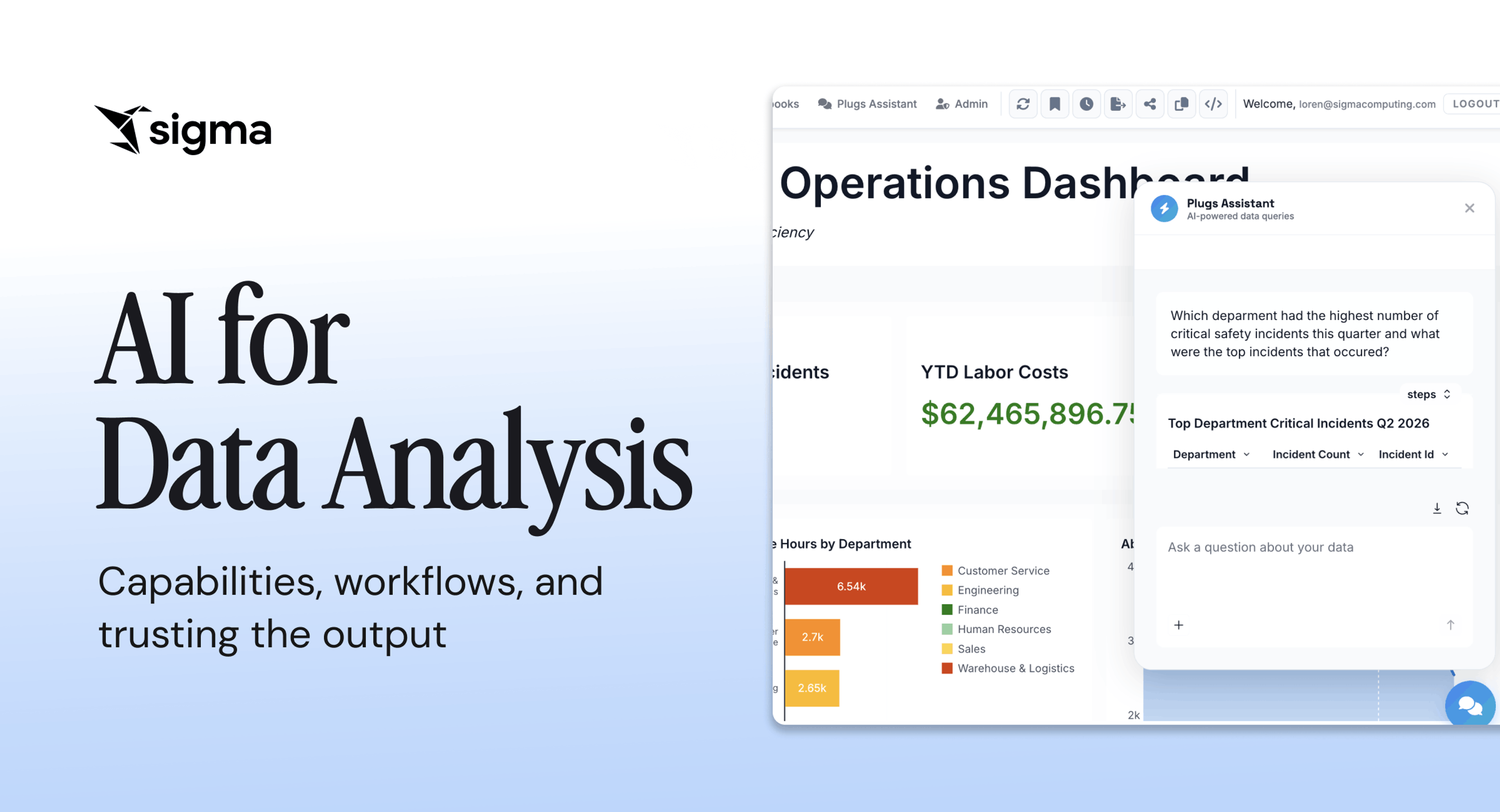
You’ve probably seen one of those demos in which someone types a question in plain English, a chart appears, and the answer looks useful. You want that same experience on your own data, against the numbers your team actually trusts.
AI can clean messy data, write queries, build charts, and summarize what the numbers mean. The harder part is putting those capabilities into production: governed, repeatable, and defensible.
This guide is a practical walkthrough on using AI for data analysis and moving from one-off analyses to a workflow your team trusts.
Key takeaways
- A repeatable AI data analysis workflow requires clean modeled data, live warehouse queries, inherited access controls, and an audit trail built in from day one.
- Treat AI output as a fast first draft, not a finished answer. Validate every result against a number you already trust, inspect the query path, and keep a human reviewer in the loop with full context.
- Sigma builds the workflow, governance, and audit trail into your AI data analysis from the start, so your team can begin with one trustworthy question and expand to more questions and teams without rebuilding the underlying foundation.
The role of AI in the data analysis workflow
AI shows up in five distinct categories of analysis, each mapped to a different question: what happened, why, what’s next, what to do, and how to act on the answer.
Descriptive analysis: what happened
Descriptive analysis summarizes historical data into the metrics, aggregations, and breakdowns that tell a team what occurred. Trying to figure out what happens is often where natural-language querying shows up most. You type a question in plain English, AI translates it into SQL, runs it against your warehouse, and returns structured results.
Diagnostic analysis: why it happened
Diagnostic analysis surfaces the patterns, anomalies, and drivers behind a change you’ve already noticed or missed. These systems continuously monitor data, flag changes, and generate plain-language narratives explaining the shift.
Predictive analysis: what will happen
Predictive analysis uses machine learning models trained on historical data to forecast outcomes such as demand, churn, and risk. Accuracy depends on the quality and completeness of the historical data feeding the model, which is why teams that skip the data foundation see forecasts drift fast.
Prescriptive analysis: what to do about it
Prescriptive analysis recommends an action based on the data and the predicted outcome. Where predictive analysis tells you a customer is likely to churn, prescriptive analysis suggests which offer to extend or which intervention is most likely to retain them. The recommendations are only as good as the constraints and business rules someone has given the system to work within, and setting those is the human-in-the-loop work that determines whether the recommendations are usable.
Agentic analysis: how to act on the answer
Agentic analysis plans and executes multi-step workflows, then acts on the results, moving beyond answering questions to changing the underlying state. Instead of returning a number for a person to interpret, an agent might update a forecast, send a notification, or write back to the warehouse on its own.
How to use AI for data analysis: a step-by-step process
A reliable AI analysis workflow typically follows six steps. Connect to governed data, frame the question precisely, generate the analysis, inspect the query path, validate against a trusted number, and route the result into a decision.
Step 1: Connect AI to a governed, trusted data source
The AI layer needs read access to a warehouse that already enforces permissions, metric definitions, and table relationships, not a raw pile of unmodeled tables. While it’s possible to connect AI to a spreadsheet or CSV, those sources introduce the same challenges around inconsistent definitions while making collaboration more difficult due to stale data and a lack of governance. Connecting to raw tables without consistent metric definitions creates similar risks, as the AI has no way to choose among three different definitions of “active customer” across three different schemas.
The practical work here is mapping the AI to a semantic layer or modeled views that encode your team’s agreed-upon definitions, then verifying that the AI inherits the same row-level security your warehouse already enforces.
Step 2: Frame the question in plain business terms
Specific business questions produce specific answers. Vague prompts produce vague or fabricated ones. “Show me revenue” is weaker than “Show me monthly recurring revenue by product line for Q1 2026 compared to Q1 2025.”
A specific question acts as a structural check against fabricated outputs. The more concrete the time window, dimension, and metric, the less room the AI has to guess. In practice, this means teaching business users to frame questions with a metric, a dimension, and a time range, just as they would brief an analyst.
Step 3: Let AI generate and run the analysis
Standard AI analysis platform exposes the generated SQL alongside the answer, so that you can verify every result end-to-end. The AI translates the question into a query, executes it against the warehouse, and returns results.
More advanced systems show you the exact query that ran, the tables it touched, and the filters it applied. If the system hides the query, you have no way to tell whether the AI joined the right tables or filtered on the right column. You can’t defend a number you can’t verify.
Step 4: Check how the AI reached the result
Inspect the tables, joins, filters, and transformations behind every AI-generated number before you trust it. Lineage comes down to the same questions every time. What data contributed, where it came from, and what transformations the AI applied. If you can’t see the query path, you can’t trust the number, and you can’t explain it to a stakeholder who asks why this quarter’s churn figure differs from the dashboard they looked at yesterday.
Step 5: Validate the output against a number you already trust
Run the AI against a metric you already know cold, like last quarter’s revenue or last month’s active users, and compare the answer. If the AI returns the same number for the same question, your pipeline is working. If it returns a different number, you have a specific problem to chase: the query logic, the data, or the metric definition. This kind of validation builds confidence step by step and surfaces semantic mismatches early, before they reach a board deck.
Step 6: Turn the result into a decision or action
A validated answer only matters if it reaches a decision-maker or triggers the next workflow. An analysis that sits in a tab accomplishes nothing. The handoff might be a Slack message to a stakeholder, an updated forecast in the planning workbook, or an automated writeback to the warehouse that triggers downstream operations. Whatever the path, you have to close the loop. Teams that stall here end up with a library of correct answers that no one acted on.
Best practices for using AI for data analysis
Even with a clean workflow, AI can return confident, fluent, and sometimes wrong answers. The teams that get dependable results treat AI output as a fast first draft and build a small set of habits around it.
- Keep a human reviewer in the loop with full context. Reviewers need the original question, the data sources queried, and the prompt used. Without that context, review becomes a rubber stamp instead of a real quality gate.
- Document the prompts and definitions that work. When a prompt produces a correct, validated analysis, version-control it the same way your data team manages SQL queries. The next person gets a template to build on, rather than rediscovering it from scratch.
- Inspect the query path behind every result. Check the tables, joins, filters, and transformations the AI used. If you can’t see the query path, you can’t trust the number or explain it to a stakeholder.
- Don’t mistake a confident answer for a correct one. AI can sometimes fabricate joins, misinterpret a metric definition, or apply the wrong filter and present the result with the same fluency as a correct one.
Taken together, these habits turn AI from a black box into a transparent collaborator.
How Sigma makes AI-powered analysis practical
Sigma is the runtime layer for building and scaling analytics, apps, and agents on live cloud data warehouse data. Sigma makes sure every artifact your team generates (workbooks, AI Apps, and agents) is governed, auditable, permissioned, and traceable from the moment of creation. Sigma delivers AI for data analysis through Sigma Assistant for analyzing and building, and Sigma Agents for combining analysis with action.
Sigma Assistant turns natural-language questions into governed analysis
Sigma Assistant is a single-governed AI interface for both analyzing data and building apps in natural language, available from inside workbooks and through the Sigma MCP Server in Claude and ChatGPT.
Analyze with Sigma Assistant answers plain-language questions using your data models, certified metrics, and endorsed workbooks as context. Answers are verifiable: you can inspect the query, trace it to the underlying table, and audit the analysis in a workbook.
Build with Sigma Assistant takes the same interface further. Describe an application or dashboard, and Sigma Assistant selects the data sources, prepares the data, builds the UI components, and wires them together.
Sigma Agents combine analysis and action in a governed workflow
Sigma Agents are customized agentic workflows scoped to a specific workbook, where a builder configures three things: instructions (a plain-English prompt defining the agent’s role), data access (the tables and columns the agent can read, inherited from the workbook’s security model), and the Sigma actions the agent can take.
Viewers interact through a chat interface, and the agent can write back to the warehouse through Input Tables, send notifications, run scenarios, or trigger any other Sigma action the builder configured, all within the governance model the builder set.
Every query runs live on your warehouse with no extracts
Formulas, filters, and AI queries in Sigma compile to SQL and execute inside your cloud data warehouse (Snowflake, Databricks, Amazon Redshift, or BigQuery), with no extracts, no data duplication, and no separate in-memory engine.
Sigma’s AI features run on your warehouse compute (such as Snowflake Cortex or Databricks model serving), so every answer inherits row-level security and lineage from the source. Sigma also validates queries before they execute, so malformed or randomly generated SQL never reaches the warehouse.
Access controls and governance stay inside your warehouse
Row-level security and column masking stay intact across Sigma Assistant and Sigma Agents, so the AI can’t access data that the user doesn’t have permission to access. Sigma Agents inherit the permissions of whoever calls them, which means a viewer asking an agent a question gets answers scoped to their own access. Sigma’s permissions model also automatically governs every workbook Sigma Assistant builds for the user.
Anyone can explore data in a familiar spreadsheet interface
Sigma’s interface looks and works like a spreadsheet, with 200+ calculation functions, pivot tables, and formulas that compile to warehouse-scale SQL. If you can write a SUM formula, you can query a billion rows of live warehouse data, without SQL, Python, or a proprietary modeling language. Sigma also offers SQL and Python for users who want them, but the spreadsheet UI is what opens the analysis to everyone else.
Get started with AI for data analysis on Sigma
The fastest way to see whether AI for data analysis can hold up in your stack is to try it on a question that actually matters to your team.
Start with a free Sigma trial, connect to your cloud data warehouse, and bring one specific question with you, like a weekly revenue reconciliation, a customer churn metric, or a pipeline forecast that your team currently waits days to get. Because Sigma runs every query live on your warehouse, the answer comes back governed by the row-level security and metric definitions your team already enforces, with the underlying query inspectable end-to-end.
From there, you can validate the result against a number you already trust, ask a follow-up question, save the analysis into a workbook, or wire it into a Sigma Agent that can act on the answer. If you’d rather see it in context first, book a demo to see how teams use Sigma Assistant and Sigma Agents with their own data.