Sigma Tables + Databricks Lakebase: The Foundation for Real-Time AI Apps


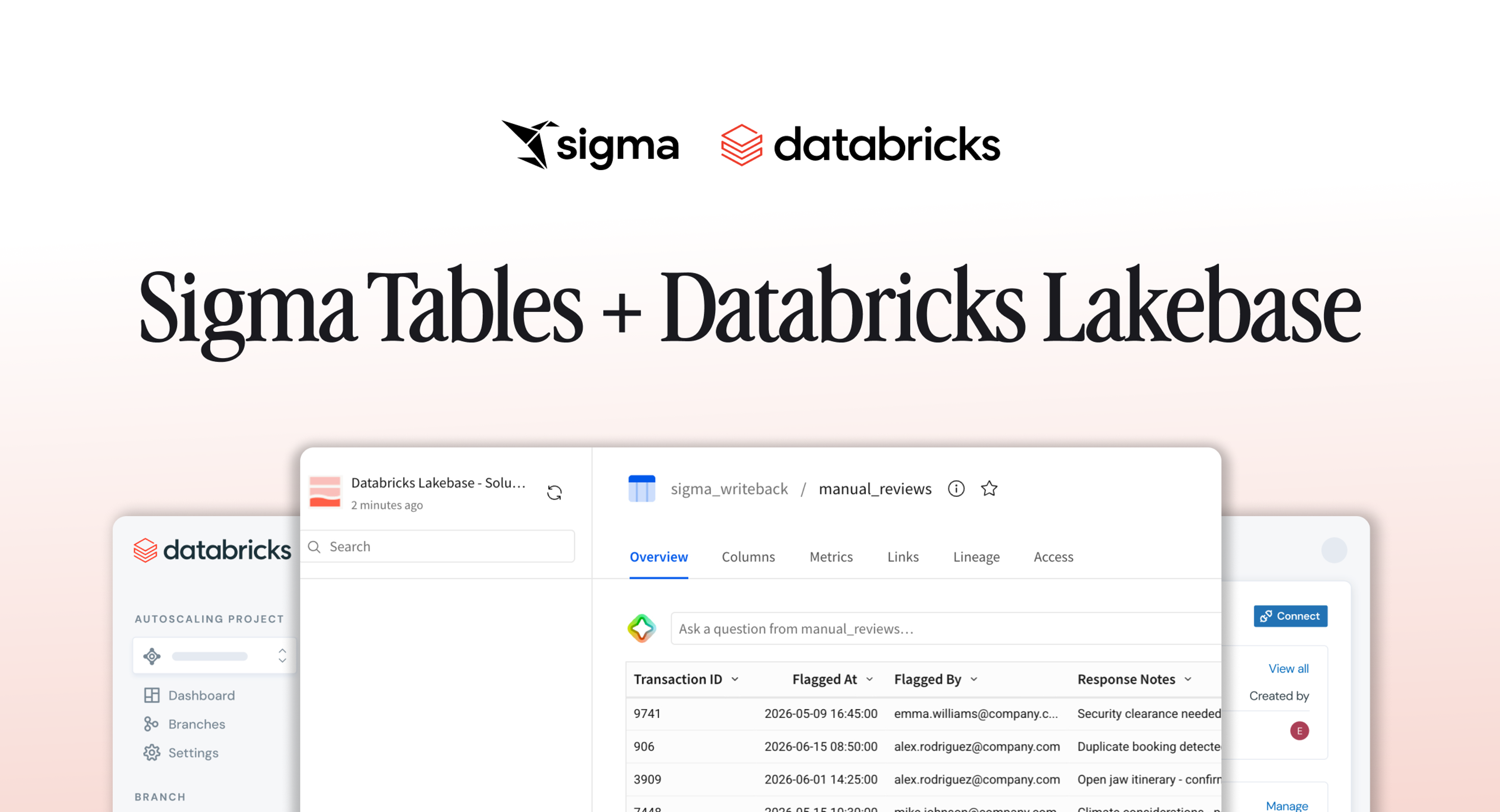
Enterprises have built governed, secure workflows on their Databricks data with Sigma for years. Sigma Tables with support for Databricks Lakebase brings reading analytical data and transacting with application data together in a single governed place, so every write is immediately available to the workflows downstream, enabling customers to build more complex AI Applications than they could ever before.
This blog walks through those releases and how they fit together. By the end, you'll have what you need to start thinking through Sigma + Databricks AI Apps of your own, like the ones DraftKings, Unilever, and Hospital for Special Surgery run today.
The Write Problem: Why Data Apps Have Always Fallen Short
Sigma Apps let teams build dashboards, applications and workflows directly on top of live warehouse data. For example, with custom AI Apps built in Sigma on warehouse data:
- A finance team can review and approve budget adjustments in context.
- An operations team can manage inventory, triage exceptions and flag anomalies.
- A customer success team can log renewal commitments alongside live account health data.
These are the kinds of apps that eliminate the round-trip between a dashboard and a separate system of record.
The challenge to build these types of workflows has been the write layer. Sigma's writeback functionality, Input Tables, addressed this for some low to medium complexity workflows, but the data is scoped to the workbook where the table lived. Another app couldn't reference it or write to it directly. A downstream pipeline couldn't treat it as a reliable source. Getting that data into a proper warehouse table required manual steps that broke the operational loop.
Sigma Tables is an evolution of Writeback that changes the architecture.
Sigma Tables: From Workbook-Scoped to Platform-Native
Sigma Tables are writable tables in Sigma backed by actual database tables in your Databricks environment. When a user edits a row, adds data, or updates the schema, Sigma writes that change directly to the underlying database table. The data doesn't live in Sigma; it lives in your warehouse, exactly where it belongs.
This is a meaningful shift from how writeback has traditionally been handled in BI. The conventional approach relied on staging tables, CSV exports, or workbook-scoped structures that never reached the warehouse in a clean, queryable form. A Sigma Table is a proper database table with a primary key, versioned, governed, and immediately queryable by any system connected to your data platform.
The same Sigma Table can be referenced across multiple workbooks, Sigma Apps, data models, and modules without any duplication or sync logic. Any external system with access to your data platform reads from it directly: dbt models, Databricks jobs, reverse ETL pipelines, and AI agents all treat it as first-class data.
Sigma Tables support Databricks connections across both analytical and operational layers. On the analytical side, Sigma Tables work with Databricks SQL for live queries against Delta tables at scale. On the operational side, Sigma Tables now work with Databricks Lakebase for transactional writes that power real-time app workflows. This post focuses on the Lakebase use case, but the dual-layer support is what makes Sigma Tables a full-platform capability on Databricks.
Databricks Lakebase: An Operational Database Native to the Lakehouse
Databricks introduced Lakebase at Data + AI Summit 2025 and reached general availability in early 2026. Lakebase brings fully managed, serverless PostgreSQL natively into the Databricks Data Intelligence Platform, governed by Unity Catalog, and built for the architectural demands of modern cloud-native applications.
The core innovation is the separation of compute from storage. In Lakebase, data lives in cloud object storage in open formats, while a serverless Postgres compute layer runs independently on top. This eliminates the traditional hard boundary between OLTP and OLAP that has forced teams to maintain separate systems for application data and analytical data, and then build pipelines to move data between them.
The performance specs matter for app builders: Lakebase provides low-latency read and write access with instant database branching and cloning for development environments, and the ability to scale to zero when idle. For teams building AI-driven workflows, Lakebase is also designed for agents. An AI system can spin up an isolated Lakebase instance, run experiments against a high-fidelity copy of production data, and write back results without touching live systems.
The Architecture: How Sigma Tables and Lakebase Work Together
Here is what the end-to-end pattern looks like in practice:
- User initiates a session in Sigma through a Sigma AI App, Workbook, or AI Experience in the Client Layer. Sigma's Services Layer handles authentication (SSO, OAuth, MFA), role-based permissions, observability, and query routing before any data is touched.
- Sigma Tables push down a query or write to Databricks. The Services Layer sends the operation through Unity Catalog, which enforces column-level security and access controls across both the Lakehouse (OLAP) and Lakebase (OLTP) compute layers. Analytical queries route to Databricks SQL; transactional writes from Sigma Tables route to Lakebase.
- Lakebase stores the write to cloud object storage. Data written through Sigma Tables is persisted to Lakebase Storage (S3, Azure, GCS) in open formats, making it immediately durable and available across the Databricks platform.
- Lakebase reads back from storage, enriched with Lakehouse data. Databricks is actively developing the ability to read directly from Lakebase Storage, which will allow Lakebase to serve queries from object storage and enable Lakehouse analytical data to enhance Lakebase tables.
- Databricks returns data to Sigma. Processed results, updated records, or outputs from workflows and AI agents flow back through the Services Layer.
- Results surface in the Sigma Client Layer. The updated data reaches the user's app, workbook, or AI experience, completing the loop.
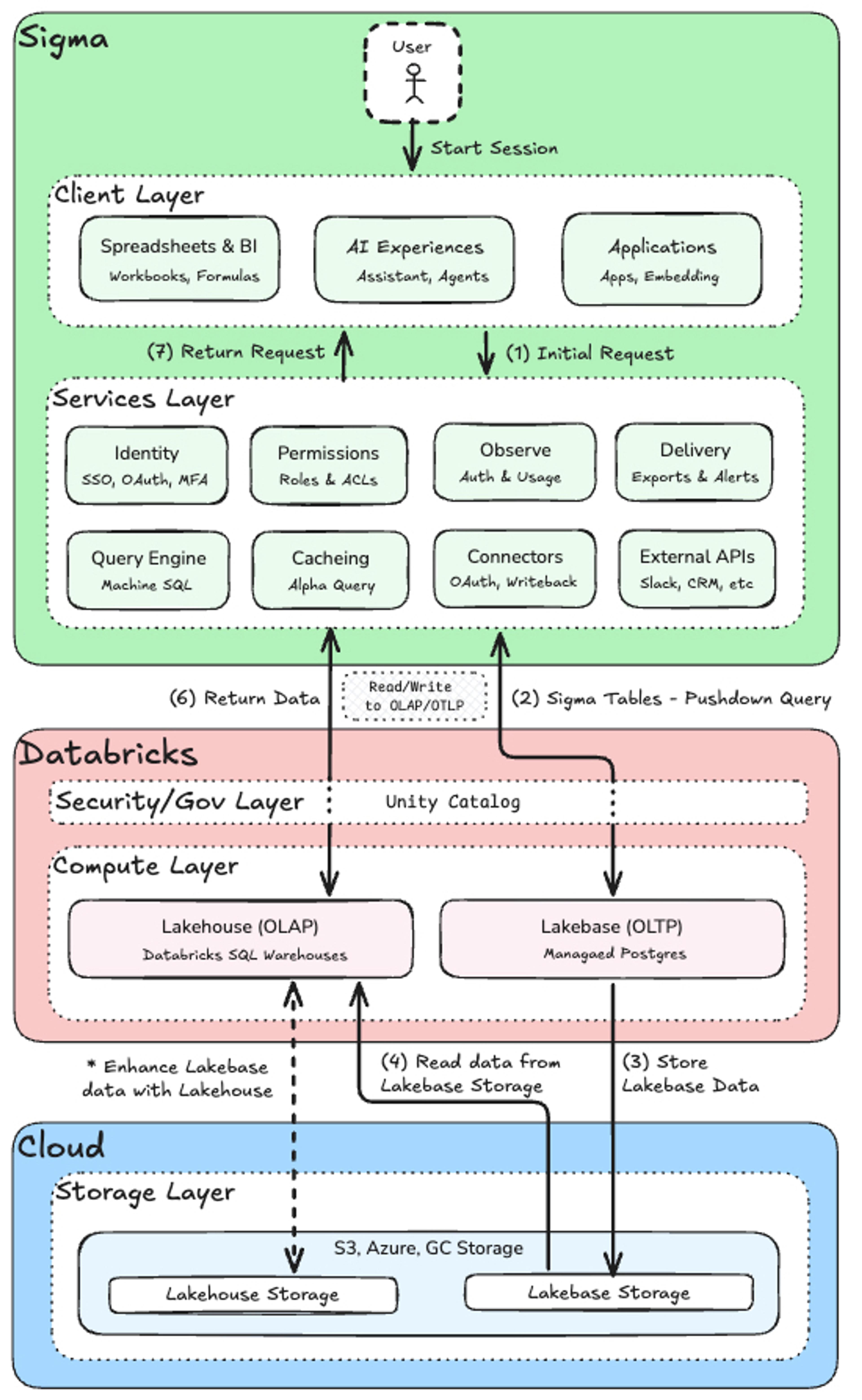
This closes the operational loop. The app isn't just displaying data; it's driving decisions, feeding processes, and receiving results back, all within a single governed data infrastructure.
Note: This architecture references a forward facing feature that Databricks is developing to seamlessly read/write data from Cloud Storage via OLAP and/or OLTP
Real-Time Apps in Practice
Exception Management with AI Escalation
An operations team reviews a live queue of flagged transactions inside a Sigma App. A user marks one as requiring manual review and adds a note. That action writes to a Lakebase table. A Databricks workflow reads the flag, runs a classification model, and writes a recommended resolution back to a separate table. The Sigma App surfaces the recommendation in near real time. The user approves it, writing a final disposition row. Every step is traceable, audited, and queryable.
Cross-Team Financial Planning
Finance, Sales, and Supply Chain each work in their own Sigma Apps, tailored to their workflows. All three write forecast adjustments to Sigma Tables backed by Lakebase. A Databricks workflow runs a reconciliation model on a rolling schedule, reading from all three input tables and writing a consolidated plan to Delta. Every team sees the latest version in their app, with no manual consolidation and no one emailing spreadsheets.
What makes both patterns work is that Sigma Tables and Lakebase remove the coordination overhead. There's no custom integration layer, no export-and-import cycle, and no permission gap between the app interface and the warehouse data.
Built for AI: Governance at the Speed of Agents
As organizations move from AI-assisted analysis to AI agents that actually take action, the write layer becomes as important as the read layer. Every output an agent produces, every recommendation it makes, needs to land somewhere governed and queryable if it's going to be trusted and improved over time.
Sigma sits naturally as the human-in-the-loop surface. Business users review, adjust, or approve what AI agents have produced, directly inside the apps they already use. Every approval, override, or correction is written back to Lakebase and becomes part of the governed data record. That feedback loop, when captured cleanly in the warehouse, is how AI systems improve with each cycle.
Lakebase's serverless architecture is built for agent-scale workloads. Agents can branch a Lakebase database for experimentation, operate against a production-quality copy of the data, and promote results back without operational overhead. Unity Catalog ensures that every interaction, whether from a business user in a Sigma App or an agent in a Databricks workflow, is subject to the same governance policies.
For data leaders, this is what makes the architecture defensible at enterprise scale. The data never escapes the governed perimeter. Writes from Sigma are audited. Reads by agents are logged. The chain of custody stays intact across every interaction.
Sigma & Databricks: A shared foundation
Sigma Tables on Lakebase is one part of a broader set of capabilities Sigma is building on the Databricks Data Intelligence Platform. Sigma connects to Databricks SQL for live analytical queries against Delta tables at any scale. It now connects to Lakebase for operational writes that feed real-time app workflows. The read and write layers work together on a single governed foundation.
This partnership reflects a shared conviction: the future of enterprise data isn't two separate stacks, one for analytics and one for operations, stitched together with pipelines. It's a unified platform where analysts, engineers, business users, and AI agents all operate on the same data, in real time, with full governance.
Sigma is committed to expanding our capabilities across the entire Databricks platform, from Lakehouse analytics to Lakebase-powered operational apps. As Databricks continues to evolve Lakebase and Sigma deepens the app-building surface, organizations will have a single governed layer where every business decision, whether made by a human or an AI agent, is captured, audited, and wired into downstream intelligence.
Ready to see it in action? Request a demo to learn more about Sigma on Databricks, or read about Sigma Tables in our launch blog.