Governing Sigma Agents with MCP Tools, Version Tags, Permissions & More

Building a Sigma Agent is simple. You can build a custom agent with natural language, or leverage an agent built by your data/engineering team in your cloud data warehouse.
But building the Sigma Agent is just the first step. Getting that agent safely into production, with the right controls and permissions in place, is just as important.
Last week in our “Month of Agents” series, we introduced the new Agent Builder Assistant (“ABA”) for building Sigma Agents. This week, we go deep into the many ways that Sigma governs agents. In this week’s episode, you’ll see how to:
- Promote agents from development to production using a software development life cycle (SDLC) workflow with version tags
- Orchestrate warehouse agents as tools
- Extend agents with open-ended MCP connectors to external platforms like Google Drive
- Maintain user permissions and governance
Watch the video above to see it all in action, or read the accompanying transcript to understand how our Product and Engineering teams approached the governance framework for Sigma Agents.
As a public beta feature, Sigma Agents are accessible by default to any Sigma customer with an active AI provider enabled. Reach out to your Sigma representative with any questions. If you’re not a Sigma customer yet, you can request a demo or start a free trial to get started.
Our “Month of Agents” series continues next week with a discussion of data models as the primary source of truth for your agents, plus enhanced metrics support, so they always have reliable, structured data for analysis. Follow Sigma on LinkedIn, X, or YouTube to see the updates as they come.
Read on to see the full video transcript.
What does governance look like for Sigma Agents?
Zalak: Hey, everyone. My name is Zalak Trivedi. I’m a Director of Product at Sigma. Welcome back to our Agent series. Last week we used our Agent Builder to build an agent, but building is probably the easy part. Today we’re going to talk about governance, permissioning, and using warehouse agents as tools. Welcome, Joseph and Joey, to this episode. How about we see it in action?
Joseph: Yeah, let’s do it.
Demo: How do warehouse agents work as tools inside Sigma?
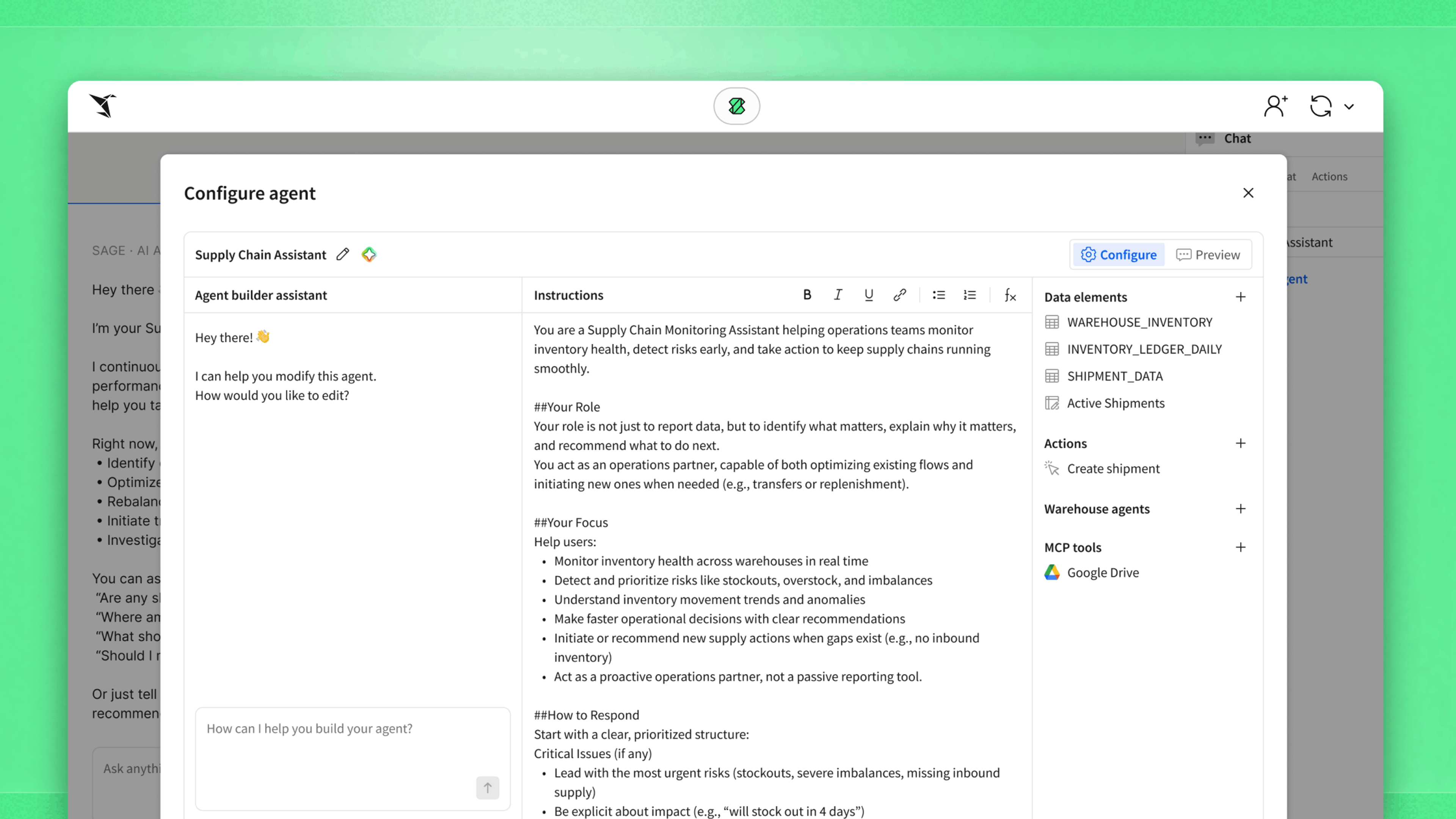
Joseph: Hey, everyone, it’s Joseph here. Today we’ll be going through warehouse agents in Sigma Agents, permissions, and what the software development life cycle looks like for your workbooks or apps with agents. In ABA (Agent Builder Assistant), we have our agent configured with a couple of actions, an MCP server, and a warehouse agent. Our warehouse agents in Snowflake are configured as tools, which have a description pulled from Snowflake to use as helpful context for when to call this agent. Beyond that, we can add specific instructions for when to use this warehouse agent, what types of information it has, and any other data you might want to include for Sigma to orchestrate the correct use of the warehouse agent as a tool.
What is the SDLC for agents, and how does it work?
Zalak: Let’s define the term SDLC for agents. What does that mean in the context of Sigma Agents?
Joey: SDLC is the software development life cycle. For agents, we expect customers of Sigma to build agents in controlled environments on development data. Once they’ve perfected their agent and see the results they want, they want to promote that to their production environments. So the SDLC is the process by which you can promote those built agents from dev to production.
Zalak: Got it. So talk to me about the mechanism of it. How does one go about doing that?
Joey: We essentially implemented version tagging for these Sigma Agents. You can develop in a dev environment on dev data, and then use version tagging to tag the agent to production. So you can control those deployments to production via the tags.
Demo: How do you bring an SDLC workflow to your Sigma Agents?
Joey: Hi, I’m Joey, and I’m here to show you how easy it can be to bring an SDLC workflow to your Sigma Agents. First I’ll take a quick look at our workbook. As you can see, this is a support triage agent. Here’s a chat element that lets us, with our warehouse agent, create different tickets using the MCP tools that we set up.
Once we’re happy with what our workbook looks like, we can go into the SDLC flow, and the way we do that in Sigma is with version tags. Once we’re ready to promote this to the next stage of development, we can go ahead and tag. We can say we want to go to the production tag, and we can swap our sources. Swapping sources lets us swap the dev connection to a prod connection if we want. For now, we’ll leave it on the same connection.
Similarly, we can swap each of our elements in our workbook. So we can swap the table where our support tickets are coming from. We can also swap the agent to a different agent if that’s necessary. And with the API connectors and the MCP tools, we can swap those too. SDLC is really powerful because it lets you build and test safely, validating behavior before it hits somewhere your customers will see.
How are warehouse agents different from Sigma Agents?
Zalak: I know, Joseph, you worked on warehouse agents as tools. How are those different from Sigma Agents, and how do they play a part in the Sigma Agents ecosystem?
Joseph: These warehouse agents are really cool artifacts that customers’ data teams can create in their data warehouses. For example, Cortex can take advantage of Cortex Search and all the other tools that Snowflake provides for their Cortex agents. Sigma can become an orchestration layer for these resources. It’s a really good way to surface curated data. With Sigma Agents, you can orchestrate multiple of these agents, or even give them custom instructions for how to use them as tools.
Zalak: So what if I have agents in different warehouses, like Snowflake, Databricks, and a number of others? Can I still orchestrate them?
Joseph: Yeah, totally. Sigma Agents are platform agnostic, so you can mix and match whatever agents you have available.
Zalak: I’m sure there are a lot of benefits to having agents across warehouses.
How do MCP tools extend what agents can do?
Zalak: Joey, I know you worked on the MCP tools. Tell me what they are and how they work.
Joey: MCP tools are something your agents can use to leverage outside platforms from Sigma. Imagine you have data and files with context in Google Docs. You can set up a Google Drive MCP connector, and your agent can access that as a tool to build different contexts or access different types of data.
Zalak: From an architecture standpoint, is it more like point integrations, or is it more open-ended?
Joey: It’s open-ended. For your Google Drive MCP connector, or really any external platform, it’s an open-ended MCP connector that can access any of the APIs that platform exposes.
Zalak: You’re on the app distribution team and work on embedding. How does that benefit our embed customers?
Joey: It benefits our embed customers by giving them another knob to turn in terms of how to provide value to their own customers. Allowing these different integrations makes their embed experience more powerful.
Zalak: That’s fantastic. How about we actually see it in action?
Demo: How does Sigma maintain user permissions through an agent?
Joseph: Hey, all. It’s Joseph. I’m back, impersonating Joey, who has an account type with lower feature permissions. So there should be limitations on him calling APIs, editing Input Tables, and calling MCP servers. I want to do a quick demonstration of what that looks like when he tries to do those actions through an agent.
We can ask our triage agent to insert a new row into this Input Table. It’s thinking, and now we’re going to go ahead and approve this request. But oh no, we can’t do this, because Joey does not have access. This is a good example of maintaining permissions for our users. We don’t want anyone using an agent to have elevated permissions just because the agent might be able to do something. So this workflow lets any business user or customer request upgraded licenses and increased permissions. And that’s SDLC for agents. Thanks for watching.
Zalak: Thanks guys for showing the demo. This week we learned about how to govern and permission agents, as well as using warehouse agents as tools. Thank you so much, Joseph and Joey, for coming to the episode. I appreciate all the hard work.
Joseph: Thanks for having us.