What Is Augmented Analytics? How It Works and Why It Matters

A dashboard tells you retention dropped 12% last quarter. But it doesn't tell you what caused the drop, what changed in the weeks leading up to it, or what to do about it now. A business user files a ticket with the analytics team, and by the time the analyst delivers the answer, the window for acting on it has often closed.
Augmented analytics uses AI and machine learning (ML) to surface those answers without being asked and explain them in plain language. It then pushes recommendations directly to the people who need to act, including those who have never written a line of SQL.
The question data teams should be asking is whether their current business intelligence (BI) stack actually surfaces causes, explains changes, and presents recommendations, or whether it just adds an AI layer on top of the same charts and dashboards.
Key takeaways
- Augmented analytics shortens the time between finding a signal in the data and using it to make a business decision, filling the gap left by dashboards and self-service BI.
- A complete augmented analytics platform needs governed data access, a multi-persona authoring layer, AI that explains and recommends, and an action path to the system of record.
- Sigma is the runtime layer between the cloud data warehouse and AI for business, carrying every question through to a governed answer and a written-back action without leaving the workbook.
What is augmented analytics?
Augmented analytics is the use of AI and machine learning to automate data preparation, insight discovery, and sharing within analytics and business intelligence platforms. It reduces the manual, technical work traditionally required to analyze data, like writing queries, building models, and interpreting results. More people across an organization can then work with data without needing deep statistical or coding expertise.
Removing the SQL and modeling barrier expands who can act on the data and shortens the path from question to decision. Decision-makers stop waiting for someone else to translate warehouse tables into an answer, and the analytics team stops spending its week on ad hoc requests the system could answer directly.
Augmented analytics vs. traditional BI vs. self-service analytics
Augmented analytics is the third step in a progression. Traditional BI gave central teams a way to package data into reports. Self-service analytics puts query and visualization tools in business users' hands. Augmented analytics adds an AI layer that interprets data and recommends actions, so the user needs less prior knowledge of what to ask or how to interpret the results.
- Traditional BI focuses on predefined reports and dashboards built by a central team. Business users consume what the team has already built.
- Self-service analytics expands access by allowing business users to build their own queries and visualizations. However, they still need to know what to ask and how to interpret the results.
- Augmented analytics automates the next step. The system proactively surfaces insights, explains them in plain language, and recommends actions, so the user doesn't have to know what to ask in advance.
Augmented analytics emerged because dashboards and manual analysis couldn't keep up with the growing volume of data. Automating more of the analytical workflow itself lets IT keep governance and visibility intact while business teams answer more of their own questions.
Why do businesses need augmented analytics?
A decade of BI redesigns hasn't expanded the share of employees who can actually answer their own data questions. The share of non-IT professionals who can fulfill their own BI needs has plateaued at roughly 20% for over a decade.
Three structural constraints explain why about 80% of employees remain overly dependent on the data team:
1. Dashboards only answer the questions they were built to answer
A dashboard only answers the questions its builders anticipated. When a business user looks at a churn dashboard and wants to know which contract terms correlate with the spike, the dashboard can't help. That question wasn't in scope at design time.
Every out-of-scope question requires another build cycle, ticket, or export to a spreadsheet. Most business users don't have the access or the skills to do any of that themselves.
The result is a dashboard library that grows wider every quarter without getting any more useful. Each new question prompts a new tile, a new view, or a new report rather than a deeper answer, and the surface area IT has to maintain keeps expanding while the underlying gap stays the same.
2. Most new questions become a ticket
When a business user can't answer a question themselves, that question becomes a ticket in an analyst's queue. Each ad hoc request creates a serial dependency on someone else's calendar, and the queue only gets longer.
Even in organizations that have deployed self-service BI, ad hoc requests still consume much of the data team's time, causing reactive tasks to crowd out everything else on the roadmap. The result is that analysts spend the week clearing tickets instead of building the data models, metric definitions, and infrastructure that would let business users serve themselves in the first place.
3. Slow decisions cost real money
One of the most expensive parts of the analytics workflow is the time between a question and the answer that informs the decision.
More than a third of a manager's week goes to making decisions, and over half of those hours are wasted. Scaled across a typical Fortune 500 company, the drag works out to hundreds of thousands of lost workdays and roughly a quarter of a billion dollars in annual labor costs.
On the other side of that math, firms with advanced insights-driven capabilities are nearly three times more likely to report double-digit year-over-year revenue growth compared to firms without such mature data-driven capabilities. Compressing the question-to-decision cycle from days to hours is where augmented analytics produces its clearest return on investment (ROI).
How augmented analytics works
Augmented analytics layers four capabilities on top of your data, with each one feeding into the next.
1. Automated data preparation
Automated data preparation handles the work that data engineers used to do by hand. Machine learning (ML) algorithms detect correlations, associations, and outliers.
In traditional BI, data engineers manually find relationships between variables, catalog metadata, and clean transformations by hand. Augmented analytics automates much of that work. ML algorithms detect correlations, associations, and outliers. The system learns what "normal" looks like from historical data, then flags anomalies for cleansing or review before analysis begins.
2. Pattern and anomaly detection
Once data preparation is complete, ML algorithms automatically surface business-relevant patterns. AutoML techniques evaluate which variables matter most, select features, and combine models so the output is repeatable across runs.
These algorithms work in both directions: a sudden drop in website traffic might signal a technical failure, while an unexpected spike outside a promotional period might point to emerging demand. The system helps users interpret each deviation rather than simply flagging it.
3. Natural language interfaces
Natural language processing (NLP) translates plain-language questions into structured queries. A marketing director types "What were our top-performing campaigns last quarter?" and gets a visualization back, no SQL required.
Modern large language models (LLMs) have sharpened this layer's ability to parse intent and map entity references to the right dimensions in the data model.
4. AI-generated explanations
Natural language generation (NLG) converts structured outputs into plain-language summaries. Instead of staring at an upward-trending chart and guessing at the cause, the user reads a sentence explaining what went up, by how much, and what drove it.
The summaries shift the analyst's role from producing outputs to validating and contextualizing them, and keep human judgment focused on the context a model can't supply.
4 components of an augmented analytics platform
Platforms that claim to deliver augmented analytics often require four components to work together.
1. A governed data connection
An augmented analytics platform integrates data from multiple sources and sits atop a semantic model that encodes business rules. A governed semantic layer defines metrics, hierarchies, and access rules once and applies them consistently across queries, so teams stop debating which number is right.
Platforms that bolt governance onto raw connectivity instead of enforcing it at the semantic layer leave business users free to redefine metrics downstream and lose the single source of truth that IT was protecting.
2. An authoring layer that business users can actually use
The authoring layer serves multiple personas within a single governed environment. Business users building no-code dashboards, analysts running ad hoc explorations, and data scientists developing models all work in the same surface.
If the platform only serves one of those groups, the others end up exporting data to spreadsheets or filing tickets, and the workflow stalls before it reaches the people who need to act on the answer.
3. AI that explains and recommends
Automated insight distinguishes augmented analytics from earlier forms of business analytics. The platform should apply ML to identify the most important attributes in a dataset, forecast time series, identify clusters, and explain what changed in plain language. Without this layer, the user is back to staring at a chart and guessing.
4. An action path from insight to system of record
Insight that no one can act on dies in the dashboard. A complete augmented analytics platform connects the insight directly to the system of record, so a user can write back changes, trigger notifications, run scenarios, or update status without leaving the workflow. By 2027, AI agents will augment or automate 50% of business decisions, and agents can't act through a static dashboard.
How Sigma delivers augmented analytics
Sigma is the runtime layer between your cloud data warehouse and your AI. It sits between the data and the AI that acts on it, so every query, AI call, and writeback inherits the governance, permissions, and audit trail the warehouse already enforces.
That makes Sigma the natural place to deliver augmented analytics. The AI layer that interprets data and recommends actions has to run inside the same governed surface as the data itself. Otherwise, the explanations and recommendations can't be trusted.
Inside that runtime, queries run live against the warehouse, and workbooks inherit the warehouse's permissions from the moment a builder creates it. Insights, AI features, and writeback all operate on the same governed surface. Teams move from question to answer to action without leaving the platform or losing the audit trail.
Four Sigma capabilities deliver augmented analytics end-to-end.
Sigma Assistant: plain-English questions, verifiable answers
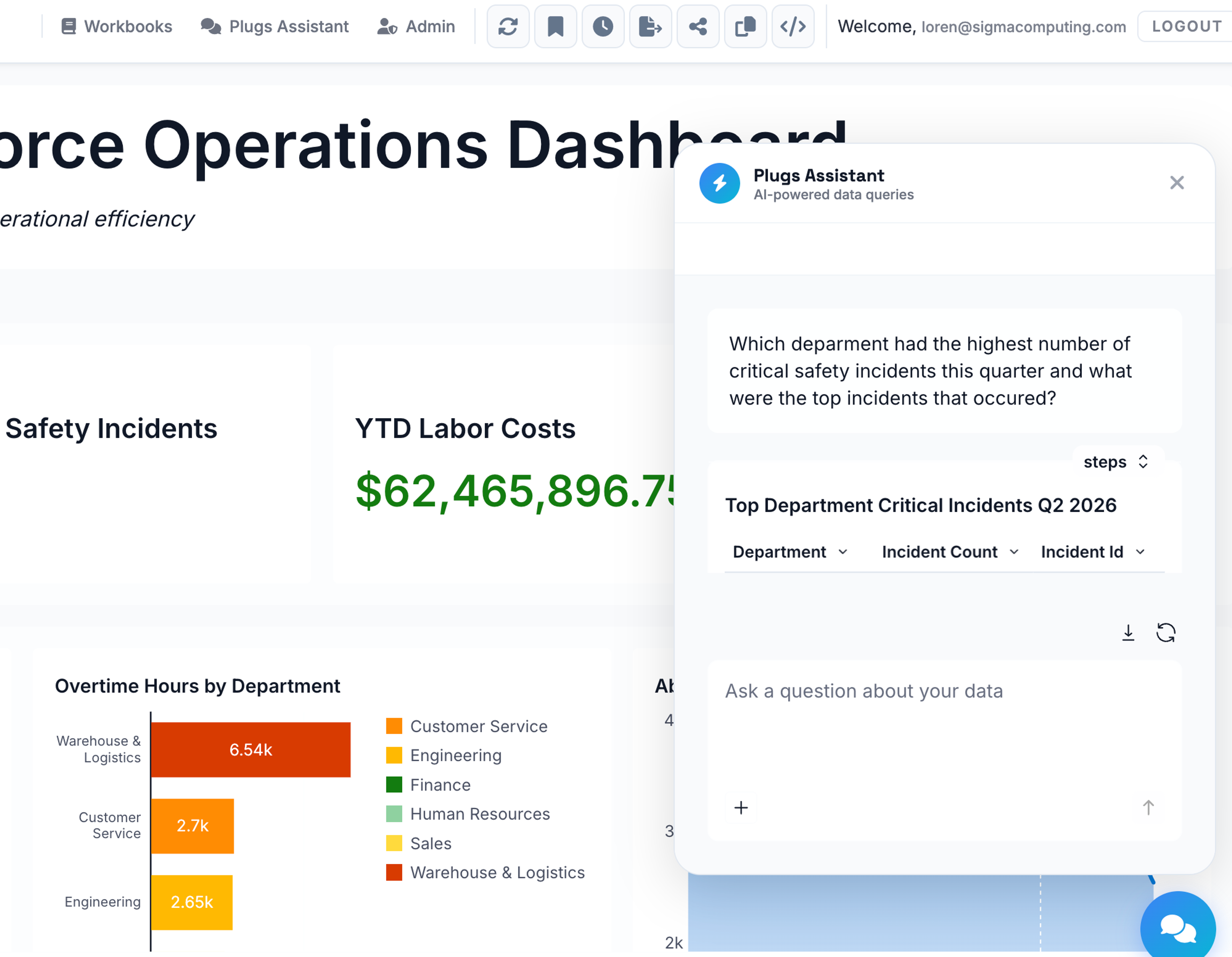
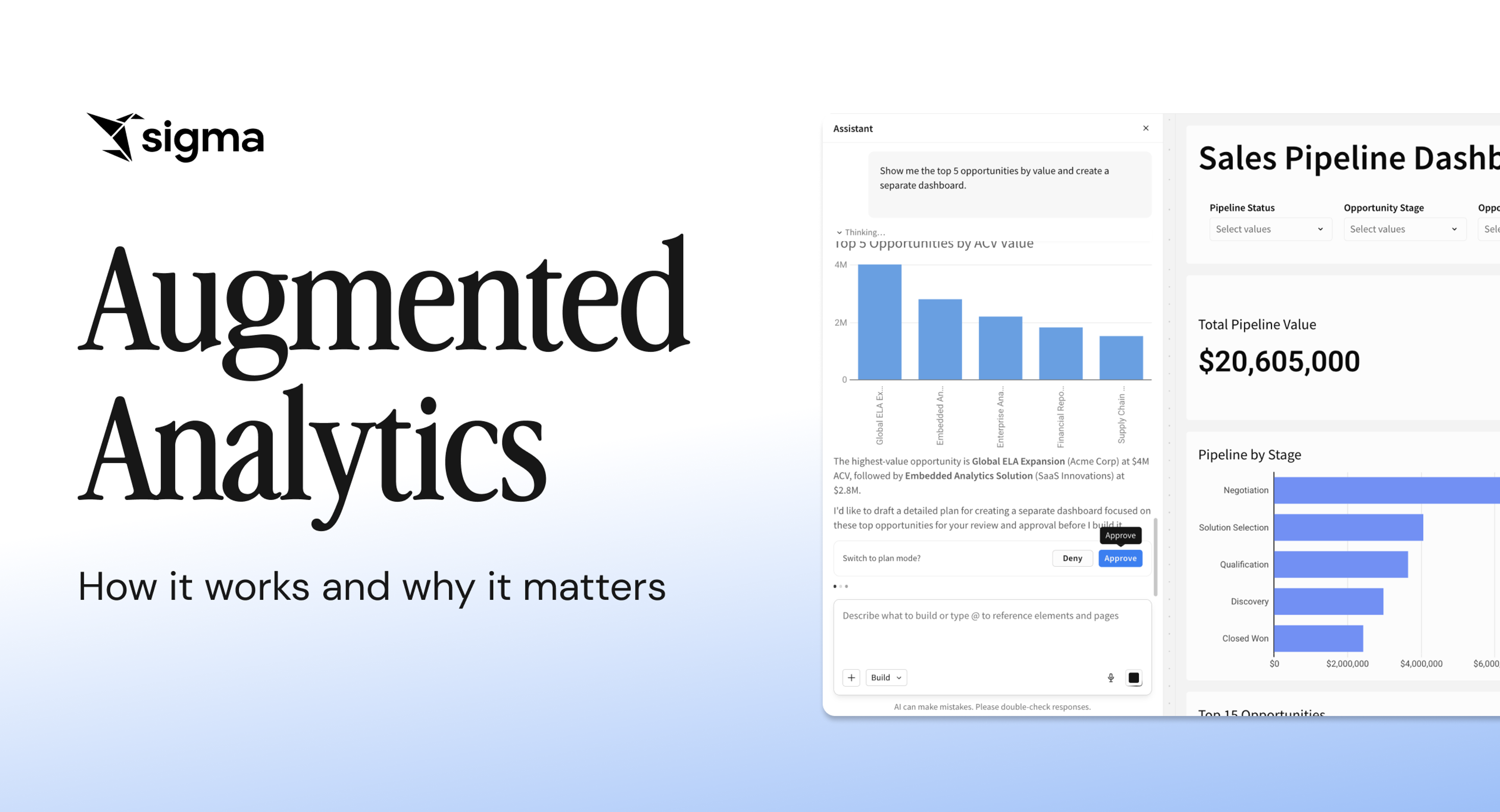
Sigma Assistant lets users ask questions of warehouse data in plain language. Answers draw on the organization's data models, certified metrics, endorsed workbooks, and usage patterns as context, so the system answers in the same vocabulary the business already uses. Users can verify every answer by inspecting the query, tracing it to the underlying table, and auditing the analysis in a workbook. Sigma validates every query before it executes, so malformed SQL never reaches the warehouse.
Sigma Agents: scoped workflows that explain and act
Sigma Agents carry the work from answer to action. Each agent is a customized agentic workflow scoped to a specific workbook, and a builder configures its instructions, data access, and permitted actions. Viewers interact with the agent through a chat interface that connects to writeback, notifications, scenario generation, and status updates.
AI Columns: LLM logic per row, governed by the warehouse
AI Columns brings LLM calls directly into the spreadsheet grid. Builders add a column that runs an LLM prompt against each row, and warehouse row-level security governs the prompt logic. The logic stays in the data layer instead of moving to a separate AI engine, so governance, lineage, and access controls all hold.
Input Tables and writeback: insight to system of record
Input Tables let users edit data in the workbook UI and write it back to the warehouse as a separate schema. An audit trail captures every change, showing what changed, who changed it, and when, so the action path from insight to system of record stays governed end to end.
Experience augmented analytics with Sigma
Augmented analytics is moving from a differentiator to a baseline expectation across the BI market. The distance between teams that have it and those that don't shows up in three measurable places:
- How long it takes to make a decision.
- How much of the analytics team's week goes to ad hoc requests.
- How quickly the business can respond to a change in its own data.
Companies that still route every question through a ticket queue make decisions based on stale answers, and most of the team is locked out of the analysis. That cost compounds every quarter.
Sigma delivers augmented analytics inside the workbook surface business teams already use, on top of the warehouse where the data already lives. Business users ask questions in plain English, agents carry the work through to action, and every change writes back to the system of record with a full audit trail.
The warehouse already holds your data and enforces your governance. Sigma is the runtime that turns it into answers your business teams can act on.
Get a demo to see how augmented analytics works in Sigma or try Sigma free.
Frequently asked questions about augmented analytics
What is augmented analytics?
Augmented analytics is a category of analytics that uses AI and machine learning to automate tasks that analysts used to perform manually. It cleans and prepares data, detects patterns and outliers, explains drivers in plain language, and suggests next steps.
What are the 4 types of analytics?
The four widely recognized types are descriptive (what happened), diagnostic (why it happened), predictive (what is likely to happen), and prescriptive (what to do about it). Augmented analytics spans all four by using AI to forecast outcomes and automatically recommend actions.
What is an example of data augmentation?
Data augmentation is a separate concept from augmented analytics. It refers to enriching a dataset to make it more useful. For example, joining customer records with third-party demographic data or generating synthetic training examples for a machine learning model.
How does augmented analytics improve decision-making?
It shortens the time between a question and the answer that informs a decision. Instead of waiting on a dashboard refresh or a ticket queue, decision-makers ask questions in plain language and get governed answers with explanations of what changed and why. The result is compressed decision cycles, fewer dropped insights, and freed-up analyst capacity for strategic work.