Build > Buy: How Sigma saved $500K building a Partner Portal on Sigma


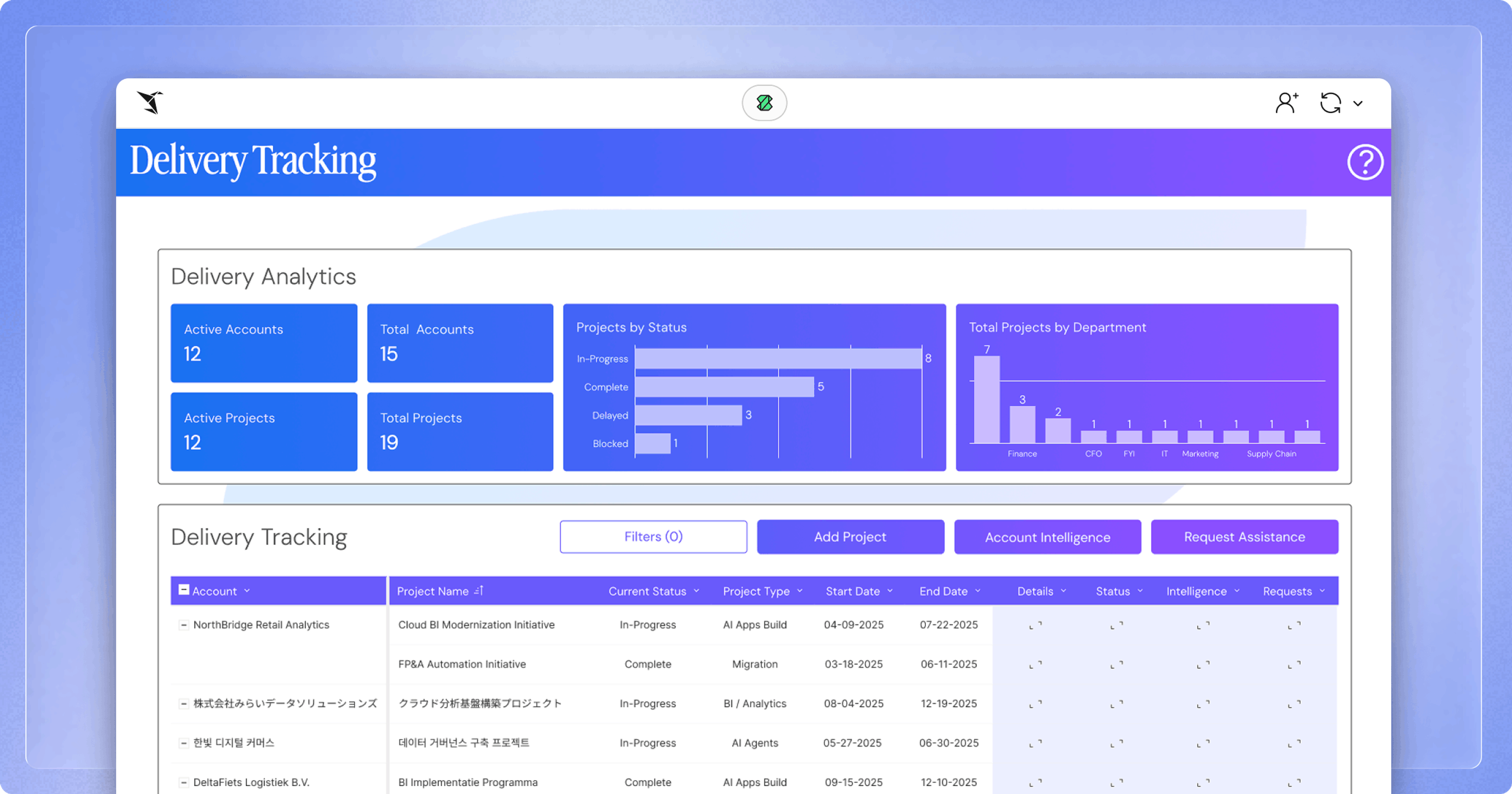
Sigma recently launched a Partner Portal to almost 200 System Integrators (SIs) built by an internal team entirely on our platform with a collection of embedded AI Apps.
Why? Because the Partner Portals on the market do not meet the standards we desire, and their financial cost and opportunity cost miss the mark. The CRM-centric tools on the market provide turnkey solutions for a boilerplate offering that doesn’t integrate business processes. The integrated analytics offerings included are weak, showing read-only dashboards with workflows requiring other tools. If you want to plan, forecast, or take action, you’d have to leave the portal. That’s not just grossly inefficient, it’s a fragmented user experience. Plus, many of the AI offerings from these solutions narrate ambiguously with confidence, without driving meaningful action.
We wanted to take a different approach by drinking our own champagne, building entirely on Sigma to offer the following:
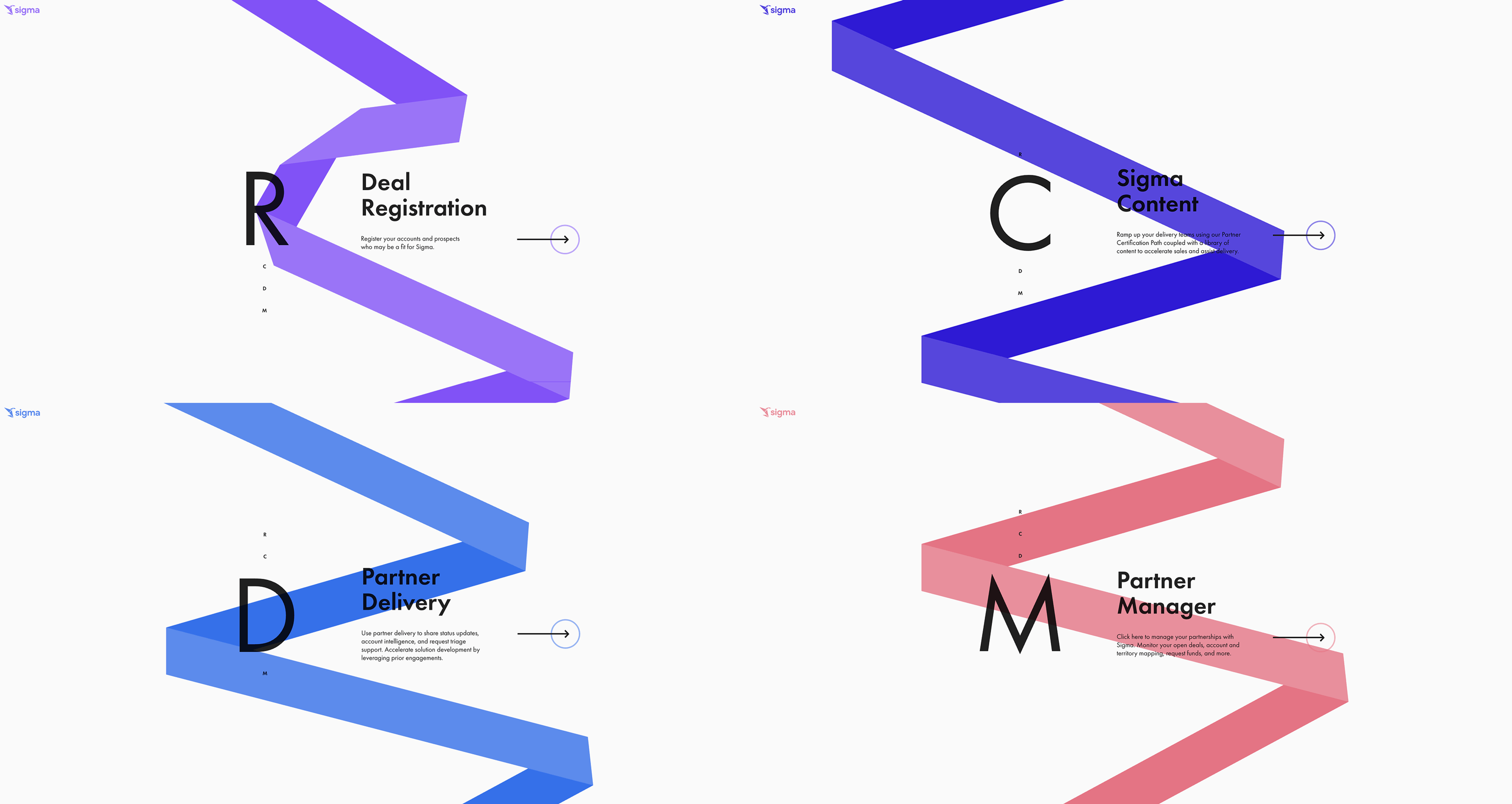
- Deal Registration form with behind-the-scenes account and opportunity mapping
- Project Tracking platform for logging consulting engagement details
- Partner Management view for tracking goals against our newly launched SI Partner Program
- Sigma Content page rich in features, assets, and resources to drive partner success
- Partner Certification Path with the ability to sign up for upcoming training sessions
- Solutions Framework for ideation, exploration, and submission of new GTM assets
- Industry360 prospecting tool for showing partners the art of the possible with AI Apps
Again, we built all of this within Sigma leveraging writeback-driven workflows, app layouts, AI accelerators, and a slick user interface built around partner’s needs without compromises.
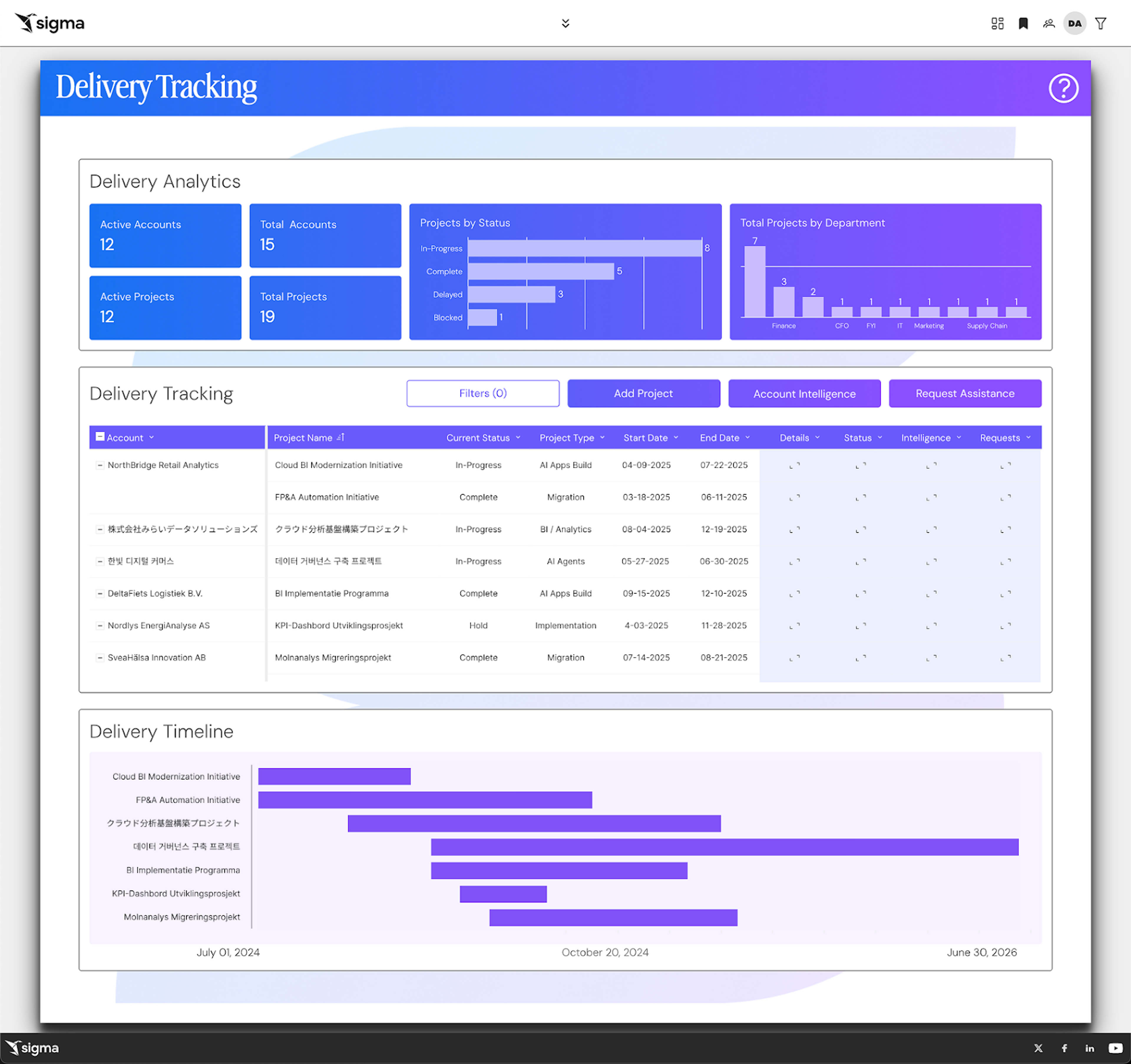
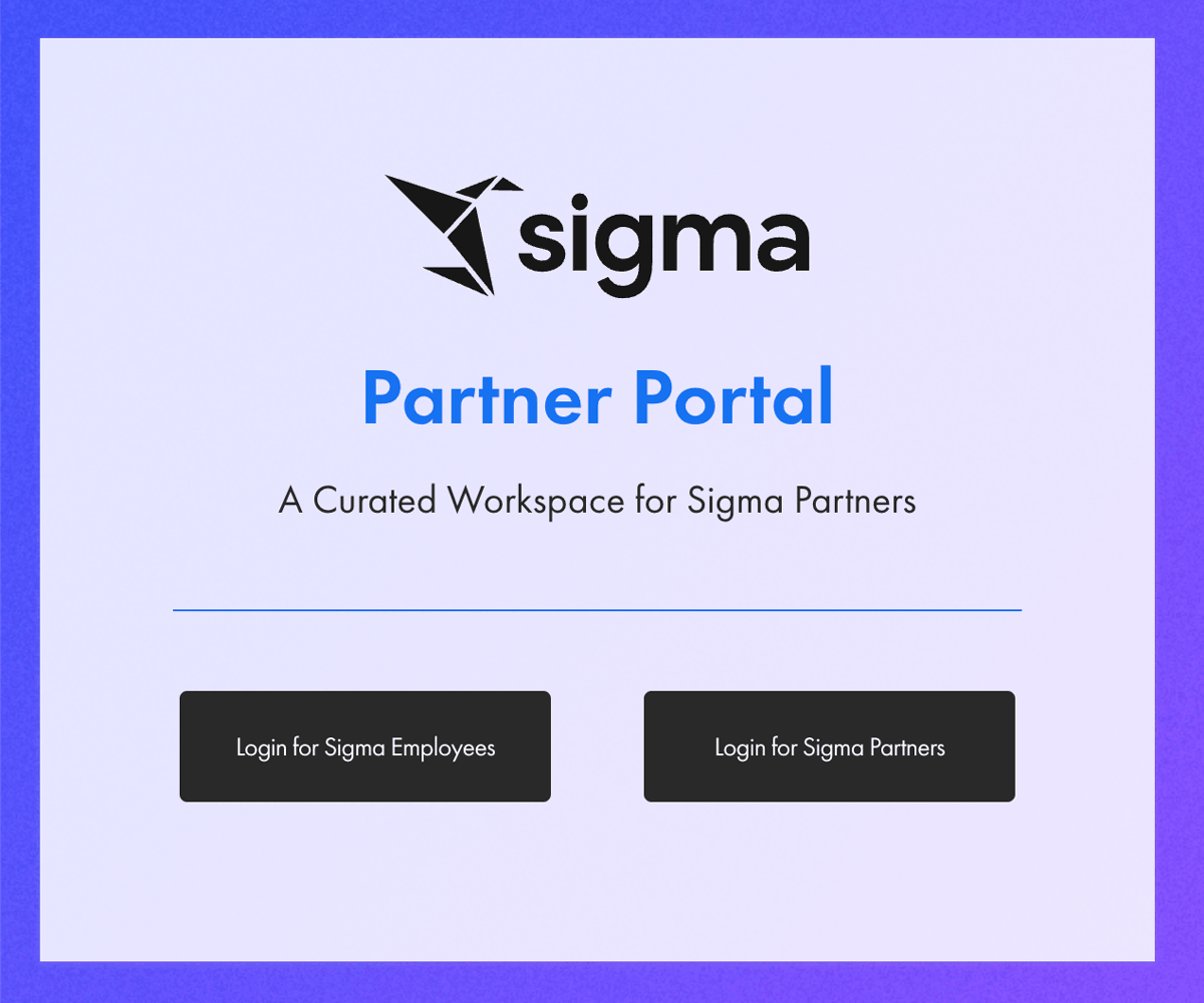
Workplace-oriented social media is loaded with ten tons of tell and a feather-weight of show. We choose to show. We’re going deep into the intricacies of this build to provide a blueprint for others on how they can do the same with Sigma starting with this example to the right - a real production asset used by external partners, not a demo environment or conceptual mockup.
Discovery
Measure twice, cut once. Before ever going hands-on-keyboard, we thoughtfully curated the administration model, access controls, navigation, user interface, content strategy, system integrations, data models, workflows, forms, actions, outputs, and overall look and feel. We designed the experience long before we built it.
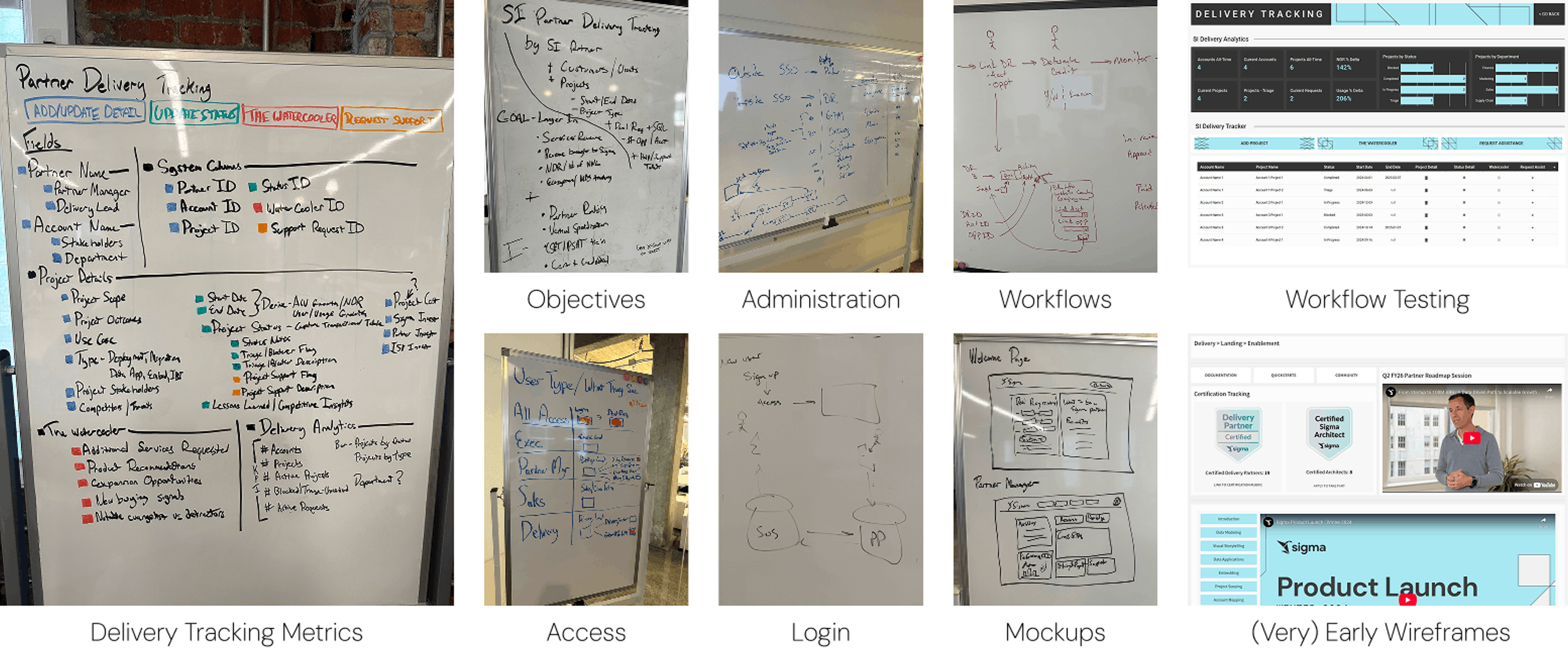
When building AI Apps with complex workflows, multiple user interaction points, and/or embedded experiences for external users unfamiliar with your systems, it’s critical to map and document the following to ensure return on investment in the form of sustained usage, adoption, and measurable impact. As detailed in the images above, we honed in on:
- The types of users accessing the portal
- How they would gain access
- What jobs they needed the portal to accomplish
- Which metrics they would consume and act on
- What the mockups would look like
- What the design language would be
This was all defined before a single production build began. Each of these artifacts reflects our intentionality and thoughtfulness for our partners—the people who would be hands-on in the platform every single day.
Design
Data and analytics tools commonly value design as an afterthought. It shows. The effects of which impact adoption, usability, and trust.
Sigma AI Apps allow deep customization, especially around visual design and accessibility. Design drives adoption. Design drives usage. People don’t want to exist in environments that are visually unappealing or cognitively exhausting.
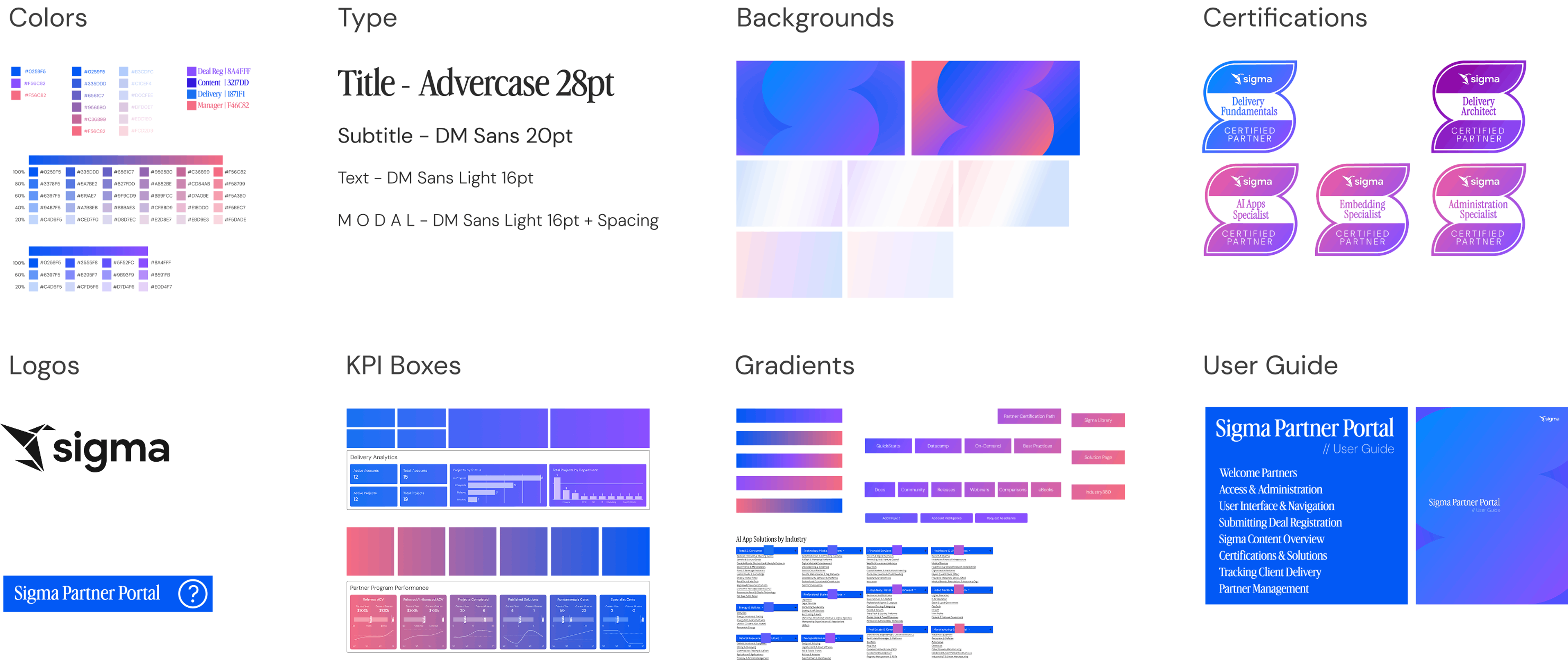
For the Partner Portal, we blended analytics design best practices, WCAG guidelines, and a new brand language all to show the art of the possible. Our intentional gradient-heavy color system guides users toward key interactions and decision points. We leaned into blue tones for brand alignment while ensuring accessibility for color-blind users.
Design choices centered on being thoughtful. Typography was deliberate: serif for titles, sans serif for body and numbers to maximize legibility. Consistent type sizing across workbooks reinforces hierarchy instantly. We minimized scrolling to preserve workflow intentionality. Rather than relying on tabs, we built separate pages within a single workbook using a planned reference architecture for intuitive navigation. Using Sigma templates and Figma-created graphics, we balanced flexibility with structure. We fixed workbook widths for embedding, prioritizing a common experience for external users. White space, modular containers, and a defined design system ensures continuity and scalability.
We didn’t just measure twice before cutting, we measured ten times. The goal wasn’t simply to ship a tool. It was to meet users where they are, enable collaborative partnership management, and demonstrate how an AI App can scale across hundreds of external organizations… built entirely on Sigma.
Development
Building AI Apps in Sigma means leveraging controls, actions, and app layouts with native writeback at the core. No hacks. No extensions. No duct tape.
Actions serve as workflow triggers that can run sequentially, conditionally, and extensibly—bringing applications to life without heavy coding. The point-and-click interface, paired with embedded AI accelerators, enables rapid building, prototyping, and iteration.
Again, measure twice, cut once… but build lightning fast. This capability comes from our multi-modal approach of being rooted in spreadsheets to enable non-technical business users to conduct their own self-service analytics, but now creating Apps. We also support creation via SQL and Python with extensibility in the form of stored procedures, API calls, webhooks, plugins, and soon programmatic building.
For the Partner Portal, four primary workbooks and seven supporting views were developed in just 80 hours of hands-on work. Seven workflows built in under two weeks replaced five separate applications Sigma previously used and paid for internally to support Partnerships.
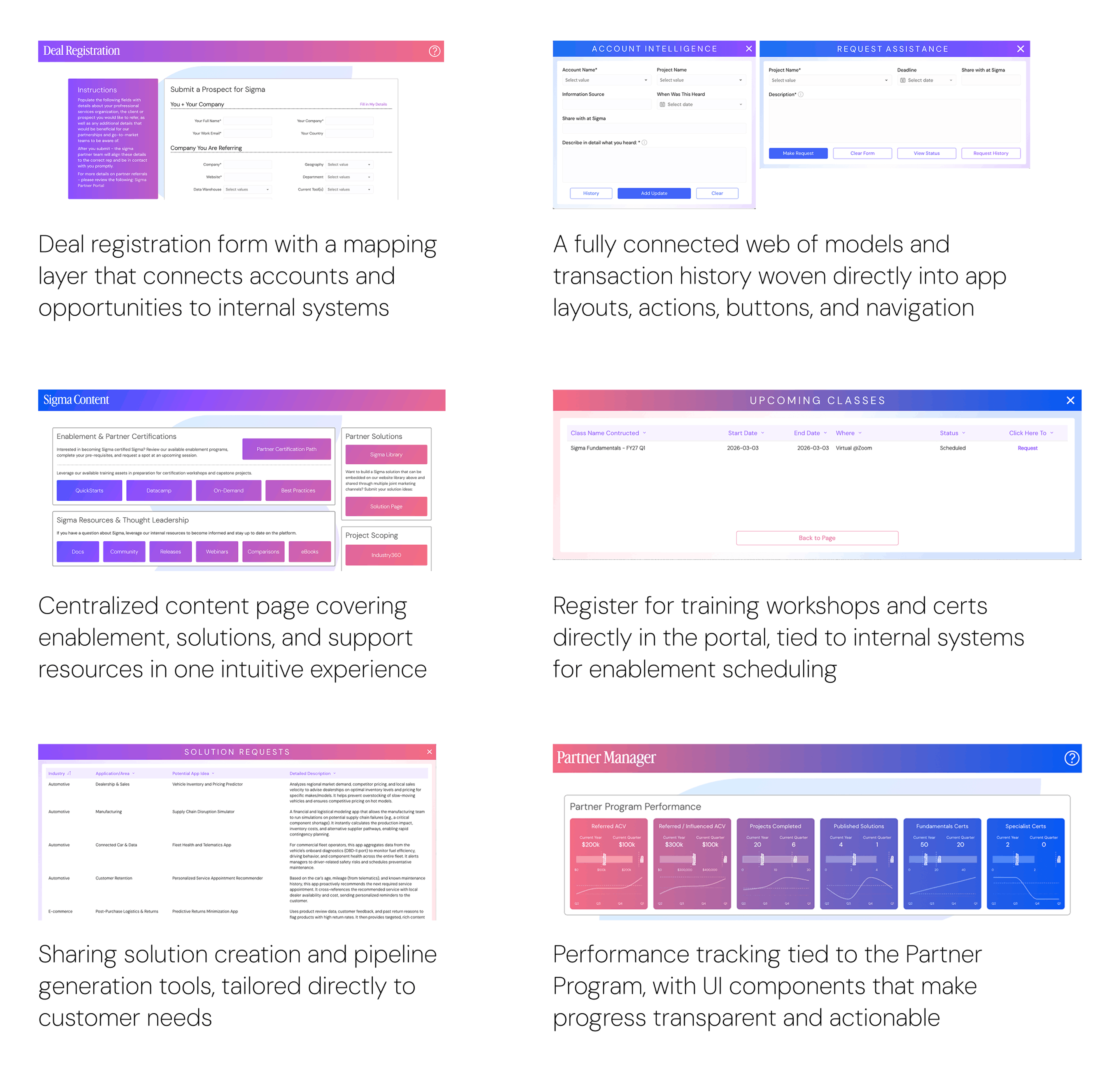
During development, we intentionally pushed the boundaries of workflows, layouts, and app features. Here are a few highlights for inspiration:
Modeling
To ensure AI Apps are effective, we recommend carefully planning data models that connect user interaction points within a workbook to a structured backend. We commonly leverage the following approach sequentially using writeback via Input Tables, enriched base tables with shared logic, security in a dedicated layer, local filtering, and ultimately surface front-end tables and visualizations.
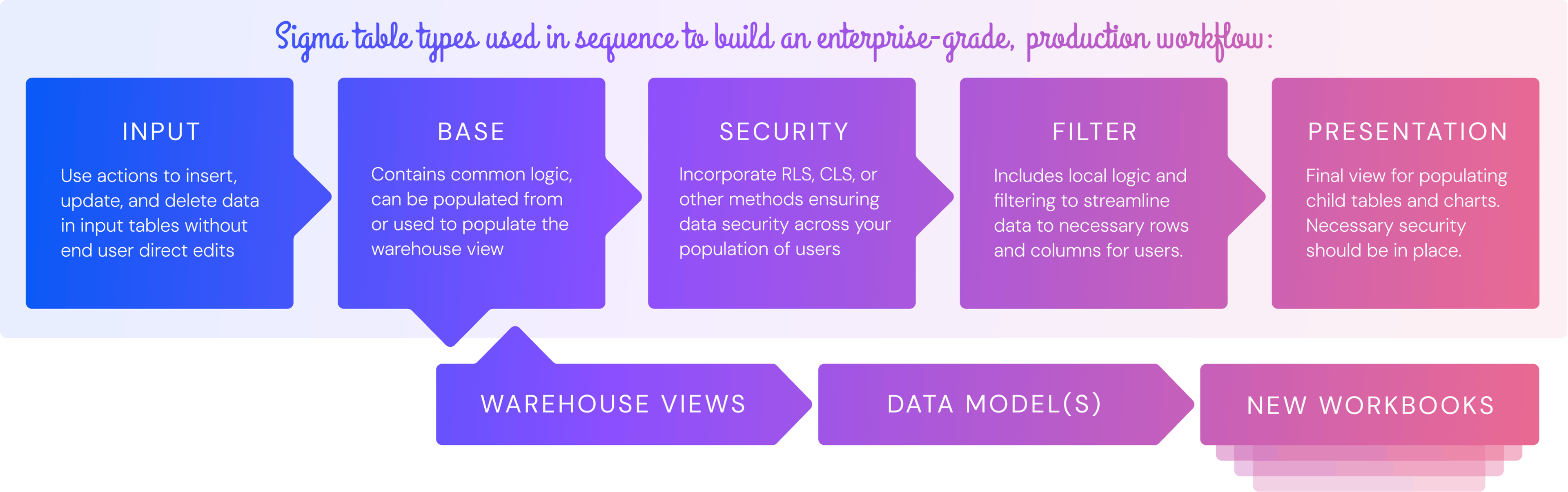
Input Tables
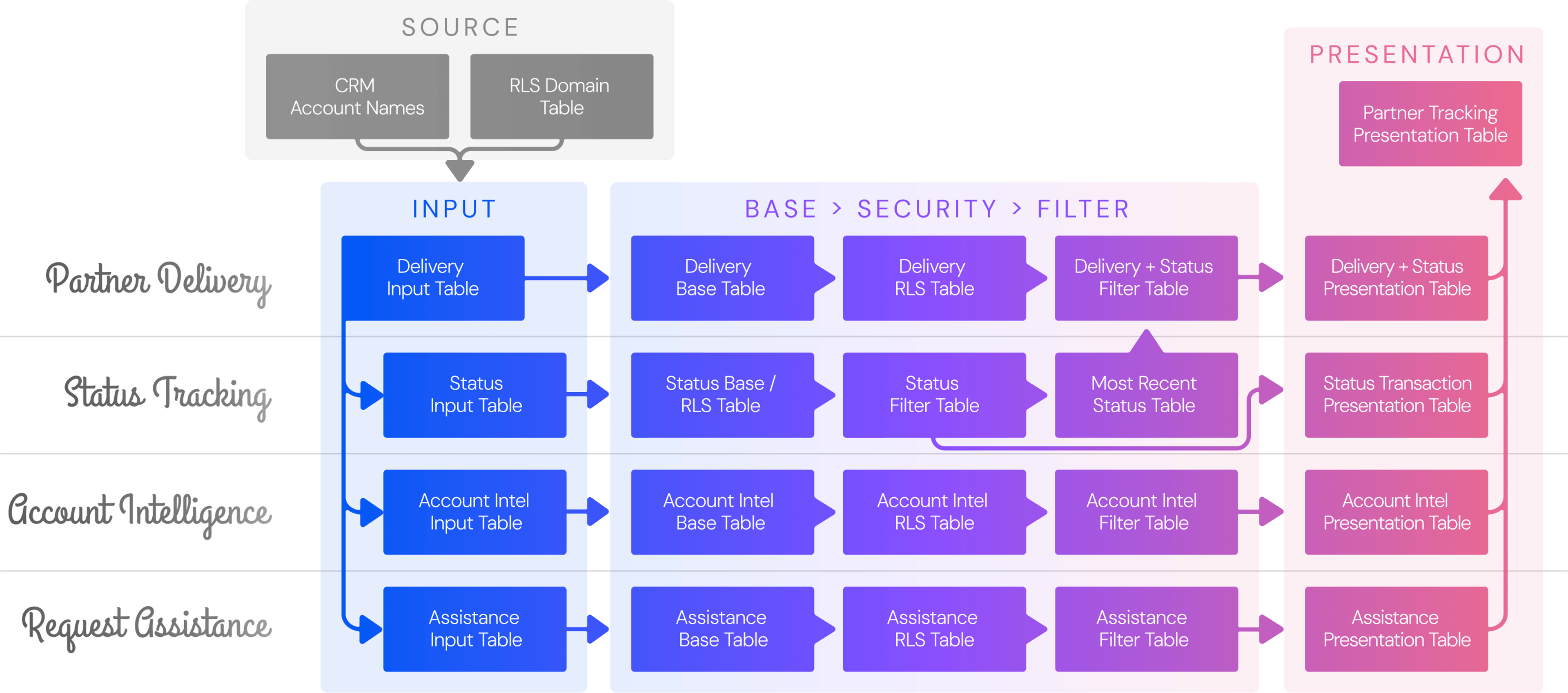
For the Delivery Tracker, partners submit information through forms that populate Input Tables. We reference the user’s email domain to associate each submission with the correct partner organization. This ensures partners can create and view only their own projects, status updates, account intelligence, and assistance requests tied to their associated customer accounts. All submitted data is written back to the CDW.
Warehouse data
Next, we create child tables containing shared transformation logic called Base Tables. These serve as the foundation for warehouse views that allow partner project data to flow from the external portal into internal systems, while also powering external progress and performance tracking. This structure provides flexibility in the transformation layer, whether extending with additional Sigma Data Models, workbooks, or dbt models. It also cleanly separates upstream filtering from downstream development.
Security
Within the Security Table, we implement Row Level Security (RLS). Here, we apply the rules and logic that restrict partners to viewing only their own data. We also account for organizations operating across multiple domains, treating users from www.partnerdomain.com and www.partnerdomain.co.eu as the same company. Multi-domain complexity is common, particularly following acquisitions, and must be handled carefully.
Presentation
Finally, we apply light transformations and required filters through dedicated Filter Tables to prepare data for presentation. This final Presentation layer delivers clean, consumable tables and highly polished visualizations to partners. For a production example, see the reference architecture for the Delivery Tracking AI App.
Engineering
Building the Partner Portal wasn’t just about connecting systems, it was about creating an experience where partners could engage, contribute, and see the impact of their actions in real time.
Data Setup
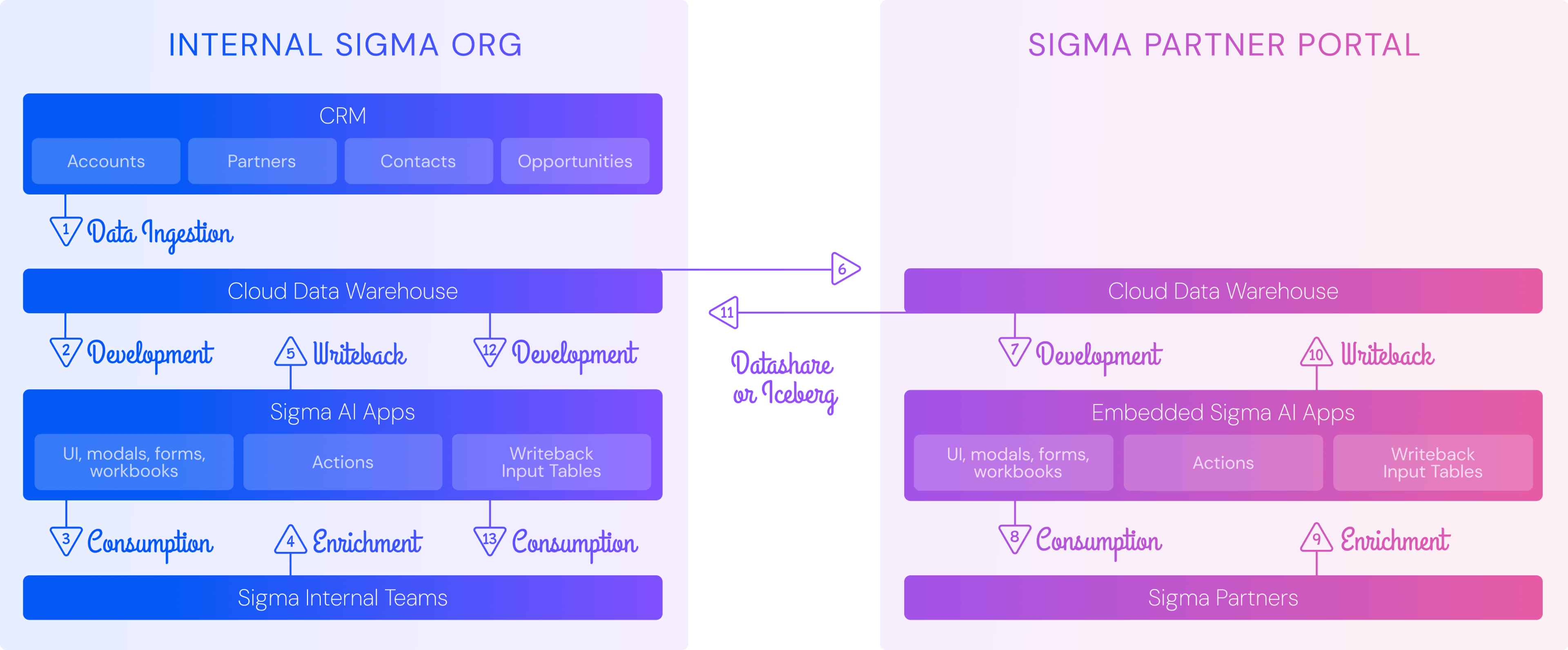
To ensure security and create a wall between systems, the partner portal uses a dedicated environment for partners. While our main CDW account remains the system of record for internal operations, we provisioned a separate CDW account just for the Partner Portal, with its own Sigma instance on top. This separation gives us strong data isolation, clear security boundaries, and ownership clarity, all while still allowing smooth collaboration through CDW data sharing. Partners get access to exactly what they need, but nothing more.
Data Preparation
Next comes the work of preparing partner-ready data. Raw data flows in from multiple CRMs and operational systems into the main CDW, where dbt transforms, enriches, and standardizes it into analytics-ready tables. Internal teams then interact with this curated data in Sigma Apps—adding mappings, tags, and business context. Using Sigma’s native writeback, these enriched inputs flow back into the CDW. This is where data becomes actionable, grounded in the realities of our business.
But data alone isn’t enough; it has to be delivered thoughtfully. Only a purpose-built subset of tables is shared with the Partner Portal account. Partners get precisely the information they need, no clutter, no confusion.
Data Experience
Once in the Partner Portal, Sigma brings the experience to life. AI Apps transform the raw tables into an intuitive, interactive workspace. Partners never touch the backend directly—they interact with a polished web application. They can submit project updates, provide account intelligence, track leads, request support, and register for training. They can monitor their progress through tables, dashboards, and status indicators, seeing clearly how their inputs translate into outcomes. Every action is connected to results, making the portal not just a tool, but a living, measurable part of our partnership.
Data Security
As discussed in the modeling section, data privacy is baked in. Row Level Security (RLS) ensures each partner sees only their own data within the Portal. To handle multi-domain companies through acquisition or global operations, we treat these as a single organization, so users from different domains access all relevant information seamlessly. This also assists greatly in tracking Partner Program performance.
Data Shares
And then the loop closes. Partner inputs written back to CDW are processed in the Partner Portal account via dbt, refined, and shared back to the main CDW. Internal teams can then leverage these insights through Sigma dashboards and apps, turning partner contributions into actionable intelligence—powering decisions, operational workflows, and strategy across the organization.
In short, the Partner Portal isn’t just a data pipeline—it’s a living ecosystem that connects internal teams and external partners, combining thoughtful engineering with a seamless, transparent experience. Every layer, from input to presentation, was designed to empower partners and ensure that their actions drive real impact.
Portal Administration & Security
The Partner Portal is more than just a set of Sigma workbooks, it’s an embedded solution designed to give both internal teams and partners a seamless, secure, and self-service experience. Today, it powers a fully operational portal that drives the success of our partnership team.
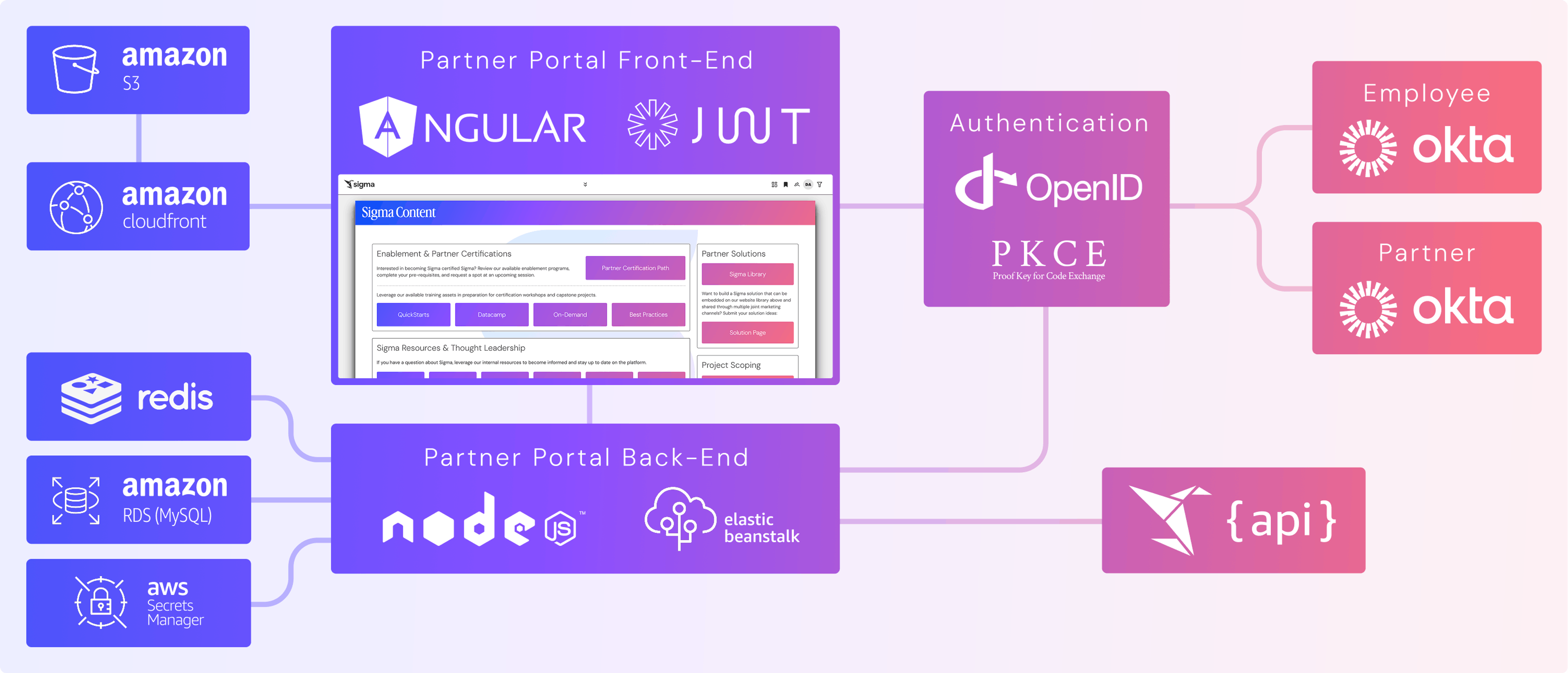
Architecture diagram detailing front- and back-end of the Partner Portal with tools used for storage, authentication, security, and APIs
At its core, the portal’s AI Apps are embedded in a web application using Sigma’s JWT Embedding framework. The front-end is built in Angular, the back-end in NodeJS, and key functionality is implemented through Sigma’s REST APIs.
A Sigma employee with the right permissions can create a partner account, specifying the partner’s email domain. They also select an Administrator team and a Standard team from a list of Sigma teams. The system automatically creates two profiles, one for Administrators, one for Standard users, streamlining access and management.
Authentication is handled via Okta. Sigma employees and partner users each have dedicated Okta instances. Users authenticate via OpenID Connect (OIDC) with PKCE, and multi-factor authentication (Okta Verify + email) is enforced. Backend calls to Sigma and Okta APIs are secured using the Okta access token issued at login. No sensitive user data is passed from the front-end; any required information is retrieved securely from Okta using that token.
Individual users can be added to a partner by Sigma employees or by partner Administrators. The portal provisions the user in Okta, sends an invite, and automatically provisions them in Sigma with the correct user type (Embed) and team membership. Role changes including moving users between Administrator and Standard will update team memberships in Sigma automatically. Deactivation in the portal deactivates the user in Okta as well.
Access control within Sigma is managed via folders: Apps are placed in folders, and teams are granted access accordingly. Row-Level Security (RLS) uses the user’s email domain to determine which rows of data each user can access. The portal also supports full white-labeling using Sigma’s REST APIs, allowing seamless navigation across Sigma folders and Apps, along with the creation and sharing of custom views (bookmarks).
How is the Partner Portal deployed?
The infrastructure supporting the portal is designed for security, scalability, and reliability, but it’s also built with flexibility to evolve as partner needs grow. The Angular front-end is served through CloudFront, sitting in front of a private AWS S3 bucket, delivering fast, secure content to users around the globe. The NodeJS back-end runs on a self-scaling Elastic Beanstalk environment, so the system adjusts automatically to demand, whether a handful of users log in or hundreds are interacting simultaneously.
Secrets, like Sigma Client IDs and Secrets, are stored securely in AWS Secrets Manager, ensuring sensitive credentials are never exposed. For performance-sensitive tasks, such as retrieving Sigma bearer tokens for API calls, the back-end leverages a Redis cache, providing both speed and reliability.
All partner-specific configurations—profiles, team assignments, and application settings—are maintained in an AWS RDS MySQL database, giving a single source of truth for the portal while supporting safe, transactional updates.
From a development perspective, this architecture is a story of modular design and thoughtful separation. The front-end focuses purely on delivering a clean, intuitive experience; the back-end handles orchestration, security, and data movement. Sigma’s APIs and writeback capabilities tie everything together, bridging the portal to internal systems seamlessly. Together, the front-end, back-end, and underlying infrastructure create a system that feels instantaneous to partners while remaining secure, auditable, and robust behind the scenes.
Sigma can replace SaaS with AI Apps
A year ago, we introduced AI Apps at a virtual apps conference to showcase how writeback, actions, and app layouts could power real-world workflows effectively replacing SaaS and custom point solutions. We even wrote about it at the time. Fast forward a year: our customers have built over 5,000 AI Apps, with growth accelerating since. The tooling and build experience continue to improve, and new AI features and development accelerators are rapidly reducing time to impact.
Now, while everything up to this point could have been dismissed as marketing fluff with Sigma hopping on the latest bandwagon screaming “Death to SaaS,” our reality is far more substantial. Internally, we built an embedded Partner Portal with authentication and user provisioning for 200 external organizations. It was created entirely on our own platform, leveraging native spreadsheets, writeback, actions, controls, app layouts, and Sigma’s AI feature set. What we’ve built is enterprise-ready, highly scalable, and designed to evolve through a natural development lifecycle across multiple phases, all using our industry-leading UI. This example proves that Sigma can replace SaaS across your organization, from startup to enterprise. We empower both business and technical users to not only extract more value from data but also build data entry points that enrich the Cloud Data Warehouse, maximizing its impact. Over the past twelve months, our native features and extensibility have grown dramatically, and the next 12-month product roadmap with even more AI capabilities is poised for exponential growth — the time to build AI Apps is now.
(No, that ending line wasn’t written by AI. Donny has always liked using em dashes, irritatingly.)
To start building your own AI App, check out these resources.