Leverage Sigma Skills Directly in Snowflake Cortex Code


Last week, we shared how the Sigma MCP Server brings live, governed data directly into AI chat assistants like Claude and ChatGPT. This week, we're bringing that same philosophy to Snowflake Cortex Code so data engineers can build, manage, and validate their full Sigma workflow without ever leaving their Snowflake environment.
To install Sigma Skills for AI assistants:
Cortex Code is Snowflake's AI-powered coding agent — built for data engineers, developers, and architects who want to write, debug, and deploy data workflows in Snowflake. It's powerful on its own, and now the workbooks, data models, and business logic your teams have built and validated in Sigma are accessible directly from Cortex Code — giving data engineers a complete, end-to-end workflow from a Snowflake table to Sigma AI App, all without switching tools.
Create, update, and deploy Sigma assets directly from Cortex Code
At Sigma, we shipped a set of skills for Cortex Code that teach the agent how to work with Sigma's APIs. Think of skills as expert instructions: They tell the agent which API calls to make, in which order, and how to validate the result. Once installed, the Sigma plugin surfaces directly inside the Cortex Code interface with a full set of commands: setting up the CLI, creating data models, updating existing models, building workbooks (coming soon), and managing users.
Here's what that looks like end to end:
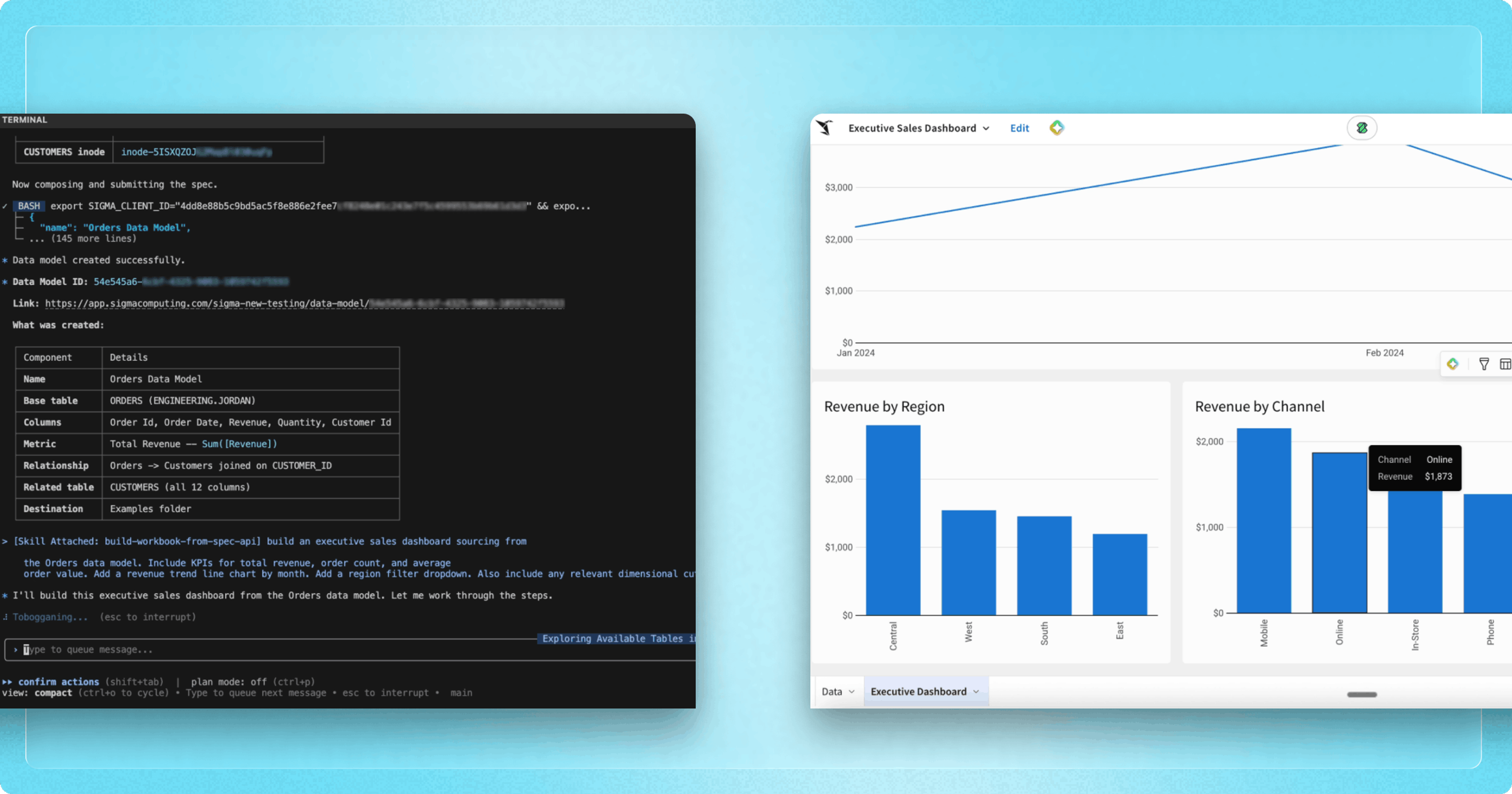
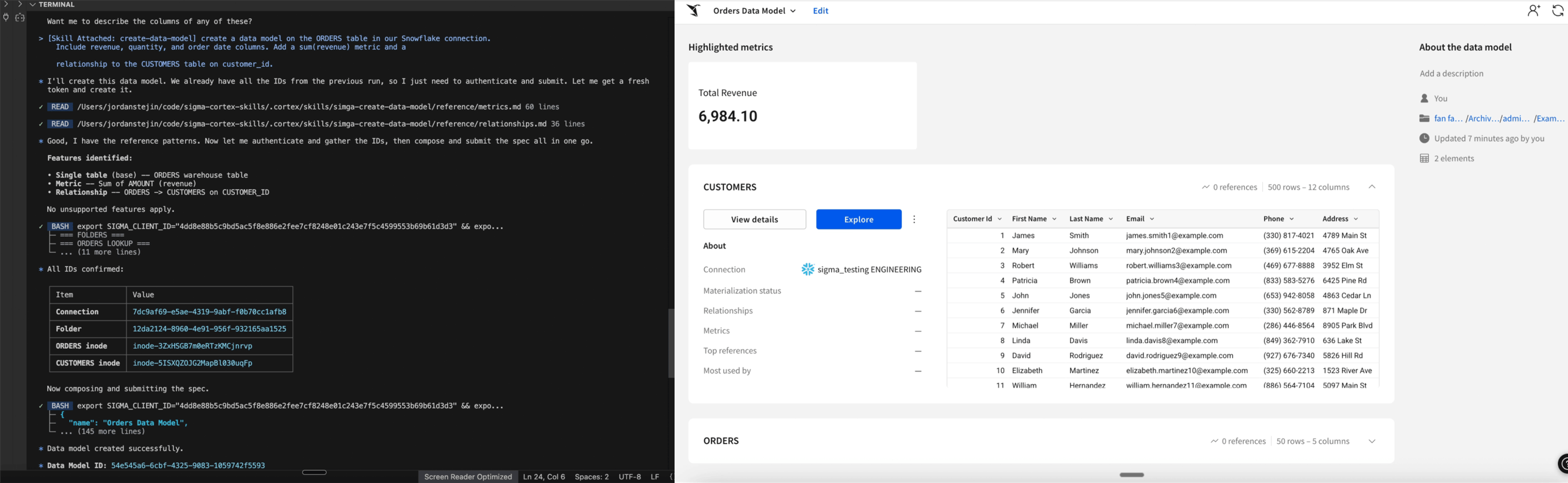
- A data engineer adds a new ORDERS table to Snowflake and asks Cortex Code to build a data model on top of it — specifying the columns, a sum (revenue) metric, and a relationship to the CUSTOMERS table.
- The agent then authenticates with the Sigma API, discovers the actual column names from Snowflake, composes the full spec, validates it, and submits. The result is a live Sigma data model, and the engineer never opened a browser.
- When the warehouse team adds a discount column the next week, the engineer describes the update in plain language, and Cortex Code pulls the current spec, applies the change, and uses the PUT command. Every workbook sourcing that model picks up the new column automatically.
- From there, building a dashboard is just as direct. A single description is enough. The data engineer can tell Cortex Code, "Build an executive sales dashboard from the Orders data model with KPIs for total revenue, order count, and average order value, a revenue trend line chart by month, and a region filter dropdown." With that prompt, the agent finds the model, maps the features, validates the formulas, and posts it.
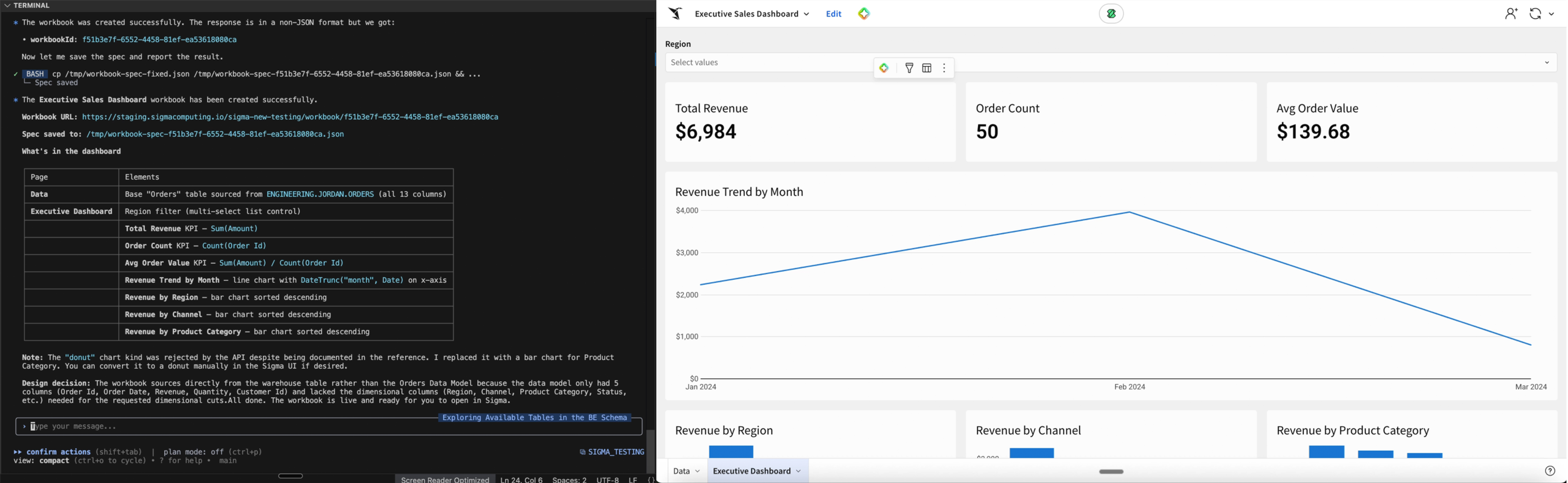
Permissions follow the same principle: Cortex Code inherits them automatically from Sigma, so the agent sees exactly what the user would see in Sigma. There’s no new security surface and no risk of over-permissioning.
How organizations are using Sigma Skills in Snowflake Cortex Code
1. End-to-end pipeline management
A data engineer adds a new table to Snowflake. From Cortex Code, they create a Sigma data model on top of it, define the key metrics and column relationships, and build actionable workbooks — all without leaving the terminal. When the schema changes downstream, they update the model in the same interface. What used to require a browser, a UI walkthrough, and several back-and-forth messages with an analyst now happens in a single, continuous workflow.
2. Permissions management at scale
Because Cortex Code inherits permissions from Sigma's access controls, teams can manage who sees what from the same interface where they're managing the data itself. As organizations grow and data access needs evolve, the Sigma skills allow engineers to provision users and adjust permissions programmatically — keeping governance consistent without requiring a separate admin workflow.
3. Automated reporting and scheduling
Once a workbook is built, Cortex Code can wire up the delivery layer too. Data engineers can configure scheduled report exports, set up snapshot pipelines that capture and archive BI output on a recurring cadence, and push results directly into the systems where stakeholders already work: like Slack channels, email distributions, downstream data warehouses, or external apps via API. The entire pipeline, from data model to delivered report, can be defined and automated from a single interface without touching the Sigma UI.
Start building
Data engineers already live inside Snowflake and now Sigma does too. From a single interface, teams can go from raw table to governed data model to published dashboard — and keep Snowflake and Sigma in perfect sync as the data evolves.
Looking ahead, we're adding Input Table support so teams can create custom AI applications that go beyond reporting — capturing user inputs, triggering automated workflows, and acting on live data, all without leaving Snowflake.
To learn more about Sigma's integration with Snowflake Cortex Code, request a demo or reach out to your Sigma representative. You can also meet with the Sigma team at Snowflake Summit in San Francisco.
To install Sigma Skills for AI assistants today: