Turning Everyday Business Files Into Trusted, Queryable Data With Unstructured AI

About 80%-90% of the data organizations collect is unstructured, created as part of everyday business operations. PDFs, images, slide decks, call recordings, and documents are just a few of the unstructured data sources businesses generate, but aren’t tapping into.
This is valuable information that carries context business teams care about deeply. So, why is it not in use? The answer is fairly simple—because it doesn’t live in a data warehouse, it’s difficult to work with this data in a governed, repeatable way. Just think about photos that reveal why a claim looks suspicious, or Word documents that explain certain business decisions. When you’re able to connect that unstructured information back to real warehouse data, the picture of your business gets much clearer.
But until recently, most teams didn’t realize this kind of analysis was even possible inside their governed data environment. Combine that with the fact that 33% of executives say they often don’t even get around to using the data they receive, and you start to see just how much information businesses aren’t taking advantage of. Now, Sigma and Snowflake are bridging that gap together by making it easy to explore unstructured data where it already lives, using the same permissions, controls, and context as the rest of the business.
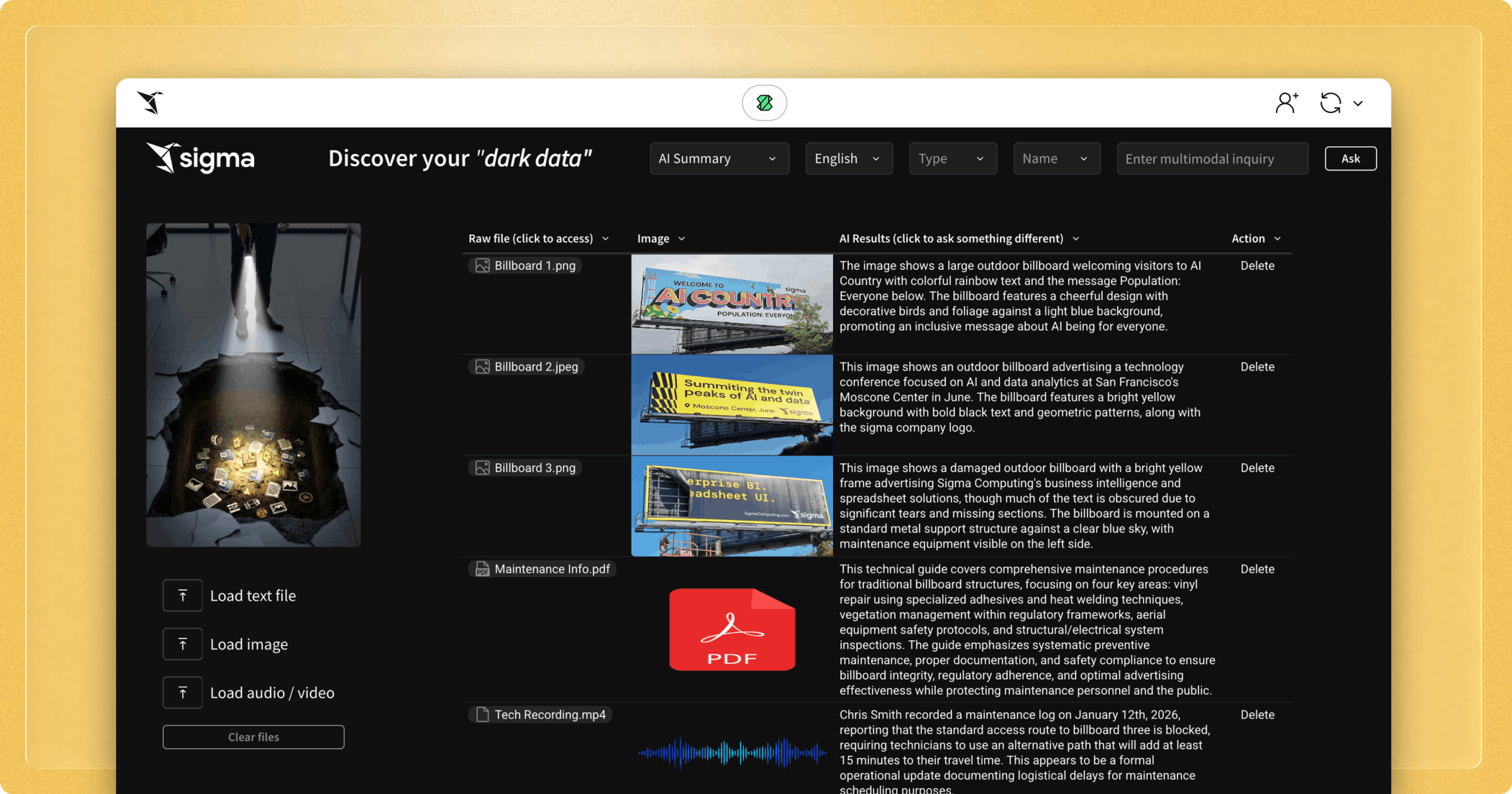
In Sigma, you can build an AI App to process multiple file types using LLMs in the warehouse.
What is “unstructured AI”?
Let's back up for a moment and first clarify what we mean by "unstructured data", because it's a term people use in different ways. I usually think about it as:
Structured unstructured data: documents that may look different from one another, but are answering similar questions. Healthcare claims are a good example—one might be a single page, another three pages. The layout changes, the terminology varies, logos move around, but you’re still trying to understand the same core details: what happened, who it involves, and what was charged.
Totally unstructured data: cases where you might have two or more documents with no consistency at all. One could be 20 pages long, another just two pages, covering different topics with different formats. But even then, it can be valuable to ask questions like, “What’s the summary?” or “What was the main point?” or even to pull out a specific detail, like how long a contract is valid for, for example.
Multimedia data: things like images, audio, and video also contain a wealth of information that provides necessary business context to dig into from an analytics perspective.
In all these instances, the asks and auto-generated responses to the questions from this type of data fall under the umbrella of "unstructured AI". The value here comes from being able to ask these questions at scale, in a way that makes this data usable alongside everything else the business already analyzes.
No, you can’t just do it with ChatGPT
Tools like ChatGPT and Gemini, for example, are incredible. They make it easy to upload a document or an image and start asking questions right away. But for businesses, the limitations of these tools quickly become clear.
For instance, when you copy and paste sensitive documents or customer information into a standalone chat tool, that data no longer sits inside your Snowflake account. It’s not protected by the same permissions, audit controls, and security models you trust for the rest of your data, and that poses significant risks. Scale is another major limitation. Uploading one file at a time might work for a demo, but it doesn’t work when you already have thousands of documents sitting in S3, Azure Blob, or Google Cloud Storage. You can’t easily run the same analysis across all of them, and you can’t connect the results back to the structured data that already lives in your warehouse.
That’s exactly what Sigma and Snowflake tackle together. When AI runs inside Snowflake, those models are operating within your governed data environment. Nothing is being exported or handed off to a third party. And when Sigma sits on top of that, it gives business users a way to ask questions of unstructured data using the same interface they already use for analytics, while keeping everything connected, secure, and repeatable.
How do Sigma & Snowflake enable you to work with unstructured AI?
So, how does it work? The key is making unstructured AI accessible through a workflow that business users can navigate on their own:
- Step 1: Upload files directly into your Sigma workbook
This is intentionally lightweight. You can upload a handful of files directly in Sigma to get started, and those files are written to your configured cloud storage infrastructure, such as Amazon S3 or Google Cloud Storage. From there, you can immediately begin exploring what’s possible with unstructured AI, without setting up pipelines or logging into other systems. - Step 2: Access files currently sitting in your enterprise cloud storage locations (Amazon S3, MS Azure Blob and Google Cloud Storage)
Keep using the same cloud storage infrastructure the business already trusts. Sigma can see and access all of these cloud-based files (if granted secure access of course), while the actual content stays inside your governed environment. - Step 3: Ask questions using AI functions
Sigma can call Snowflake functions likeAI_PARSE_DOCUMENTfor any non-image/audio/video files, accessing the full text from a given document. LikewiseAI_TRANSCRIBEcan be called for audio/video files. By callingAI_COMPLETE, a core Snowflake Cortex function next, Sigma enables users to ask questions of images directly, or the results from the parsing or transcription mentioned. If the user is working with multiple files, they can run the same question across all of them at once. And this doesn’t have to strictly be Snowflake—you can leverage numerous AI functionalities with our other cloud data warehouse partners to achieve similar results. - Step 4: Work at scale, not one file at a time
Once the files are in place, users can filter, group, and compare results just like any other dataset. They can ask questions across thousands of files that already live in cloud storage. - Step 5: Connect results back to warehouse data
Join outputs back to structured data, like sales, claims, inventory, or customer records, retrieving image and document insights that can be analyzed alongside everything else the business already tracks.
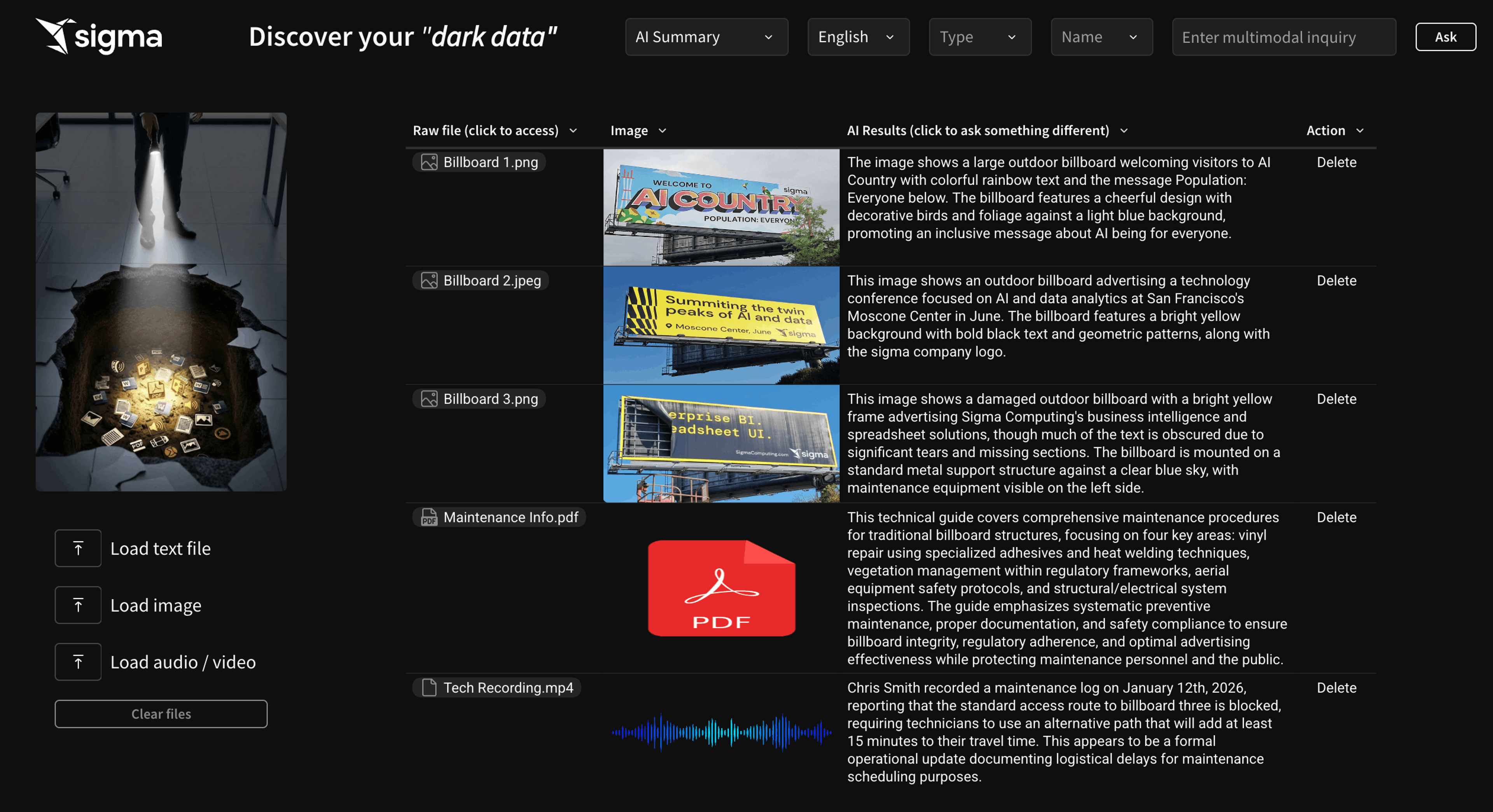
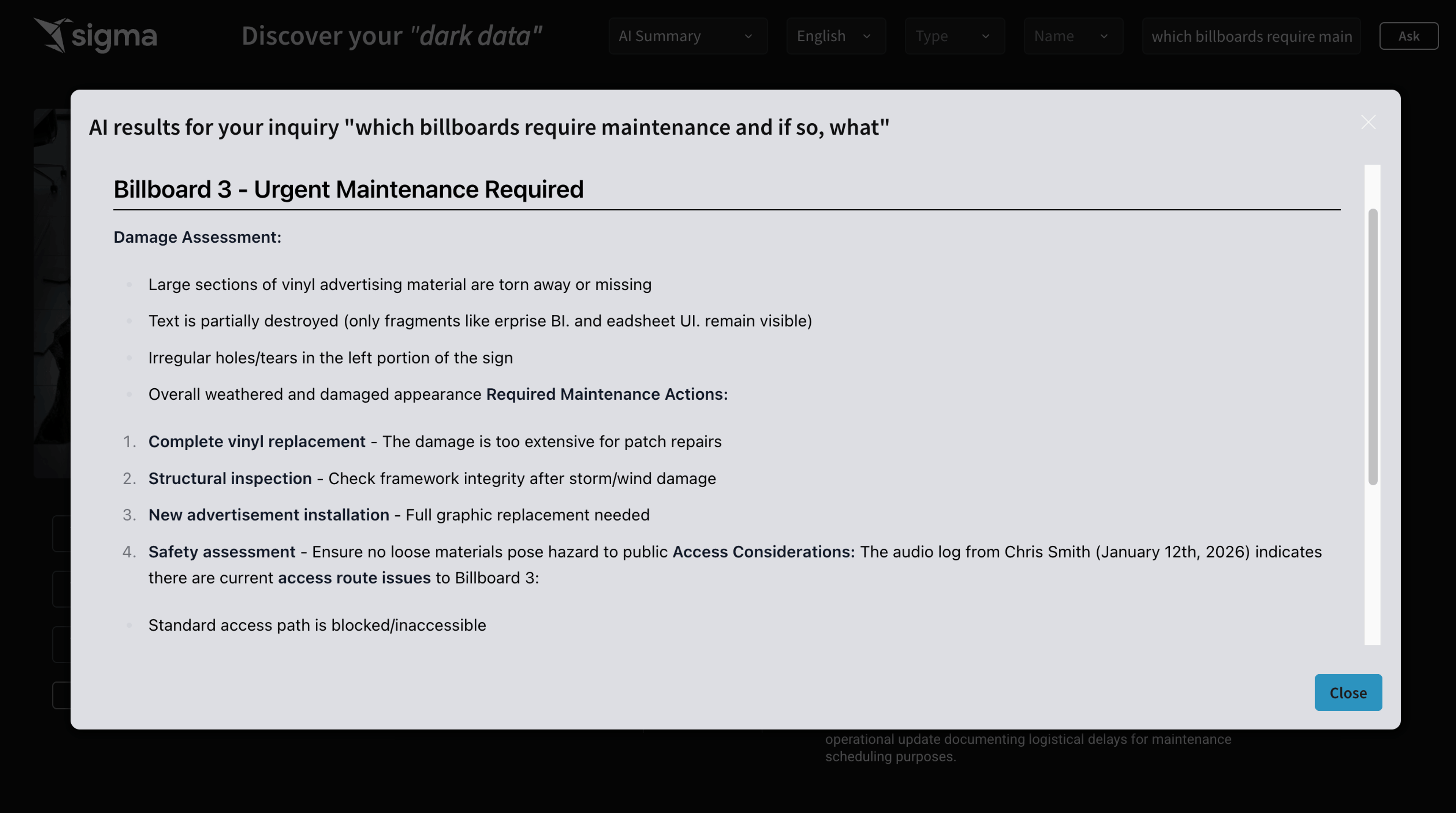
What’s most powerful here is the ability to ask a single question across multiple data types—documents, images, and beyond—to understand how they relate to one another. This is where unstructured AI begins to feel truly multimodal, enabling insights that simply aren’t possible when each format is analyzed in isolation.
Formulas you can use to parse unstructured data in Sigma
For more detail, here are the three key calculations I used in the video at the top of this blog. In Sigma, you can write formulas to invoke LLMs—a process we call AI Query—that are hosted by your cloud data warehouse (e.g. Snowflake, Databricks, Google BigQuery, etc.). While the calculations below are used in an app with a Snowflake connection, you can write similar functions for other cloud warehouses. For step-by-step instructions on how to build an AI App that analyzes multiple file types, review this Quickstart.
Process images
Text(CallVariant("ai_complete", [LLM], "give a detailed description of the following: ", CallText("to_file", [Stage], Text(Json(Text([File])).id))))
Process audio and video files
Text(CallVariant("ai_complete", [LLM], Concat("give a detailed description of the following: ", CallText("to_varchar", CallText("ai_transcribe", CallText("to_file", [Stage], Text(Json(Text([File])).id)))))))
Process documents
Text(CallVariant("ai_complete", [LLM], Concat("give a detailed description of the following: ", CallText("get", CallText("ai_parse_document", CallText("to_file", [Stage], Text(Json(Text([File])).id))), "content"))))
The next era of AI and analytics
What this ultimately changes is how we think about analytics. For a long time, it’s been defined by what fits neatly into tables and dashboards. But a huge amount of business context lives outside those boundaries, in documents, images, and files that teams rely on every day but rarely analyze.
By bringing unstructured AI into the same environment as BI, Sigma extends analytics rather than replacing it. Business users don’t need to learn a new tool or hand work off to specialists. They can explore questions, validate results, and connect insights back to warehouse data using workflows they already understand.
Just as importantly, they can do it without breaking governance or security. Unstructured AI moves from isolated experiments to something teams can safely explore and turn into repeatable workflows. When AI lives where business data already lives, it starts becoming part of how decisions actually get made.
Ready to apply AI to unstructured data? Build your own AI Apps at Workflow, Sigma's User Conference.
Note: This content was made with Snowflake functions, but our other cloud data warehouse partners offer similar functionality in varying capacities.