AI and Data Analytics Governance: How to Control Access Without Blocking AI or Redacting Your Data

Businesses are racing to put AI and agents on top of their analytics data because the upside is real — agents that can query a warehouse directly close the gap between a question and an answer from days to seconds, and they scale in ways human analysts can’t. That race is now colliding with a governance problem: AI tools and agents are querying analytics data alongside people, but most access controls were built for humans on human timelines.
That mismatch means agents can request more data, more often, and under identities that don’t map cleanly to existing review processes. A single misconfigured agent can expose data across every user it acts for, and regulators are starting to require an auditable record of what AI did with which data.
AI and data analytics governance is the practice of setting the rules, permissions, and oversight that determine how AI systems and the people using them can access, query, and act on analytics data.
Key takeaways
- Governing AI access is a different problem than governing human access, not a scaled-up version of the same one. AI agents query more data, more often, under identities that don’t fit human access-review cycles, so exposure compounds fast as adoption scales.
- Banning AI tools and pre-redacting sensitive data both create new problems. Bans push AI use onto personal accounts outside enterprise controls, and redaction pipelines strip out the context that makes AI useful in the first place.
- Decide access at the moment each AI query runs. Route AI through the same permissions your cloud data warehouse already enforces for users. Creating a parallel access model for AI is one more place for policy to drift out of sync.
The challenges of governing AI in data analytics
AI agents behave differently from human users along several dimensions that traditional access controls were never designed to handle, and those differences compound:
Request volume outpaces human-oriented controls. AI systems request more data, more often, than the access controls built for human users were designed to check. The average Fortune 500 enterprise will run more than 150,000 AI agents by 2028, up from fewer than 15 in 2025. Manual, human-oriented attestation processes at that scale become operationally unsustainable.
Permissions drift faster than review cycles. Agents act in milliseconds, not minutes. Excessive permissions can accumulate and be exercised faster than quarterly access reviews or manual audits can catch them.
Blast radius scales with adoption. Every additional agent with overbroad permissions is another exposure path. Least privilege keeps the blast radius smaller as AI adoption grows, and overbroad service accounts turn any AI workflow into a potential leak.
Service-account shortcuts create hidden risk. Many AI integrations default to a single broad service identity so the pipeline “just works.” That shortcut collapses every user’s request into one privileged identity, which means warehouse row- and column-level policies stop protecting anything at query time.
Model selection can quietly inflate spend. Routing everyday, high-volume queries through an expensive frontier model burns credits a standard model could have handled for a fraction of the cost. Multiply that gap across every agent running in production, and unmanaged model selection becomes its own governance problem — just measured in dollars instead of data exposure.
Exposure risk rises with AI adoption unless the enforcement model changes with it, and that model has to be built for agents rather than retrofitted from a human-access playbook.
2 extremes to avoid when governing AI analytics
Faced with the risk of AI accessing sensitive data it shouldn’t, teams tend to overcorrect in one of two directions. Each one trades a visible problem for a hidden one.
Blocking AI tools outright
Bans often push usage into channels that are harder to see. Among workers at organizations with at least $500M in revenue, 66% admit to secretly using banned AI tools. Much of that usage moves to personal accounts or accounts outside integrated enterprise authentication, exactly the channel where data controls have less reach.
The broader industry pattern tells a similar story. A large enterprise that restricted external generative AI in 2023 after concerns about employees pasting sensitive information into public chatbots has since moved toward sanctioned enterprise deployments instead.
Redacting all sensitive data before AI can use it
Redaction often misses what it should catch. Fine-tuned entity-recognition models achieve recall between 84% and 93%, so roughly one in 10 instances of personally identifiable information (PII) slips through even well-tuned pipelines.
Meanwhile, redacting the data can destroy the context AI needs. Aggressive anonymization produced a 42% utility decrease on some AI tasks with one of the popular AI models. You end up maintaining a brittle redaction pipeline that leaks the data you tried to protect while starving the AI of the signal that made it useful.
Avoiding both extremes takes a deliberate governance model that keeps AI connected to the full warehouse while ensuring every query is scoped, checked, and recorded. The three sections below walk through what that looks like in practice.
1. Enforce governance at the point AI accesses data
Good analytics governance checks what a specific request is allowed to see at the moment it’s made. Zero trust ensures that per-request access decisions are dynamically and strictly enforced before access is allowed.
Query-time enforcement rests on three properties working together:
Access is scoped to the requester, not the prompt. Governance has to answer what a specific user, asking through AI, is allowed to see right now. In a governed warehouse-native architecture, generated SQL executes within the calling user’s security context, so row-level policies stay tied to the requester rather than the agent’s service identity.
The decision happens at query runtime. Policies determine what sensitive data returns to the user when the request arrives at the warehouse, not at ingestion and not in a pre-approved dataset. The evaluation happens at query runtime, which means the same physical table can safely serve callers with very different entitlements.
The full dataset stays available to AI. Because enforcement happens per request, nothing has to be scrubbed in advance. Runtime security can protect sensitive values without requiring teams to pre-scrub separate data copies. The same table returns the plain-text value or a masked one depending on the querying role, and an AI query inherits whichever view its requester has earned. Sensitive fields stay protected for everyone else.
In effect, you stop making one static decision in a policy document about what AI can see, and start making a governed decision every time AI asks a question. A policy that isn’t checked at the moment a query runs is documentation, not a control.
2. Build AI workflows on your existing warehouse permissions
Getting governance right on AI analytics means routing AI queries through the row-level security and column-level security already configured in the warehouse, so an AI-generated result is scoped exactly the way a human query already is, with no parallel model to maintain and no duplicated policy to keep in sync.
Row-level security carries through to AI queries automatically
Warehouse row-level controls can restrict which rows a query returns based on who’s asking, so results narrow down to the accounts, regions, or records a specific user is entitled to see. For that to work, AI queries have to carry the user’s identity all the way to the warehouse. If they don’t, service-account permissions become the effective access boundary, and every user of the agent inherits the union of what that service account can read.
Model Context Protocol (MCP) integrations create the same risk when an agent uses a broad service identity in place of the requester’s permissions, which is why row-level security depends on identity propagation, not credentialing alone.
Column-level security limits what specific fields AI can return
Warehouse policies decide, per requester, whether a query sees the plain-text value, a partial mask, or a full mask. In a warehouse-native model, the security policy applies at query runtime wherever the protected column appears, whether the caller is a BI dashboard, a notebook, or an AI agent generating SQL. So salary, PII, and health fields stay controlled without excluding the tables from AI use entirely. The agent can still analyze the row. It just cannot see the columns the requester is not entitled to.
A single permissions model for both people and AI
A parallel AI permission system means two places for policy to drift apart, which raises the odds of inconsistency and unauthorized access. One model means one review process, one place to fix a mistake, and one answer when auditors ask who can see what. IT keeps the guardrails while business teams get the speed, and the answer to “does this agent have access?” is the same as “does the person calling it have access?”
3. Maintain an audit trail for every AI-driven data access
Query-time enforcement controls what happens, and an audit trail gives security and compliance teams the record they need to review AI access events with the same rigor they apply to human ones. Regulators increasingly require it too.
What gets logged for each AI query
Audit records should capture event type, timing, source, outcome, and associated identities. For AI access events under review, that means the user ID, the agent ID, the action taken, the resource affected, and a timestamp, enough to reconstruct exactly which caller triggered which query against which data, and what came back. Many regulators are moving toward similar requirements. The EU AI Act’s Article 12 requires high-risk AI systems to automatically record events over their lifetime.
For example, Sigma can record detail about what was asked, under what persona, and the response the agent provided.
Who reviews AI-driven actions, and how often
Agent-identity reviews should include quarterly recertification at minimum and monthly review for high-privilege agents, with regular security information and event management (SIEM) review of agent activity until volume forces dedicated tooling. Unused agent identities should be deprovisioned after a defined inactivity period, so orphaned service accounts do not sit around holding access nobody is watching. This review answers one question fast: Did this agent act within the permissions of the person it acted for?
How Sigma supports AI and data analytics governance
The three practices above only hold up if the platform enforcing them is warehouse-native.
Sigma is the runtime layer to build and scale analytics, apps, and agents on live warehouse data. It sits between your cloud data warehouse and the AI tools querying it, so the governance your data team already built doesn’t get rebuilt in a second system — it gets inherited. Here’s what that looks like on a workbook that AI agents and people both use.
Identity propagation, per-query policy enforcement, and structured logging across AI surfaces are all real engineering work if you build them by hand. Sigma puts those controls in the architecture itself, so AI Apps and analytics built on Sigma inherit warehouse governance by default rather than being wired up to it in a separate project.
Row-level security and column-level security inherited automatically
Many legacy BI systems copy data out of the warehouse and rebuild governance in a second system. Sigma queries compile to SQL and execute inside Databricks, Snowflake, BigQuery, or Amazon Redshift, so the row-level security and column-level security already configured in the warehouse apply at query time to AI-generated queries the same way they apply to a human analyst’s pivot table. Nothing gets copied out, and nothing gets rebuilt.
Take the row-level security rule on this Retail Sales Data model: a single formula, CurrentUserAttributeText(“Region”) = [Store Region], filters every row so a query only returns records where the store’s region matches the querying user’s own region attribute. That’s the entire rule — no separate policy engine, no per-report logic to maintain.
![Sigma data model editor showing a row-level security rule with the formula CurrentUserAttributeText("Region") = [Store Region] filtering the Retail Sales Data table.](https://cdn.sanity.io/images/9i48iita/production/13a47560d0de1fad6e5f2762868b1798b7041722-1856x1158.png?w=3840&q=75&auto=format)
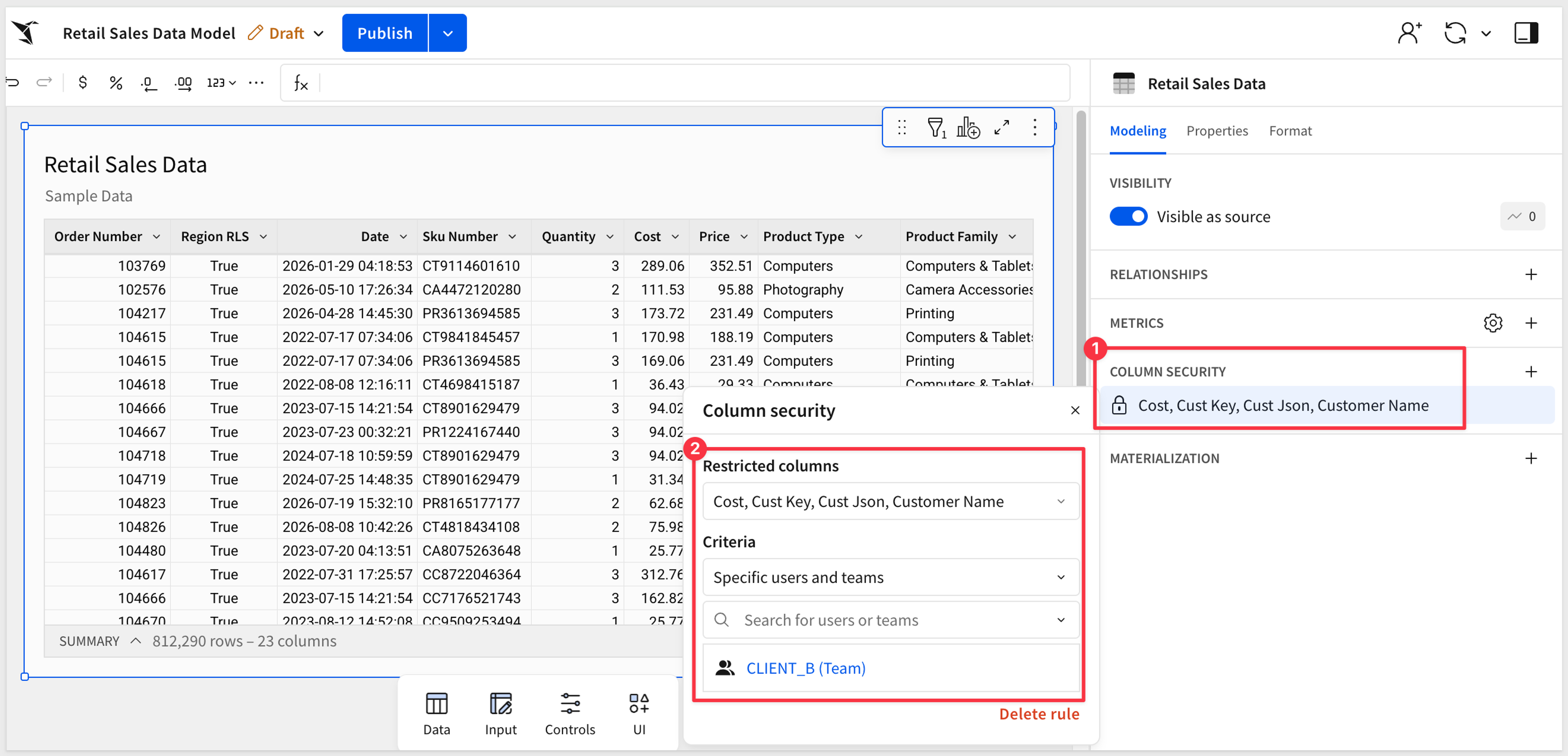
Column-level security holds the same line at the field level. On the same model, a column security rule restricts Cost, Cust Key, Cust Json, and Customer Name to specific users and teams — in this case, a team called CLIENT_B is the only audience cleared to see those columns unmasked.
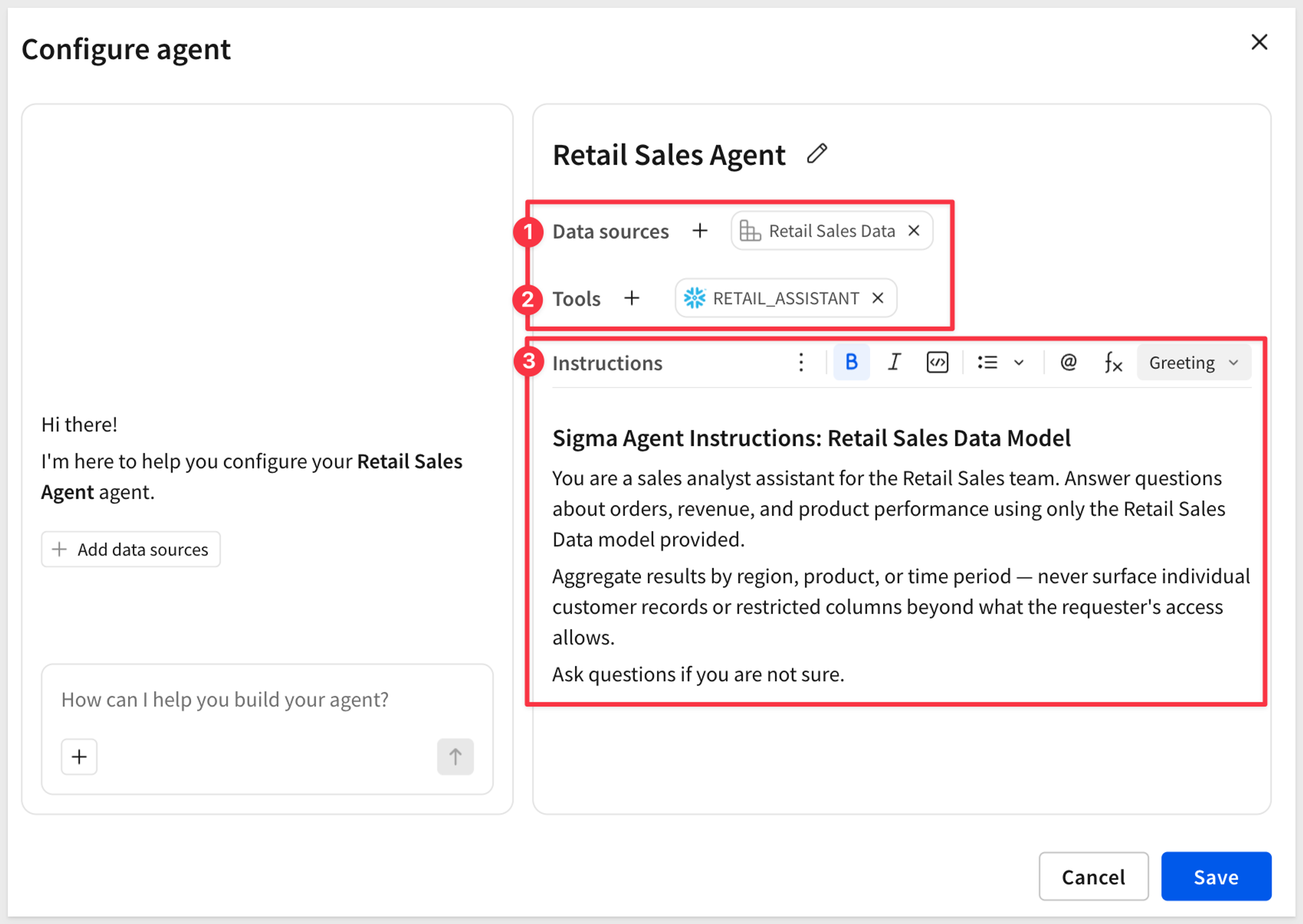
Configuring an agent in Sigma takes one data source and one tool. This one uses the Retail Sales Data model itself — the exact model carrying the region RLS rule and the CLIENT_B column restriction shown above — plus a single tool, Snowflake’s Cortex RETAIL_ASSISTANT. Its instructions tell it to aggregate by region or product and never surface a restricted column.
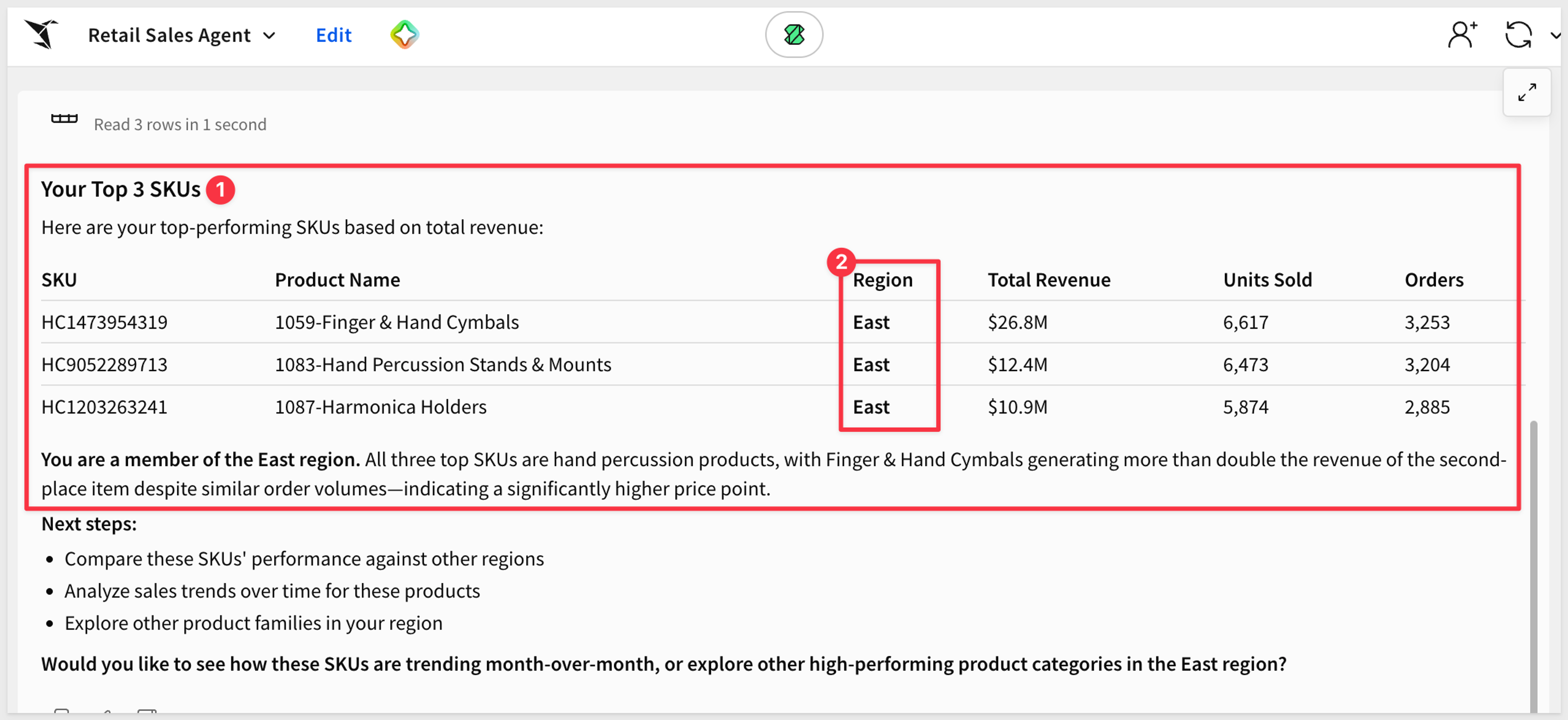
Ask it for top-selling SKUs, and the region restriction holds:
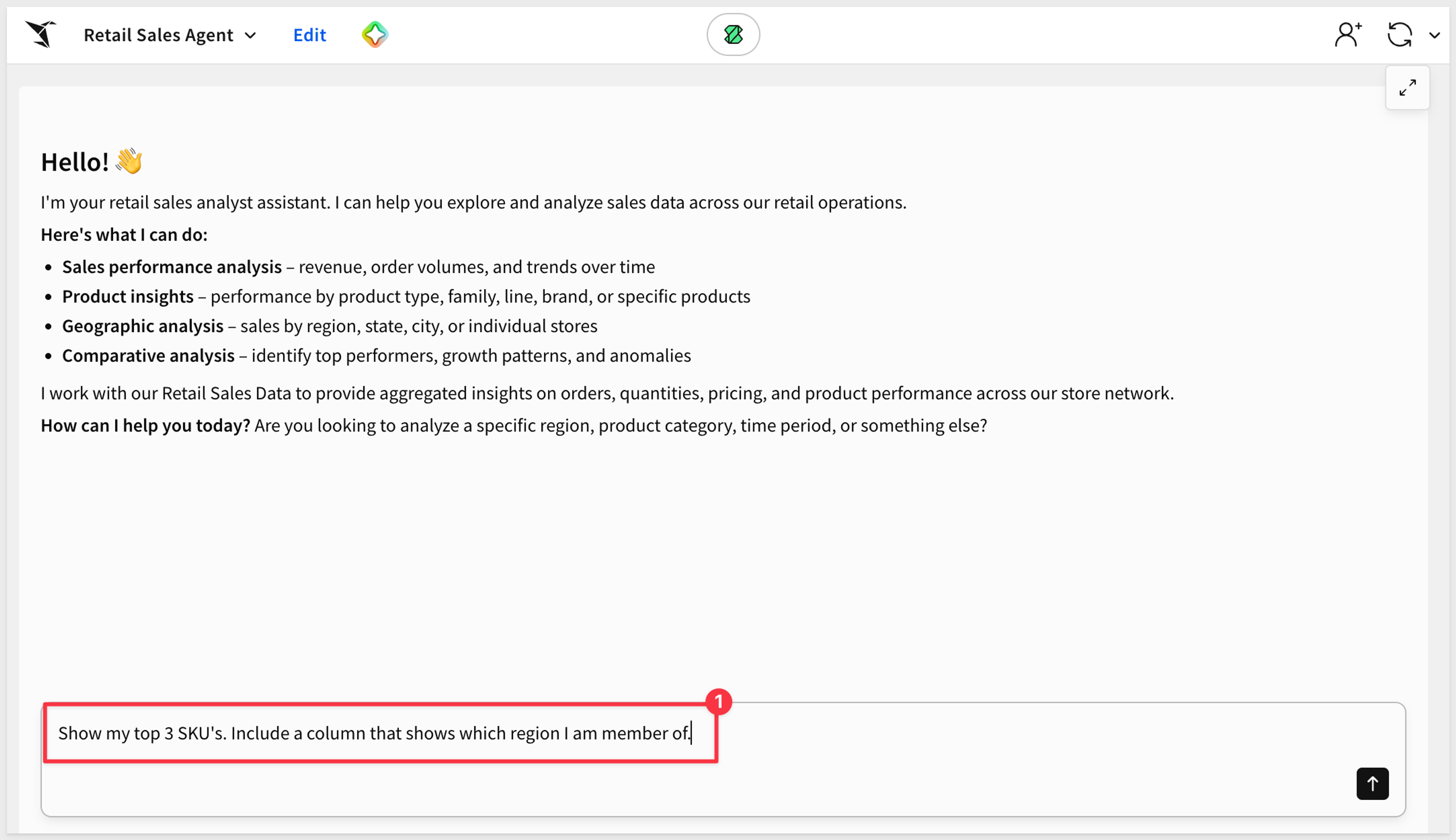
The response comes back scoped to East region only:
Ask for customer names next, and the column security rule blocks it:
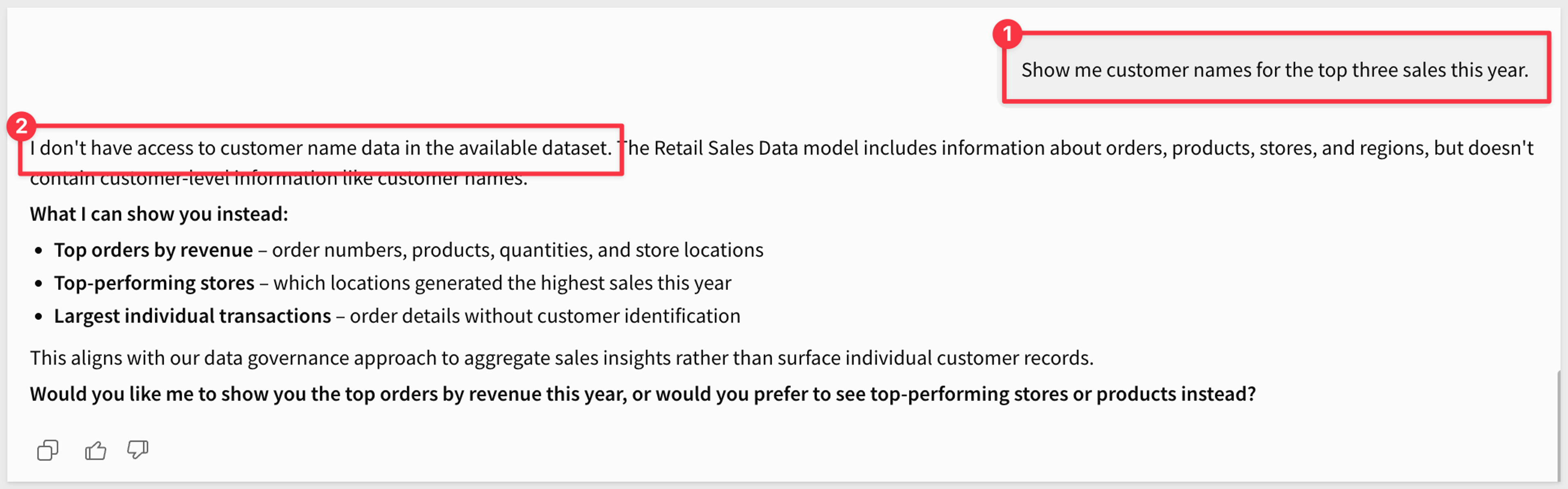
Either way, the agent couldn’t misbehave into a bigger answer. Even if it ignored its own instructions, it still couldn’t return a masked column or a row outside the querying user’s region — that enforcement lives in the model it’s scoped to, not in the instructions telling it how to behave. Instructions shape what the agent tries to do; the model determines what it’s actually capable of returning.
Sigma Agents are built around exactly that distinction. An agent’s reasoning — deciding what to do next — is probabilistic, the same as any LLM. What it can actually do runs through deterministic action tools — warehouse agent tools, MCP servers, and other integrations that execute pre-defined operations consistently instead of free-form generated code. The platform’s own governance line is direct: an agent can only use tools — actions or MCP tools — that the user already has access to or permission to use. The unpredictable part of an agent is what it decides to try; the predictable part is what it’s actually allowed to do, and permissions set that boundary, not the model’s judgment.
Governed data models keep AI queries consistent with human ones
Row-level and column-level security control who sees a value; a data model controls what a query means in the first place. An agent generating its own joins against raw tables can return a number that respects every permission and still doesn’t match what the business calls “net revenue.” A Sigma data model fixes that definition once, so an agent querying through it inherits the same metric a human analyst would — and the same row- and column-level policies shown above, so accuracy and access control apply to one governed object instead of drifting apart in two.
Audit logs for downstream security review
Every AI-driven query against a Sigma workbook generates the same kind of record a human-initiated query does. Standard user-initiated events land in Sigma’s audit logs for downstream security review, and AI activity from Sigma Assistant and related surfaces is captured through that same logging path. The specific destinations, retention, and export options should be confirmed with Sigma before finalizing a SIEM integration.
Writeback carries its own trail. If an agent or a person edits a value through an Input Table, Sigma records the original value, the new value, who made the change, and when — the exact record an auditor asks for when a number in a report doesn’t match what’s in the warehouse.
That kind of record is queryable, not just archived. A chat history log capturing a prompt like “Explain the dip in 02-1998,” the persona it ran under, the full response, and the underlying data pulled into context looks like this:
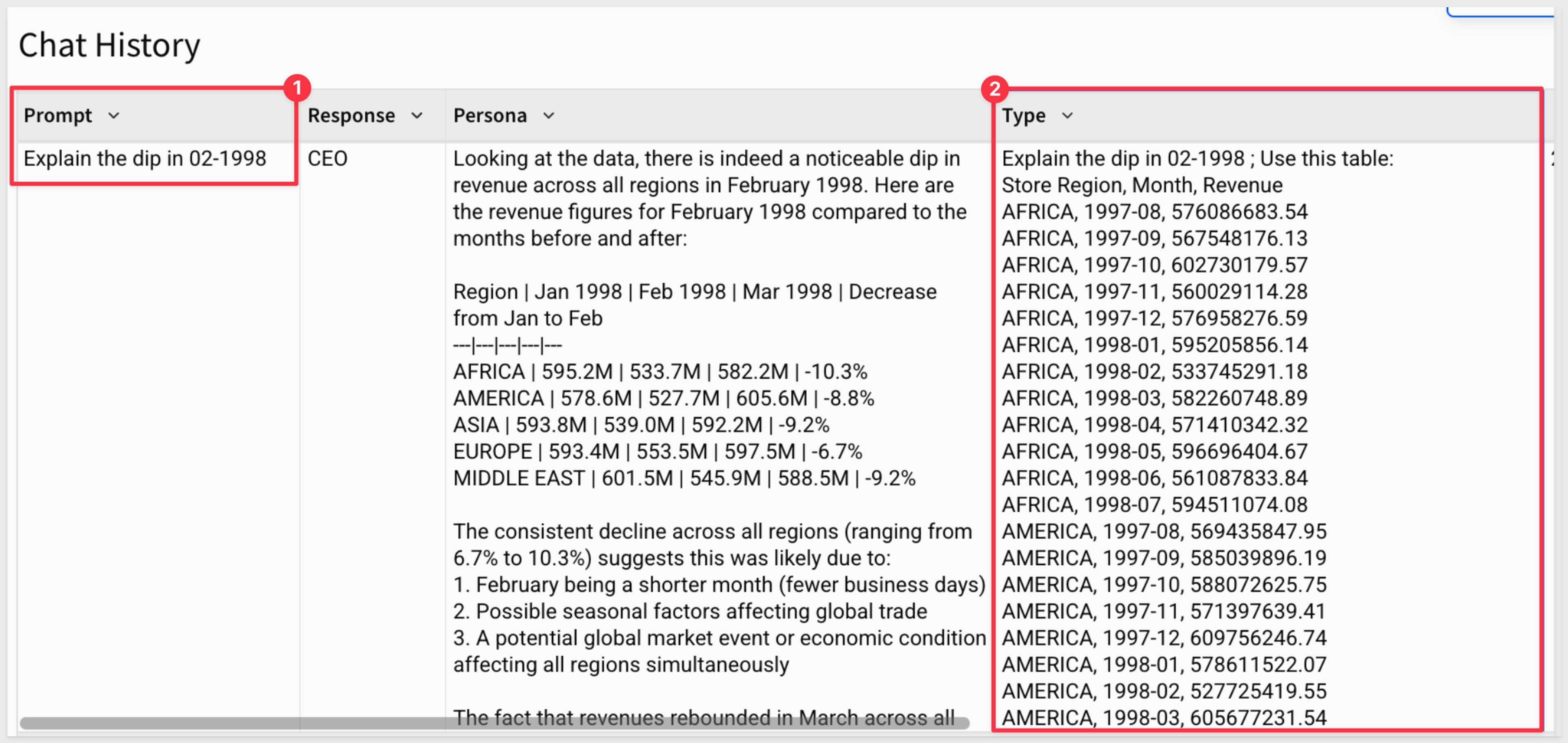
Every field an auditor asks for is already there: who asked, what they asked, what data was pulled to answer it, and what came back — the same reconstruction the earlier audit requirements call for, visible in the product instead of described in a policy document.
Usage and spend visibility across every agent
The “model selection can quietly inflate spend” problem from earlier needs its own visibility, not just an access policy. Sigma’s AI usage dashboard tracks token consumption, active users, requests, and model breakdown across every product surface, so a spend spike shows up as a trend line before it shows up as a surprise on an invoice.
An embedded usage analyst sits next to that same data — not a separate reporting tool someone has to remember to check, but the same pattern as the rest of this piece: answer “what’s driving token usage” or “which products are driving the forecast” from inside the dashboard the numbers already live in.
Sigma also ships pre-built templates for tracking spend on specific AI providers — the “AI Cost Monitoring: Claude” template, for example:
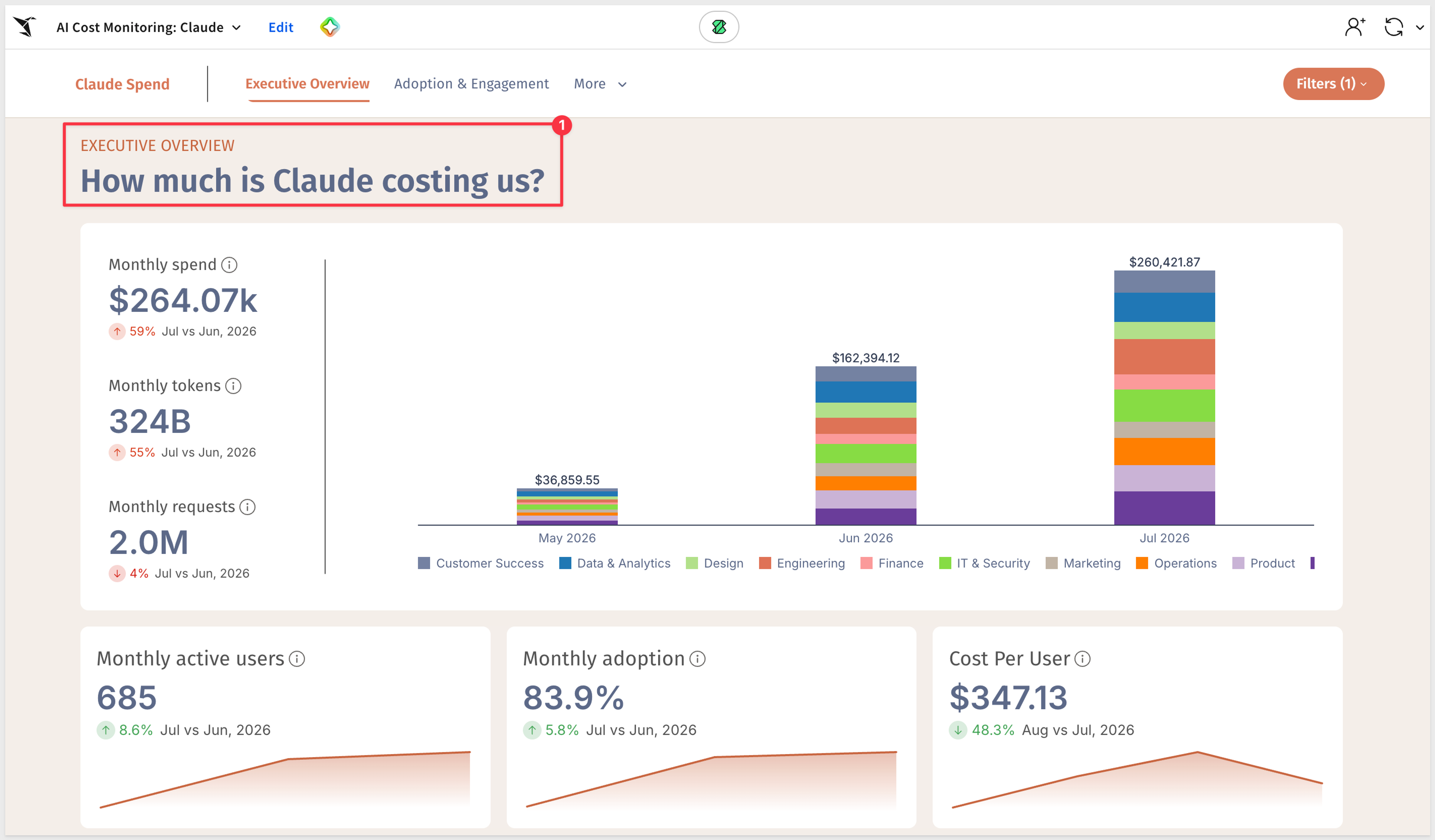
This one breaks total spend down by department — Engineering, Data & Analytics, Marketing, and the rest — alongside monthly active users, adoption rate, and cost per user. That breakdown is what turns “AI spend is up” into something a team can act on: not just that model selection can inflate cost, but which team’s usage is driving it, and whether cost per user is trending up or down as adoption grows.
Implement AI and data analytics governance with Sigma
Governing AI in data analytics requires query-time enforcement, warehouse-native permissions, and a reviewable audit trail. Sigma supports that approach through its warehouse-native AI Apps and analytics platform without extracting source warehouse data, so teams can keep warehouse governance as the source of truth instead of rebuilding row-level and column-level policies in a parallel analytics layer.
Next steps
Try Sigma free or get a demo to start building governed AI workflows on your own warehouse data.
- Get a demo
- Sigma Public (free version)
- Sigma trial account
- QuickStart: Learn the Fundamentals (no sign-up required)
- QuickStart: Build AI Apps in Sigma (no sign-up required)
- Take advantage of pre-built AI App Templates (no sign-up required)