Javascript Events in Embedded Analytics with Sigma

If analytics feel separate from your product, they're already breaking the experience.
Users don't distinguish between "your application" and "the analytics layer inside it." They just know when something feels off: a loading spinner that doesn't match the rest of the UI, a navigation element that duplicates what's already on the page, a filter interaction that resets when they didn't expect it to. These small friction points accumulate into a product that feels stitched together rather than built.
Javascript events close that gap by giving your host application control over what Sigma displays and letting it respond the moment a user interacts with the embed.
What are Javascript events, and why do they matter?
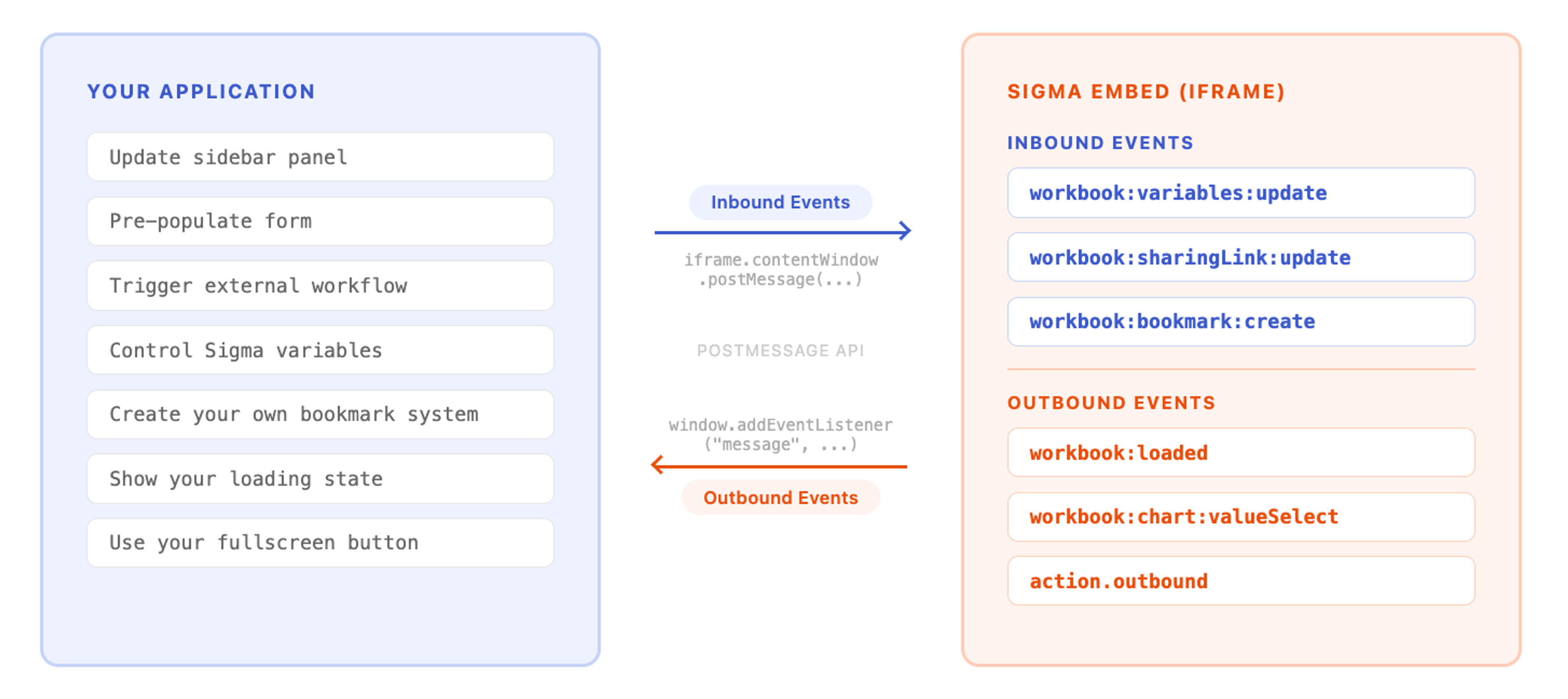
When you embed Sigma inside your application using an iframe, you're creating a boundary between two separate browsing contexts. By default, those contexts can't talk to each other. The iframe renders its content, and the parent application renders its own, and neither knows what the other is doing.
Javascript events break down that wall. They use the browser's native postMessage API to pass structured messages across the iframe boundary in both directions, enabling the embedded Sigma experience and your host application to respond to each other in real time.
This might sound like a plumbing detail, but it determines the entire character of the embedded experience. Without Javascript events, you have embedded elements that happen to live inside your product. With Javascript events, you have analytics that behave like a first-class part of your product.
How inbound and outbound events create a complete embedded experience
Sigma's Javascript event model is built around two types of communication, and both matter.
Outbound events flow from Sigma to your host application. They notify the parent page when something happens inside the embed: a workbook finishes loading, a user changes a filter, a cell gets selected in a table or pivot table, a bookmark is created or modified, or a custom workbook action gets triggered. Your application listens for these events using a standard window.addEventListener('message', ...) handler, checks that the message came from https://app.sigmacomputing.com to confirm its origin, and then executes whatever logic makes sense in that context.
Inbound events flow from your host application to Sigma, and this is where things get particularly powerful. Your host application sends messages directly to the iframe's contentWindow using postMessage, targeting https://app.sigmacomputing.com as the destination origin for security. Those messages can update workbook variables, change which page or element is currently selected, open or close modals, toggle fullscreen, and more. This means your application isn't just passively displaying analytics; it's actively controlling them based on user context, application state, or business logic that lives entirely outside Sigma.
Many embedded analytics tools only support one side of this conversation, typically the outbound side. An embedded element can tell your app that something happened, but your app can't reach back in and change the workbook's behavior dynamically. Sigma supports both inbound and outbound events with iframes, which is what enables true product integration rather than a glorified embed.
How product teams use Javascript events in real workflows
It helps to think through what this communication model enables in practice, beyond the abstract mechanics.
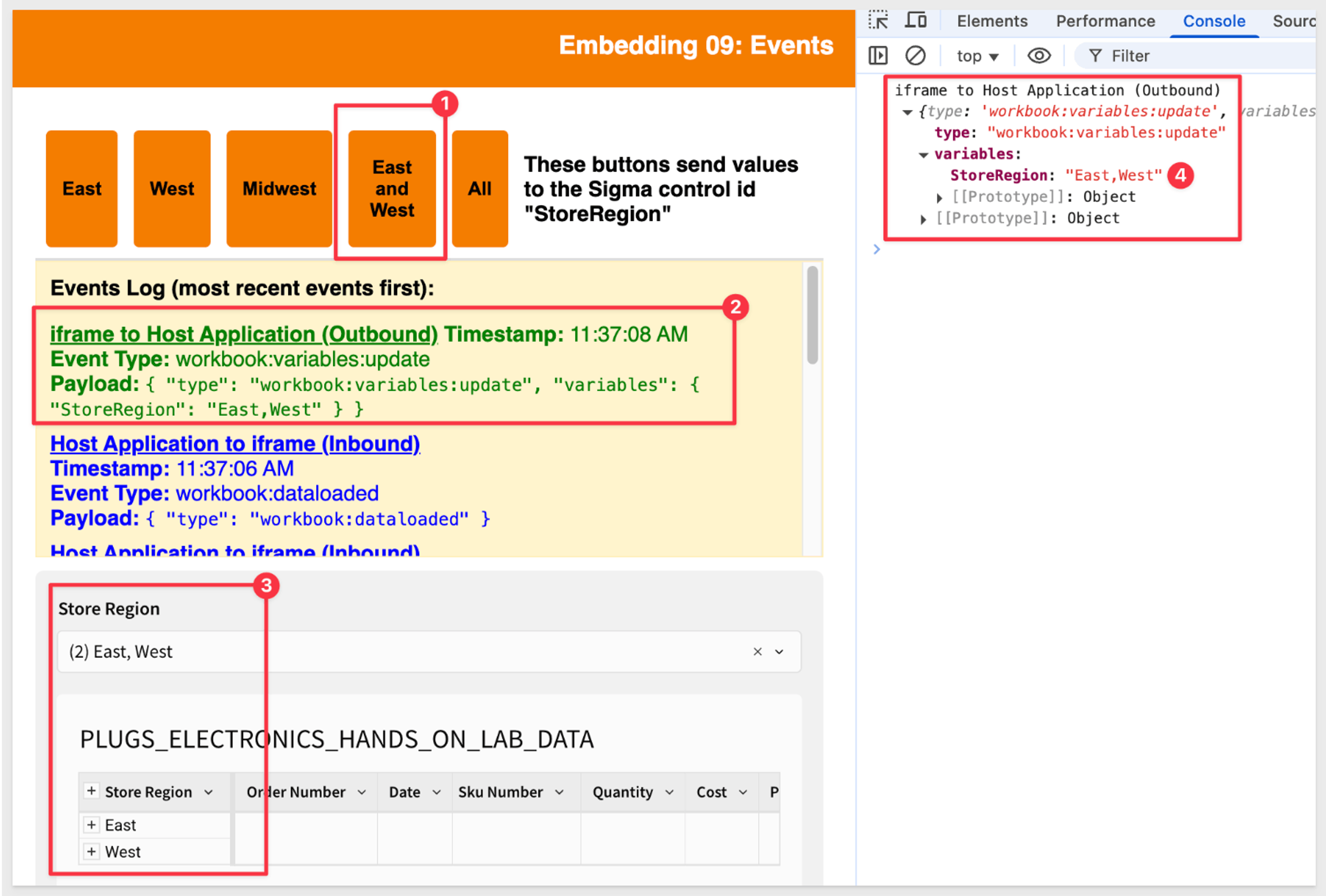
Consider a SaaS platform that manages customer accounts, where users may have access to data across multiple teams (e.g., operations and finance). When a user opens an embedded Sigma workbook, your host application can use workbook:variables:update to set default control values—such as scoping the view to the user’s own team or region. This ensures the user lands on data that’s most relevant to them by default, while still allowing them to adjust controls in the UI to explore other teams or broader datasets they have access to.
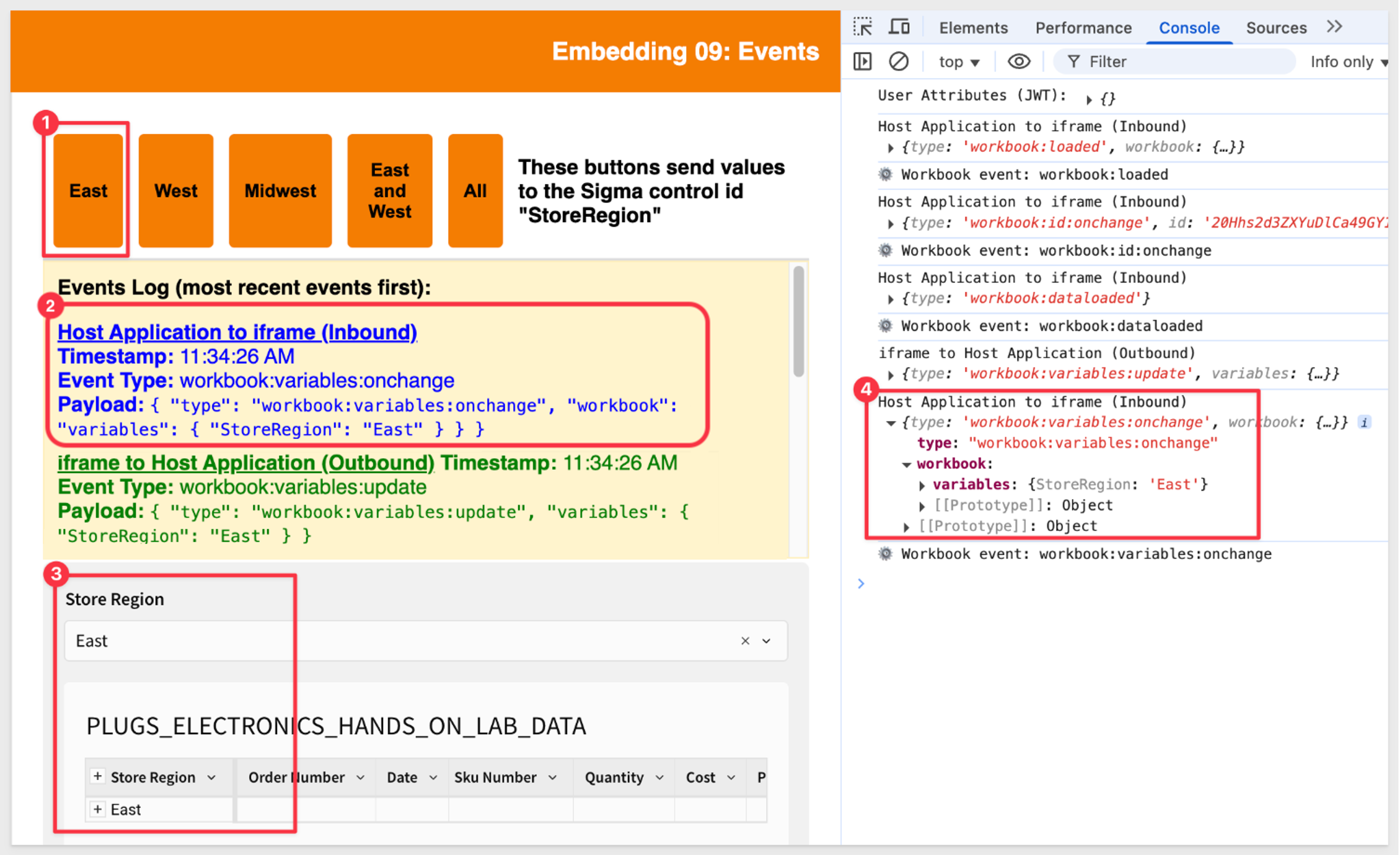
Now imagine that same user clicks on a specific bar in a revenue chart inside the Sigma embed. An outbound workbook:chart:valueSelect event fires, containing the details of exactly what they clicked: the category, the value, the underlying data. Your host application catches that event and uses it to update a separate panel elsewhere on the page with context-specific information, or to pre-populate a support ticket form, or to trigger a workflow entirely outside of Sigma. The chart click becomes a product interaction, not just a visualization interaction.
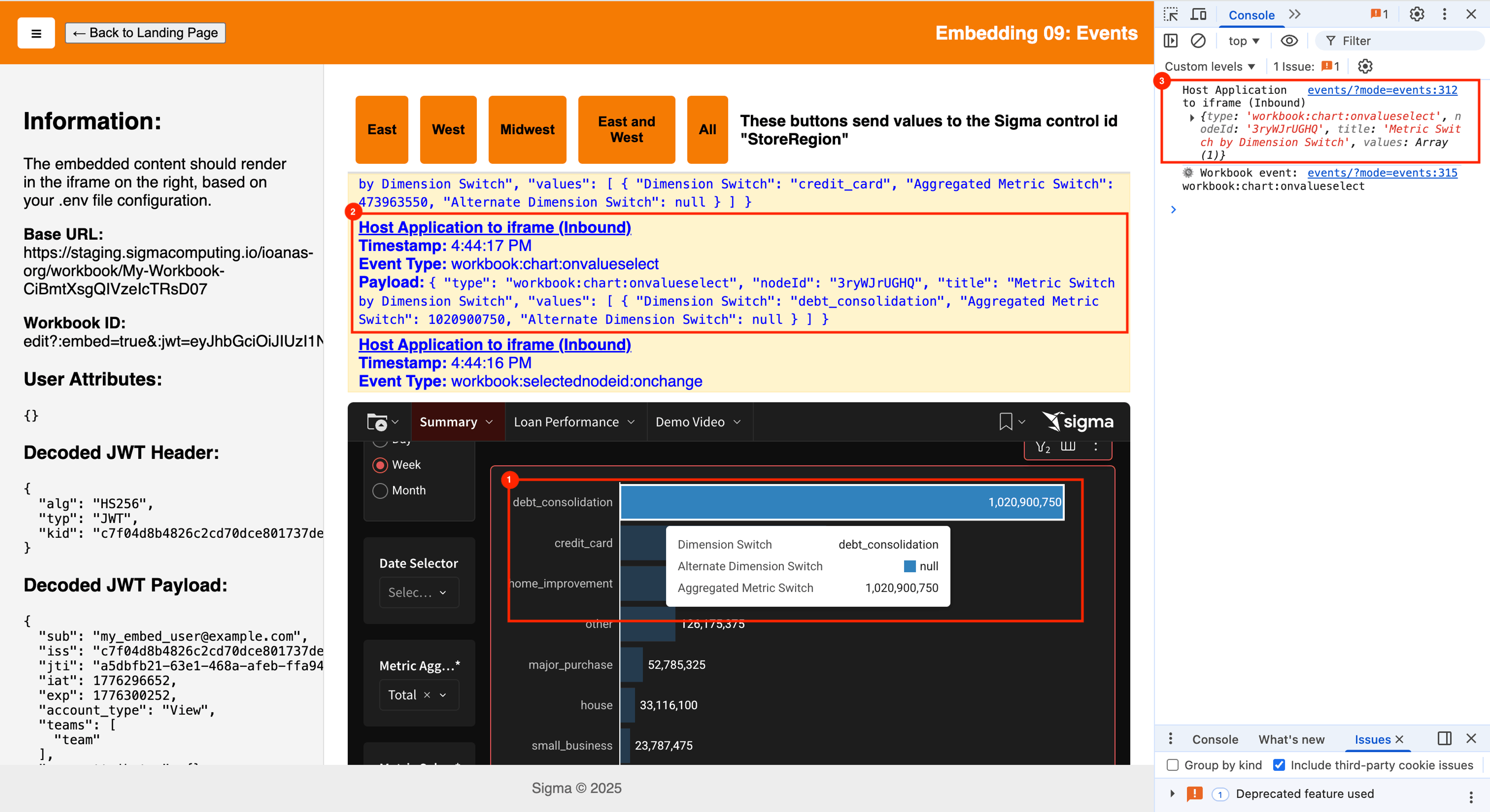
Or think about loading states. One of the most jarring things about poorly integrated embedded analytics is the mismatch between when the parent page is ready and when the iframe has finished loading its data. Sigma fires a workbook:loaded outbound event once the workbook's data has finished rendering. Without Javascript events, users experience two distinct loading moments: the host page loads first, then Sigma catches up, leaving a visible gap where the analytics section sits blank or half-rendered. Sigma's workbook:loaded outbound event fires once the workbook data has finished rendering, giving the host application a reliable signal to hold the analytics section until it's ready.
These examples barely scratch the surface. Sigma supports over 30 distinct event types, spanning the full range of user interactions: bookmark creation, updates, deletion, and selection; variable and control state changes; modal and fullscreen management; table and pivot cell selection; workbook publishing; empty data states; and custom action-triggered events that teams can define themselves.
How custom workbook actions connect analytics to product logic using action:outbound
One of the more sophisticated pieces of Sigma's Javascript event model is the ability to configure workbook actions that generate outbound events. Rather than relying solely on built-in events tied to standard user interactions, teams can instrument specific moments in their Sigma workbooks such as a button click, a row selection, or a data drill and configure those interactions to emit a custom event payload to your host application.
This makes it possible to design workflows where a specific analytical action in Sigma kicks off a real business process: creating a record in another system, surfacing a notification, or updating application state. The analytics aren't just reading data; they're participating in the product's operational flow.
How Sigma keeps sharing native without losing embed context
Sharing is a workflow that often breaks the embedded experience. A user builds their own exploration inside an embedded workbook, drilling down, applying filters, and surfacing something meaningful, then wants to send it to a colleague. In a typical embedded business intelligence setup, that shared link either breaks because it points to a standalone BI environment the colleague doesn't have access to, or it strips away all the context that made the insight meaningful in the first place.
In Sigma embeds, your application owns this flow. Using the workbook:sharinglink:update event, your application can intercept when a user initiates sharing and generate its own link. That link can include any necessary state (for example, an exploration key or serialized context) and route back through your product.
When the recipient opens the link, they land in your product, which restores the same exploration inside the embedded iframe with the full context intact.
This matters because sharing stays entirely within your product. There’s no redirect to a separate BI tool, no loss of state, and no gap in governance. Sharing behaves like a native feature because you control how the link is created, routed, and resolved.
How Sigma secures cross-Javascript event communication
A communication model that passes messages across iframe boundaries could create security concerns if not designed carefully. Sigma's implementation addresses this in a few ways worth understanding.
When listening for outbound events from Sigma, your host application should always validate that the message's origin matches https://app.sigmacomputing.com before processing it. This prevents spoofed messages from other sources from being treated as legitimate Sigma events. Similarly, when sending inbound events to the iframe, targeting the correct origin ensures that messages reach only the intended recipient.
On the embedding side more broadly, Sigma's secure embedding model uses server-side generated, JWT-signed URLs that are single-use and time-limited. User attributes, team assignments, row-level security rules, and permission controls are all enforced at the URL-generation layer, which means the Javascript event communication layer operates within an already-governed access model. Events can update variables and change views, but they can't escalate permissions or expose data that the signed URL didn't grant access to in the first place.
How to implement Sigma Javascript events without the complexity

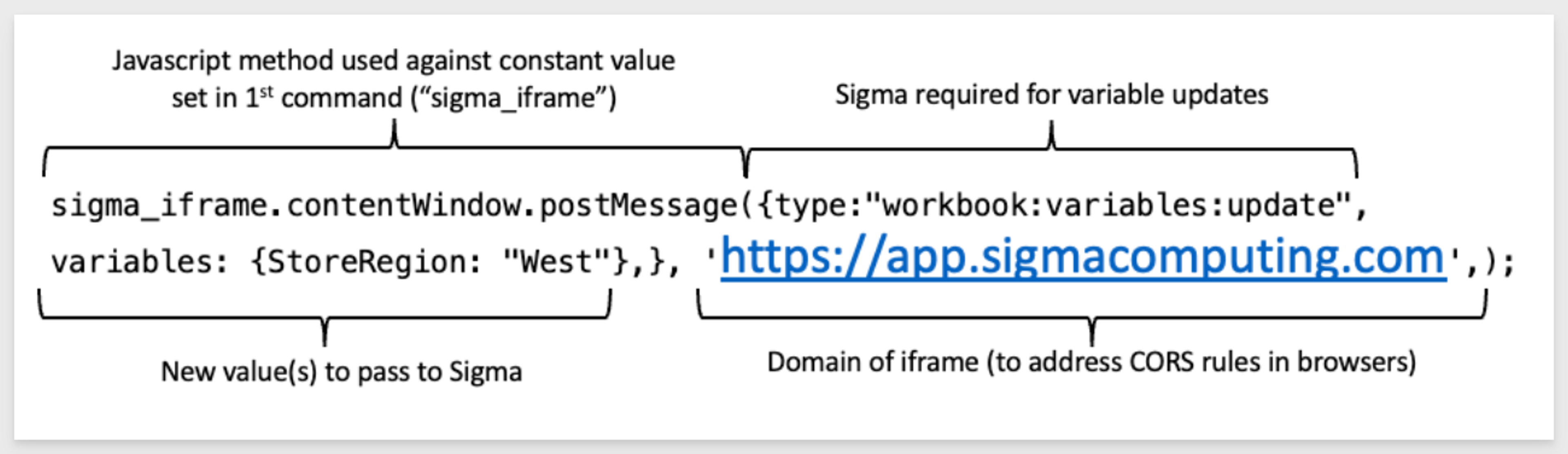
One concern that often comes up with sophisticated embedding capabilities is implementation complexity. Sigma has invested in making the event API approachable for product and engineering teams that aren't already Sigma experts.
The QuickStart guide for Javascript events (specifically QuickStart 09: Events) provides an end-to-end walkthrough of configuring event listeners and sending inbound messages, including working sandbox environments that function without requiring full production embedding setup. The documentation separates the conceptual overview of how events work from the reference documentation for specific event types, so teams can orient themselves and then go deep where they need to. Clear guidance on credential configuration and debugging reduces the time between starting an integration and having something that actually works.
This matters in practice because every embedding project has a point where the team needs to validate the approach before committing to it. The faster that validation happens, the faster the real build begins.
From visualization layer to product infrastructure: The case for Javascript events
There's a meaningful difference between analytics that display data and analytics that participate in a product. The distinction isn't visual; it's behavioral. Can the analytics respond to what the rest of the product knows? Can the product respond to what happens inside the analytics? Can users move between the two without ever feeling like they've left?
For most of the history of embedded BI, the answer to all three questions was "not really." Embedded charts and analytics were visualization outputs, and the embedding was primarily cosmetic, a way to put charts inside an application without them obviously living somewhere else.
The shift toward true bidirectional communication changes what's possible. When Sigma knows what a user clicked and can tell your host application in real time, and when your host application can reach into Sigma and change what it's showing based on application state, the boundary between product and analytics starts to dissolve.
For product teams building on Sigma, Javascript events are the mechanism that makes embedded analytics a genuine product capability rather than an add-on. Getting them right, understanding the full event surface and thinking carefully about what your product needs to know and control, is some of the highest-leverage work in a Sigma embedding implementation.
The teams that treat Javascript events as infrastructure, rather than a nice-to-have layer on top of an embed, are the ones whose analytics feel like they were built there from the start.
If you're evaluating how Sigma could fit into your product architecture, or you're already embedding and want to see what a fully realized Javascript event integration looks like in practice, we'd love to show you. Request a demo and we'll walk through what's possible for your specific use case.
Frequently Asked Questions
What are Javascript events in embedded analytics?
Javascript events are messages passed between an embedded analytics tool and your host application using the browser's native postMessage API. They enable real-time, bidirectional communication — so your host app can control what Sigma displays, and Sigma can notify your host app when a user interacts with a workbook.
What is the difference between inbound and outbound Javascript events in Sigma?
Outbound events flow from Sigma to your host application, notifying it when something happens inside the embed — such as a chart click, filter change, or workbook load. Inbound events flow from your host application to Sigma, allowing your host to update variables, change pages, or control the embed based on application state.
How do Javascript events make embedded analytics feel native?
By enabling your host application and the analytics embed to share state in real time, Javascript events eliminate the disconnect between the two contexts. Loading states sync, filters reflect the user's existing session, and interactions inside the embed can trigger actions anywhere else in the product.
Can Sigma embedded analytics trigger actions in an external application?
Yes. Sigma supports custom workbook actions that emit event payloads to your host application when a user clicks a button, selects a row, or drills into data. Your host application can use that payload to create records, trigger workflows, or update application state entirely outside of Sigma.
How does Sigma handle sharing in an embedded analytics context?
Embedded link sharing in Sigma routes through your host application, not Sigma's domain. When a user shares a workbook, exploration, or bookmark inside the embed, your application handles the event and generates a link back to your product. That link carries an exploreKey, bookmarkId, or both, so the recipient opens the exact view inside your embed. Recipients must be authenticated through your application's security model. For setup details, see QuickStart 13: Link Sharing.